Establishing secure connection…Loading editor…Preparing document…

Partnership Agreement

This template is fully customizable. Edit the text, fill out the fields, and send it for signature. Give it a try!
Partnership Agreement

What a Partnership Agreement Is and When It Matters

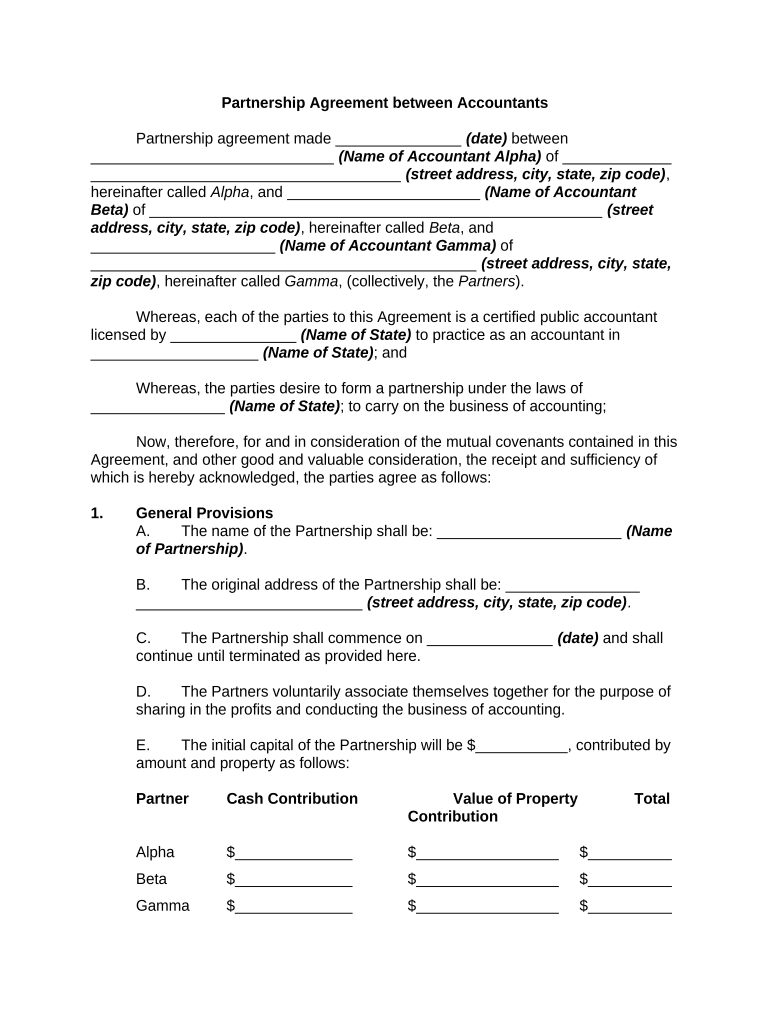
A Partnership Agreement is a written contract that sets the legal and financial relationship among partners in a general partnership, limited partnership, or limited liability partnership. It records capital contributions, profit and loss allocation, management powers, decision-making and voting rules, buy-sell and exit procedures, dispute-resolution processes, and tax reporting responsibilities. Although partners may operate without a written agreement, a formal document reduces ambiguity and creates enforceable obligations under contract law; electronic execution is generally acceptable under ESIGN and UETA for interstate and intrastate transactions.

Why a Clear Partnership Agreement Protects Partners

A clear, signed agreement defines economic rights, governance, liability sharing, and exit mechanics, reducing disputes and exposure. It sets expectations for capital calls, distributions, tax allocations, and management authority so partners and third parties can rely on predictable outcomes.

Why a Clear Partnership Agreement Protects Partners

Core Sections Every Professional Partnership Agreement Should Include

These six elements establish the partnership’s structure, financial rules, governance, and contingency planning. Each section should be detailed enough to guide routine operations and to resolve foreseeable disputes without resorting immediately to litigation.

Parties

Full legal names, entity types, and addresses for each partner or entity; define capacity (general partner, limited partner, manager) and roles to avoid identity or authority disputes.
Capital Contributions

Specify initial and future capital contributions, accepted forms (cash, property, services), valuation methods, and consequences for missed contributions including dilution or penalties.

Profit & Loss Allocation

Set exact formulas for distributing profits and losses, timing of distributions, and priority returns where applicable; address tax allocations and partnership capital accounts.

Management & Voting

Describe management structure, voting thresholds for ordinary and major decisions, day-to-day authority, and procedures for deadlocks or removal of a partner.

Transfer & Exit

Include buy-sell provisions, right of first refusal, valuation method, restrictions on transfers, voluntary withdrawal process, and dissolution triggers.

Dispute Resolution

State governing law, arbitration or mediation clauses, venue for disputes, and indemnification obligations to minimize litigation cost and delay.

Step-by-Step: Preparing and Executing a Partnership Agreement

Follow a consistent process: gather facts, draft core terms, confirm tax and liability consequences, obtain partner approvals, execute signatures, then record and retain the final agreement.

  • 01
    Gather Information: Collect partner identities, capital commitments, and business purpose details.
  • 02
    Draft Terms: Draft clauses for contributions, allocations, governance, transfers, and exit mechanics.
  • 03
    Legal Review: Have counsel check tax, liability, and state registration implications.
  • 04
    Execute & Store: Sign all copies, distribute signed versions, and retain originals per retention policy.

How to Configure an Online Signing Workflow

Set up fields, authentication, and routing in your eSignature platform so each partner receives the document in the correct order and the system captures an audit trail.

Field Configuration
Signature Fields Place one signature and date field per partner; require initials where needed
Authentication Use email link plus SMS code or stronger ID proofing for high-value agreements
Signing Order Set sequential or parallel signing as agreed by partners
Notifications Enable reminders and completion emails for all signers

Document Routing: Typical Distribution and Filing Destinations

After execution, distribute signed copies to partners, the company accountant, and any escrow or title agent; file with state agencies only when registering an LP/LLP is required.

  • Prepare Document: Finalize the agreement and insert all required signature fields.
  • Share with Partners: Send secure signing links to each partner for review and signature.
  • Sign and Authenticate: Apply signatures with chosen authentication method and capture audit trail.
  • File or Distribute: Provide signed copies to CPA and retain originals; file with state only if LLP/LP registration applies.

Digital Signing and eSubmission Considerations

Electronic signatures are legally accepted for most partnership agreements; select authentication and retention options to meet legal and internal audit needs.

  • Authentication: Email, SMS code, or KBA options
  • Audit Trail: IP, timestamp, and action log
  • Integrations: CRM, accounting, and cloud storage

Security and Compliance Elements to Include or Verify

Transport Encryption: TLS 1.2/1.3
At-Rest Encryption: AES-256
Audit Trail: Tamper-evident event log
HIPAA BAA: Required if PHI is involved
Authentication: Multi-factor or identity proofing
Certifications: SOC 2 Type II, ISO 27001

eSignature Vendor Comparison for Executing Partnership Agreements

Basic pricing and capabilities vary; below is a compact comparison with signNow presented first. Confirm plan details and compliance add-ons with vendors before purchase.

signNow DocuSign Adobe Sign PandaDoc HelloSign
Starting Price $8/user/mo $15/user/mo $14/user/mo $19/user/mo $15/user/mo
Free Trial 7-day free trial Varies by plan Varies by plan Varies by plan Varies by plan
Bulk Send Yes Yes Yes Yes Yes
Audit Trail Yes Yes Yes Yes Yes
HIPAA Compliant Yes Yes Yes No No

Who Typically Prepares and Signs Partnership Agreements

Partnership agreements are used across startups, small businesses, investment groups, and professional practices to set internal rules and external expectations.

  • Small business owners forming a general partnership or LLC electing partnership taxation.
  • Real estate investors creating multi-owner property-holding entities and distribution rules.
  • Professional firms and service providers allocating management authority and income.

In many cases, a CPA and an attorney review tax and liability provisions before final execution to reduce unexpected tax or regulatory exposure.

Representative Signers and Their Roles

Managing Partner — CEO

A managing partner typically has day-to-day control and signs on behalf of the partnership for operational matters. The agreement should describe the limits of that authority and voting thresholds for major decisions.

Limited Partner — Investor

A limited partner usually contributes capital and receives allocated profits without engaging in daily management. The agreement should define transfer restrictions, withdrawal procedures, and rights to financial reports.

Common Drafting Mistakes to Avoid

  • Failing to specify capital contribution timing and valuation methods, which creates disputes on partner capital accounts and dilution.
  • Using vague profit allocation language such as 'pro rata' without defining calculation methods or capital account treatment.
  • Omitting clear buy-sell mechanisms and valuation triggers for withdrawal, disability, death, or involuntary transfer events.
  • Neglecting dispute-resolution clauses and governing-law selection, which leads to higher litigation costs and forum disputes.

Risks and Legal Consequences of an Incomplete Agreement

Tax Reclassification: Possible reclassification or challenge
Personal Liability: Unlimited exposure for general partners
State Penalties: Fines for unregistered LP/LLP
Backup Withholding: 24% withheld for incorrect TINs
Breach Claims: Contract damages and litigation costs
Enforceability Issues: Ambiguity can void specific provisions

Frequently Asked Questions About Partnership Agreements

Answers to common legal and procedural questions about preparing, signing, and maintaining a Partnership Agreement, focusing on enforceability and practical execution issues.


Need help? Contact support

be ready to get more
Join over 28 million airSlate SignNow users