Establishing secure connection… Loading editor… Preparing document…
Navigation

Fill and Sign the Pearson Mj United States District Court Northern Govinfo Form
Fill and Sign the Pearson Mj United States District Court Northern Govinfo Form

How it works

Open the document and fill out all its fields.
Apply your legally-binding eSignature.
Save and invite other recipients to sign it.

Rate template

4.4
66 votes
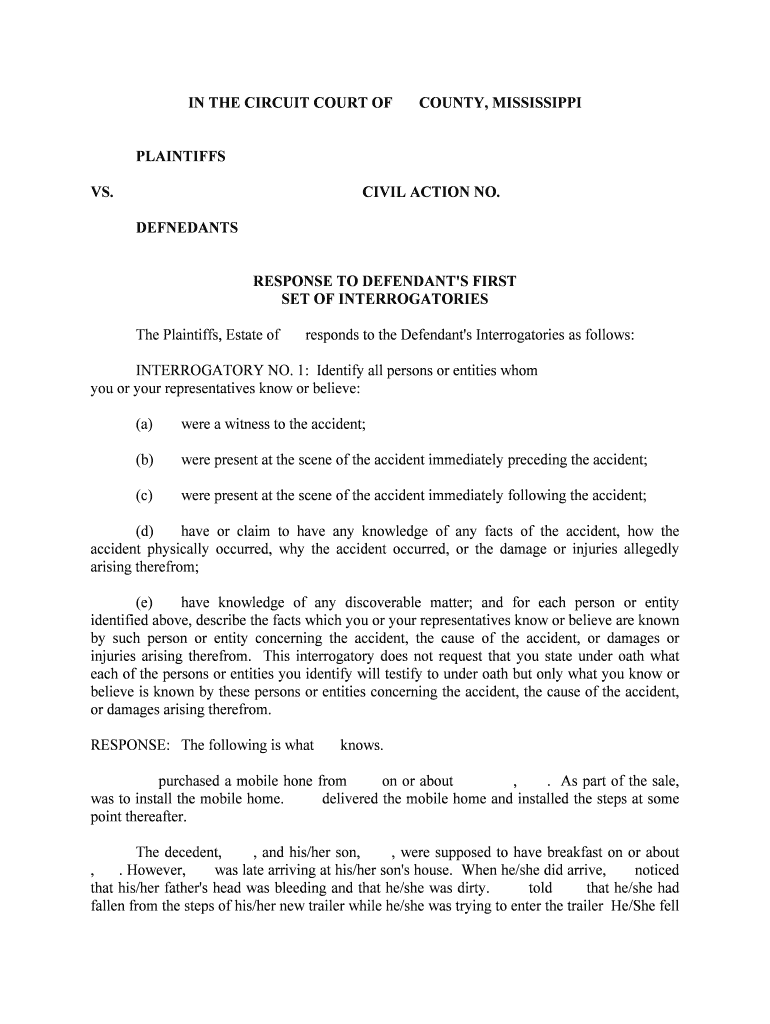
IN THE CIRCUIT COURT OF COUNTY, MISSISSIPPI PLAINTIFFS VS. CIVIL ACTION NO. DEFNEDANTS RESPONSE TO DEFENDANT'S FIRSTSET OF INTERROGATORIES The Plaintiffs, Estate of responds to the Defendant's Interrogatories as follows: INTERROGATORY NO. 1: Identify all persons or entities whom you or your representatives know or believe: (a) were a witness to the accident; (b) were present at the scene of the accident immediately preceding the accident; (c) were present at the scene of the accident immediately following the accident; (d) have or claim to have any knowledge of any facts of the accident, how the accident physically occurred, why the accident occurred, or the damage or injuries al legedly arising therefrom; (e) have knowledge of any discoverable matter; and for each person or entity identified above, describe the facts which you or your representatives know or believe are known by such person or entity concerning the accident, the cause of the accident, or dam ages or injuries arising therefrom. This interrogatory does not request that you state under oath what each of the persons or entities you identify will testify to under oath but only what you know or believe is known by these persons or entities concerning the accident, the cause of the a ccident, or damages arising therefrom. RESPONSE: The following is what knows. purchased a mobile hone from on or about , . As part of the sale, was to install the mobile home. delivered the mobile home and installed t he steps at some point thereafter. The decedent, , and his/her son, , were supposed to have breakfast on or about , . However, was late arriving at his/her son's house. When he/she did arrive, notic ed that his/her father's head was bleeding and that he/she was dirty. told that he/ she had fallen from the steps of his/her new trailer while he/she was trying to enter the trai ler He/She fell because the steps had been installed so that there was a large gap at the top of the steps, which had to jump over in order to enter the trailer. does not know whether anyone witnessed the fall. When his/her father/mother arrived around ______ A.M./P.M., he/she was in great pain and having trouble breathing. immediately took his/her father/mother to to receive medical treatment, where he/she was admitted on or about , . He/She stayed in the hospi tal until , . While in the hospital, several doctors attended to him/her, includi ng, and . doctors know the extent of the injuries suffered and the pain that he/she was in. According to the medical reports of his/her doctors, sustained multiple rib fracture s and a broken clavicle as a result of the fall. In addition, the strain and stress from those a nd other injuries caused him/her to have trouble breathing and caused him/her to be in great pain. Shortly after the accident, visited his/her father/mother's trailer and found the ste ps installed in the manner set forth in the Complaint. He/She later took the pictures attached as Exhibit A to the Complaint. After he/she was discharged from 's, condition worsened. He/She was in great pain and again had trouble breathing so he/she was readmitted to the following day a nd remained in the hospital until , . He/She was again hospitalized at on or about , and stayed in the hospital until , . In addition to examined while he/she was at . contacted and spoke with someone whom believes was named " ." asked " " if he/she was aware that his/her father had fallen from the steps. " " said tha t he/she was aware of the fall. " " further stated that the installers could not put the stairs perpendicular to the house because it would be too "wobbly" since the end of the steps would have been over the edge of the concrete walkway that went around the trailer. a sked " " why they did not put the stairs perpendicular to the house and put a block or support under the end of the stairs to stabilize them, and " " replied that he/she didn't know, or words to that effect. Before the accident, had been an active and vivacious man/woman for his/he r age and physical condition. He/She was not the same after the accident. He/She spent over we eks in the hospital for the injuries he/she sustained from the fall. While his/her father/mothe r was in the hospital, moved to . After was discharged from for the last time, had to t ake his/her father/mother back to because father/mother was no longer able to care for him/herself. never did recover from the fall and died on or about , . INTERROGATORY NO. 2: As to each person or entity identified in response to the preceding Interrogatory, identify from whom a written or tape recorded statement has been take n and for each person state the date the statement was taken, the name and address of the person taking the statement, whether the statement is in writing or was tape recorded, and the name and address of the person who presently has possession of the statement or tape. RESPONSE: As of the date of these responses no written or tape recorded statements have been taken from any witness. INTERROGATORY NO. 3: Identify all oral or written statements of any party or witness, at the scene of the accident or otherwise, which in any way relate to t he cause of the accident or the injuries allegedly sustained as a result of the accident. RESPONSE: None. INTERROGATORY NO. 4: Identify all witnesses you expect to testify on behalf of the Plaintiffs, giving for each such witness a summary of the facts you generally expect to eli cit from such witness by his/her testimony. RESPONSE: The Plaintiffs object to this interrogatory to the extent that it seeks information, which the Plaintiffs, pursuant to the Mississippi Rules of Civil Procedure, do not have to provide. Subject to this objection, the Plaintiffs have not determined who will testify on behalf of the Plaintiffs. This response will be supplemented when such a determination is made. INTERROGATORY NO. 5: Describe and identify all documents, photographs, videos, and other physical evidence which you expect to offer as evidence on behalf of the Plaintiffs. RESPONSE: The Plaintiffs have not determined what evidence be offered at trial. This response will be supplemented such a determination is made. INTERROGATORY NO. 6: Identify each person you expect to call as an expert witness at trial [including physicians or generally employed expert(s) whose information was not acquired will when in preparation for this particular trial] and for each give their qual ifications, state the subject matter on which the expert is expected to testify, the substance of the facts and opinions to which the expert is expected to testify, and a summary of the grounds for each suc h opinion. RESPONSE: The Plaintiffs object to this interrogatory to the extent that it is beyond the scope of Rule 26(b) (4) (A) (i) of the Mississippi Rules of Civil Procedure. Subject to this objection, the Plaintiffs have not yet determined whom they will call as an expe rt in this case. This response will be supplemented when, and if such a determination is made. INTERROGATORY NO. 7: Describe in specific factual detail how and why you contend the accident occurred, including the actions of the person involved, including efforts to avoid the accident; physical location of all witnesses to the a ccident; the time of day; weather conditions; premises conditions; what part of the premises made contact with in the accident; the physical location where any impact(s) occurred. RESPONSE: See Response to Interrogatory No. 1. INTERROGATORY NO. 8: Please give a detailed description of every witness, fact, opinion, document and other physical evidence which supports your answer to the preceding inter-rogatory. RESPONSE: See Response to Interrogatory No. 1. INTERROGATORY NO. 9: Describe in specific factual detail what you contend did or failed to do which caused or contributed to the accident. RESPONSE: , its agents, employees or other representatives negligently installed the stairs to create a dangerous condition when tried to enter his/her trailer. knew that was aged and overweight, knew that it had installed the stairs improperly, and knew or should have known that was in danger if he/she tried to enter the mobile home. Even though had this knowledge, installed the stairs in the way described in callous disregard for the rights of . INTERROGATORY NO. 10: Please give a detailed description of every witness, fact, opinion, document and other physical evidence which supports your answer to the preceding interrogatory RESPONSE: See Response to Interrogatory No. 1. INTERROGATORY NO. 11: Identify and describe any and all pictures, photographs, drawings, diagrams, plats, maps, measurements, reports, recordings, statements, calculations, invoices, payroll records receipts or other documents or copies thereof of any kind or nature concerning the accident, the cause of the accident or the alleged injuries or dam ages arising therefrom made either before, after, or at the time of the events in question. RESPONSE: The photographs attached to the Complaint as Exhibit A depict the position of the steps when fell from the steps. There are additional photographs, not attached to the Complaint, which depict the same scene from different distances and angles. There a re also medical records, an autopsy report, and certificate of death which relate to the injuries and damages suffered by the Plaintiffs. All of the above will be produced to the defendant. INTERROGATORY NO. 12: Describe in detail the nature, location, and extent of each and every abrasion, laceration, cut, bruise, sprain, strain, contusion, fracture, dislocation, or any other ailment or injury sustained by the deceased, , as a result of the accident and identify and describe in detail every witness, fact, opinion, document or other physical evidence which supports your answer to this Interrogatory. RESPONSE: The Plaintiffs object to this interrogatory because it is overly broad, unduly burdensome, and beyond the scope of knowledge and ability. Subject to this objection, knows that his/her father/mother suffered a cut to his/her head, broken ribs and a broken clavi cle. also knows that his/her father/mother suffered other injuries which caused his/her father/mot her to have trouble breathing and otherwise be in great pain. treating physicians are bet ter able to describe in detail the nature and extent of his/her injuries. INTERROGATORY NO. 13: If you contend that underwent any conscious pain and suffering prior to his/her death, describe in detail the time, length, place, and source of all such pain and suffering; and describe in detail every witness, fact, opinion, document and other evidence which supports your contention that underwent conscious pain and suffering. RESPONSE: The Plaintiffs object to this interrogatory as overly broad, unduly burdensome, and beyond the knowledge and ability of to identify and quantify. Subject to this objection, knows that his/her father/mother suffered pain and suffering from the date of the accident continuously to the date of his/her death, with some intermittent peri ods of relative peace. INTERROGATORY NO. 14: Please categorize and describe each element of damages for which you are seeking recovery, specify the amount you are seeking for each element of damages, the manner in which you calculated each element, and identify each pe rson whom you believe may have information relating to or pertaining to the same and identify any documents pertaining to the same. RESPONSE: The Plaintiffs are seeking damages for past medical expenses, the pain and suffering of loss of consortium and/or support, and punitive damages. The medical expenses incurred are contained in the medical records of , which have been produced. The Pla intiffs will produce an itemized summary of such damages. The remaining damages cannot be calculated with precision and will be determined by the jury. Persons with knowledge of the se damages include , his/her husband/wife, health care providers, and . INTERROGATORY NO. 15: For the deceased, , please state full name; date of birth; all residence addresses for the last five years; names and addresses of any former spouse s; names, ages and addresses of any children; social security number; and the driver's lice nse number for each state in which was licensed to drive prior to his/her death. RESPONSE: DOB: Address: Spouse: , deceased Children: Address: SS#: D.L.#: INTERROGATORY NO. 16: Please describe in detail all income earned or received by during the year period preceding his/her death, including in your description: (a) name and address of each employer or other source of income; (b) job title or description with each employer; (c) rate of pay with each employer; (d) total weekly, monthly, or annual earnings with each employer; (e) time(s) of employment with each employer; (f) reason for termination with each employer; and (g) immediate supervisor with each employer. RESPONSE: The Plaintiffs object to this interrogatory to the extent that it seeks information which is neither relevant nor reasonably calculated to lead to the disc overy of admissible evidence. Subject to this objection, at the time of his/her death, was retired. He/She was formerly employed as a part owner in a wire rope manufacturing business named . See the resume of , which has been produced. is not in the possession, custody or control of the other documents and information requested by this interrogatory. Such documents and information may be obtained from former employer. INTERROGATORY NO. 17: Describe in detail the educational history of , including in your description: (a) the names, addresses, and dates of all schools or courses attended; (b) all degrees, certificates, awards, and scholarships received; (c) date of graduation from any institution or curriculum; and (d) grade or grade point average for all schools or curriculum attended after the 9th grade. RESPONSE: attended the . He was a Registered Professional in . See the resume of , which has been produced. INTERROGATORY NO. 18: Please describe in detail the medical history of , including in your description: (a) the names, addresses, and dates of all physicians who treated or attended during the years preceding his/her death; (b) the names and addressed of all hospitals or institutions where was hospitalized or confined for treatment of any kind during his/her lifetime, and the dates and purpose of ea ch such treatment or confinement; (c) any and all serious or continuing diseases or ailments suffered by during his/her lifetime; (d) any medication regularly taken by during the year preceding his/her death; and (e) any recommended restriction of activity or recommended activity given for by any physician or other medical provider during his/her lifetime. RESPONSE: The Plaintiffs do not have knowledge sufficient to answer this interrogatory. was under the regular care of . medical records have been or will be produced. INTERROGATORY NO. 19: Describe in detail any and all financial or monetary contributions made by or through during his/her lifetime to any of the plaintiffs herein, including a description of dates, amounts, source, and purpose of such contributions. RESPONSE: The Plaintiffs object to this interrogatory because it seeks information which is neither relevant nor reasonably calculated to lead to the discovery of a dmissible evidence. INTERROGATORY NO. 20: For each plaintiff named herein, describe all services, assistance and support given or obtained through during his/her lifetime. RESPONSE: None. INTERROGATORY NO. 21: State whether the deceased, , had taken any type of medication or had anything to drink with alcoholic content within a 24-hour period prior to the time of the accident, state the name, type and amount of drinks had and, if medication or drugs, the type and amount taken. RESPONSE: The Plaintiffs do not know whether had taken any medication prior to the fall. INTERROGATORY NO. 22: If had ever been arrested or charged with any criminal activity during his/her lifetime, describe in detail each and every arrest includi ng, the place, date, arresting department, jurisdiction, and final result of the charge. RESPONSE: The Plaintiffs object to this interrogatory because it seeks information which is neither relevant nor reasonably calculated to lead to the discovery of a dmissible evidence. MEDICAL AUTHORIZATION Rules 503(d) & (f), Mississippi Rules of Evidence, state that: Any party to an action or proceeding subject to these rules who by his or her pleadings places in issue any aspect of his or her physical, mental or emotional condition the reby and to that extent only waives the privilege otherwise recognized by this rule. Attached hereto is a Medical Authorization authorizing to obtain medical records, etc., pertaining to the Plaintiff's injuries and treatment, etc., alleged to ha ve been sustained as a result of the negligence of the Defendant. Please execute the Medical Authorization and return to the attention of the undersigned. RESPONSE: Attached to these responses is a Medical Authorization which executed before his/her death. Respectfully submitted, __________________________________ ATTORNEY FOR PLAINTIFFS OF COUNSEL: ____________________________________ CERTIFICATE OF SERVICE I, , certify that I have this day caused the above to be placed in the Unit ed States mail, postage fully prepaid, addressed as follows: THIS, the day of , . _________________________________ STATE OF MISSISSIPPI COUNTY OF _________________________ Personally came and appeared before me, the undersigned authority in and for the said County and State, the within named _______________________________________________________ who after first being duly sworn, stated under oath that the factual information in the above answers to interrogatorie s is based on his/her personal knowledge or on information supplied to his/her by others, and is true and correct to the best of his/her knowledge, information and belief. ___________________________________ Sworn to and subscribed before me, this the ______ day of _______________________, ______. ___________________________________ Notary Public My Commission expires:________________________

Convenient instructions for finalizing your ‘Pearson Mj United States District Court Northern Govinfo’ online

Are you fed up with the inconvenience of handling paperwork? Look no further than airSlate SignNow, the premier digital signature solution for individuals and organizations. Wave goodbye to the monotonous tasks of printing and scanning documents. With airSlate SignNow, you can swiftly finalize and sign paperwork online. Utilize the powerful features integrated into this user-friendly and cost-effective platform to transform your approach to document management. Whether you need to approve forms or gather eSignatures, airSlate SignNow manages it all effortlessly, requiring just a few clicks.

Follow these detailed instructions:

  1. Access your account or sign up for a complimentary trial with our service.
  2. Select +Create to upload a document from your device, cloud storage, or our template collection.
  3. Open your ‘Pearson Mj United States District Court Northern Govinfo’ in the editor.
  4. Click Me (Fill Out Now) to complete the form on your behalf.
  5. Add and designate fillable fields for other participants (if necessary).
  6. Proceed with the Send Invite options to request eSignatures from others.
  7. Save, print your version, or convert it into a reusable template.

Don’t be concerned if you need to collaborate with your colleagues on your Pearson Mj United States District Court Northern Govinfo or send it for notarization—our solution offers everything you require to achieve such tasks. Sign up with airSlate SignNow today and elevate your document management to a higher level!

Here is a list of the most common customer questions. If you can’t find an answer to your question, please don’t hesitate to reach out to us.

Need help? Contact Support

The best way to complete and sign your pearson mj united states district court northern govinfo form


Save time on document management with airSlate SignNow and get your pearson mj united states district court northern govinfo form eSigned quickly from anywhere with our fully compliant eSignature tool.

How to Sign a PDF Online How to Sign a PDF Online

How to fill out and sign forms online

Previously, dealing with paperwork required pretty much time and effort. But with airSlate SignNow, document management is fast and easy. Our powerful and easy-to-use eSignature solution lets you effortlessly fill out and eSign your pearson mj united states district court northern govinfo form online from any internet-connected device.

Follow the step-by-step guidelines to eSign your pearson mj united states district court northern govinfo form template online:

  • 1.Sign up for a free trial with airSlate SignNow or log in to your account with password credentials or SSO authorization option.
  • 2.Click Upload or Create and add a file for eSigning from your device, the cloud, or our form collection.
  • 3.Click on the file name to open it in the editor and utilize the left-side menu to fill out all the blank fields properly.
  • 4.Place the My Signature field where you need to approve your sample. Type your name, draw, or import a picture of your handwritten signature.
  • 5.Click Save and Close to finish modifying your completed document.

After your pearson mj united states district court northern govinfo form template is ready, download it to your device, save it to the cloud, or invite other people to electronically sign it. With airSlate SignNow, the eSigning process only takes a couple of clicks. Use our powerful eSignature tool wherever you are to deal with your paperwork successfully!


How to Sign a PDF Using Google Chrome How to Sign a PDF Using Google Chrome

How to complete and sign documents in Google Chrome

Completing and signing documents is easy with the airSlate SignNow extension for Google Chrome. Installing it to your browser is a fast and effective way to deal with your paperwork online. Sign your pearson mj united states district court northern govinfo form sample with a legally-binding electronic signature in just a couple of clicks without switching between applications and tabs.

Follow the step-by-step guide to eSign your pearson mj united states district court northern govinfo form in Google Chrome:

  • 1.Navigate to the Chrome Web Store, search for the airSlate SignNow extension for Chrome, and install it to your browser.
  • 2.Right-click on the link to a document you need to sign and choose Open in airSlate SignNow.
  • 3.Log in to your account with your credentials or Google/Facebook sign-in option. If you don’t have one, sign up for a free trial.
  • 4.Use the Edit & Sign toolbar on the left to fill out your template, then drag and drop the My Signature option.
  • 5.Insert a photo of your handwritten signature, draw it, or simply enter your full name to eSign.
  • 6.Make sure all data is correct and click Save and Close to finish modifying your paperwork.

Now, you can save your pearson mj united states district court northern govinfo form sample to your device or cloud storage, send the copy to other people, or invite them to electronically sign your document via an email request or a secure Signing Link. The airSlate SignNow extension for Google Chrome enhances your document workflows with minimum effort and time. Start using airSlate SignNow today!


How to Sign a PDF in Gmail How to Sign a PDF in Gmail How to Sign a PDF in Gmail

How to complete and sign paperwork in Gmail

When you receive an email with the pearson mj united states district court northern govinfo form for signing, there’s no need to print and scan a file or save and re-upload it to another program. There’s a much better solution if you use Gmail. Try the airSlate SignNow add-on to quickly eSign any documents right from your inbox.

Follow the step-by-step guidelines to eSign your pearson mj united states district court northern govinfo form in Gmail:

  • 1.Navigate to the Google Workplace Marketplace and look for a airSlate SignNow add-on for Gmail.
  • 2.Set up the tool with a related button and grant the tool access to your Google account.
  • 3.Open an email containing an attached file that needs approval and utilize the S key on the right sidebar to launch the add-on.
  • 4.Log in to your airSlate SignNow account. Select Send to Sign to forward the file to other people for approval or click Upload to open it in the editor.
  • 5.Place the My Signature option where you need to eSign: type, draw, or upload your signature.

This eSigning process saves time and only requires a couple of clicks. Utilize the airSlate SignNow add-on for Gmail to update your pearson mj united states district court northern govinfo form with fillable fields, sign paperwork legally, and invite other individuals to eSign them al without leaving your inbox. Enhance your signature workflows now!


How to Sign a PDF on a Mobile Device How to Sign a PDF on a Mobile Device How to Sign a PDF on a Mobile Device

How to complete and sign paperwork in a mobile browser

Need to quickly complete and sign your pearson mj united states district court northern govinfo form on a smartphone while doing your work on the go? airSlate SignNow can help without needing to install extra software applications. Open our airSlate SignNow solution from any browser on your mobile device and create legally-binding eSignatures on the go, 24/7.

Follow the step-by-step guide to eSign your pearson mj united states district court northern govinfo form in a browser:

  • 1.Open any browser on your device and go to the www.signnow.com
  • 2.Create an account with a free trial or log in with your password credentials or SSO option.
  • 3.Click Upload or Create and import a file that needs to be completed from a cloud, your device, or our form collection with ready-made templates.
  • 4.Open the form and complete the blank fields with tools from Edit & Sign menu on the left.
  • 5.Put the My Signature area to the sample, then type in your name, draw, or upload your signature.

In a few easy clicks, your pearson mj united states district court northern govinfo form is completed from wherever you are. When you're done with editing, you can save the file on your device, generate a reusable template for it, email it to other individuals, or ask them to eSign it. Make your paperwork on the go fast and productive with airSlate SignNow!


How to Sign a PDF on iPhone How to Sign a PDF on iPhone

How to fill out and sign forms on iOS

In today’s corporate environment, tasks must be accomplished quickly even when you’re away from your computer. Using the airSlate SignNow application, you can organize your paperwork and approve your pearson mj united states district court northern govinfo form with a legally-binding eSignature right on your iPhone or iPad. Set it up on your device to close deals and manage forms from anywhere 24/7.

Follow the step-by-step guide to eSign your pearson mj united states district court northern govinfo form on iOS devices:

  • 1.Go to the App Store, search for the airSlate SignNow app by airSlate, and install it on your device.
  • 2.Launch the application, tap Create to upload a template, and choose Myself.
  • 3.Select Signature at the bottom toolbar and simply draw your signature with a finger or stylus to eSign the sample.
  • 4.Tap Done -> Save right after signing the sample.
  • 5.Tap Save or utilize the Make Template option to re-use this paperwork in the future.

This process is so straightforward your pearson mj united states district court northern govinfo form is completed and signed in just a couple of taps. The airSlate SignNow app works in the cloud so all the forms on your mobile device remain in your account and are available whenever you need them. Use airSlate SignNow for iOS to improve your document management and eSignature workflows!


How to Sign a PDF on Android How to Sign a PDF on Android

How to fill out and sign documents on Android

With airSlate SignNow, it’s easy to sign your pearson mj united states district court northern govinfo form on the go. Set up its mobile app for Android OS on your device and start improving eSignature workflows right on your smartphone or tablet.

Follow the step-by-step guidelines to eSign your pearson mj united states district court northern govinfo form on Android:

  • 1.Navigate to Google Play, search for the airSlate SignNow application from airSlate, and install it on your device.
  • 2.Log in to your account or create it with a free trial, then upload a file with a ➕ button on the bottom of you screen.
  • 3.Tap on the uploaded file and select Open in Editor from the dropdown menu.
  • 4.Tap on Tools tab -> Signature, then draw or type your name to electronically sign the template. Complete empty fields with other tools on the bottom if necessary.
  • 5.Use the ✔ key, then tap on the Save option to end up with editing.

With a user-friendly interface and full compliance with main eSignature requirements, the airSlate SignNow app is the perfect tool for signing your pearson mj united states district court northern govinfo form. It even operates offline and updates all record adjustments once your internet connection is restored and the tool is synced. Complete and eSign documents, send them for approval, and generate re-usable templates anytime and from anyplace with airSlate SignNow.

Sign up and try Pearson mj united states district court northern govinfo form
  • Close deals faster
  • Improve productivity
  • Delight customers
  • Increase revenue
  • Save time & money
  • Reduce payment cycles

