Establishing secure connection… Loading editor… Preparing document…
Navigation

Fill and Sign the Perpetual Easement of Form
Fill and Sign the Perpetual Easement of Form

How it works

Open the document and fill out all its fields.
Apply your legally-binding eSignature.
Save and invite other recipients to sign it.

Rate template

4.6
43 votes
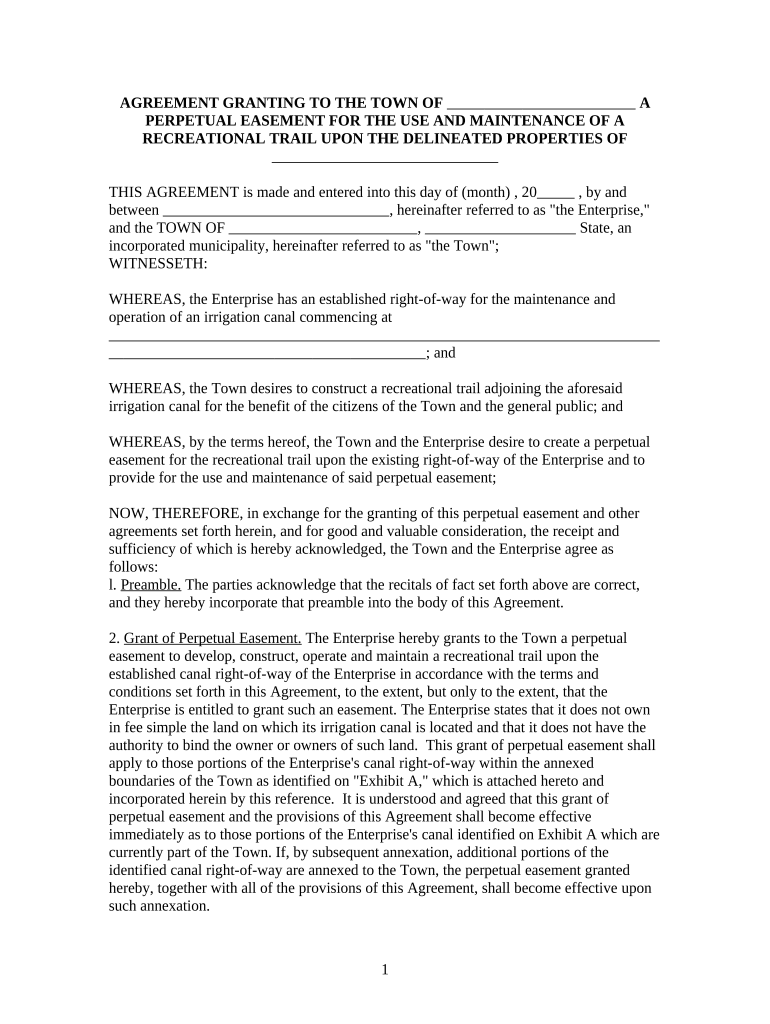
AGREEMENT GRANTING TO THE TOWN OF                               A PERPETUAL EASEMENT FOR THE USE AND MAINTENANCE OF A RECREATIONAL TRAIL UPON THE DELINEATED PROPERTIES OF                                     THIS AGREEMENT is made and entered into this day of (month) , 20       , by and between                                     , hereinafter referred to as "the Enterprise," and the TOWN OF                               ,                         State, an incorporated municipality, hereinafter referred to as "the Town"; WITNESSETH: WHEREAS, the Enterprise has an established right-of-way for the maintenance and operation of an irrigation canal commencing at                                                                                                                                            ; and WHEREAS, the Town desires to construct a recreational trail adjoining the aforesaid irrigation canal for the benefit of the citizens of the Town and the general public; and WHEREAS, by the terms hereof, the Town and the Enterprise desire to create a perpetual easement for the recreational trail upon the existing right-of-way of the Enterprise and to provide for the use and maintenance of said perpetual easement; NOW, THEREFORE, in exchange for the granting of this perpetual easement and other agreements set forth herein, and for good and valuable consideration, the receipt and sufficiency of which is hereby acknowledged, the Town and the Enterprise agree as follows: l. Preamble. The parties acknowledge that the recitals of fact set forth above are correct, and they hereby incorporate that preamble into the body of this Agreement. 2. Grant of Perpetual Easement. The Enterprise hereby grants to the Town a perpetual easement to develop, construct, operate and maintain a recreational trail upon the established canal right-of-way of the Enterprise in accordance with the terms and conditions set forth in this Agreement, to the extent, but only to the extent, that the Enterprise is entitled to grant such an easement. The Enterprise states that it does not own in fee simple the land on which its irrigation canal is located and that it does not have the authority to bind the owner or owners of such land. This grant of perpetual easement shall apply to those portions of the Enterprise's canal right-of-way within the annexed boundaries of the Town as identified on "Exhibit A," which is attached hereto and incorporated herein by this reference. It is understood and agreed that this grant of perpetual easement and the provisions of this Agreement shall become effective immediately as to those portions of the Enterprise's canal identified on Exhibit A which are currently part of the Town. If, by subsequent annexation, additional portions of the identified canal right-of-way are annexed to the Town, the perpetual easement granted hereby, together with all of the provisions of this Agreement, shall become effective upon such annexation. 1 In the event the Town should desire to extend the perpetual easement outside of the annexed boundaries of the Town, written request shall be made to the Enterprise including the description of the canal right-of-way affected, the justification for the request and the written consent of the underlying landowner. It shall be the sole discretion of the Enterprise to grant or deny any request to extend the perpetual easement outside the annexed boundaries of the Town. 3. Description of Easement. The easement granted hereby shall perpetually afford the Town the right of ingress and egress over and across the canal right-of-way of the Enterprise for the purpose of constructing, operating and maintaining a recreational trail. It is understood and agreed that upon the granting of the within easement and the subsequent construction of the trail, the Town will authorize the general public to use said trail under such terms and conditions as may from time to time be established by the Town. The terms and conditions of such use shall include the following: a. Permitted uses will be limited to walking, jogging, bicycling and other similar non- motorized uses. No motorized vehicles will be allowed except for management, patrol and maintenance purposes. b. The public will be prohibited from entering the canal channel or cross-section at all times, and no fishing, swimming, wading, tubing, rafting, boating or any other water activity will be allowed in the canal. The cross-section of the canal for purposes of this Agreement shall be described as the inverted portion of the canal, being the bottom of the canal and the two interior banks of the canal. c. No camping or campfires will be allowed on the canal right-of-way. d. No hunting, firearms, weapons or explosives will be allowed on the canal right-of-way. e. No littering or dumping of trash will be allowed on the canal right-of-way. f. No alcoholic beverages will be allowed on the canal right-of-way. g. Domestic animals shall be permitted on the recreational trail, subject to the applicable ordinances of the Town. Domestic animals will not be permitted to enter the canal cross- section at anytime. The ordinances of the Town regarding public parks, recreational facilities, and trails, including but not limited to, the Town's requirement that fecal matter deposited by domestic animals shall be removed by the owners or keepers of such animals, shall be enforced on the canal right-of-way. The enforcement of the ordinances with regard to the recreational trail shall be the responsibility of the Town, and by the terms of this Agreement, the Town agrees to diligently perform this responsibility. The parties agree that nothing herein shall prevent them from subsequently agreeing to additional terms and conditions concerning the use of the perpetual easement as they may deem appropriate. The easement granted hereby shall be measured from:                                                                                                                                                                                                                                                             In conjunction with this grant of perpetual easement, the Town shall have the right to enter upon the canal right-of-way of the Enterprise for the purposes of constructing and thereafter reconstructing, locating or maintaining the recreational trail contemplated by this Agreement. Upon the completion of any construction, reconstruction or maintenance, the 2 Town shall return the property as near as practicable to its original condition, taking into consideration the nature of the work performed. 4. Proposed Development of Recreational Trail. Whenever the Town proposes to construct the recreational trail, or any portion thereof, as contemplated by this Agreement, it shall cause a description of said trail to be placed upon the final plat of any development being contemplated in conjunction with the construction of said trail or portion thereof and, before recordation, shall obtain written approval of the final plat by the Enterprise. The Enterprise agrees that in accordance with the grant of perpetual easement set forth herein, it shall not unreasonably withhold approval of any final plat. No trail shall be constructed within the easement granted unless and until a description of such trail appears on a final development plat. 5. Improvements - Signage. Gates and Fences Encompassed Within the Enterprise's Grant of Easement. The Enterprise agrees not to erect or construct any building or other structure, drill or operate any well, or otherwise construct any obstruction in the easement. Likewise, the Enterprise reserves the right to deposit or permit or allow to be deposited any earth, rubbish, debris, or any other substance or material in the easement for maintenance purposes that may affect the Town's right to maintain and operate the recreational trail, except on a strictly temporary basis. The Enterprise agrees that the Town shall have the right to install, maintain and use gates and fences on or abutting the easement and to place signs for public information and safety upon the easement. The Town agrees that all such gates, fences, signs or other improvements installed in accordance with this Agreement shall not interfere in the Enterprise's use, maintenance, repair or replacement or the canal, nor its right of ingress and egress. Further, no such improvements by the Town shall interfere with the Enterprise's ability to go upon the canal right-of-way without interference or obstruction. The Town further agrees that signage shall be constructed to generally inform the users of the recreational trail and of the limitations thereon and the dangers associated therewith. At the request of the Enterprise, the Town shall include additional information relating to the historic nature and current use of the canal as well as additional information concerning the Enterprise. In the event the Enterprise desires to include such information as a part of the Town's signage, the parties agree that they will negotiate in good faith regarding the nature of the information and the location and manner of its placement within the Town's signage. 6. The Enterprise's Right to Continued Operation of the Canal. Notwithstanding the existence of the perpetual easement granted to the Town, the Enterprise, as it may deem appropriate, shall have the right to use, operate, maintain, repair, replace and improve the canal and any and all structures associated with it, including the addition of structures. In this regard, the Enterprise will take reasonable steps to avoid or minimize adverse impacts upon the Town's easement or its ability to utilize such easement, but any reasonable costs or expenses incurred by the Enterprise in so doing shall be paid for, or shall be reimbursed to the Enterprise, by the Town. 7. Trail and Canal Right-of-Way Maintenance. The Town agrees that it shall be responsible for all maintenance of the trail and the full width of the canal right-of-way 3 except for the cross-section of the canal itself. The Town shall be responsible for vegetation control and removal of trash, rubbish or debris for the full width of the canal right-of-way. With the specific exception of vegetation control and the removal of trash, rubbish or debris as aforesaid, the Enterprise shall continue to maintain the canal cross- section. The Town's control of vegetation shall not employ any method that would cause the water delivered by the canal to be unsuitable for the uses of its shareholders. The Town's operation and maintenance of the recreational trail shall not unreasonably interfere with the Enterprise's continued use and maintenance of its canal, nor shall the Enterprise's continued use and maintenance of its canal unreasonably interfere with the Town's operation and maintenance of the recreational trail. Specifically, the operation, maintenance and existence of the recreational trail and the provisions of this Agreement shall not in any way interfere with the flow of water in the canal or the delivery of water by the Enterprise. The Enterprise may use its right-of-way for the use and maintenance of its canal, including bringing machinery and vehicles onto such right-of-way where necessary. The Town acknowledges that the use of heavy equipment by the Enterprise may pact the recreational trail, and the Town agrees that to the extent possible, it shall design the recreational trail to withstand the use of such equipment. Each party shall seek the advice and consent of the other before entering into projects which may have the potential of impacting the other party's use of its property or exercise of the rights afforded hereunder or otherwise existing. 8. Indemnification. The Town shall be liable for, and shall indemnify and hold the Enterprise, its officers, directors and employees harmless from all liabilities, claims or demands that may be caused as a result of the construction, operation, maintenance and use of the easement granted hereby, or by any wrongful or negligent acts or omissions of the Town or its agents or employees in the course of their employment. In addition, the Town agrees to indemnify the Enterprise, its officers, directors and employees, as to all costs and expenses related to defending such liabilities, claims and demands made against the Enterprise, its officers, directors and employees, or any of them, by any other person or entity, whether or not any such liabilities, claims and/or demands are groundless, frivolous, false or fraudulent. However, the Town and the Enterprise acknowledge that all such liabilities, claims and demands made by third parties shall be subject to any notice requirements, defenses, immunities, and limitations of liability that the Town and its officers, directors and employees may have under the State Governmental Immunity Act (Section                               ) and under any other law; provided, however, that the Town's assertions of any of such requirements, defenses, immunities or limitations shall not be used or made if the result would be that the Enterprise is not fully indemnified and held harmless by the Town as stated above. 9. Warranty. The Enterprise hereby warrants that to its knowledge there are no prior easements in effect which would in any way alter or impair the Enterprise's grant of a perpetual easement to the Town pursuant to the terms and provisions of this Agreement. 10. Right of the Enterprise to Sell or Lease. Subject to the provisions of the perpetual easement granted hereby and the terms and conditions of this Agreement, nothing 4 contained herein shall impair the right of the Company to sell, lease or otherwise manage its facilities. 11. Right of Termination. Upon any substantial breach of any of the provisions of this Agreement by one of the parties, the other party shall retain the right to terminate this Agreement or seek other remedies, including damages, subject to the mandatory arbitration provisions hereinafter set forth. The waiver by either party of any default or breach of any term, covenant or condition of this Agreement shall not operate as a waiver of any default or breach of any other term, covenant or condition, or subsequent default or breach of the same. 12. Mediation and Arbitration. In the event the Town and the Enterprise cannot resolve issues that may arise from this Agreement, the parties agree that any such disputes shall be submitted to mediation by a mediator to be jointly selected and equally paid for by the parties. Should such mediation fail to resolve the issue, the parties further agree that the mediator shall then be designated as an arbitrator, with the power to decide unresolved issues. The decision or decisions of the arbitrator shall be final and binding upon the parties. The fees and other expenses of arbitration shall be borne equally by the parties unless the arbitrator assesses all or a portion of the fees and costs against either party. Upon any arbitration decision finding a breach of contract that is subject to cure, the arbiter shall determine the maximum number of days to effectuate such cure. It is understood and agreed that any arbitration decision rendered pursuant to the provisions of this paragraph may be filed by either party in a court of appropriate jurisdiction and may be enforced as a judgment. 13. Running of Benefits and Burdens. The provisions of this Agreement, including all benefits and burdens, shall be deemed to run with the land and shall be binding upon and shall inure to the benefit of the successors and assigns of the respective parties hereto, subject to the provisions hereof. 14. Assignment. Neither party may assign or transfer all or any part of this Agreement without the prior written consent of the non-assigning party, although such consent shall not be unreasonably withheld. 15. Notice. Any notice, demand or request delivered by mail in accordance with the provisions of this Agreement shall be deemed given seventy-two (72) hours after the same is deposited in certified mail in any post office or postal box regularly maintained by the United States Postal Service and addressed to the Enterprise at                                                                         , and to the Town at                                                                         . In addition, notice may be personally delivered to the above addresses, in which event notice shall be deemed given as of the time and date of delivery. Each party may change its above address by providing written notice of such change to the other party, provided that such addresses are within                         County,                         State. 5 16. Recordation. It is understood and agreed that upon the execution of this document by both parties, the town shall cause it shall be filed with the County Clerk and Recorder and made a part of the permanent records of                         County,                         State. A copy of the document along with recording information shall be provided to the Enterprise by the Town. 17. Applicable Law. This Agreement shall be interpreted in accordance with the laws of the State. IN WITNESS WHEREOF, the parties hereto have signed this Agreement on the day and year first above written.                                                                                                                                                 6

Practical advice on finalizing your ‘Perpetual Easement Of’ online

Are you fed up with the inconvenience of handling paperwork? Look no further than airSlate SignNow, the leading eSignature solution for individuals and businesses. Bid farewell to the monotonous procedure of printing and scanning documents. With airSlate SignNow, you can effortlessly complete and sign documents online. Make use of the comprehensive tools included in this user-friendly and cost-effective platform and transform your method of paperwork management. Whether you need to approve forms or gather eSignatures, airSlate SignNow manages it all smoothly, with just a few clicks.

Follow these detailed instructions:

  1. Log into your account or initiate a free trial with our service.
  2. Click +Create to upload a document from your device, cloud, or our forms library.
  3. Open your ‘Perpetual Easement Of’ in the editor.
  4. Click Me (Fill Out Now) to finish the form on your end.
  5. Add and assign fillable fields for other individuals (if needed).
  6. Proceed with the Send Invite configurations to request eSignatures from others.
  7. Download, print your copy, or convert it into a reusable template.

Don’t worry if you need to work with others on your Perpetual Easement Of or send it for notarization—our platform provides everything you require to complete such tasks. Create an account with airSlate SignNow today and enhance your document management to a new level!

Here is a list of the most common customer questions. If you can’t find an answer to your question, please don’t hesitate to reach out to us.

Need help? Contact Support

The best way to complete and sign your perpetual easement of form

Save time on document management with airSlate SignNow and get your perpetual easement of form eSigned quickly from anywhere with our fully compliant eSignature tool.

How to Sign a PDF Online How to Sign a PDF Online

How to fill out and sign paperwork online

Previously, dealing with paperwork took pretty much time and effort. But with airSlate SignNow, document management is fast and easy. Our powerful and user-friendly eSignature solution lets you easily fill out and electronically sign your perpetual easement of form online from any internet-connected device.

Follow the step-by-step guide to eSign your perpetual easement of form template online:

  • 1.Sign up for a free trial with airSlate SignNow or log in to your account with password credentials or SSO authorization option.
  • 2.Click Upload or Create and import a file for eSigning from your device, the cloud, or our form collection.
  • 3.Click on the document name to open it in the editor and utilize the left-side toolbar to complete all the empty areas appropriately.
  • 4.Drop the My Signature field where you need to eSign your form. Provide your name, draw, or upload an image of your regular signature.
  • 5.Click Save and Close to accomplish modifying your completed form.

As soon as your perpetual easement of form template is ready, download it to your device, save it to the cloud, or invite other people to eSign it. With airSlate SignNow, the eSigning process only requires several clicks. Use our powerful eSignature tool wherever you are to manage your paperwork effectively!

How to Sign a PDF Using Google Chrome How to Sign a PDF Using Google Chrome

How to fill out and sign paperwork in Google Chrome

Completing and signing paperwork is simple with the airSlate SignNow extension for Google Chrome. Adding it to your browser is a fast and efficient way to manage your paperwork online. Sign your perpetual easement of form template with a legally-binding eSignature in a couple of clicks without switching between applications and tabs.

Follow the step-by-step guide to eSign your perpetual easement of form template in Google Chrome:

  • 1.Go to the Chrome Web Store, search for the airSlate SignNow extension for Chrome, and add it to your browser.
  • 2.Right-click on the link to a form you need to sign and choose Open in airSlate SignNow.
  • 3.Log in to your account using your credentials or Google/Facebook sign-in buttons. If you don’t have one, sign up for a free trial.
  • 4.Use the Edit & Sign toolbar on the left to complete your sample, then drag and drop the My Signature option.
  • 5.Add a photo of your handwritten signature, draw it, or simply type in your full name to eSign.
  • 6.Make sure all data is correct and click Save and Close to finish editing your paperwork.

Now, you can save your perpetual easement of form sample to your device or cloud storage, email the copy to other people, or invite them to electronically sign your document with an email request or a protected Signing Link. The airSlate SignNow extension for Google Chrome improves your document processes with minimum time and effort. Try airSlate SignNow today!

How to Sign a PDF in Gmail How to Sign a PDF in Gmail How to Sign a PDF in Gmail

How to fill out and sign forms in Gmail

When you receive an email containing the perpetual easement of form for approval, there’s no need to print and scan a file or download and re-upload it to another program. There’s a better solution if you use Gmail. Try the airSlate SignNow add-on to quickly eSign any documents right from your inbox.

Follow the step-by-step guide to eSign your perpetual easement of form in Gmail:

  • 1.Visit the Google Workplace Marketplace and locate a airSlate SignNow add-on for Gmail.
  • 2.Set up the tool with a corresponding button and grant the tool access to your Google account.
  • 3.Open an email with an attachment that needs signing and use the S sign on the right sidebar to launch the add-on.
  • 4.Log in to your airSlate SignNow account. Choose Send to Sign to forward the document to other people for approval or click Upload to open it in the editor.
  • 5.Place the My Signature option where you need to eSign: type, draw, or upload your signature.

This eSigning process saves efforts and only requires a few clicks. Take advantage of the airSlate SignNow add-on for Gmail to adjust your perpetual easement of form with fillable fields, sign paperwork legally, and invite other individuals to eSign them al without leaving your inbox. Improve your signature workflows now!

How to Sign a PDF on a Mobile Device How to Sign a PDF on a Mobile Device How to Sign a PDF on a Mobile Device

How to fill out and sign paperwork in a mobile browser

Need to rapidly complete and sign your perpetual easement of form on a smartphone while doing your work on the go? airSlate SignNow can help without the need to install extra software applications. Open our airSlate SignNow tool from any browser on your mobile device and add legally-binding eSignatures on the go, 24/7.

Follow the step-by-step guidelines to eSign your perpetual easement of form in a browser:

  • 1.Open any browser on your device and follow the link www.signnow.com
  • 2.Register for an account with a free trial or log in with your password credentials or SSO authentication.
  • 3.Click Upload or Create and add a file that needs to be completed from a cloud, your device, or our form catalogue with ready-made templates.
  • 4.Open the form and fill out the empty fields with tools from Edit & Sign menu on the left.
  • 5.Put the My Signature field to the form, then enter your name, draw, or add your signature.

In a few simple clicks, your perpetual easement of form is completed from wherever you are. When you're done with editing, you can save the document on your device, build a reusable template for it, email it to other individuals, or ask them to eSign it. Make your paperwork on the go quick and efficient with airSlate SignNow!


How to Sign a PDF on iPhone How to Sign a PDF on iPhone

How to complete and sign forms on iOS

In today’s corporate environment, tasks must be accomplished rapidly even when you’re away from your computer. With the airSlate SignNow mobile app, you can organize your paperwork and sign your perpetual easement of form with a legally-binding eSignature right on your iPhone or iPad. Install it on your device to conclude contracts and manage documents from just about anywhere 24/7.

Follow the step-by-step guidelines to eSign your perpetual easement of form on iOS devices:

  • 1.Open the App Store, find the airSlate SignNow app by airSlate, and install it on your device.
  • 2.Open the application, tap Create to upload a template, and choose Myself.
  • 3.Select Signature at the bottom toolbar and simply draw your autograph with a finger or stylus to eSign the sample.
  • 4.Tap Done -> Save right after signing the sample.
  • 5.Tap Save or use the Make Template option to re-use this paperwork later on.

This process is so easy your perpetual easement of form is completed and signed in just a few taps. The airSlate SignNow app works in the cloud so all the forms on your mobile device are kept in your account and are available any time you need them. Use airSlate SignNow for iOS to improve your document management and eSignature workflows!


How to Sign a PDF on Android How to Sign a PDF on Android

How to complete and sign documents on Android

With airSlate SignNow, it’s simple to sign your perpetual easement of form on the go. Set up its mobile app for Android OS on your device and start boosting eSignature workflows right on your smartphone or tablet.

Follow the step-by-step guide to eSign your perpetual easement of form on Android:

  • 1.Open Google Play, find the airSlate SignNow application from airSlate, and install it on your device.
  • 2.Log in to your account or create it with a free trial, then add a file with a ➕ button on the bottom of you screen.
  • 3.Tap on the uploaded document and select Open in Editor from the dropdown menu.
  • 4.Tap on Tools tab -> Signature, then draw or type your name to eSign the form. Fill out empty fields with other tools on the bottom if necessary.
  • 5.Use the ✔ key, then tap on the Save option to end up with editing.

With an easy-to-use interface and full compliance with primary eSignature standards, the airSlate SignNow application is the best tool for signing your perpetual easement of form. It even operates offline and updates all document modifications once your internet connection is restored and the tool is synced. Complete and eSign forms, send them for eSigning, and create multi-usable templates whenever you need and from anywhere with airSlate SignNow.

Sign up and try Perpetual easement of form
  • Close deals faster
  • Improve productivity
  • Delight customers
  • Increase revenue
  • Save time & money
  • Reduce payment cycles







