Establishing secure connection…Loading editor…Preparing document…

Petition for Guardianship of Minor

This template is fully customizable. Edit the text, fill out the fields, and send it for signature. Give it a try!
Petition for Guardianship of Minor

What a Petition for Guardianship of Minor Is and when it’s used

A Petition for Guardianship of Minor is a court filing that asks a probate, family, or juvenile court to appoint a legal guardian to make personal, medical, educational, and sometimes financial decisions for a child when a parent is unavailable, incapacitated, or the court finds guardianship is in the child’s best interests. The petition identifies the minor and petitioner, explains why guardianship is needed, names a proposed guardian, and requests specific powers. The court typically schedules a hearing and may require notice, background checks, and supporting documentation before issuing an order.

Why filing this petition matters

A valid guardianship order gives the guardian clear statutory authority to consent to medical care, enroll the child in school, and manage certain assets when parental authority is absent or limited. It reduces uncertainty for institutions and third parties and creates a court record of the guardian’s responsibilities and limits.

Why filing this petition matters

Who typically files or completes a guardianship petition

People and organizations that commonly prepare these petitions vary by relationship to the child, urgency, and court rules.

  • Close relatives and extended family members seeking legal authority to care for a child when parents are unable or unwilling to do so.
  • Nonparent caregivers and kinship guardians, including family friends or foster caregivers, pursuing formal decision-making rights.
  • Public agencies, social workers, or attorneys representing the child in dependency or abuse/neglect cases requiring court supervision.

Many petitioners consult local court clerks or family law counsel because procedural and notice rules vary by state and county.

Key roles involved

Petitioner

The person or agency filing the petition. The petitioner presents facts, serves notice, and may be the proposed guardian or someone requesting the court appoint another adult to act for the minor. Courts evaluate petitioner fitness and relationship to the child.

Proposed Guardian

The adult nominated to act as guardian. The proposed guardian completes disclosures and background checks, may attend the hearing, and must accept the appointment under court terms; duties can be limited to personal care, education, or financial management.

Essential information to include in the petition

Minor’s full name: As shown on birth certificate
Minor’s birth date: Use MM/DD/YYYY format
Petitioner details: Full name, address, phone
Proposed guardian: Name, relationship, contact
Jurisdiction: County and state of filing
Relief requested: Scope of guardianship powers

Consequences of filing errors or omissions

Delayed hearing: Court may continue the matter
Dismissal: Petition may be rejected
Loss of standing: Improper service can void notice
Unauthorized acts: Decisions may be invalidated
Financial exposure: Guardian may face liability
Additional costs: Re-filing and counsel fees

Common mistakes to avoid when preparing the petition

  • Incomplete party information or mismatched names that prevent proper service and slow the court process.
  • Failing to attach required supporting evidence such as the child’s birth certificate, medical records, or notarized consents.
  • Using the wrong venue or filing in the incorrect county, which can result in dismissal or transfer delays.
  • Neglecting to follow notice and service rules for parents or interested parties, which can require re-service and new hearing dates.

Step-by-step: completing the Petition for Guardianship of Minor

Follow these sequential actions to prepare a properly completed petition and minimize processing delays.

  • 01
    Gather documents: Collect birth certificate, ID, and supporting records
  • 02
    Complete form: Enter names, dates, addresses, and requested powers
  • 03
    Attach exhibits: Add medical, school, and background documentation
  • 04
    File and serve: File with clerk and serve parties per court rules

Where the petition goes and what happens next

Filing and routing steps vary by state; below are common submission destinations and follow-up actions.

  • Court clerk: File in county probate or family court
  • Notice: Serve parents and interested parties
  • Hearing: Judge considers evidence and testimony
  • Order: Court issues guardianship decree

Core sections to include in a professional petition

A complete petition is organized into discrete sections that give the court clear facts, legal basis, and requested relief; ensure each section is precise and supported by exhibits.

Caption

Case caption with court, county, case number request and parties clearly identified to ensure proper record-keeping and service.
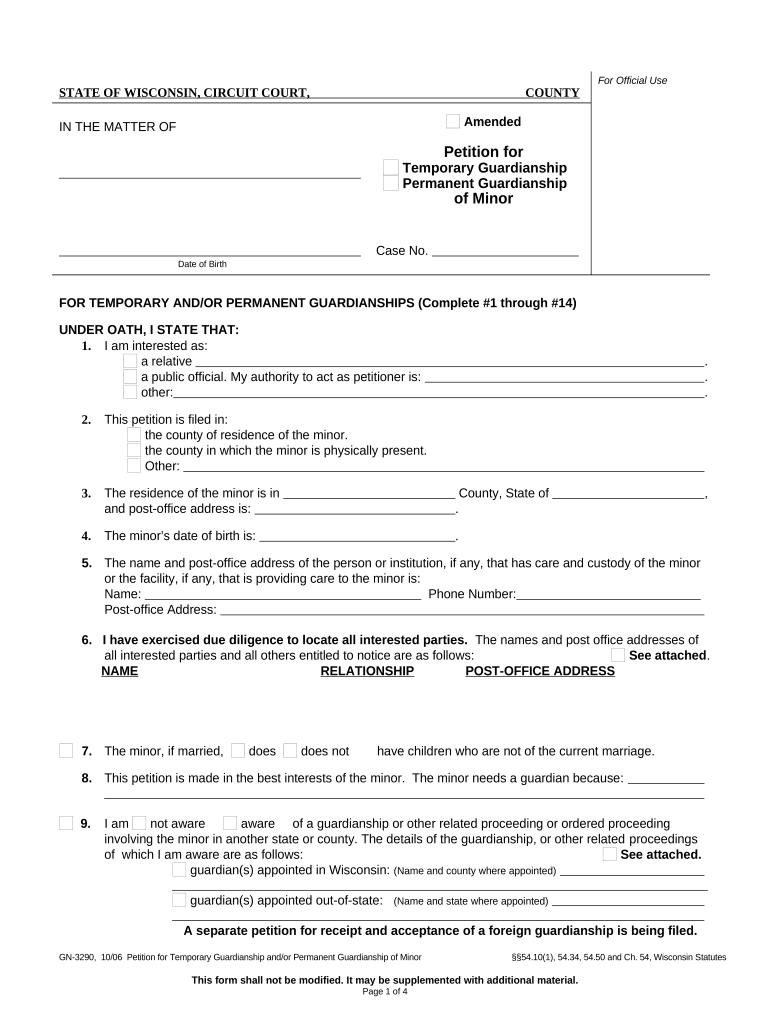
Petitioner information

Full name, address, relationship to minor, and statement of standing to file are required so the court can evaluate petitioner suitability.

Facts supporting guardianship

Concise factual narrative explaining why guardianship serves the child’s best interests, including parental incapacity or absence facts.

Relief sought

Clear, itemized request for powers (medical, educational, limited financial) and any requested temporary relief included.

Proposed guardian details

Name, age, address, criminal background disclosures, and contact information for the adult proposed to serve as guardian.

Exhibits and declarations

Attach birth certificate, medical records, background checks, and any sworn declarations supporting the petition.

Configuring an online workflow for the petition

When using an e-signature or document platform, set fields and authentication to match the court’s requirements and evidence standards.

Field Configuration
Signature Method Electronic signature or uploaded wet signature per local court rules
Authentication Email + SMS code or advanced ID verification where required
Template Lock required fields and attach exhibits as separate, indexed files
Notifications Enable signer reminders and completion certificates

Digital submission and platform considerations

Courts and institutions vary in whether they accept electronic filings and what authentication they require; verify local rules before e-submitting.

  • Supported Formats: PDF, DOCX accepted by most filing systems
  • Integrations: Connectors to case management and cloud storage
  • Authentication: Email, SMS, or advanced ID verification

Keep printed originals where the court requires wet-ink signatures or certified copies; retain electronic audit trails and certificates for compliance and reproducibility.

Typical timing milestones and processing expectations

Timelines vary by jurisdiction and case complexity; the items below list common scheduling expectations for non-emergency matters.

Prepare and File:

Document assembly and filing typically completed within days to weeks

Service of Process:

Serve parents and interested parties per local rules, often within 30 days

Hearing Scheduling:

Courts often set hearings 4–12 weeks after filing

Emergency Relief:

Temporary guardianship may be requested immediately, often heard within days

Final Order Entry:

Final orders issued after hearing and any required investigations

Key milestones from filing to final order

A sequential view of common milestones clarifies what to expect after filing the petition.

01

File Petition

Clerk accepts filing and assigns case number

02

Serve Parties

Provide notice to parents and interested persons

03

Court Hearing

Judge reviews evidence and hears testimony

04

Order Issued

Court issues guardianship decree and specifies powers

Supporting documents to attach and file copies to keep

Courts expect key documentary proof; include certified copies and retain originals as the court directs.

Birth Certificate

Certified copy proving the child’s identity and parentage; courts commonly require an official copy rather than a photocopy.

Proof of Parentage or Consent

Signed parental consents or court decisions showing parental rights are limited or relinquished as applicable to the petition.

Medical and School Records

Current records documenting the child’s needs and justifying requested medical or educational decision-making authority.

Financial Documents

Bank statements, proof of property, or social security records when the guardian will manage the minor’s assets.

How guardianship differs from other legal arrangements

Compare common legal instruments to understand when court-ordered guardianship is the appropriate remedy versus alternatives.

Document Purpose
Guardianship court-appointed long-term care
Custody Order family law parental rights allocation
Power of Attorney agent appointment revocable while competent
Conservatorship financial control often for adults

Frequently asked questions about the Petition for Guardianship of Minor

Answers to common procedural and practical questions when preparing or filing a guardianship petition.


Need help? Contact support

eSignature vendor pricing and feature comparison relevant to filing petitions

A neutral comparison of typical eSignature starting prices and common feature distinctions to consider when choosing a platform for petition assembly and signing.

signNow DocuSign Adobe Sign PandaDoc HelloSign
Starting Price $8/user/mo $15/user/mo $14/user/mo $19/user/mo $15/user/mo
Free Trial 7-day free trial Varies by plan Varies by plan Varies by plan Varies by plan
Bulk Send Yes Yes Yes Yes Varies
Audit Trail Yes Yes Yes Yes Yes
Envelope Cap No cap 100 envelopes/user/year Varies Varies Varies
be ready to get more
Join over 28 million airSlate SignNow users