Establishing secure connection…Loading editor…Preparing document…

Proceedings Supplemental Order

This template is fully customizable. Edit the text, fill out the fields, and send it for signature. Give it a try!
Proceedings Supplemental Order

What a Proceedings Supplemental Order Is and When It Appears

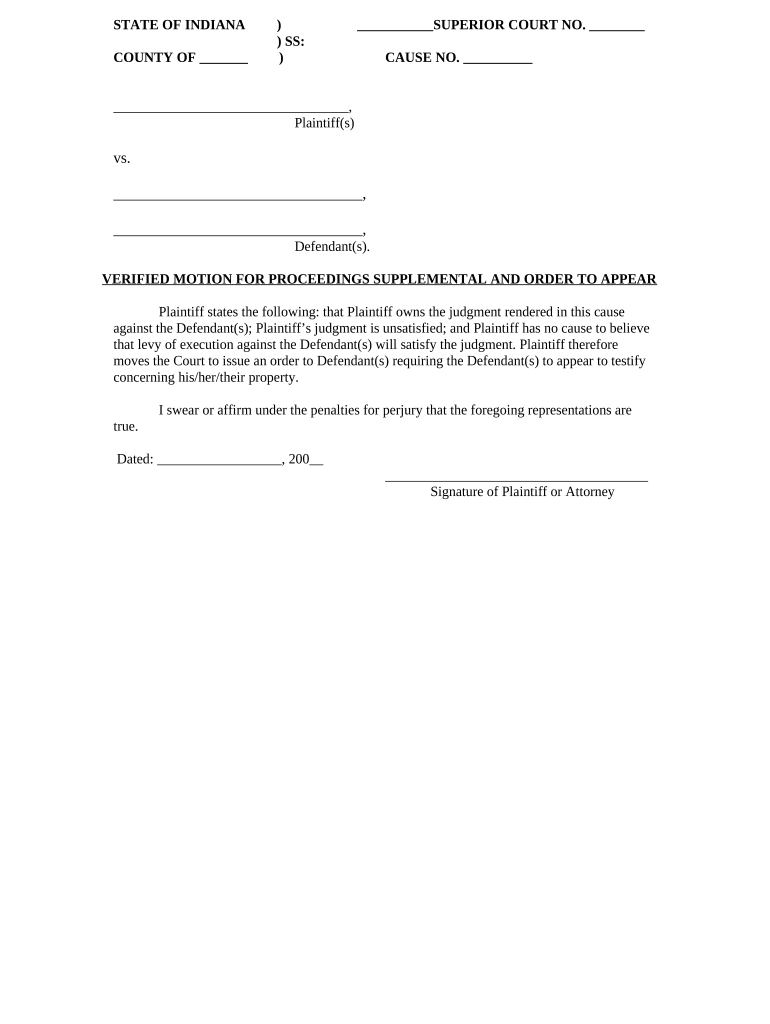
A Proceedings Supplemental Order is a court-issued or court-approved document that supplements, clarifies, or modifies an existing court order or case schedule. It typically adds procedural directions, new deadlines, or additional findings without reopening full merits of the original order. Supplemental orders are used to address gaps, implement interim relief, or record judge-directed changes after hearings. Because they affect case timing and rights, they must follow local court rules for form, signature, service, and filing to be effective.

Why a Clear Supplemental Order Matters for Case Management

A well-drafted Proceedings Supplemental Order reduces ambiguity, prevents procedural disputes, and preserves the intended effects of judicial rulings.

Why a Clear Supplemental Order Matters for Case Management

Who Prepares and Relies on a Proceedings Supplemental Order

Accurate preparation and prompt service help avoid sanctions, missed deadlines, and contested compliance disputes.

  • Attorneys of record preparing proposed supplemental language for judge review and signature.
  • Court clerks processing filings, docketing the signed order, and notifying parties of entry.
  • Judges issuing or approving supplemental language to implement rulings or adjust schedules.

Step-by-Step: Preparing a Proposed Proceedings Supplemental Order

Follow these core steps when preparing and submitting a proposed supplemental order to the court.

  • 01
    Draft Proposed Language: Write precise amendments or additions to the original order.
  • 02
    Attach Supporting Materials: Include relevant minutes, affidavits, or hearing transcripts.
  • 03
    Confer with Opposing Counsel: Attempt agreement on wording to avoid contested motions.
  • 04
    Submit to Court: File via e-filing or deliver to the clerk per local rules.

How to Customize and Submit the Order Online

Configure your digital workflow to match court e-filing and service requirements before submitting the supplemental order.

Field Configuration
Document Format PDF/A for court e-filing where required
Signing Method Judge signature via authorized electronic method or wet ink
Service Method E-service per local rule, or certified mail where required
Filing Channel Use court ECF/e-filing portal or clerk's office

Where to File and How the Submission Moves Through the Court

After finalizing the supplemental order, route it through the court's accepted channels to ensure timely docketing and service.

  • File with Clerk: Submit via e-filing portal or hand-deliver to the clerk's office.
  • Judge Review: The judge signs, amends, or rejects the proposed supplemental order.
  • Docket Entry: Clerk enters the signed order onto the official docket.
  • Service to Parties: Clerk or filer serves all parties per local rules.

Distribution Options and Platform Requirements

Ensure your chosen platform supports required formats, signer authentication, and a reliable audit trail for later verification.

  • E-Filing Portals: Court-specific portals accept PDF/A documents
  • Certified Mail: Use when e-service is not authorized
  • Secure eDelivery: Audit trail and timestamps required for proof

Typical Timelines and Filing Deadlines to Watch

Local rules determine exact deadlines; use these typical milestones to structure compliance and service.

Proposed Order Filing:

File promptly after hearing or stipulation; some courts expect same-day or within 7 days.

Response Period:

Opposing parties often have 7–14 days to object, depending on rule.

Judge Signature Time:

Judge may sign at hearing or within a set days after submission.

Service Deadline:

Serve parties immediately upon entry per local practice.

Appeal Timing:

Deadlines for appeal or motion for reconsideration vary by court.

Notarization and Witnessing Steps for Authenticated Orders

When a supplemental order or attached affidavit requires notarization or witnesses, follow this authentication sequence.

01

Prepare Originals

Assemble the final document and attachments for signature.

02

Sign Before Notary

Sign in the presence of the notary or authorized official.

03

Notary Acknowledgment

Notary completes acknowledgment and affixes seal.

04

Witness Signatures

Collect witness names and signatures where required.

05

Record Retention

Notary retains journal entries per state rules.

06

Attach to Filing

Include notarized pages with the filed supplemental order.

07

Serve Notarized Copy

Provide parties with the notarized or certified copy as required.

08

Confirm Acceptance

Verify the court accepted notarized format for filing.

Common Mistakes to Avoid When Drafting the Supplemental Order

  • Using vague or non-specific language that invites dispute or additional litigation.
  • Failing to include the exact case caption and docket number required by the clerk.
  • Submitting the wrong document format, which leads to e-filing rejections or delays.
  • Not serving all parties promptly after entry, risking default or procedural objection.

Consequences of an Incorrect or Improper Supplemental Order

Case Dismissal: Order deficiencies can contribute to procedural dismissal.
Monetary Sanctions: Courts may impose fines for repeated noncompliance.
Delay Costs: Incorrect filings extend timelines and increase litigation expense.
Service Failure: Improper service can void effect of the order.
Credibility Loss: Repeated errors can damage counsel credibility with the court.
Refiling Fees: You may incur additional filing costs to correct errors.

Required Information Elements for an Enforceable Supplemental Order

Case Caption: Exact party names
Docket Number: Full docket identifier
Precise Language: Clear amendment text
Effective Date: MM/DD/YYYY
Judge Signature: Judge or authorized signatory
Service Statement: Method and date of service

Key Components to Include in a Professional Proceedings Supplemental Order

A complete supplemental order has defined sections to ensure the court and parties understand the modification, its scope, and how to comply.

Title and Caption

A clear title referencing the original order and the full case caption to prevent misfiling and to make the document immediately identifiable to clerks and parties.
Recitals

Brief factual context identifying the prior order, hearing date, or stipulation that justifies the supplemental language and frames the court's authority to issue modifications.

Amendment Text

Precise, itemized language stating additions, deletions, or substitutions, using numbered paragraphs or subparts for easy reference in compliance and enforcement.

Effective Date Clause

A single defined date or event that triggers the supplemental order's operative provisions, avoiding ambiguity about when obligations begin.

Signature Block

Designated space for the judge's signature, printed name, title, and date; include clerk acknowledgment area if required by local practice.

Service Direction

A short direction noting who must be served, acceptable methods of service, and the responsibility for filing proof of service with the court.

Supporting Documents and File Formats to Include

Attach supporting materials and choose file formats that match court e-filing requirements and preserve evidentiary integrity.

Hearing Minutes

Include hearing minutes or a court reporter transcript excerpt if the supplemental order implements verbal directions from the bench; these support the factual basis for modifications.

Affidavits or Declarations

Attach sworn affidavits or declarations that establish facts referenced in the supplemental order; ensure they are signed and, if required, notarized.

Proposed Order File

Provide a clean, court-ready proposed order in PDF/A format when e-filing; include editable Word DOCX if the court accepts proposed edits.

Proof of Service

Include the proof of service or certificate of service page showing the date and method used to serve opposing parties and other required recipients.

How to Update or Revise a Previously Filed Supplemental Order

Follow a controlled sequence to revise a supplemental order to preserve docket clarity and avoid procedural objections.

01

Draft Revision:

Prepare redlined and clean versions showing changes.
02

Notify Parties:

Provide notice and opportunity to respond before filing.
03

File Motion:

Where required, file a motion for modification explaining reasons.
04

Submit Proposed Order:

Attach a proposed revised supplemental order for the judge.
05

Obtain Signature:

Judge signs revised order after review or hearing.
06

Serve Revised Copy:

Serve and docket the revised order with proof of service.

Real-World Examples of Supplemental Orders in Practice

These brief examples show how practitioners and organizations have used supplemental orders to streamline case administration.

Tim Martin — Martin Properties

After a landlord–tenant hearing, the judge issued a supplemental order clarifying move-out dates and inspection windows.

  • The supplemental order specified exact deadlines for possession and remediation.
  • Clear deadlines reduced follow-up motions and helped both sides comply without additional hearings by placing precise obligations in the docket entry.

Dan Rotelli — BIS

A commercial dispute required a supplemental order to extend fact discovery and add a protective order.

  • The supplemental order amended the discovery cutoff and protective terms.
  • By formalizing the extension and confidentiality terms, the parties avoided discovery disputes and preserved proprietary information while proceeding to mediation.

Who Has Authority to Sign a Proceedings Supplemental Order

Presiding Judge

The presiding judge or judicial officer has authority to sign and enter a supplemental order. The judge's signature makes the supplemental text part of the official court record enforceable against the parties.

Court Clerk

Court clerks do not sign substantive orders but docket and enter judge-signed supplemental orders; clerks may certify copies and handle ministerial endorsement required for filing and service.

How a Proceedings Supplemental Order Differs from Similar Court Documents

Compare typical court documents to identify where a supplemental order is the appropriate vehicle for change.

Document Type Purpose When Used
Amended Complaint substantive change alters claims or parties
Proposed Order draft for judge submitted pre-signature
Supplemental Order clarify or modify adjusts procedures or deadlines
Judgment final decision concludes merits of case

eSignature Pricing Comparison for Executing Proceedings Supplemental Orders

Select an eSignature vendor that supports audit trails, required authentication, and the file formats courts accept; the table compares common plan indicators.

signNow DocuSign Adobe Sign PandaDoc HelloSign
Starting Price $8/user/mo $15/user/mo $14/user/mo $19/user/mo $15/user/mo
Free Trial 7-day free trial No No Yes, limited Yes, limited
Bulk Send Yes Yes Yes Yes No
Audit Trail Yes Yes Yes Yes Yes
Envelope Cap No cap 100 envelopes/user/year Varies by plan Varies by plan Varies by plan

Frequently Asked Questions About Proceedings Supplemental Orders

Answers to common procedural and technical questions when preparing, filing, and serving a supplemental order.


Need help? Contact support

be ready to get more
Join over 28 million airSlate SignNow users