Establishing secure connection…Loading editor…Preparing document…

Request for Proposal Template

This template is fully customizable. Edit the text, fill out the fields, and send it for signature. Give it a try!
Request for Proposal Template

What a Request for Proposal Template Is and when to use it

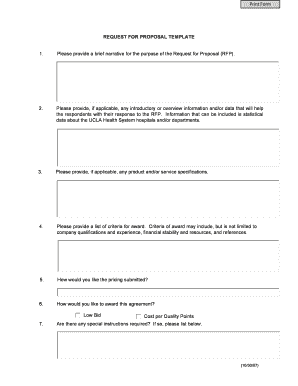
A Request for Proposal (RFP) template is a structured procurement document used by organizations to describe requirements, invite competitive bids, and compare vendor responses on consistent criteria. It typically includes scope of work, submission instructions, evaluation criteria, schedule, pricing format, and contractual terms. Using a standardized RFP template reduces ambiguity, speeds vendor comparison, and establishes a record of requirements and responses that supports auditability and later negotiation or award decisions. Electronic distribution and eSigning are commonly used to streamline receipt and retention.

Why a consistent RFP template matters for procurement

A professional RFP template clarifies expectations across bidders, reduces evaluation time, and helps ensure fair, auditable selection. Consistency in content and submission formats lowers administrative overhead, reduces bidder questions, and improves comparability of technical and cost proposals.

Why a consistent RFP template matters for procurement

Which teams prepare or respond to an RFP

Many internal teams and external vendors interact with RFPs; the template helps each party know their role and requirements.

  • Procurement and sourcing professionals who draft scope, evaluation criteria, and contractual terms for competitive selection.
  • Project managers and technical leads who define requirements, acceptance criteria, and milestone schedules for deliverables.
  • Vendors and suppliers who prepare compliant technical and pricing proposals per the template's instructions.

A clear template reduces back-and-forth and supports faster, documentable award decisions across these stakeholder groups.

Core sections to include in a professional RFP template

A strong RFP template organizes requirements and evaluation elements so reviewers can score and compare proposals objectively.

Scope of Work

Describe deliverables, technical specifications, acceptance criteria, and any mandatory standards so vendors understand obligations and success metrics.
Evaluation Criteria

List weighted factors (technical, cost, timeline, references) and scoring method to enable consistent, defensible comparisons across proposals.

Submission Instructions

Specify format, file types, contact person, number of copies, how to submit electronically, and whether partial proposals are acceptable.

Schedule & Milestones

Provide issuance date, question deadline, submission deadline, anticipated award date, project start, and key delivery milestones.

Pricing Format

Define required pricing templates (fixed price, hourly rates, expense rules) and state currency, taxes, and invoicing expectations.

Terms & Conditions

Include warranty, liability limits, confidentiality, intellectual property, compliance requirements, and governing law to reduce post-award disputes.

Step-by-step: prepare and issue an RFP

Follow a consistent sequence to minimize rework and ensure compliance when issuing an RFP.

  • 01
    Prepare the RFP: Draft scope, budget, and evaluation criteria; attach exhibits.
  • 02
    Publish and invite: Issue the RFP via the chosen channels with unique RFP number.
  • 03
    Manage vendor questions: Log Q&A, publish amendments to all prospective bidders.
  • 04
    Receive and evaluate: Collect submissions, score against criteria, and document decisions.

Typical electronic submission and eSignature workflow

Leverage a digital workflow to collect proposals and sign award documents while preserving an audit trail.

  • Upload template: Upload PDF/DOCX and attach exhibits.
  • Place fields: Add fillable and signature fields where vendors will enter responses.
  • Send to bidders: Distribute via email or secure links with clear deadlines.
  • Collect signed copies: Capture signed proposals and certificate of completion for each signer.

Key workflow settings to configure for an electronic RFP

Configure document and signer settings to match your procurement and audit requirements before issuing the RFP.

Field Configuration
Submission Method Email link | Secure portal
Authentication Email + SMS code optional
Deadline Handling Time zone locking | No late uploads
Audit Trail Enable IP, timestamp, and activity log

Technical requirements for issuing and receiving an RFP

Confirm platform capabilities for format, integrations, and signer authentication before you issue the RFP.

  • File formats: PDF and DOCX supported
  • Integrations: Salesforce, NetSuite, Google Workspace
  • Authentication: Email, SMS, or advanced KBA

Ensure the chosen platform captures a detailed audit trail and supports secure storage to satisfy procurement and compliance requirements.

Typical eSignature vendor pricing and feature comparison for RFP workflows

Basic vendor pricing and feature availability can affect per-document costs and multi-recipient workflows. signNow is listed first for comparison.

signNow DocuSign Adobe Sign PandaDoc HelloSign
Starting Price $8/user/mo $15/user/mo $14/user/mo $19/user/mo $15/user/mo
Free Trial 7-day free trial No No Yes, limited Yes, limited
Bulk Send Yes Yes Yes Yes No
Audit Trail Yes Yes Yes Yes Yes
HIPAA Compliant Yes Yes Yes No No

Security and compliance features to require in an eSignature platform

Encryption: TLS 1.2/1.3; AES-256 at rest
Certifications: SOC 2 Type II, ISO 27001
HIPAA Support: BAA available on request
21 CFR Part 11: Compliance options for regulated records
Audit Trails: Timestamps, IPs, and action logs
Accessibility: WCAG 2.0 Level AA

Risks and consequences of an incomplete or incorrect RFP

Bid Rejection: Incomplete responses may be disqualified
Contract Disputes: Ambiguous requirements increase litigation risk
Procurement Delay: Errors extend procurement timelines
Financial Exposure: Unclear pricing rules cause cost overruns
Compliance Gaps: Missing security terms can breach regulations
Reputational Harm: Perceived unfairness undermines vendor trust

Common mistakes when preparing an RFP template

  • Unclear scope that forces clarifying amendments and late changes, which creates unequal access to information across bidders.
  • Missing evaluation weights that lead to subjective scoring and difficulty defending award decisions in audits.
  • Inconsistent submission formats that cause manual rework and increase data-entry errors during vendor comparison.
  • Failing to specify signature and authentication requirements, resulting in returned proposals that are noncompliant or not legally enforceable.

Real-world examples showing how standardized RFP templates help

Standardized templates reduced administrative friction and sped selection in real customer deployments.

Optica Ventures — COO

Optica adopted a reusable RFP template to streamline vendor intake and scoring.

  • The template standardized submissions across projects.
  • As a result, the procurement team reduced clarification cycles, sped evaluation, and improved transparency for stakeholders and bidders during award decisions.

Martin Properties — Founder

Martin Properties moved to digital RFP distribution to close property services contracts faster.

  • Electronic templates and signing removed mail delays.
  • This enabled on‑time vendor selection, consistent contract terms, and secure retention of signed proposals accessible by mobile or desktop for audits.

Practical tips for accurate and efficient RFP completion

Adopt these practices to reduce errors, accelerate evaluation, and maintain defensible procurement records.

Standardize templates
Use a single approved template for similar procurements and keep version history. Standard templates reduce reviewer confusion and prevent inconsistent clauses that can delay award and contract execution.
Be explicit on evaluation
Publish weighted criteria and scoring rubrics. Clear scoring reduces subjective decisions and supports procurement transparency and auditability when awards are challenged.
Set clear deadlines
Lock submission deadlines with time zone and late submission policy. Publish amendments and Q&A to all bidders simultaneously to preserve fairness.
Capture an audit trail
Require authenticated submissions and an audit log that records signer identity, timestamp, and actions to defend decisions and support post-award compliance reviews.

Typical signers and their authority

Procurement Manager

Responsible for issuing the RFP, collecting proposals, convening the evaluation panel, and executing award documentation. Authorized to accept proposals subject to approved budget and contract thresholds.

Vendor Authorized Signer

An officer or designated representative who can bind the bidder contractually. Ensure the signer name and title match corporate authorization and that signature authority is documented.

Frequently asked questions about using the RFP template

Answers to common questions on execution, eSignatures, deadlines, and corrections when working with an RFP template.


Need help? Contact support

be ready to get more
Join over 28 million airSlate SignNow users