Establishing secure connection…Loading editor…Preparing document…

Trust Agreement for Funds for Recovery of Judgment for Minor

This template is fully customizable. Edit the text, fill out the fields, and send it for signature. Give it a try!
Trust Agreement for Funds for Recovery of Judgment for Minor

What this Trust Agreement Is and When it Applies

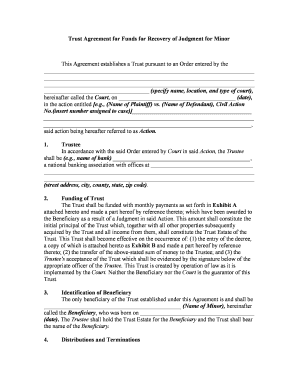
A Trust Agreement for Funds for Recovery of Judgment for Minor is a legal document that places settlement or judgment proceeds for a minor into a fiduciary account managed by a trustee until court-approved distribution. It records parties, the source of funds, trustee powers, conditions for disbursement, and protective provisions to safeguard the minor’s interests and comply with any probate or guardianship orders.

Why use a Trust Agreement for Minor Recovery Funds

A formal trust centralizes control, documents fiduciary duties, and reduces disputes when distributing judgment proceeds to a minor. It helps satisfy court or guardian ad litem requirements, protects public benefits eligibility, and preserves a clear audit trail; electronic execution is valid under ESIGN (15 U.S.C. §7001) and most states’ UETA frameworks.

Why use a Trust Agreement for Minor Recovery Funds

Who typically prepares or signs this trust

Common participants include the minor’s attorney, appointed trustee, guardian or conservator, and sometimes a court-appointed fiduciary before distribution.

  • Minor’s Attorney — Drafts the trust language and coordinates court approval and settlement documentation.
  • Trustee or Custodian — Manages funds, invests prudently, and follows distribution conditions set in the agreement.
  • Court or Guardian — Approves the agreement and may sign or file it to permit disbursement to the minor.

Parties should confirm signatory authority and any required court approvals before execution to prevent rejection or delayed distribution.

Core components to include in a professional trust agreement

A complete agreement addresses identity, authority, funds, investment and distribution rules, accounting, and termination to align trustee obligations with court or statutory requirements.

Trustee Identity

Full legal name and contact details for the trustee, including capacity (individual, bank trust division, or trust company) and any successor trustee appointment language to ensure continuity of administration.
Beneficiary Details

Minor’s full legal name, date of birth, Social Security number or identifier, and guardian information, establishing exactly who will receive benefits and under what conditions the funds are payable.

Source of Funds

A clear description of the judgment, settlement, case number, payer, gross and net amounts, and any liens or holdbacks to clarify what the trustee holds and any subtractions required.

Distribution Rules

Precise criteria for payments to the minor (age triggers, medical or educational expenses, court permission), including discretionary vs mandatory distributions and required documentation for releases.

Trustee Powers

Authority to invest, disburse, retain counsel, pay taxes and fees, and obtain court instructions, plus fiduciary standards and limitations to avoid conflicts or ultra vires actions.

Reporting and Termination

Accounting frequency, beneficiary notice provisions, record retention, closing mechanics, and conditions for termination or transfer of remaining assets to the minor or an alternate payee.

Step-by-step: executing the Trust Agreement for recovery funds

Follow these core steps to prepare, approve, and fund the trust while preserving legal and accounting records.

  • 01
    Prepare Draft: Assemble settlement documents and draft trust language consistent with court requirements.
  • 02
    Obtain Court Approval: Submit trust to the court or guardian for review and signature when required by the settlement terms.
  • 03
    Open Trust Account: Open a segregated account in the trustee’s name identified for the minor’s funds.
  • 04
    Transfer Funds: Deposit net settlement proceeds and record each transaction for accounting and tax reporting.

Digital workflow setup for completing and routing the agreement

Configure signing, authentication, storage and notifications to reflect court or fiduciary requirements and preserve an audit trail.

Field Configuration
Authentication Level Email, SMS code, or ID verification depending on court rules
Notary / RON Enable remote notarization if permitted by jurisdiction
Template Controls Lock required fields and add conditional fields for court approvals
Storage Location Secure cloud storage with audit log and versioning

Where to file and who should receive copies

Routing depends on whether a court order, guardian, or financial institution requires notice or holding of funds.

  • Court Clerk: File signed order or trust when court approval is required.
  • Trustee Records: Retain the original trust and all receipts in trustee’s records.
  • Financial Institution: Provide bank trust account documentation for account setup and compliance.
  • Guardian or Attorney: Send certified copies to guardian and counsel for case files.

Technical considerations for electronic completion and delivery

Ensure the platform supports secure PDFs, tamper-evident audit trails, and accepted signer authentication for court filings.

  • File Formats: PDF and DOCX accepted by most courts
  • Authentication: Email or SMS code authentication supported
  • Integrations: Connect to cloud storage and case management systems

Maintain copies in an access-controlled repository and confirm the court’s electronic submission policies before e-filing or sharing signed copies.

Time-sensitive items to watch during trust setup

Certain administrative and reporting deadlines affect funding, tax reporting, and court oversight; track timing carefully to avoid penalties or delayed distributions.

Court Approval Timing:

Obtain approval according to the settlement schedule and any court deadlines for reporting.

Account Opening:

Open a segregated trust account promptly after approval to segregate funds.

Tax Reporting:

Prepare for required IRS reporting and any required 1099 or informational returns.

Notary Availability:

Schedule notarization or RON session to align with signing dates.

Record Retention:

Begin the retention timeline upon funding and document creation.

Key milestones from judgment to final distribution

Track these milestones sequentially to ensure compliance from settlement receipt through final payment to the minor.

01

Judgment Entry

Case judgment or settlement finalized and documented with the court.

02

Trust Establishment

Trust drafted, signed by trustee, and approved by required parties or court.

03

Funds Receipt

Settlement funds deposited into the trustee’s segregated account and logged.

04

Final Distribution

Funds distributed to minor when trigger conditions are met or per court order.

Common mistakes to avoid when preparing the trust

  • Using ambiguous distribution language such as 'for health and welfare' without listing required supporting documentation for discretionary payments.
  • Failing to match the minor’s name exactly to court and social security records, which can block account openings and tax reporting.
  • Not obtaining required court approval or guardian consent before disbursing funds, which may trigger reversal or sanctions.
  • Keeping funds commingled with personal accounts rather than a segregated trust account, exposing assets to creditor claims or accounting disputes.

Risks and legal consequences of incorrect trust setup

Void Transactions: Court may void improper disbursements
Fiduciary Breach: Trustee liable for breach and damages
Tax Penalties: Incorrect reporting may trigger IRS penalties
Loss of Benefits: Improper distributions can affect public benefits eligibility
Account Rejection: Banks may refuse deposits without proper documentation
Guardian Challenges: Opposing parties may contest trustee actions

Security and compliance features to require for electronic execution

In-transit Encryption: TLS 1.2/1.3
At-rest Encryption: AES-256
Compliance Certifications: SOC 2 Type II and ISO 27001
Health Data Controls: HIPAA-compliant with BAA
Legal Standards: ESIGN and UETA alignment
Audit Trail: Tamper-evident logs and timestamps

Pricing and capability comparison for common eSignature vendors

Basic vendor pricing and key capability differences relevant to trust execution and secure recordkeeping; signNow is listed first for direct comparison.

signNow DocuSign Adobe Sign PandaDoc HelloSign
Starting Price $8/user/mo $15/user/mo $14/user/mo $19/user/mo $15/user/mo
Free Trial 7-day free trial Varies Varies Varies Varies
Bulk Send Yes Yes Yes Yes No
Audit Trail Yes Yes Yes Yes Yes
HIPAA Compliant Yes Yes Yes No No

Frequently asked questions about the Trust Agreement for Funds for Recovery of Judgment for Minor

Answers to common execution, custody, and compliance questions when creating and managing a trust for recovered judgment funds held for a minor.


Need help? Contact support

be ready to get more
Join over 28 million airSlate SignNow users