Establishing secure connection…Loading editor…Preparing document…

Release by Trustor of Right to Revoke Trust

This template is fully customizable. Edit the text, fill out the fields, and send it for signature. Give it a try!
Release by Trustor of Right to Revoke Trust

What the Release by Trustor of Right to Revoke Trust Is

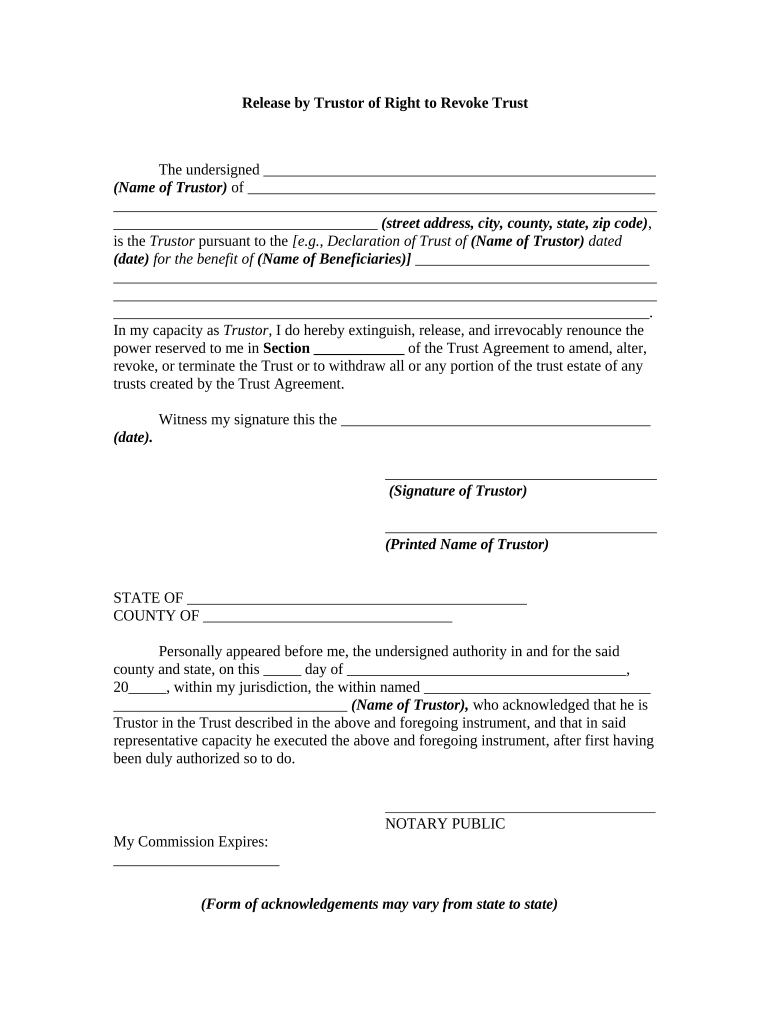
The Release by Trustor of Right to Revoke Trust is a legal instrument in which a trustor formally relinquishes the ability to later revoke or amend a trust, effectively converting all or part of a revocable trust into an irrevocable interest. This release typically identifies the trust, specifies the property or interests affected, and sets an effective date and consideration if any. Because the release alters fundamental property and estate rights, it often requires strict execution formalities—such as signatory capacity verification, notarization, and witness statements—under state law and benefits from attorney review.

Why a Formal Release Matters

A Release by Trustor of Right to Revoke Trust provides certainty for beneficiaries and third parties by removing the trustor's unilateral ability to revoke. It clarifies ownership interests, reduces future disputes, and helps align trust terms with tax and estate planning objectives.

Why a Formal Release Matters

Who Prepares and Signs This Release

Estate attorneys, trustees, and trustors commonly prepare or execute this release to formalize irrevocable transfers and reduce future challenges.

  • Estate attorneys: Draft and review release language to ensure tax and fiduciary compliance.
  • Trustors: Sign to relinquish revocation rights; ensure capacity and informed consent are documented.
  • Beneficiaries and trustees: Receive clearer title and reduced litigation risk after effective release.

Step-by-Step: Completing and Executing the Release

Follow these sequential steps to complete, sign, and formalize the Release by Trustor of Right to Revoke Trust accurately under applicable state rules.

  • 01
    Identify Trust: Locate the trust instrument and note execution date.
  • 02
    Draft Release: Prepare release language matching trust provisions and intent.
  • 03
    Execute Signing: Trustor signs before required witnesses and notary if applicable.
  • 04
    Record/Deliver: File or deliver release to trustee, title agents, and recorders.

Essential Elements of a Professional Release

A professional release should combine clear identification, defined scope, execution formalities, and notice provisions to protect parties and third-party stakeholders.

Identification

State the trustor's full name, trust name, trust date, and any identifying numbers. Tie the release to the exact trust instrument to prevent disputes about covered assets or parties.
Scope

Specify which assets, accounts, or interests are released and whether the release is partial or total. Include legal descriptions, account numbers, and parcel identifiers where relevant.

Consideration

Document any payment, exchange, or other bargained-for consideration supporting the release to satisfy contract formation principles and clarify tax treatment of the transfer.

Effective Date

State the exact effective date and whether the release is retroactive or prospective. Clarify if delivery, recording, or notarization conditions control effectiveness.

Execution Clauses

Include representation of capacity, absence of undue influence, and authority to execute. Specify witness and notarization requirements required under state law or trust terms.

Recording/Notice

Describe whether the release should be recorded in land records or delivered to financial institutions and beneficiaries, and state any notice timelines and procedures.

Security and Compliance Considerations

Data Encryption: AES-256 at rest; TLS 1.2/1.3 in transit
Access Controls: Role-based access, SSO, and MFA options
Audit Trail: Tamper-evident logs with timestamps and IPs
HIPAA Compliance: BAA available when release contains PHI
ESIGN/UETA Support: Supports electronic signatures under ESIGN and UETA
Notary & RON: Supports remote online notarization where state permits

Principal Risks If the Release Is Defective

Invalid Execution: Release may be void if formalities unmet
Tax Liability: Possible gift or transfer tax consequences
Litigation Risk: Beneficiaries may challenge undue influence
Title Defects: Failure to record can complicate ownership
Capacity Claims: Mental incapacity challenges post-signing
Elder Abuse: Heightened scrutiny for transfers by elderly

Common Preparation Errors to Avoid

  • Using vague descriptions of assets risks ambiguity that creditors or beneficiaries could exploit in future disputes.
  • Failing to obtain required witness signatures or notarization under state law can render the release unenforceable.
  • Not documenting consideration or independent counsel increases the chance of successful post-execution challenges.
  • Attempting to rely on electronic signatures where state law or trust terms require wet signatures can invalidate the release.

How a Typical Release Is Processed

This workflow outlines the typical steps from drafting a release to verification, signing, and delivery or recording with relevant authorities.

  • Draft: Prepare release wording consistent with trust terms.
  • Review: Attorney reviews for capacity, tax, and fiduciary issues.
  • Sign: Execute before witnesses and notary if required.
  • Record: Record in land or institutional records as appropriate.

Online Workflow Settings to Configure Before Sending

Configure the online signing workflow, authentication strength, and routing before sending the release for signature and recording.

Field Configuration
Authentication Email link or SMS code; KBA optionally available
Routing Sequential signer order or parallel signing
Notarization Enable RON where state law permits
Recording Instructions Attach recording requirements or delivery addresses

Platform Capabilities to Support Execution and Recording

Ensure the signing platform supports secure authentication, audit trails, optional remote online notarization, and delivery to recording offices or trustees for document finalization.

  • Integrations: Connect with title agents and trustees
  • Formats: PDF/A and DOCX supported for recording
  • Security: AES-256 at rest; TLS 1.2/1.3 in transit

eSignature Pricing and Features Comparison for Executing Releases

Compare common eSignature plan features and starting prices to support selection for executing trust releases.

signNow DocuSign Adobe Sign PandaDoc HelloSign
Starting Price $8/user/mo $15/user/mo $14/user/mo $19/user/mo $15/user/mo
Free Trial Yes, 7-day trial Varies by vendor Varies by vendor Varies by vendor Varies by vendor
Bulk Send Yes Yes Yes Yes No
Audit Trail Yes Yes Yes Yes Yes
HIPAA Compliant Yes Yes Yes No No

Key Milestones from Draft to Recorded Release

Key milestones outline the timeline from drafting the release through legal review, execution, and final recording or delivery to stakeholders.

01

Drafting

Prepare release language and identify affected assets.

02

Legal Review

Attorney reviews capacity, tax, and fiduciary issues.

03

Execution

Signatures, witness attestations, and notary where required.

04

Recording/Notice

Record in land records and notify trustee and beneficiaries.

Practical Examples of How Releases Are Used

Case examples illustrate practical uses of a Release by Trustor of Right to Revoke Trust in estate and property contexts.

Property Transfer

A trustor releases revocation rights to allow a trustee to convey real property to beneficiaries without later reversal.

  • This removes ambiguity on title.
  • After notarization and recording, title companies accepted the release as evidence to update deeds and process transfers; the release helped avoid extended probate or reversion claims and provided banks confidence to update account ownership.

Estate Tax Planning

A grantor executes a release to remove retained powers that could otherwise attribute assets to the taxable estate.

  • It clarifies estate tax exposure.
  • Counsel documented consideration and independent legal advice; the final release reduced future IRS challenges, clarified beneficiary interests, and allowed trustees to administer assets according to irrevocable trust terms without fear of late revocation.

Best Practices to Reduce Challenge Risk

Adopt clear drafting, independent counsel, and strict execution steps to reduce contestability and administrative friction.

Obtain Independent Counsel for Trustor
Document that the trustor received independent legal advice or had the opportunity to seek counsel; a written acknowledgement reduces claims of coercion and strengthens enforceability in contested proceedings.
Verify Capacity and Informed Consent
Include capacity attestation, mental state observations, and, where appropriate, medical or professional certifications. Clear evidence of informed consent reduces post-execution challenges alleging incapacity or undue influence.
Comply with State Execution Formalities
Follow witness counts, notarization, and RON rules required in the trust's governing jurisdiction. Failure to meet statutory formalities can void the release or impede recording with county offices.
Record and Notify Relevant Parties
Record the release in land or institutional records when property interests are affected, provide notice to beneficiaries and custodial institutions, and retain certified copies to support later title transfers or account retitling.

Frequently Asked Questions about the Release by Trustor of Right to Revoke Trust

Answers to frequent questions about preparing, signing, and recording a Release by Trustor of Right to Revoke Trust.


Need help? Contact support

be ready to get more
Join over 28 million airSlate SignNow users