Establishing secure connection…Loading editor…Preparing document…

Replevin

This template is fully customizable. Edit the text, fill out the fields, and send it for signature. Give it a try!
Replevin

What Replevin Is and When it Applies

Replevin is a civil court action used to recover personal property that a plaintiff alleges is wrongfully detained by another party. The procedure seeks the return of specific tangible items (not money) and can include an immediate writ directing a sheriff or marshal to seize the property pending a hearing. Remedies, procedural names, and available interim relief vary by state; courts commonly require proof of ownership, a description of the property, and security (a bond) to protect the defendant against wrongful seizure.

Why Replevin Matters for Recovering Personal Property

Replevin provides a direct remedy to recover identifiable goods without first proving damages in full, preserving the plaintiff’s property interest and limiting loss while the court decides the case.

Why Replevin Matters for Recovering Personal Property

Who Typically Files or Responds to a Replevin Case

Replevin actions are commonly brought by individuals and businesses seeking the return of leased, loaned, or wrongfully detained property.

  • Equipment owners and lessors seeking recovery of leased machinery or tools within commercial disputes.
  • Retailers or distributors reclaiming inventory held by vendors or third parties after payment disputes.
  • Individuals reclaiming personal property taken or withheld during contract or familial disputes.

Cases often involve counsel for either party; attorneys prepare pleadings, bonds, and coordinate sheriff execution where required.

Step-by-Step: Preparing and Filing a Replevin Petition

Follow these core steps to prepare a complete replevin filing and reduce the chance of procedural rejection.

  • 01
    Gather Evidence: Collect ownership documents, receipts, photos, and serial numbers to prove title and identification.
  • 02
    Draft Complaint: Prepare a clear complaint listing parties, property, value, and requested relief with an affidavit of ownership.
  • 03
    Calculate Bond: Determine security or bond amount as required by statute or court rules to protect the defendant.
  • 04
    File & Serve: File with the correct court, pay filing fees, and arrange service according to local rules before seeking writ execution.

How to Configure an Online Replevin Workflow

Set up an efficient digital workflow that captures evidence, signatures, and notarization where needed to accelerate filing and preserve an audit trail.

Field Configuration
Ownership Evidence Attach PDFs/photos; require uploader name and timestamp for chain of custody
Affidavit Signature Require signer authentication and date field; enable notarization field if jurisdiction requires
Bond Documentation Include bond amount field and attachment for surety or payment confirmation
Service Instructions Export a service packet with filed stamp and certified copy for process server

Where to File and How the Replevin Process Moves

Replevin is filed in the court with jurisdiction over the property or parties; the court may issue a writ for law enforcement to seize property pending hearing.

  • Filing Court: Clerk accepts complaint and issues case number for court docketing
  • Judge Review: Judge reviews pleadings and bond to decide on immediate writ issuance
  • Writ Execution: Sheriff or marshal serves writ and seizes identified property for safekeeping
  • Hearing: Court schedules hearing to resolve competing claims and determine final possession

Digital Signing, Evidence Capture, and Delivery Options

Use platforms that support secure signatures, notarization where required, and reliable file formats for court filing.

  • File Formats: PDF, DOCX accepted for court-ready exhibits
  • Integrations: Connectors for NetSuite, Google Workspace, Box for evidence retrieval
  • Authentication: Email, SMS, or advanced signer verification supported

Ensure the platform you use retains an unalterable audit trail, supports TLS/AES encryption, and can export signed packages for court submission.

Timing Considerations and Typical Deadlines

Deadlines in replevin cases vary by state and court; be mindful of expedited hearing windows, service timelines, and appeal periods that affect possession rights.

Ex Parte Relief Window:

Hearing often within days to weeks after temporary seizure

Service Timing:

Serve defendant per state civil procedure rules promptly after filing

Bond Posting:

Bond must often be posted before writ execution

Return of Writ:

Sheriff returns executed writ to court as per local rule

Appeal Period:

Time to appeal possession orders varies by state

Key Milestones from Filing to Final Disposition

Track these sequential milestones to monitor progress and avoid missed opportunities for interim relief or enforcement.

01

File Complaint

Draft and file a verified petition describing property and ownership

02

Post Bond

Secure bond or security required to protect defendant against wrongful seizure

03

Writ Issued

Court issues a writ authorizing law enforcement to seize property

04

Final Hearing

Court determines rightful possession and any damages or costs

Essential Parts of a Professional Replevin Filing

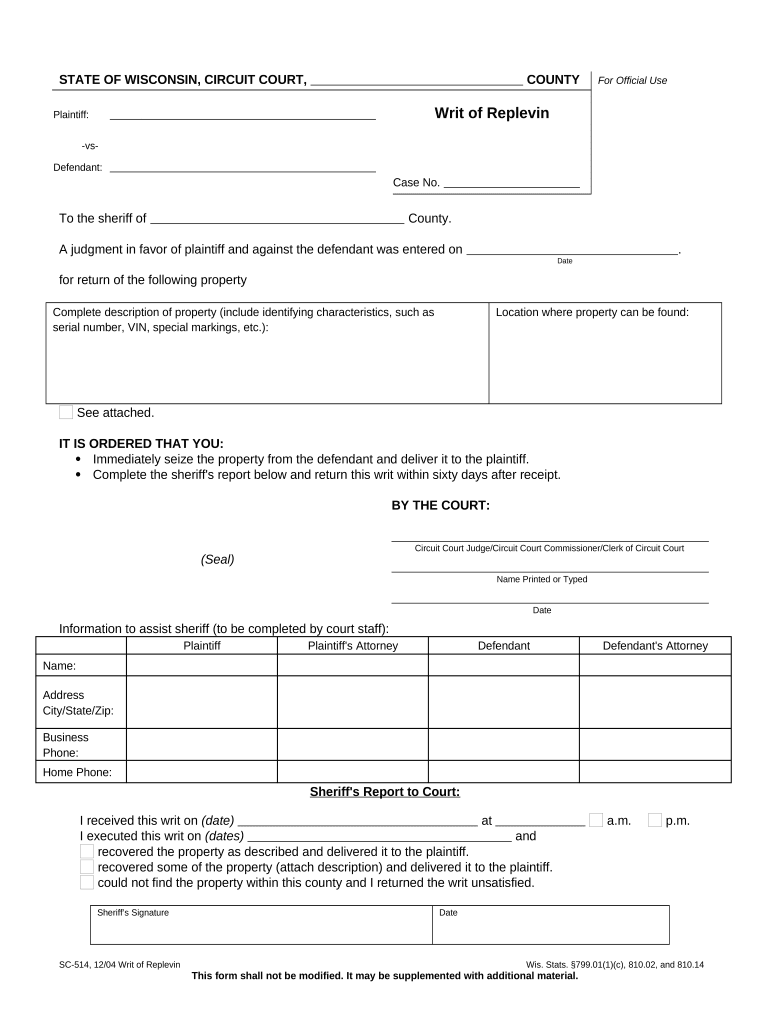
A complete filing combines narrative allegations, verified facts, supporting evidence, and procedural safeguards so the judge can evaluate entitlement and order appropriate relief.

Verified Complaint

A clear statement of facts explaining why the plaintiff has immediate entitlement to possession, including dates, contract references, and legal basis for replevin, drafted to satisfy the court’s pleading standards.
Affidavit of Ownership

A sworn affidavit from the plaintiff or authorized representative affirming ownership, how title was acquired, and facts supporting the claim that the defendant is wrongfully detaining the property.

Detailed Property List

A precise inventory listing make, model, serial number, condition, and photographs where possible to enable accurate identification and reduce the risk of wrongful seizure of third-party items.

Bond or Undertaking

A surety or cash bond sufficient to indemnify the defendant for wrongful seizure, calculated per statute or court rule, with documentation attached to the filing to permit issuance of the writ.

Proposed Writ

A draft writ or order for the judge’s signature that authorizes law-enforcement to seize and hold the specified property pending further court proceedings.

Service and Execution Plan

Instructions for service of process and sheriff execution, including contact details for the custodian of seized goods and requested times for lawful seizure to avoid property damage or dispute.

Security and Legal Standards for Electronic Replevin Documents

ESIGN / UETA: Governs e-signature validity
Audit Trail: Timestamps, IP, signer events
Encryption: TLS 1.2/1.3 in transit
Data at Rest: AES-256 encryption
HIPAA BAA: BAA available where PHI present
21 CFR Part 11: Supported for regulated workflows

Consequences of Procedural Errors in Replevin Filings

Bond Forfeiture: Plaintiff pays damages if seizure wrongful
Dismissal: Case dismissed for improper pleading
Contempt Risk: Noncompliance with court orders incurs sanctions
Property Damage Liability: Plaintiff may reimburse for harm during seizure
Attorney Fees: Court may award fees against moving party
Criminal Exposure: Self-help seizure may trigger civil or criminal claims

Common Mistakes to Avoid When Preparing a Replevin Petition

  • Imprecise property descriptions that make it impossible for law enforcement to identify and seize the correct item, leading to delays or dismissal.
  • Failing to verify geographic jurisdiction or filing in the wrong court, which can cause returned filings and waived relief opportunities.
  • Omitting or underfunding the required bond or undertaking, preventing issuance of a writ or exposing the plaintiff to bond forfeiture.
  • Relying on informal e-signatures without satisfying ESIGN/UETA consent and retention requirements for consumer-facing or regulated records.

Practical Replevin Scenarios

Realistic examples show typical fact patterns and court responses to common requests for immediate possession.

Lease Equipment Recovery

A small business leased a generator and stopped paying after breach of contract, then refused to return it

  • Plaintiff produced the lease and serial number
  • The court granted a writ after bond was posted; sheriff recovered the generator and it was returned to the lessor following the hearing.

Retail Inventory Dispute

A distributor withheld inventory after a payment dispute and moved goods to a third-party warehouse

  • Plaintiff provided purchase orders and invoices
  • The court issued a seizure order for clearly identified SKUs while the dispute proceeded to a merits hearing.

eSignature Vendor Comparison for Replevin Workflows

Document execution, notarization support, and audit trails are important for replevin filings; the table compares entry-level pricing and a few core capabilities across vendors.

signNow DocuSign Adobe Sign PandaDoc HelloSign
Starting Price $8/user/mo $15/user/mo $14/user/mo $19/user/mo $15/user/mo
Free Trial 7-day free trial Varies by vendor Varies by vendor Varies by vendor Varies by vendor
Bulk Send Yes Yes Yes Yes No
Audit Trail Yes Yes Yes Yes Yes
HIPAA Compliant Yes Yes Yes No No

Frequently Asked Questions: Common Replevin Issues

These answers address frequent procedural and technical questions encountered when preparing replevin filings or using electronic tools to assemble the record.


Need help? Contact support

be ready to get more
Join over 28 million airSlate SignNow users