Establishing secure connection… Loading editor… Preparing document…
Navigation

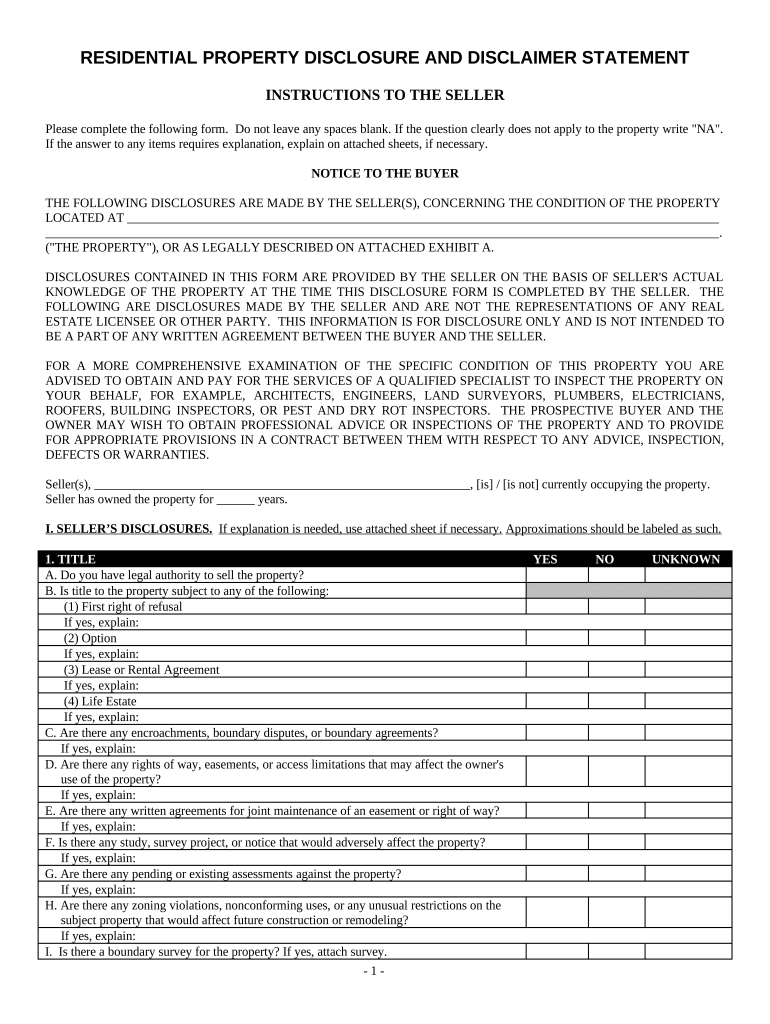
Fill and Sign the Residential Real Estate Sales Disclosure Statement West Virginia Form
Fill and Sign the Residential Real Estate Sales Disclosure Statement West Virginia Form

How it works

Open the document and fill out all its fields.
Apply your legally-binding eSignature.
Save and invite other recipients to sign it.

Rate template

4.8
50 votes
RESIDENTIAL PROPERTY DISCLOSURE AND DISCLAIMER STATEMENT INSTRUCTIONS TO THE SELLER Please complete the following form. Do not leave any spaces blank. If the question clearly does not apply to the property write "NA". If the answer to any items requires explanation, explain on attached sheets, if necessary. NOTICE TO THE BUYER THE FOLLOWING DISCLOSURES ARE MADE BY THE SELLER(S), CONCERNING THE CONDITION OF THE PROPERTY LOCATED AT             . ("THE PROPERTY"), OR AS LEGALLY DESCRIBED ON ATTACHED EXHIBIT A. DISCLOSURES CONTAINED IN THIS FORM ARE PROVIDED BY THE SELLER ON THE BASIS OF SELLER'S ACTUAL KNOWLEDGE OF THE PROPERTY AT THE TIME THIS DISCLOSURE FORM IS COMPLETED BY THE SELLER. THE FOLLOWING ARE DISCLOSURES MADE BY THE SELLER AND ARE NOT THE REPRESENTATIONS OF ANY REAL ESTATE LICENSEE OR OTHER PARTY. THIS INFORMATION IS FOR DISCLOSURE ONLY AND IS NOT INTENDED TO BE A PART OF ANY WRITTEN AGREEMENT BETWEEN THE BUYER AND THE SELLER. FOR A MORE COMPREHENSIVE EXAMINATION OF THE SPECIFIC CONDITION OF THIS PROPERTY YOU ARE ADVISED TO OBTAIN AND PAY FOR THE SERVICES OF A QUALIFIED SPECIALIST TO INSPECT THE PROPERTY ON YOUR BEHALF, FOR EXAMPLE, ARCHITECTS, ENGINEERS, LAND SURVEYORS, PLUMBERS, ELECTRICIANS, ROOFERS, BUILDING INSPECTORS, OR PEST AND DRY ROT INSPECTORS. THE PROSPECTIVE BUYER AND THE OWNER MAY WISH TO OBTAIN PROFESSIONAL ADVICE OR INSPECTIONS OF THE PROPERTY AND TO PROVIDE FOR APPROPRIATE PROVISIONS IN A CONTRACT BETWEEN THEM WITH RESPECT TO ANY ADVICE, INSPECTION, DEFECTS OR WARRANTIES. Seller(s),       , [is] / [is not] currently occupying the property. Seller has owned the property for       years. I. SELLER’S DISCLOSURES. If explanation is needed, use attached sheet if necessary. Approximations should be labeled as such. 1. TITLE YES NO UNKNOWN A. Do you have legal authority to sell the property?                   B. Is title to the property subject to any of the following: (1) First right of refusal                   If yes, explain:       (2) Option                   If yes, explain:       (3) Lease or Rental Agreement                   If yes, explain:       (4) Life Estate                   If yes, explain:       C. Are there any encroachments, boundary disputes, or boundary agreements?                   If yes, explain:       D. Are there any rights of way, easements, or access limitations that may affect the owner's use of the property?                   If yes, explain:       E. Are there any written agreements for joint maintenance of an easement or right of way?                   If yes, explain:       F. Is there any study, survey project, or notice that would adversely affect the property?                   If yes, explain:       G. Are there any pending or existing assessments against the property?                   If yes, explain: H. Are there any zoning violations, nonconforming uses, or any unusual restrictions on the subject property that would affect future construction or remodeling?                   If yes, explain:       I. Is there a boundary survey for the property? If yes, attach survey.                   - 1 - 1. TITLE YES NO UNKNOWN J. Are the property’s boundaries marked?                   If yes, explain:       K. Are there fences on the property?                   If yes, were the fences put up by the property owner?                   L. Are any trees or other flora on the property diseased, dead or damaged?                   If yes, explain:       M. Are there any covenants, conditions, or restrictions which affect the property?                   If yes, explain:       N. Is the property accessed by public or private road? PUBLIC PRIVATE UNKNOWN If private, what yearly upkeep amount is paid by the property owner?       If private, explain road upkeep in detail:       2. WATER A. Household Water (1) The source of the water is: Public Community Private Shared (2) Water source information: YES NO UNKNOWN a. Are there any written agreements for shared water source?                   If yes, explain:       b. Is there an easement (recorded or unrecorded) for access to and/or maintenance of the water source?                   If yes, explain:       c. Are any known problems or repairs needed?                   If yes, explain:       d. Does the source provide an adequate year round supply of potable water?                   e. Are there any water treatment systems (softener, purifier, etc.) for the property?                   If yes, explain, and state if the system(s) is/are leased or owned:       B. Irrigation (1) Are there any water rights for the property?                   If yes, explain:       (2) If they exist, to your knowledge, have the water rights been used during the last five- year period?                   If yes, explain:       (3) If so, is the certificate available?                   Explain:       C. Outdoor Sprinkler System (1) Is there an outdoor sprinkler system for the property?                   (2) Are there any defects in the outdoor sprinkler system?                   If yes, explain:       3. SEWER/SEPTIC SYSTEM A. The property is served by (circle one): Public Sewer Main Septic Tank System Other Disposal System If other, describe:       B. If the property is served by a public or community sewer main, is the house connected to the main? Yes No Unknown If no, explain:       C. Is the property currently subject to a sewer capacity charge? Yes No Unknown If yes, explain:       D. If the property is connected to a septic system:       (1) Was a permit issued for its construction, and was it approved by the city or county following its construction? Yes No Unknown (2) On what date was it last pumped:       (3) Are there any defects in the operation of the septic system? Yes No Unknown If yes, explain:       (4) On what date was it last inspected: By whom:       - 2 - (5) How many bedrooms was the system approved for?       E. Do all plumbing fixtures, including laundry drain, go to the septic/sewer system? Yes No Unknown If no, explain:       F. Are you aware of any changes or repairs to the septic system? Yes No Unknown If yes, explain:       G. Is the septic system, including drainage field, located entirely within the property’s boundaries? Yes No Unknown If no, explain:       4. STRUCTURAL A. How old is the current roof?       years. (If unknown, mark Unknown.) Unknown Roof is constructed of: Asphalt Shingle, Wood Shingle, Slate, Metal, Tile, Asbestos, Unknown, Other: B. Has the roof leaked during your ownership? Yes No Unknown If yes, has it been repaired? Yes No Explain any roof repairs of which you are aware:       C. Has the house undergone any conversions, additions, or remodeling? Yes No Unknown 1. If yes, were all building permits obtained? Yes No Unknown 2. If yes, were all final inspections obtained? Yes No Unknown Explain any conversions/additions/remodeling:                   D. Do you know the age of the house? Yes No If yes, give year of original construction (if approximation, indicate such):       E. Are you aware of: Yes No (1) Any movement, shifting, deterioration or other problems with walls, foundation, crawl space or slab? Yes No (2) Any cracks or flaws in the walls, ceilings, foundations, concrete slab, crawl space, basement, floors or garage? Yes No (3) Any water leakage or dampness in the crawl space or basement? Yes No (4) Any dry rot on the property? Yes No (5) Any repairs or other attempts to control the cause or effect of any problem described above? Yes No Explain any ‘Yes’ answer(s) to 1-5 above. When describing repairs or control efforts, describe the location, extent, date, and name of person/company who did the work. Attach any reports and/or other documentation:                                     F. If you know of any defect(s) regarding the following items, mark the defective item with a check: 1. Foundation 6. Fire Alarm 11. Slab Floors 16. Sidewalks 21. Balconies 2. Deck 7. Doors 12. Driveways 17. Outbuildings 22. Wood Stoves 3. Exterior walls 8. Door locks 13. Attic Stairs 18. Fireplaces 4. Chimneys 9. Patio 14. Windows 19. Garage Floors 5. Interior walls 10. Ceilings 15. Window locks 20. Walkways If you checked any of the above items, explain the defect(s):                               G. In the last 4 years, was a pest, dry rot, structural or "whole house" inspection done? Yes No Unknown If yes, which test(s), when, and by whom was the inspection done? (Attach documentation)             H. Has the property had a problem with pest control, infestations, or vermin? Yes No Unknown If yes, explain:       I. Are you aware of: (1) Any termites, wood destroying insects or pests on or affecting the property? Yes No (2) Property damage by termites, wood destroying insects or pests? Yes No - 3 - If yes, describe:       (3) Any termite/pest control treatments on the property in the last 4 years? Yes No If yes, list company and where treated:       (4) Current warranty or other coverage by a licensed pest control company on the property? Yes No If yes, explain warranty and attach documentation:             J. Have you made a homeowner’s insurance claim(s) regarding the property in the last 4 years? Yes No If yes, explain when and why:       5. SYSTEMS AND FIXTURES If the following systems or fixtures are included with the transfer, do they have any existing defects: YES NO UNKNOWN A. Electrical system, including wiring, all switches, all outlets, and service       If yes, explain:       What type of wiring comprises the electrical system? Copper Aluminum Unknown B. Plumbing system, including pipes, faucets, fixtures, and toilets       If yes, explain:       C. Hot water heater (mark one): Electric Natural Gas Other: Age:       years       If yes, explain:       D. Oven/stove: Electric Natural Gas Other: Age:       years       If yes, explain:       E. List ANY OTHER APPLIANCES TO REMAIN, attach separate sheet if necessary. 1.       Age:       years YES NO UNKNOWN If yes, explain:       2.       Age:       years       If yes, explain:       3.       Age:       years       If yes, explain:       F. Cooling and Heating systems Air Conditioning (mark one): Central Electric Central Gas Heat Pump Window Unit(s)       # included in sale Other (describe): Air Conditioning (continued): Age of cooling system:       years. Zoned cooling? [Yes] [No] Air Conditioning defects? No Unknown Yes, explain:       Heating system (mark one): Electric Natural Gas Fuel Oil Heat Pump Propane Other: Age of heating system:       years. Zoned heating? [Yes] [No] Heating system defects? No Unknown Yes, explain:       Last date of servicing: Heating:       Cooling:       By whom:       Are there rooms without heating/air conditioning vents? Yes No If yes, which rooms:       G. Security system (Circle One): Owned Leased Any defects? Yes No Unknown Describe security system:       If defects are indicated, explain:       H. Other: Any defects? Yes No Unknown If defects are indicated, explain:                   6. COMMON INTEREST A. Is there a Home Owners' Association? Yes No Unknown If yes, what is the name of the association?       B. Are there regular periodic assessments: Yes No Unknown If yes, give amount per: Month: $       Year: $       Other: $       If other, explain:       C. Are there any pending special assessments? Yes No Unknown - 4 - D. Are there any shared “common areas” or any joint maintenance agreements (facilities such as walls, fences, landscaping, pools, tennis courts, walkways, or other areas co-owned in undivided interest with others)? Yes No Unknown If any such areas exist, explain:                   7. APPLIANCES, HEATING, PLUMBING, ELECTRICAL and OTHER MECHANICAL SYSTEMS Instructions : Mark INCL if the item is included in the sale. If item is included in sale, mark Yes or No to indicate whether item is in working order. Indicate the item’s approximate age (in years) in the ‘age’ space, if provided-- if age is unknown, mark ‘ ? ’ in space. ITEM INCL Yes No ITEM INCL Yes No Attic Fan       Lawn Sprinkler Auto-timer       Air Conditioner (central) age:          Lawn Sprinkler Backflow Valve       Air Conditioner (wall/window) age:          Microwave Oven age:          Air Cleaner/Purifier age:          Plumbing       Ceiling Fan(s), # included             Pool age:          Clothes Washer age:          Pool Equipment/ mechanisms age:          Convection Oven age:          Range/Oven age:          Dishwasher age:          Range Timer       Door Bells       Range Vent-hood       Drain Tile System       Refrigerator age:          Dryer age:          Security System       Exhaust Fans (bathroom)       Smoke Detectors (battery)       Fireplace       Smoke Detectors (hardwired)       Fireplace Mechanisms       Solar Collectors       Furnace age:          Sump Pump       Furnace Mechanisms       Toilet Mechanisms       Freezer age:          TV Antenna/ receiver/ dish       Garbage Compactor       TV Cable wiring       Garbage Disposal       Water Heater age:          Garage Door Opener (GDO)       Window Treatments       GDO Auto-reverse Safety Mechanism       Whirlpool/Hot-tub age:          GDO Remote Opener(s), # included:          Wood Burning Stove       Gas Grill       Yard Lights       Gas Logs       Other:       Heating System (central) age:          Other:       Heating System (supplemental) age:          Other:       Humidifier age:          Other:       Incinerator       Other:       Intercom       Other:       Lawn Sprinkler System       Other:       Explanations: if any item above is NOT in working order, list the item and explain the defect in the space below.                         8. GENERAL YES NO UNKNOWN A. Is there any settling, soil, standing water, or drainage problems on the property?       If yes, explain: B. Does the property contain fill material?       C. Is there any material damage to the property or any of the structure from fire, wind, floods, beach movements, earthquake, expansive soils, or landslides?       If yes, explain:       D. Is the property in a designated flood plain?       E. Are there any substances, materials, or products that may be an environmental hazard such as, but not limited to, asbestos, formaldehyde, radon gas, lead-based paint, fuel or chemical storage tanks and contaminated soil or water on the subject property?       - 5 - If yes, explain:       F. Are there any tanks or underground storage tanks (e.g., chemical, fuel, etc.) on the property?       If yes, explain, and give approx. position (attach map):       G. Has the property ever been used as an illegal drug-manufacturing site?       If yes, explain:       H. If the property contains a wood-burning stove or fireplace, when was/were the chimney(ies) last cleaned?       Detail date(s) and chimney(ies), or mark Unknown:       I. Are you aware of any of the following regarding the property? Existing or threatened legal action Violation of any law or regulation General stains or pet stains to carpet or floor Transferable warranties Any locks without keys Unrecorded interests affecting the property Fire Damage at any time Appraiser or Mechanic’s Lien Landfills or underground problems If any of the above are marked, explain:                   J. If any tests to detect radon gas have been done on the property, provide documentation. If radon gas has been detected on the property, explain when, where, by whom, and all other details:             9. FULL DISCLOSURE BY SELLERS A. Other conditions or defects: Does the Seller know of any other material defects affecting this property or its value that a prospective buyer should know about? Yes No   If yes, explain:                   B. Verification: The foregoing answers and attached explanations (if any) are complete and correct to the best of my/our knowledge and I/we have received a copy hereof. I/we authorize all of my/our real estate licensees, if any, to deliver a copy of this disclosure statement to other real estate licensees and all prospective buyers of the property. ____________________________ _____________________________________ _____________________________________ Date Seller Seller II. BUYER'S ACKNOWLEDGMENT A. As buyer(s), I/we acknowledge the duty to pay diligent attention to any material defects which are known to me/us or can be known to me/us by utilizing diligent attention and observation. B. Each buyer acknowledges and understands that the disclosures set forth in this statement and in any amendments to this statement are made only by the seller. C. Buyer (which term includes all persons signing the buyer's acknowledgement portion of this disclosure statement below) hereby acknowledges receipt of a copy of this disclosure statement (including attachments, if any) bearing seller's signature. DISCLOSURES CONTAINED IN THIS FORM ARE PROVIDED BY THE SELLER ON THE BASIS OF SELLER'S ACTUAL KNOWLEDGE OF THE PROPERTY AT THE TIME OF DISCLOSURE. BUYER HEREBY ACKNOWLEDGES RECEIPT OF A COPY OF THIS REAL PROPERTY TRANSFER DISCLOSURE STATEMENT AND ACKNOWLEDGES THAT THE DISCLOSURES MADE HEREIN ARE THOSE OF THE SELLER ONLY, AND NOT OF ANY REAL ESTATE LICENSEE OR OTHER PARTY. ___________________________ ______________________________ _____________________________ DATE BUYER BUYER - 6 -

Valuable suggestions for finishing your ‘Residential Real Estate Sales Disclosure Statement West Virginia’ online

Are you fed up with the burden of handling paperwork? Look no further than airSlate SignNow, the leading electronic signature solution for individuals and small to medium-sized businesses. Wave farewell to the monotonous task of printing and scanning documents. With airSlate SignNow, you can effortlessly fill out and sign documents online. Make use of the powerful features integrated into this user-friendly and cost-effective platform and transform your method of paperwork management. Whether you need to sign forms or gather electronic signatures, airSlate SignNow manages it all efficiently, needing just a few clicks.

Follow this detailed guide:

  1. Sign in to your account or commence a free trial with our service.
  2. Click +Create to upload a document from your device, cloud storage, or our form library.
  3. Open your ‘Residential Real Estate Sales Disclosure Statement West Virginia’ in the editor.
  4. Click Me (Fill Out Now) to set up the document on your end.
  5. Insert and designate fillable fields for other parties (if necessary).
  6. Proceed with the Send Invite settings to request eSignatures from others.
  7. Download, print your version, or transform it into a multi-usable template.

Don’t fret if you need to collaborate with your colleagues on your Residential Real Estate Sales Disclosure Statement West Virginia or send it for notarization—our solution offers everything required to achieve such tasks. Enroll with airSlate SignNow today and take your document management to a higher level!

Here is a list of the most common customer questions. If you can’t find an answer to your question, please don’t hesitate to reach out to us.

Need help? Contact Support

The best way to complete and sign your residential real estate sales disclosure statement west virginia form


Save time on document management with airSlate SignNow and get your residential real estate sales disclosure statement west virginia form eSigned quickly from anywhere with our fully compliant eSignature tool.

How to Sign a PDF Online How to Sign a PDF Online

How to complete and sign documents online

Previously, working with paperwork required lots of time and effort. But with airSlate SignNow, document management is quick and easy. Our robust and user-friendly eSignature solution allows you to effortlessly complete and electronically sign your residential real estate sales disclosure statement west virginia form online from any internet-connected device.

Follow the step-by-step guidelines to eSign your residential real estate sales disclosure statement west virginia form template online:

  • 1.Register for a free trial with airSlate SignNow or log in to your account with password credentials or SSO authorization option.
  • 2.Click Upload or Create and import a form for eSigning from your device, the cloud, or our form library.
  • 3.Click on the file name to open it in the editor and use the left-side toolbar to fill out all the empty fields appropriately.
  • 4.Put the My Signature field where you need to eSign your form. Provide your name, draw, or upload a picture of your regular signature.
  • 5.Click Save and Close to accomplish modifying your completed document.

After your residential real estate sales disclosure statement west virginia form template is ready, download it to your device, save it to the cloud, or invite other individuals to electronically sign it. With airSlate SignNow, the eSigning process only takes a couple of clicks. Use our powerful eSignature solution wherever you are to handle your paperwork efficiently!


How to Sign a PDF Using Google Chrome How to Sign a PDF Using Google Chrome

How to fill out and sign forms in Google Chrome

Completing and signing paperwork is simple with the airSlate SignNow extension for Google Chrome. Installing it to your browser is a quick and effective way to manage your forms online. Sign your residential real estate sales disclosure statement west virginia form template with a legally-binding electronic signature in just a couple of clicks without switching between tools and tabs.

Follow the step-by-step guide to eSign your residential real estate sales disclosure statement west virginia form in Google Chrome:

  • 1.Navigate to the Chrome Web Store, locate the airSlate SignNow extension for Chrome, and install it to your browser.
  • 2.Right-click on the link to a document you need to eSign and choose Open in airSlate SignNow.
  • 3.Log in to your account with your password or Google/Facebook sign-in buttons. If you don’t have one, you can start a free trial.
  • 4.Use the Edit & Sign toolbar on the left to complete your sample, then drag and drop the My Signature field.
  • 5.Add an image of your handwritten signature, draw it, or simply type in your full name to eSign.
  • 6.Make sure all data is correct and click Save and Close to finish editing your paperwork.

Now, you can save your residential real estate sales disclosure statement west virginia form template to your device or cloud storage, send the copy to other people, or invite them to electronically sign your form via an email request or a secure Signing Link. The airSlate SignNow extension for Google Chrome enhances your document workflows with minimum time and effort. Start using airSlate SignNow today!


How to Sign a PDF in Gmail How to Sign a PDF in Gmail How to Sign a PDF in Gmail

How to complete and sign paperwork in Gmail

When you get an email with the residential real estate sales disclosure statement west virginia form for approval, there’s no need to print and scan a document or download and re-upload it to a different tool. There’s a better solution if you use Gmail. Try the airSlate SignNow add-on to quickly eSign any documents right from your inbox.

Follow the step-by-step guidelines to eSign your residential real estate sales disclosure statement west virginia form in Gmail:

  • 1.Navigate to the Google Workplace Marketplace and look for a airSlate SignNow add-on for Gmail.
  • 2.Install the tool with a related button and grant the tool access to your Google account.
  • 3.Open an email containing an attached file that needs approval and use the S sign on the right panel to launch the add-on.
  • 4.Log in to your airSlate SignNow account. Opt for Send to Sign to forward the document to other parties for approval or click Upload to open it in the editor.
  • 5.Drop the My Signature field where you need to eSign: type, draw, or upload your signature.

This eSigning process saves efforts and only requires a few clicks. Take advantage of the airSlate SignNow add-on for Gmail to adjust your residential real estate sales disclosure statement west virginia form with fillable fields, sign documents legally, and invite other individuals to eSign them al without leaving your mailbox. Enhance your signature workflows now!


How to Sign a PDF on a Mobile Device How to Sign a PDF on a Mobile Device How to Sign a PDF on a Mobile Device

How to complete and sign forms in a mobile browser

Need to quickly fill out and sign your residential real estate sales disclosure statement west virginia form on a smartphone while doing your work on the go? airSlate SignNow can help without the need to install additional software applications. Open our airSlate SignNow solution from any browser on your mobile device and create legally-binding eSignatures on the go, 24/7.

Follow the step-by-step guidelines to eSign your residential real estate sales disclosure statement west virginia form in a browser:

  • 1.Open any browser on your device and follow the link www.signnow.com
  • 2.Sign up for an account with a free trial or log in with your password credentials or SSO option.
  • 3.Click Upload or Create and pick a file that needs to be completed from a cloud, your device, or our form library with ready-made templates.
  • 4.Open the form and fill out the blank fields with tools from Edit & Sign menu on the left.
  • 5.Place the My Signature area to the sample, then type in your name, draw, or upload your signature.

In a few easy clicks, your residential real estate sales disclosure statement west virginia form is completed from wherever you are. When you're done with editing, you can save the document on your device, build a reusable template for it, email it to other people, or invite them eSign it. Make your documents on the go prompt and effective with airSlate SignNow!


How to Sign a PDF on iPhone How to Sign a PDF on iPhone

How to fill out and sign forms on iOS

In today’s corporate environment, tasks must be accomplished quickly even when you’re away from your computer. Using the airSlate SignNow mobile app, you can organize your paperwork and approve your residential real estate sales disclosure statement west virginia form with a legally-binding eSignature right on your iPhone or iPad. Set it up on your device to close deals and manage forms from anyplace 24/7.

Follow the step-by-step guide to eSign your residential real estate sales disclosure statement west virginia form on iOS devices:

  • 1.Open the App Store, search for the airSlate SignNow app by airSlate, and install it on your device.
  • 2.Launch the application, tap Create to upload a template, and choose Myself.
  • 3.Choose Signature at the bottom toolbar and simply draw your autograph with a finger or stylus to eSign the sample.
  • 4.Tap Done -> Save right after signing the sample.
  • 5.Tap Save or take advantage of the Make Template option to re-use this paperwork in the future.

This method is so straightforward your residential real estate sales disclosure statement west virginia form is completed and signed within a few taps. The airSlate SignNow application works in the cloud so all the forms on your mobile device are kept in your account and are available whenever you need them. Use airSlate SignNow for iOS to boost your document management and eSignature workflows!


How to Sign a PDF on Android How to Sign a PDF on Android

How to complete and sign forms on Android

With airSlate SignNow, it’s easy to sign your residential real estate sales disclosure statement west virginia form on the go. Set up its mobile app for Android OS on your device and start boosting eSignature workflows right on your smartphone or tablet.

Follow the step-by-step guide to eSign your residential real estate sales disclosure statement west virginia form on Android:

  • 1.Open Google Play, find the airSlate SignNow application from airSlate, and install it on your device.
  • 2.Sign in to your account or create it with a free trial, then upload a file with a ➕ option on the bottom of you screen.
  • 3.Tap on the uploaded file and choose Open in Editor from the dropdown menu.
  • 4.Tap on Tools tab -> Signature, then draw or type your name to eSign the form. Fill out blank fields with other tools on the bottom if required.
  • 5.Use the ✔ button, then tap on the Save option to end up with editing.

With a user-friendly interface and full compliance with major eSignature standards, the airSlate SignNow application is the perfect tool for signing your residential real estate sales disclosure statement west virginia form. It even operates without internet and updates all document modifications once your internet connection is restored and the tool is synced. Fill out and eSign forms, send them for approval, and make multi-usable templates whenever you need and from anywhere with airSlate SignNow.

Sign up and try Residential real estate sales disclosure statement west virginia form
  • Close deals faster
  • Improve productivity
  • Delight customers
  • Increase revenue
  • Save time & money
  • Reduce payment cycles

