Establishing secure connection…Loading editor…Preparing document…

Mississippi Response to Motion to Dismiss

This template is fully customizable. Edit the text, fill out the fields, and send it for signature. Give it a try!
Mississippi Response to Motion to Dismiss

What a Mississippi Response to Motion to Dismiss Is

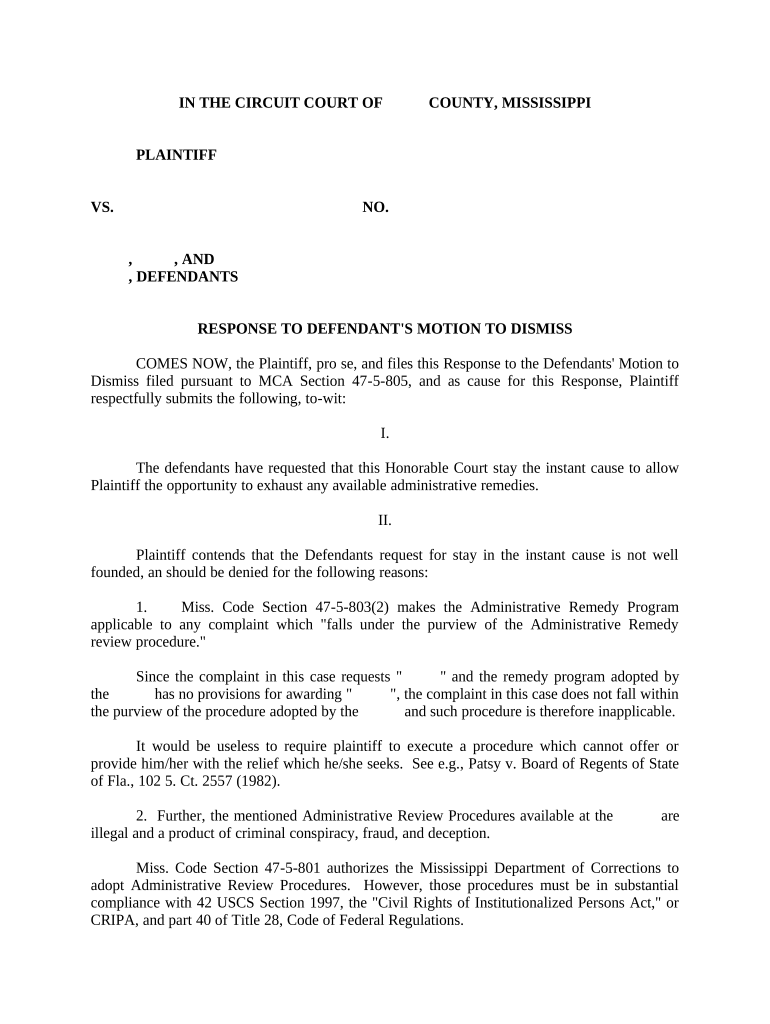
A Mississippi Response to Motion to Dismiss is a written court filing filed by a plaintiff or defendant in Mississippi state court to oppose a motion seeking dismissal of some or all claims. The response sets out factual allegations, legal arguments, and citations to authority showing why the court should deny the motion. It may attach supporting exhibits, affidavits, or statutory materials and typically includes a proposed order and a certificate of service. Proper timing, formatting, and compliance with local rules are essential to preserve claims and appellate rights.

Why a Carefully Drafted Response Matters

A timely, well-supported response preserves your claims, frames legal issues for the judge, and demonstrates why the complaint states a viable cause of action under applicable standards. It also preserves evidentiary requests and can narrow issues before discovery or hearing.

Why a Carefully Drafted Response Matters

Who Typically Prepares a Response

The document is prepared by parties who want to oppose dismissal and preserve their rights in state court.

  • Plaintiff or plaintiff counsel seeking to keep claims alive and press factual allegations.
  • Pro se litigants responding without counsel who need clear statement of facts and applicable law.
  • Defense counsel preparing cross-motions, counter-arguments, or preserving appellate issues.

Typical Signatories and Preparers

Plaintiff Attorney

A civil litigator who drafts the response to demonstrate plausibility of claims, cites governing Mississippi or federal standards, includes necessary exhibits, and signs under penalty of professional responsibility to avoid Rule 11-style sanctions.

Pro Se Litigant

An individual representing themselves who must present a concise factual narrative, clearly label legal claims, follow local filing and service rules, and sign the pleading under oath where required.

How Responses Are Used in Practice

Two practical scenarios illustrate common uses and outcomes for a Response to Motion to Dismiss.

Defense Dismissal Opposed

A plaintiff files a detailed response with facts of employment discrimination

  • Argues the complaint states plausible claims under Mississippi law
  • The court denies dismissal, allowing targeted discovery and preserving the plaintiff's theories for trial.

Pro Se Preservation

A pro se defendant contests jurisdictional grounds in a short, focused response

  • Requests leave to amend if deficiency exists
  • The court gives limited leave to amend instead of outright dismissal, maintaining the case on the docket.

Step-by-Step: Preparing Your Response

Follow these core steps to assemble, format, and file an effective Mississippi Response to Motion to Dismiss.

  • 01
    Review motion: Identify legal grounds and factual assertions to counter.
  • 02
    Draft facts: Present concise, nonconclusory factual allegations supporting each claim.
  • 03
    Legal argument: Cite controlling statutes, cases, and standards of review.
  • 04
    File and serve: Comply with court e-filing and certificate of service rules.

Filing and Service Workflow

A response follows a predictable routing: prepare the pleading, serve opposing counsel, file with the court, and preserve proof of service.

  • Prepare pleading: Use correct caption, case number, and clear headings.
  • Attach exhibits: Label exhibits and reference them in the text.
  • Serve opposing counsel: Follow the method required by local rules or agreement.
  • File with court: Submit via court e-filing or clerk's office per local rules.

Practical Filing Settings and Configurations

Common workflow settings control how you prepare and submit the response electronically or on paper.

Field Configuration
Filing Method E-file via court portal or paper filing with clerk
Document Format PDF/A preferred; submit searchable text when possible
Exhibit Handling Attach as sequentially numbered exhibits with references
Certificate of Service Include email or mail method and date served

Digital Tools and Integration Notes

Electronic filing and signing reduce handling time but must meet court and security requirements.

  • File types: PDF, DOCX convertible to court-approved PDF
  • Integrations: Connects with Microsoft 365 and Google Workspace
  • Audit trail: Maintain timestamps, IPs, and signer records

Typical Timing and When to Act

Response timing depends on the court and method of service; local rules or the motion text often set the period.

Check local rule:

Response windows commonly range from 7 to 30 days

Emergency motions:

Shorter timelines may apply; act immediately

Extensions:

Agreements or court orders can extend deadlines

Service date:

Compute response from the date of effective service

Hearing schedule:

Filing earlier helps shape or avoid oral argument

Key Case Milestones to Track

Track these sequential milestones to ensure timeliness and procedural protection during the motion stage.

01

Receive motion

Date stamp and calendar the response deadline immediately

02

Draft response

Prepare statement of facts and legal argument quickly

03

Serve response

Provide proof of service per local rules and methods

04

Hearing or order

Prepare for oral argument or await the judge's ruling

Security and Compliance Essentials for Electronic Responses

Encryption: TLS 1.2/1.3 in transit; AES-256 at rest
Audit Trail: Tamper-evident logs, IPs, timestamps
Certifications: SOC 2 Type II and ISO 27001
Privacy Laws: HIPAA-compliant workflows available with BAA
Legal Acts: ESIGN and UETA compliance for e-signatures
Accessibility: WCAG 2.0 Level AA support for outputs

Consequences of Incorrect or Untimely Responses

Failure to respond: Risk of dismissal or adverse ruling
Late filing: Court may deny relief or strike papers
Incomplete service: Service defects can void the filing
Rule 11 sanctions: Signature certifies legal and factual basis
Data exposure: Improper exhibits can breach privacy laws
Inadequate preservation: Spoliation sanctions or evidentiary limits

Common Preparation Pitfalls to Avoid

  • Relying on conclusory facts instead of factual detail undermines plausibility.
  • Missing the response deadline creates procedural risk and potential waiver of arguments.
  • Improper formatting or wrong caption can lead to rejection by the clerk.
  • Failing to include a certificate of service risks disputes over notice and timing.

Essential Elements of a Professional Response

A complete response contains identifiable structural parts so the court and opposing counsel can assess each claim and defense efficiently.

Case Caption

Accurately reproduce the court, parties, and docket number to ensure the filing is associated with the correct matter.
Introduction

State the filing's purpose, identify the moving party, and summarize the primary reasons to deny the motion.

Statement of Facts

Provide concise, numbered factual paragraphs supported by exhibits where necessary, avoiding argumentative conclusions labeled as facts.

Standard of Review

Explain legal standard applicable to a motion to dismiss so the court can evaluate whether allegations meet pleading thresholds.

Argument

Develop each legal point with statutes and binding precedent, addressing every ground raised in the motion.

Certificate of Service

Include the method, recipients, and date of service to demonstrate compliance with service rules and timelines.

Practical Tips for Accurate and Efficient Responses

Adopt consistent practices that reduce risk, speed filing, and improve clarity for judges and opposing counsel.

Use checklists
Create a local-rules checklist including caption, signature block, page limits, exhibit labels, and certificate of service to avoid clerical rejection.
Cite primary authority
Rely on controlling state or federal precedent first; use secondary sources only to supplement primary law and context.
Preserve evidence
Keep originals, numbered exhibits, and secure audit trails for electronically signed or produced materials to prevent spoliation claims.
Proofread carefully
Confirm party names, docket numbers, dates in MM/DD/YYYY format, and cross-references before filing to avoid costly corrections.

Selected eSignature Vendor Comparison for Filing and Signing

When choosing an eSignature tool for drafting and signing responses, compare baseline pricing and feature support across vendors; signNow is listed first for comparison.

signNow DocuSign Adobe Sign PandaDoc HelloSign
Starting Price $8/user/mo $15/user/mo $14/user/mo $19/user/mo $15/user/mo
Free Trial 7-day free trial Varies Varies Varies Varies
Bulk Send Yes Yes Yes Yes No
Audit Trail Yes Yes Yes Yes Yes
HIPAA Compliant Yes Yes Yes No No
Envelope Cap No cap 100 envelopes/user/year Varies Varies Varies

Frequently Asked Questions About Responses

Answers to common questions about timing, service, e-signatures, and correcting or amending a Response to Motion to Dismiss.


Need help? Contact support

be ready to get more
Join over 28 million airSlate SignNow users