Establishing secure connection…Loading editor…Preparing document…

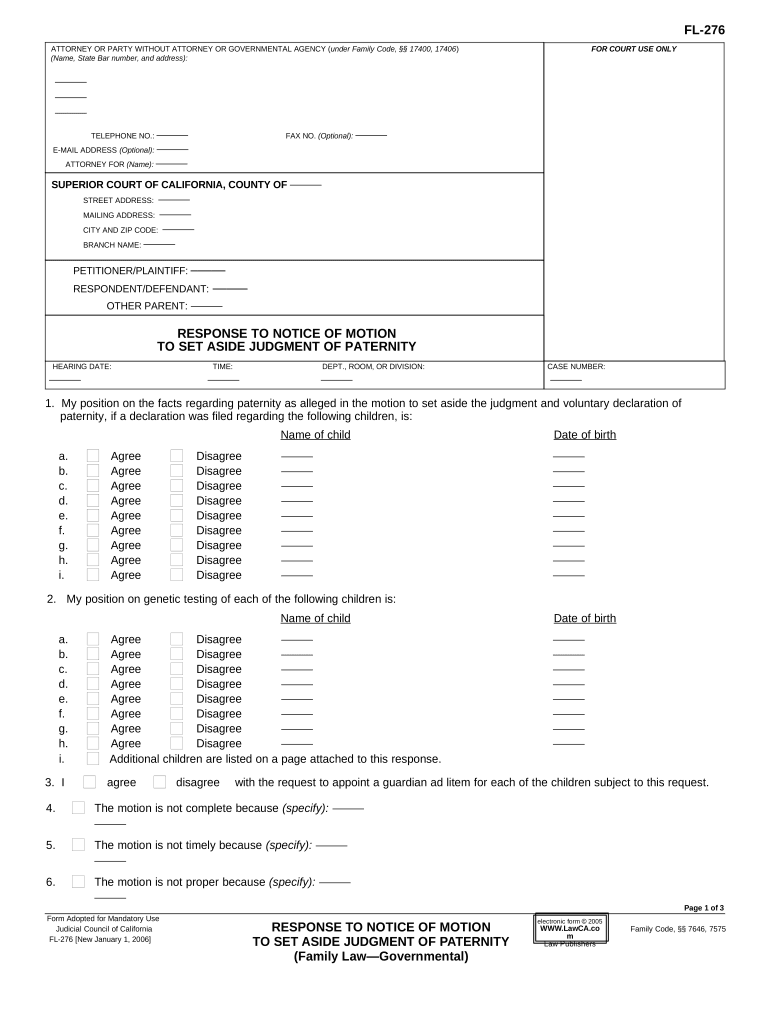
California Response to Notice of Motion to Set Aside Judgment of Paternity

This template is fully customizable. Edit the text, fill out the fields, and send it for signature. Give it a try!
California Response to Notice of Motion to Set Aside Judgment of Paternity

What the California Response to Notice of Motion to Set Aside Judgment of Paternity Is

The California Response to Notice of Motion to Set Aside Judgment of Paternity is a formal court filing a respondent uses to oppose or respond to an opposing party's motion asking the court to set aside a previously entered paternity judgment. The response identifies factual disputes, legal objections, and evidence the respondent will rely on at hearing. Because family-court procedures and e-filing rules govern format and service, parties must follow the California Rules of Court and any local superior court rules when preparing and submitting a response. Court filing rules may limit electronic signature or remote notarization options for official filings.

Why a Timely, Correct Response Matters

Filing a clear, timely response preserves your right to contest factual claims, prevents default outcomes, and ensures the court has the information needed to rule on custody, support, and related orders.

Why a Timely, Correct Response Matters

Who Typically Prepares and Files This Response

The response is prepared by the respondent or the respondent's attorney to oppose the motion; courts and child-support agencies may also review the filing when relevant.

  • Respondent or alleged parent — to preserve parental and financial rights and present defenses.
  • Family law attorneys — to frame legal arguments, cite authority, and ensure procedural compliance.
  • Local child support agencies — when enforcement or modification of support is implicated; they may appear or provide input.

Choose the appropriate filer and serve all parties per local rules; consider legal counsel when custody or support consequences are significant.

Step-by-Step: Preparing and Serving Your Response

Follow this sequence to prepare, serve, and file a compliant response to a motion to set aside a paternity judgment.

  • 01
    Gather Documents: Collect the motion, judgment, orders, and supporting evidence before drafting.
  • 02
    Draft Response: State admissions/denials, legal arguments, and relief requested concisely.
  • 03
    Service: Serve opposing counsel or party per local rules (personal, mail, or e-service where allowed).
  • 04
    File with Court: File response and proof of service via court clerk or approved e-filing portal.

Where the Response Travels: Filing and Service Flow

This overview shows common routing steps from preparation through the court hearing and disposition.

  • Prepare Document: Create response in PDF/A or court-accepted format.
  • Serve Opponent: Deliver per service rules: personal, mail, or approved electronic service.
  • File With Clerk: Submit to the county superior court clerk or e-filing service.
  • Attend Hearing: Appear on the noticed hearing date with originals and exhibits.

Customizing an Online Response Workflow

If you assemble or submit the response online, configure fields and authentication to match court and service requirements.

Document Format PDF or PDF/A preferred for court filings and attachments
Required Fields Caption, case number, signatures, and proof-of-service fields
Authentication Use email plus SMS or account authentication where permitted
Signature Type Typed or image signature accepted if court rules allow
Exhibit Upload Combine exhibits into a single PDF with clear bookmarks

Technical Considerations for eSubmission and Signing

Confirm each court's e-filing rules and whether electronic signatures are acceptable for this particular family-law filing before relying on online signing.

  • File Formats: PDF, PDF/A, DOCX compatibility
  • Authentication Options: Email link, SMS code
  • Court Compatibility: County e-filing systems vary

When in doubt, deliver both an electronically signed copy and an original paper filing if local rules or the clerk require an ink signature or notarized document.

Typical Time-Related Tasks and When to Complete Them

Timelines vary by county and by the specific notice. Confirm dates on the motion and local rules; the items below identify common near-term deadlines and actions.

Read the Notice Carefully:

Check hearing date and last day to file opposition or respond.

Evidence Gathering:

Assemble documents and declarations immediately upon receiving the motion.

Service Deadline:

Serve opposing parties per the notice timeline and local rules.

File Proof of Service:

File proof of service with the clerk promptly after service.

Prepare for Hearing:

Arrange witnesses and exhibits for the scheduled hearing date.

Key Milestones from Motion Filing to Hearing

A concise milestone view helps teams track critical steps from the motion's filing through the court's decision.

01

Motion Filed

Opposing party files and serves the motion to set aside the judgment.

02

Response Served

You must serve your written response before the court's deadline.

03

Proof Filed

File proof of service and any declarations or exhibits with the court.

04

Hearing and Ruling

Appear at hearing; the court issues a ruling or continues the matter.

Common Preparation Errors to Avoid

  • Missing the response deadline or failing to serve the other party, which can forfeit the opportunity to be heard and produce adverse rulings.
  • Using an incorrect caption or case number that causes the clerk to misfile or return the submission, delaying the proceeding.
  • Failing to attach or properly label exhibits and declarations, leaving the court without necessary supporting evidence.
  • Relying on an electronic signature or remote notarization without confirming the local court accepts those methods for family-law filings.

Consequences of an Incorrect or Late Response

Default Ruling: May allow motion relief without your input
Loss of Rights: Limits ability to contest custody/support orders
Monetary Sanctions: Court may impose fees or costs
Appeal Limits: Late opposition can narrow appellate options
Evidence Excluded: Untimely exhibits may be rejected
Service Defects: Improper service can void filing efforts

Required Information Typically Included in the Response

Court Caption: Court name and branch
Case Number: Exact case identifier
Party Names: Full legal names
Statement of Defense: Admissions or denials
Exhibit List: Referenced supporting documents
Proof of Service: How and when served

Practical Use Cases for a Well-Prepared Response

Two neutral vignettes show typical scenarios where a clear response affects outcome and court consideration.

Custody Dispute Scenario

After a motion to set aside paternity was filed, the respondent filed a detailed response with declarations and exhibits

  • Evidence-focused response
  • The court considered contemporaneous records and testimony at the hearing, which narrowed the factual disputes and informed the court's decision on custody and visitation.

Support Modification Scenario

Petitioner moved to set aside a paternity judgment on procedural grounds, and the respondent responded with service and jurisdiction defenses

  • Procedural objections raised
  • The court reviewed service history and jurisdictional evidence; a well-documented response led the court to preserve the existing support order pending full evidentiary review.

What a Professional Response Contains

A complete response is structured to make legal and factual positions clear; include these elements to improve clarity and compliance with court norms.

Caption

Complete court heading with case number and party names so the clerk files and distributes the document correctly.
Introduction

A short opening statement identifying whether you oppose, partially oppose, or agree with the requested relief.

Statement of Facts

Concise numbered facts and references to exhibits that support admissions or denials of the motion's assertions.

Legal Argument

Pointed citations and explanation of legal grounds opposing the motion, including statutory or case law where applicable.

Relief Requested

Specify what the respondent asks the court to do, including alternative relief if the primary argument is rejected.

Proof of Service

A judicially acceptable declaration showing how, when, and to whom the response was served.

Practical Tips for an Accurate, Efficient Response

Follow these practical tips to reduce mistakes, streamline filing, and ensure the court receives a complete record.

Confirm Local Rules First
Check the superior court's local rules and templates to meet formatting, filing, e-service, and hearing requirements before submitting.
Use Clear Exhibit Labels
Number exhibits sequentially and reference them precisely in the response so the judge and clerk can locate supporting evidence easily.
Serve and File Proof Promptly
File proof of service immediately after serving parties; late proof can create acceptance or scheduling problems.
Document Retention and Backup
Keep original paper and electronic copies for appeals and agency reviews; ensure secure storage with access controls.

eSignature Provider Comparison for Preparing and Signing Filings

Comparison of common eSignature vendors and basic plan-level characteristics. signNow is listed first per provider comparison conventions and pricing reflects common annual billing tiers.

signNow DocuSign Adobe Sign PandaDoc HelloSign
Starting Price $8/user/mo $15/user/mo $14/user/mo $19/user/mo $15/user/mo
Free Trial 7-day free trial Varies by plan Varies by plan Varies by plan Varies by plan
Bulk Send Yes Varies by plan Varies by plan Varies by plan Varies by plan
Audit Trail Yes Yes Yes Yes Yes
HIPAA Compliant Yes Yes Yes No No
Envelope Cap No cap 100 envelopes/user/year Varies by plan Varies by plan Varies by plan

Frequently Asked Questions About Responding to the Motion

Answers to common procedural and practical questions when preparing a California Response to Notice of Motion to Set Aside Judgment of Paternity.


Need help? Contact support

be ready to get more
Join over 28 million airSlate SignNow users