Establishing secure connection…Loading editor…Preparing document…

Revocation of Advance Health Care Directive

This template is fully customizable. Edit the text, fill out the fields, and send it for signature. Give it a try!
Revocation of Advance Health Care Directive

What the Revocation of Advance Health Care Directive Is

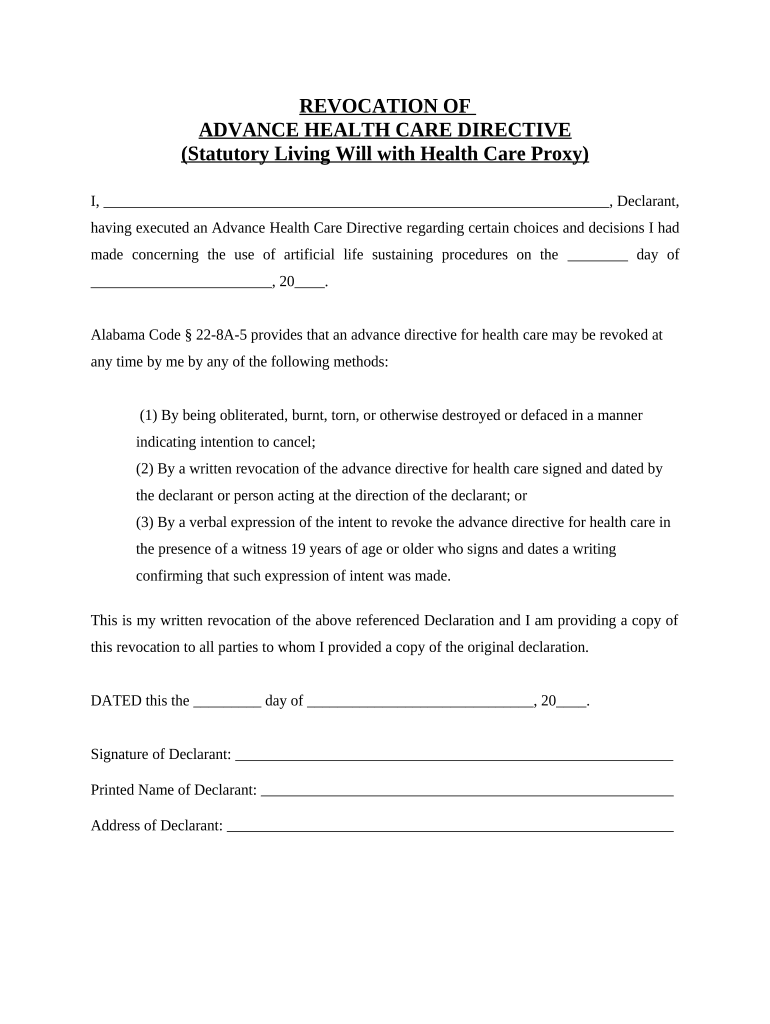
A Revocation of Advance Health Care Directive is a short legal statement by which an individual cancels a previously executed advance health care directive or durable power regarding medical decisions. The document notifies providers and previously appointed agents that the earlier directive is no longer effective, and it typically names whether a replacement directive or agent exists. In practice, revocation requires clear intent, a dated signature, and distribution to health care providers, medical facilities, and any formerly designated health care agents to ensure the revocation is followed.

Why a Clear Revocation Matters

Revoking an advance directive prevents conflicting instructions and clarifies who may make health decisions. It establishes the declarant’s current wishes and reduces the risk of unwanted treatment or disputes among family members and providers.

Why a Clear Revocation Matters

Step-by-step: Completing and Activating a Revocation

Follow a clear sequence to make the revocation effective and ensure health providers and agents receive notice.

  • 01
    Draft the Revocation: State explicitly which directive you revoke and include the original date.
  • 02
    Sign and Date: Sign in ink or use an accepted electronic signature; include MM/DD/YYYY date.
  • 03
    Notarize or Witness: Complete notarization or witness steps per state requirements when needed.
  • 04
    Distribute Copies: Give copies to your health care providers, agent, and family; keep originals safe.

Online Workflow Settings to Use for Revocation Forms

Configure your digital workflow to collect signatures, capture identity evidence, and produce an audit trail for the revocation.

Field Configuration
Authentication Email link, SMS code, or RON identity proofing
Signature Type Typed, drawn, or verified digital signature
Audit Trail Capture IP, timestamp, and signer email
Document Format PDF/A export with embedded completion certificate

Common Process for Delivering a Revocation

A straightforward delivery process helps providers apply the revocation without delay.

  • Prepare Document: Create revocation referencing the original directive.
  • Sign: Sign in-person or via an accepted e-sign method.
  • Notarize: Complete notarization if the state or provider requires it.
  • Send Copies: Deliver to providers, agent, and medical records departments.

Technical Considerations for Digital Revocation Delivery

Ensure the platform captures signer identity, timestamps, and an exportable audit trail before e-signing a revocation.

  • Formats: PDF, DOCX supported for provider records
  • Integrations: Works with EHR exports and cloud storage
  • Authentication: Email, SMS, RON, or multi-factor methods

Timing Expectations and Effective Dates

Timing matters: record the execution date and act quickly to notify providers and agents to ensure the revocation takes effect in practice.

Effective Immediately:

A validly executed revocation is effective on the date you sign.

Notify Providers Promptly:

Deliver copies to medical records and treating clinicians without delay.

Agent Notification:

Inform any previously appointed agent to prevent conflicting actions.

HIPAA Retention:

Retain copies of the revocation for at least 6 years (45 CFR §164.530(j)).

RON Recording:

If notarized remotely, retain audio-video per state RON rules.

Key Milestones from Draft to Confirmation

Track four consecutive milestones to make the revocation effective and verifiable across care settings.

01

Draft and Review

Prepare a clear written revocation referencing the original directive.

02

Execution

Sign and date the revocation in presence of required witnesses or a notary.

03

Authentication

Apply RON identity proofing or collect witness notarization per law.

04

Distribution

Deliver certified copies to providers, agent, and medical records.

Who Typically Completes a Revocation

Several parties commonly prepare or receive revocations; each has a specific role in ensuring the revocation is effective.

  • Declarant: The person who originally executed the advance directive and now wishes to cancel it.
  • Designated Agent: The previously appointed health care agent who must be informed so they no longer act on prior instructions.
  • Health Care Providers: Physicians and medical facilities that must update medical records and treatment plans.

After execution, distribute the revocation to these parties and keep an original copy with your personal records for proof.

Typical Signer Profiles

Declarant — Individual

An adult who previously executed an advance health care directive and now withdraws it. The declarant must have decision-making capacity at the time of revocation; if capacity is uncertain, providers may request an assessment.

Former Agent — Named Surrogate

The previously appointed surrogate or health care agent who receives notice. Notifying the former agent reduces risk of continued reliance on the cancelled directive by care teams or third parties.

Security and Compliance for Electronic Revocations

Encryption: TLS 1.2/1.3 in transit; AES-256 at rest
Audit Trail: Timestamp, IP, and action log captured
HIPAA: BAA available; protects PHI
ESIGN/UETA: E-signatures legally recognized
21 CFR Part 11: Support available for regulated records
Access Controls: Role-based permissions and SSO

Common Pitfalls to Avoid

  • Using vague language that does not explicitly identify the original directive, which can leave providers uncertain whether revocation applies.
  • Failing to notify the previously appointed agent and treating clinicians, allowing actions to continue under the cancelled directive.
  • Neglecting required witness or notary steps in states that demand them, which can render the revocation ineffective.
  • Relying on an unsigned or undated form; missing dates or signatures can prevent acceptance by medical records departments.

Consequences of an Improper Revocation

Invalid Revocation: Original directive may remain legally binding
Medical Confusion: Providers may continue prior treatment plans
Family Disputes: Conflicting instructions can prompt litigation
Recordkeeping Gaps: Missing proof may disadvantage your wishes
Provider Liability: Staff may face legal exposure for acting on unclear directives
Administrative Delay: Access to care decisions may be delayed

Realistic Use Scenarios

Two concise scenarios show how revocation is used in practice and the practical steps that follow.

Changed Agent After Separation

A patient divorces the previously named agent and executes a revocation of the earlier directive.

  • The revocation names the original directive date to avoid doubt.
  • The patient distributes signed copies to the hospital, new agent, and primary care provider and files a copy with their attorney to ensure records are updated.

Out-of-State Revocation via RON

A traveler executes a remote notarized revocation while out of state to cancel an older directive.

  • The RON session captures identity proofing and a recording.
  • The patient sends certified PDFs to in-state providers and the agent, and retains the RON certificate for legal verification.

eSignature Vendor Comparison for Revocation Workflows

Choose an eSignature provider that supports identity proofing, audit trails, and HIPAA protections when handling health-related revocations.

signNow DocuSign Adobe Sign PandaDoc HelloSign
Starting Price $8/user/mo $15/user/mo $14/user/mo $19/user/mo $15/user/mo
Free Trial 7-day free trial, no credit card required Varies by plan Varies by plan Trial available Trial available
Bulk Send Yes Yes Yes Yes No
Audit Trail Yes Yes Yes Yes Yes
HIPAA Compliant Yes Yes Yes No No
Envelope Cap No envelope cap 100 envelopes/user/year Varies by plan Varies by plan Varies by plan

Frequently Asked Questions and Troubleshooting

Answers to common questions about revoking an advance health care directive, e-signature acceptance, and when notarization or witness steps matter.


Need help? Contact support

be ready to get more
Join over 28 million airSlate SignNow users