Establishing secure connection…Loading editor…Preparing document…

Rhode Island Change of Name Application

This template is fully customizable. Edit the text, fill out the fields, and send it for signature. Give it a try!
Rhode Island Change of Name Application

What the Rhode Island Change of Name Application Is

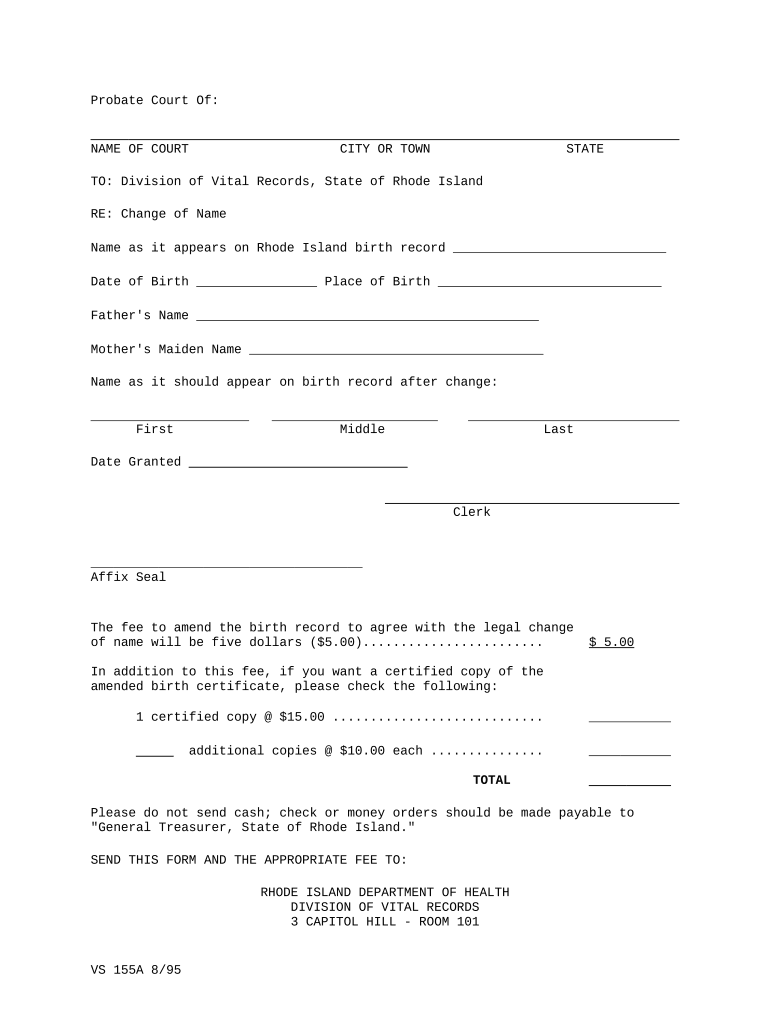
The Rhode Island Change of Name Application is a court petition used to request an official change of a person's legal name within the state. It initiates a judicial review that may include filing a petition, providing identity and residency documentation, notifying interested parties or publishing notice if required by local rules, attending a hearing, and obtaining a signed court order that authorizes updates to government and private records.

Why a Proper Application Matters

A correctly completed application establishes a clear legal record of identity change, minimizes processing delays, and supports consistent updates to vital records, tax accounts, and identification documents under applicable state and federal rules.

Why a Proper Application Matters

Who Typically Prepares and Submits This Form

Each party should confirm local court forms and filing requirements before submission to avoid delays and possible rejection.

  • Individuals changing name after marriage, divorce, or for personal reasons — files petition, provides ID and residency proof.
  • Parents or guardians filing name changes for minor children — include parental consent and birth certificate details.
  • Attorneys or legal aid providers preparing complex petitions — handle notice, background checks, and court representation.

Step-by-Step: Completing and Filing the Petition

A typical filing process follows a series of steps from initial preparation through final record updates.

  • 01
    Gather Documents: Collect ID, birth certificate, proof of residency, and any court orders.
  • 02
    Complete Petition: Fill fields accurately, sign, and date the form.
  • 03
    File with Court: Submit petition to the appropriate Rhode Island court clerk with required fee.
  • 04
    Attend Hearing: Appear at the scheduled hearing and obtain signed order if the judge grants the change.

Where the Application Goes After Submission

After filing, the petition follows a standard routing: court intake, review, scheduling, and final order issuance. Below are the primary routing steps.

  • Court Intake: Clerk accepts petition, checks fees, and assigns case number.
  • Review and Scheduling: Judge or clerk sets hearing and reviews supporting documents.
  • Notice or Publication: If required, notice is published or served; local rules determine method.
  • Final Order: Judge signs order permitting the legal name change; clerk issues certified copies.

Customizing the Process When Working Online

If you prepare, sign, and file documents digitally, configure a consistent workflow for document preparation, signer authentication, and record export.

Field Configuration
Document Format Use PDF/A for long-term archival and court compatibility
Signer Authentication Enable email or SMS verification; use stronger ID proofing if required
Audit Trail Capture timestamps, IP addresses, and signer actions for evidentiary support
Export Options Save certified PDF and separate CSV of form data for records

How to Share and Submit the Application Electronically

Confirm the court’s e-filing rules and technical requirements in advance to ensure successful electronic submission.

  • Document Formats: PDF, DOCX, or scanned images accepted by many courts
  • Authentication Options: Email, SMS code, or knowledge-based verification
  • Integrations: Works with Google Workspace, Microsoft 365, and court e-filing systems

Common Pitfalls to Avoid When Preparing the Application

  • Using inconsistent name formats across supporting documents leads to extra verification steps and possible delays.
  • Omitting required identity or residency proof often causes the clerk to reject or defer the filing.
  • Failing to follow local notice or publication rules can result in dismissal or the need to refile.
  • Relying on unsigned or improperly authenticated signatures will typically invalidate the petition for court purposes.

Consequences of an Incorrect or Incomplete Application

Filing Rejection: Case may be refused without fee refund
Delays: Processing and hearing rescheduling
Record Inconsistency: Mismatch across agencies impedes updates
Legal Sanctions: Potential court sanctions for deceptive statements
Identity Risk: Incomplete proof increases fraud risk
Additional Costs: Extra court or attorney fees to correct errors

Security, Privacy, and Compliance Considerations

Encryption: TLS 1.2/1.3 in transit; AES-256 at rest
Audit Trail: Detailed timestamps, IP addresses, signer events
HIPAA: BAA required for protected health information
ESIGN / UETA: Meets legal standards for electronic signatures
SOC 2: SOC 2 Type II reporting available
Access Controls: SSO, role-based permissions, and two-factor options

Key Elements of a Complete Rhode Island Change of Name Application

A professional application includes identification, a clear statement of requested change, supporting documentation, appropriate signatures, any required notices, and a proposed order for the court to sign.

Petition Text

A concise statement of current and requested names, reason for change, and petitioner information formatted to court requirements.
Supporting ID

Government-issued photo ID, birth certificate, or other documents proving identity and date of birth as required by the court.

Residency Proof

Utility bill, lease, or other evidence showing Rhode Island residency for the period required by local rules.

Notice Plan

Affidavit of service or publication paperwork if statute or local rule requires notice to interested parties or public notice.

Signature Block

Properly executed signature with date; include notary or witness blocks when the court or local rule requires them.

Proposed Order

Draft order for judge’s signature to simplify finalization and provide a clear form for vital-records updates.

Typical Timelines and Processing Expectations

Processing times vary by county and court docket; plan for reasonable intervals between filing, required notices, hearing, and issuance of the final order.

Filing to Hearing:

2–8 weeks depending on court calendar and notice requirements

Publication/Notice Window:

Varies by local rule; typically 2–4 weeks if required

Judge’s Decision:

Often issued at hearing or within several days afterward

Order Certification:

Certified copies available from clerk within days of entry

Updating Records:

Agency processing times vary; allow several weeks for passports or SSN records

Key Milestones From Filing to Record Update

These numbered stages show the common sequence from initial filing through final administrative updates after the court order.

01

Prepare Petition

Assemble petition, supporting ID, and fee before filing.

02

Court Filing

Submit paperwork to clerk and obtain case number.

03

Notice or Publication

Complete service or publication if local rules require it.

04

Final Order and Updates

Obtain certified order and start updating government records.

Comparing eSignature Vendor Costs and Capabilities

When selecting an eSignature provider for document execution and verification, compare subscription pricing, trial options, bulk send, audit trails, HIPAA support, and envelope limits.

signNow DocuSign Adobe Sign PandaDoc HelloSign
Starting Price $8/user/mo $15/user/mo $14/user/mo $19/user/mo $15/user/mo
Free Trial 7-day free trial Varies by vendor Varies by vendor Varies by vendor Varies by vendor
Bulk Send Yes (Business Premium) Yes Yes Yes No
Audit Trail Yes Yes Yes Yes Yes
HIPAA Compliant Yes Yes Yes No No
Envelope Cap No cap 100 envelopes/user/year Varies Varies Varies

Frequently Asked Questions About the Rhode Island Change of Name Application

Answers to common questions about preparation, filing, e-signature validity, and updating government records after a successful name-change order.


Need help? Contact support

be ready to get more
Join over 28 million airSlate SignNow users