Establishing secure connection… Loading editor… Preparing document…
Navigation

Fill and Sign the Rules Contest Form

Fill and Sign the Rules Contest Form

How it works

Open the document and fill out all its fields.
Apply your legally-binding eSignature.
Save and invite other recipients to sign it.

Rate template

4.6
57 votes
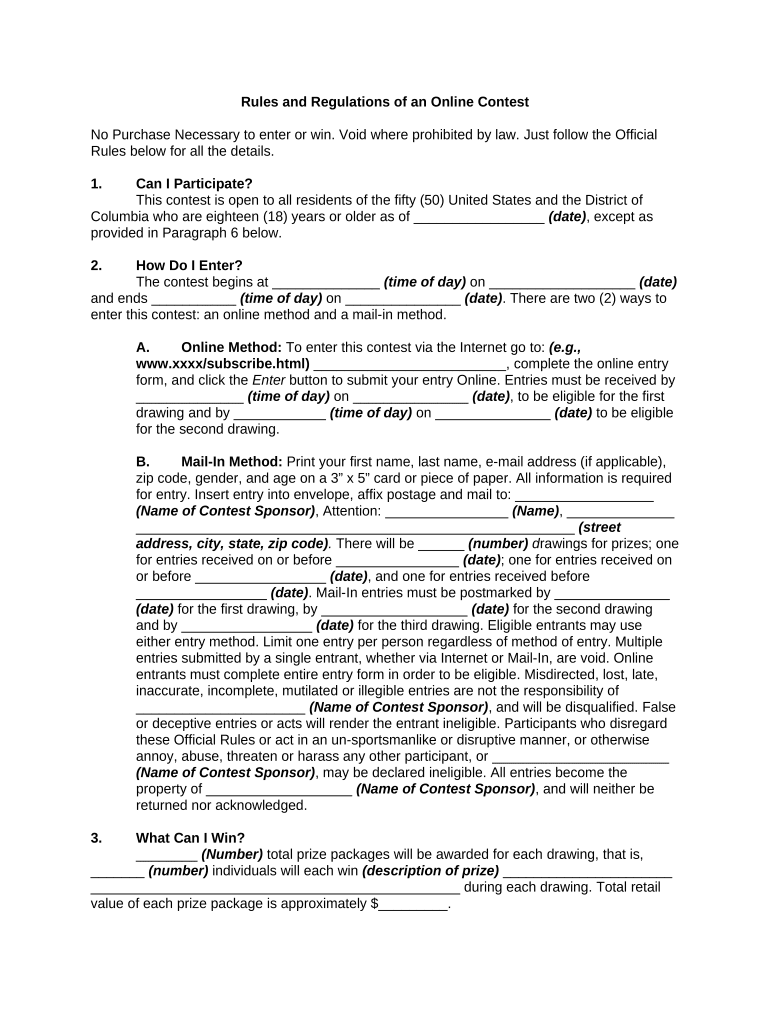
Rules and Regulations of an Online Contest No Purchase Necessary to enter or win. Void where prohibited by law. Just follow the Official Rules below for all the details. 1. Can I Participate? This contest is open to all residents of the fifty (50) United States and the District of Columbia who are eighteen (18) years or older as of _________________ (date) , except as provided in Paragraph 6 below. 2. How Do I Enter? The contest begins at ______________ (time of day) on ___________________ (date) and ends ___________ (time of day) on _______________ (date) . There are two (2) ways to enter this contest: an online method and a mail-in method. A. Online Method: To enter this contest via the Internet go to: (e.g., www.xxxx/subscribe.html) _________________________, complete the online entry form, and click the Enter button to submit your entry Online. Entries must be received by ______________ (time of day) on _______________ (date) , to be eligible for the first drawing and by ____________ (time of day) on _______________ (date) to be eligible for the second drawing. B. Mail-In Method: Print your first name, last name, e-mail address (if applicable), zip code, gender, and age on a 3” x 5” card or piece of paper. All information is required for entry. Insert entry into envelope, affix postage and mail to: __________________ (Name of Contest Sponsor) , Attention: ________________ (Name) , ______________ _________________________________________________________ (street address, city, state, zip code) . There will be ______ (number) d rawings for prizes; one for entries received on or before ________________ (date) ; one for entries received on or before _________________ (date) , and one for entries received before _________________ (date) . Mail-In entries must be postmarked by _______________ (date) for the first drawing, by ___________________ (date) for the second drawing and by _________________ (date) for the third drawing. Eligible entrants may use either entry method. Limit one entry per person regardless of method of entry. Multiple entries submitted by a single entrant, whether via Internet or Mail-In, are void. Online entrants must complete entire entry form in order to be eligible. Misdirected, lost, late, inaccurate, incomplete, mutilated or illegible entries are not the responsibility of ______________________ (Name of Contest Sponsor) , and will be disqualified. False or deceptive entries or acts will render the entrant ineligible. Participants who disregard these Official Rules or act in an un-sportsmanlike or disruptive manner, or otherwise annoy, abuse, threaten or harass any other participant, or _______________________ (Name of Contest Sponsor) , may be declared ineligible. All entries become the property of ___________________ (Name of Contest Sponsor) , and will neither be returned nor acknowledged. 3. What Can I Win? ________ (Number) total prize packages will be awarded for each drawing, that is, _______ (number) individuals will each win (description of prize) ______________________ ________________________________________________ during each drawing. Total retail value of each prize package is approximately $_________. 4. How Do I Win? Winning entries will be drawn at random on _________________ (date) or soon after __________________ (date) . Prize winners will be determined by a random drawing. The drawing will be supervised by employees of _______________________ (Name of Contest Sponsor) . All expenses and incidentals not mentioned above are the responsibility of the winners. No substitution or transfer of prize or cash redemption is permitted, but ______________________ (Name of Contest Sponsor) may, at its option, substitute cash value or another prize it believes is of equal or greater value. Taxes are the responsibility of each winner. Odds of winning each prize will be determined by the number of eligible entries received. All prizes will be awarded. 5. How Do I Find Out If I Won? Prize winners will be notified by email and/or telephone or U.S. Mail within approximately _______ (number) days after the date of the drawing. If a potential winner declines to accept the prize, forfeits the prize, has violated any contest rule, does not respond to award notification by the date listed on notification, or is found to be ineligible, the winner will be disqualified. Winners hereby release __________________ (Name of Contest Sponsor) , its employees, affiliates, agents, and representatives from all liability and responsibility of any kind which is related in any way to the prize (including without limitation any property loss, damage, personal injury or death) and consent to the use of their names and likenesses for advertising and promotional purposes without additional compensation, except where prohibited by law. Prize winners may be required to sign a Liability/Publicity Release. 6. Who Cannot Participate? Employees of __________________ (Name of Contest Sponsor) , their immediate families, and persons living in the same household as such employees, and persons associated with ___________________ (Name of Contest Sponsor) ’s advertising and promotion agencies. 7. General Conditions. Open to residents of the fifty United States and the District of Columbia only. Void where prohibited by law. This contest is subject to all applicable Federal, State and local laws and regulations. By entering the contest, each entrant agrees to be bound by these rules and the decisions of _______________________ (Name of Contest Sponsor) , whose decisions are final and binding in all respects. 8. How Do I Obtain a Winners List? To receive names of prize winners, send a self-addressed, stamped envelope after ____________________ (date) to: _____________________ (Name of Contest Sponsor) , Attention: ____________________ (Name) , ________________________________________ ______________________________________ (street address, city, state, zip code) . All winners' list requests must be received by _________________ (date) . 9. How Will Disputes Be Handled? Each entrant agrees that: A. Any and all disputes, claims, and causes of action arising out of or in connection with this contest, or any prizes awarded, shall be resolved by binding arbitration. If the parties cannot agree on an arbitrator, each party shall select one arbitrator and both arbitrators shall then select a third. The third arbitrator so selected shall arbitrate said dispute. The arbitration shall be governed by the rules of the American Arbitration Association then in force and effect; B. Any and all claims, judgments, damages and awards shall be limited to actual out-of-pocket costs incurred, including costs associated with entering this contest, but in no event attorneys' fees; and C. Under no circumstances will any entrant be permitted to obtain awards for, and each entrant hereby waives all rights to claim, punitive, incidental, and consequential damages, and any other damages (other than actual out-of-pocket expenses), and any and all rights to have damages multiplied or otherwise increased. D. All issues and questions concerning the construction, validity, interpretation and enforceability of these Official Rules, or the rights and obligations of entrant and __________________________ ( Name of Contest Sponsor) in connection with this contest, shall be governed by, and construed in accordance with the laws of the State __________________ (name of state) , without giving effect to any choice of law or conflict of law rules or provisions that would cause the application of the laws of any jurisdiction other than the State of ____________________ (name of state) . 10. Who Is The Sponsor Of This Contest? This promotion is sponsored by _______________________ ( Name of Contest Sponsor) , ___________________________________________________________________ (street address, city, state, zip code) . Sponsor reserves the right to cancel this contest at any time and substitute another in its place.

Valuable tips for finalizing your ‘Rules Contest’ online

Are you fed up with the burden of handling paperwork? Look no further than airSlate SignNow, the premier electronic signature tool for individuals and enterprises. Banish the monotonous routine of printing and scanning documents. With airSlate SignNow, you can swiftly complete and sign paperwork online. Take advantage of the extensive features integrated into this intuitive and affordable platform and transform your document management strategy. Whether you need to approve forms or collect electronic signatures, airSlate SignNow manages everything effortlessly, with just a few clicks.

Follow this detailed guide:

  1. Sign in to your account or sign up for a complimentary trial of our service.
  2. Click +Create to upload a document from your device, cloud storage, or our template library.
  3. Open your ‘Rules Contest’ within the editor.
  4. Click Me (Fill Out Now) to prepare the document on your end.
  5. Insert and designate fillable fields for others (if necessary).
  6. Continue with the Send Invite settings to request eSignatures from others.
  7. Save, print your version, or convert it into a reusable template.

Don’t fret if you need to work together with your colleagues on your Rules Contest or send it for notarization—our solution equips you with everything required to achieve such tasks. Enroll with airSlate SignNow today and enhance your document management to a higher level!

Here is a list of the most common customer questions. If you can’t find an answer to your question, please don’t hesitate to reach out to us.

Need help? Contact Support

The best way to complete and sign your rules contest form

Save time on document management with airSlate SignNow and get your rules contest form eSigned quickly from anywhere with our fully compliant eSignature tool.

How to Sign a PDF Online How to Sign a PDF Online

How to fill out and sign documents online

Previously, working with paperwork took pretty much time and effort. But with airSlate SignNow, document management is easy and fast. Our robust and easy-to-use eSignature solution lets you effortlessly complete and electronically sign your rules contest form online from any internet-connected device.

Follow the step-by-step guide to eSign your rules contest form template online:

  • 1.Sign up for a free trial with airSlate SignNow or log in to your account with password credentials or SSO authentication.
  • 2.Click Upload or Create and add a file for eSigning from your device, the cloud, or our form library.
  • 3.Click on the document name to open it in the editor and utilize the left-side toolbar to fill out all the empty fields accordingly.
  • 4.Drop the My Signature field where you need to approve your sample. Type your name, draw, or upload a photo of your regular signature.
  • 5.Click Save and Close to accomplish modifying your completed form.

As soon as your rules contest form template is ready, download it to your device, save it to the cloud, or invite other people to electronically sign it. With airSlate SignNow, the eSigning process only requires a couple of clicks. Use our powerful eSignature tool wherever you are to manage your paperwork efficiently!

How to Sign a PDF Using Google Chrome How to Sign a PDF Using Google Chrome

How to complete and sign paperwork in Google Chrome

Completing and signing paperwork is easy with the airSlate SignNow extension for Google Chrome. Installing it to your browser is a quick and beneficial way to manage your paperwork online. Sign your rules contest form sample with a legally-binding eSignature in a few clicks without switching between programs and tabs.

Follow the step-by-step guidelines to eSign your rules contest form in Google Chrome:

  • 1.Go to the Chrome Web Store, search for the airSlate SignNow extension for Chrome, and add it to your browser.
  • 2.Right-click on the link to a document you need to sign and select Open in airSlate SignNow.
  • 3.Log in to your account with your credentials or Google/Facebook sign-in buttons. If you don’t have one, you can start a free trial.
  • 4.Use the Edit & Sign menu on the left to complete your template, then drag and drop the My Signature field.
  • 5.Insert a photo of your handwritten signature, draw it, or simply enter your full name to eSign.
  • 6.Make sure all the details are correct and click Save and Close to finish modifying your paperwork.

Now, you can save your rules contest form sample to your device or cloud storage, send the copy to other people, or invite them to electronically sign your document with an email request or a protected Signing Link. The airSlate SignNow extension for Google Chrome enhances your document workflows with minimum effort and time. Start using airSlate SignNow today!

How to Sign a PDF in Gmail How to Sign a PDF in Gmail How to Sign a PDF in Gmail

How to fill out and sign documents in Gmail

When you receive an email with the rules contest form for signing, there’s no need to print and scan a file or save and re-upload it to a different tool. There’s a much better solution if you use Gmail. Try the airSlate SignNow add-on to promptly eSign any documents right from your inbox.

Follow the step-by-step guidelines to eSign your rules contest form in Gmail:

  • 1.Visit the Google Workplace Marketplace and look for a airSlate SignNow add-on for Gmail.
  • 2.Install the program with a related button and grant the tool access to your Google account.
  • 3.Open an email containing an attachment that needs signing and utilize the S sign on the right panel to launch the add-on.
  • 4.Log in to your airSlate SignNow account. Select Send to Sign to forward the document to other people for approval or click Upload to open it in the editor.
  • 5.Put the My Signature field where you need to eSign: type, draw, or upload your signature.

This eSigning process saves efforts and only takes a couple of clicks. Take advantage of the airSlate SignNow add-on for Gmail to update your rules contest form with fillable fields, sign forms legally, and invite other people to eSign them al without leaving your inbox. Enhance your signature workflows now!

How to Sign a PDF on a Mobile Device How to Sign a PDF on a Mobile Device How to Sign a PDF on a Mobile Device

How to complete and sign forms in a mobile browser

Need to quickly submit and sign your rules contest form on a smartphone while working on the go? airSlate SignNow can help without needing to install extra software applications. Open our airSlate SignNow tool from any browser on your mobile device and add legally-binding eSignatures on the go, 24/7.

Follow the step-by-step guide to eSign your rules contest form in a browser:

  • 1.Open any browser on your device and follow the link www.signnow.com
  • 2.Register for an account with a free trial or log in with your password credentials or SSO authentication.
  • 3.Click Upload or Create and add a file that needs to be completed from a cloud, your device, or our form catalogue with ready-made templates.
  • 4.Open the form and complete the blank fields with tools from Edit & Sign menu on the left.
  • 5.Put the My Signature field to the form, then enter your name, draw, or add your signature.

In a few simple clicks, your rules contest form is completed from wherever you are. When you're done with editing, you can save the file on your device, build a reusable template for it, email it to other people, or ask them to eSign it. Make your documents on the go fast and productive with airSlate SignNow!

How to Sign a PDF on iPhone How to Sign a PDF on iPhone

How to fill out and sign paperwork on iOS

In today’s business community, tasks must be done rapidly even when you’re away from your computer. With the airSlate SignNow app, you can organize your paperwork and approve your rules contest form with a legally-binding eSignature right on your iPhone or iPad. Set it up on your device to conclude agreements and manage forms from just about anywhere 24/7.

Follow the step-by-step guidelines to eSign your rules contest form on iOS devices:

  • 1.Go to the App Store, search for the airSlate SignNow app by airSlate, and set it up on your device.
  • 2.Launch the application, tap Create to import a template, and choose Myself.
  • 3.Opt for Signature at the bottom toolbar and simply draw your signature with a finger or stylus to eSign the sample.
  • 4.Tap Done -> Save after signing the sample.
  • 5.Tap Save or use the Make Template option to re-use this paperwork in the future.

This method is so straightforward your rules contest form is completed and signed within a few taps. The airSlate SignNow application works in the cloud so all the forms on your mobile device are kept in your account and are available any time you need them. Use airSlate SignNow for iOS to boost your document management and eSignature workflows!

How to Sign a PDF on Android How to Sign a PDF on Android

How to complete and sign paperwork on Android

With airSlate SignNow, it’s simple to sign your rules contest form on the go. Install its mobile app for Android OS on your device and start improving eSignature workflows right on your smartphone or tablet.

Follow the step-by-step guidelines to eSign your rules contest form on Android:

  • 1.Go to Google Play, find the airSlate SignNow application from airSlate, and install it on your device.
  • 2.Sign in to your account or create it with a free trial, then upload a file with a ➕ button on the bottom of you screen.
  • 3.Tap on the imported document and choose Open in Editor from the dropdown menu.
  • 4.Tap on Tools tab -> Signature, then draw or type your name to eSign the form. Complete empty fields with other tools on the bottom if needed.
  • 5.Utilize the ✔ key, then tap on the Save option to finish editing.

With an easy-to-use interface and total compliance with main eSignature laws and regulations, the airSlate SignNow app is the best tool for signing your rules contest form. It even works offline and updates all document modifications once your internet connection is restored and the tool is synced. Complete and eSign forms, send them for approval, and create re-usable templates whenever you need and from anyplace with airSlate SignNow.

Sign up and try Rules contest form
  • Close deals faster
  • Improve productivity
  • Delight customers
  • Increase revenue
  • Save time & money
  • Reduce payment cycles