Establishing secure connection…Loading editor…Preparing document…

Letter Regarding Unsatisfactory Living Conditions

This template is fully customizable. Edit the text, fill out the fields, and send it for signature. Give it a try!
Letter Regarding Unsatisfactory Living Conditions

What the Letter Regarding Unsatisfactory Living Conditions Is

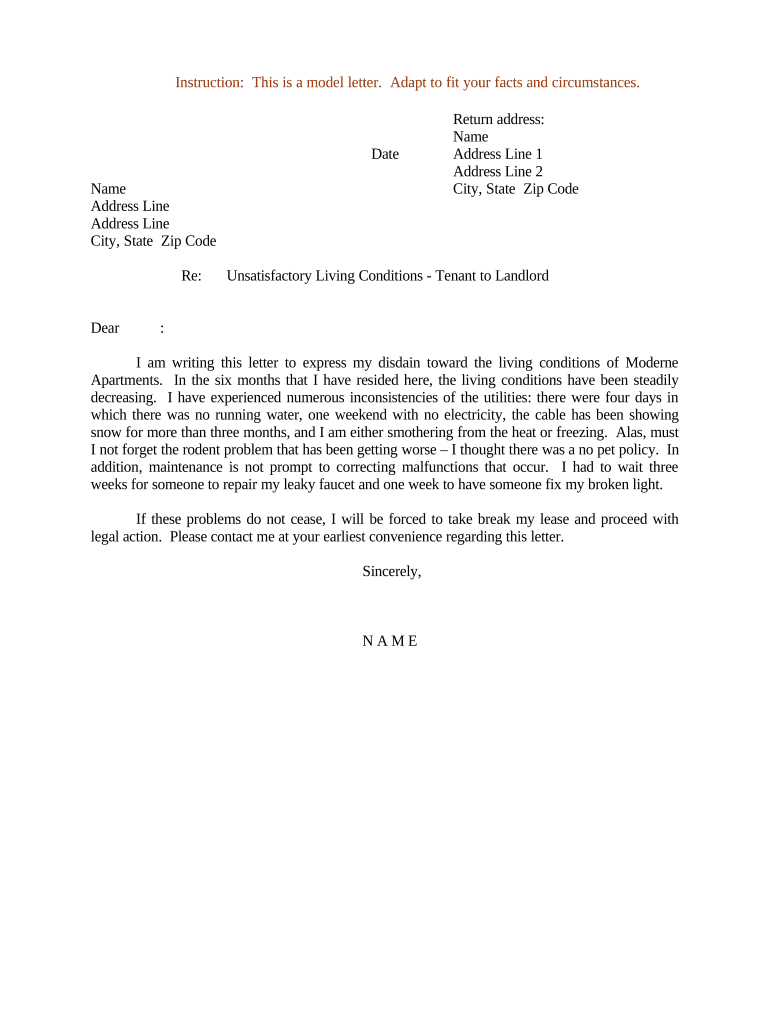
A Letter Regarding Unsatisfactory Living Conditions documents a tenant's written complaint to a landlord or property manager about habitability problems such as mold, persistent pests, water leaks, unsafe wiring, heating or hot water failures, or other conditions that materially affect health or safety. The letter typically states the specific issues, dates when problems occurred, actions already taken, a requested remedy or repair timeline, and a clear statement that the tenant expects corrective action. Properly drafted letters create a record for repair requests, housing agency complaints, rent withholding, or future legal claims.

Why a Clear Written Notice Matters

A formal written letter establishes intent, creates a dated record, and triggers legal or contractual timelines for repairs. It protects both tenant and landlord by clarifying issues, requested remedies, and the expected response window under local housing or lease rules.

Why a Clear Written Notice Matters

Who Typically Prepares and Receives This Letter

The letter serves as evidence if the matter escalates to a housing agency, small-claims court, or rent adjustment process.

  • Tenant: Individual renter documenting apartment or house defects and seeking timely repairs through written notice.
  • Property Manager: Company representative issuing or confirming receipt and outlining scheduled repairs or inspection dates.
  • Legal Advocate: Attorney or nonprofit preparing a formal notice to preserve rights before escalation or filing with housing authorities.

Step-by-Step: Preparing the Letter

Follow these sequential steps to create a clear, enforceable letter that documents living-condition complaints and requests prompt action.

  • 01
    Identify Issues: List each problem with specific dates and locations in the unit.
  • 02
    Describe Attempts: Note prior notices, calls, or technician visits with dates.
  • 03
    Request Remedy: State the repairs you want and a reasonable deadline.
  • 04
    Keep Evidence: Attach photos, videos, and any inspection reports.

How Sending and Response Usually Works

A standard workflow moves from notice delivery through landlord response and, if needed, escalation to enforcement or repair.

  • Send Notice: Deliver letter by certified mail, email, or platform with audit trail.
  • Landlord Response: Landlord inspects and proposes a repair plan or schedule.
  • Repair or Revisit: Repairs completed or follow-up inspection scheduled.
  • Escalation: If unresolved, file with local housing agency or consult counsel.

Digital Setup: Key Fields and Configuration

Configure your digital letter workflow to capture sender identity, delivery proof, and attachments before sending.

Field Configuration
Sender Info Full name | contact phone and email
Recipient Landlord or property manager name | official address
Delivery Method Certified mail | email with read receipt
Evidence Attach photos, videos, inspection reports

Delivery and Platform Considerations

Combine methods where appropriate (for example, email plus certified mail) to strengthen the record and expedite responses.

  • Email: Fast; use read receipts and PDF attachments
  • Certified Mail: Official postal proof of delivery
  • eSignature Platforms: Provide audit trail and secure storage

Typical Timelines and What to Expect

Timelines vary by lease terms and local habitability laws; use reasonable deadlines and document all dates to preserve rights.

Initial Notice to Landlord:

Send immediately after problem identification; document date and time.

Reasonable Repair Deadline:

Allow a typical 14–30 day window for non-emergency repairs.

Emergency Repairs:

Require immediate action; follow up in writing within 24–48 hours.

Follow-up Notice:

If no action, send a second notice 7–14 days after first.

Agency Complaint Deadline:

File with local housing authority after landlord fails to act within stated period.

Milestone Sequence: From Notice to Resolution

Use a milestone view to track events, response windows, and escalation triggers for the complaint process.

01

Draft and Document

Prepare the letter, collect photos, and list prior communications.

02

Deliver Notice

Send by chosen method and record proof of delivery.

03

Await Response

Allow landlord the stated period to inspect or schedule repairs.

04

Escalate If Needed

File with housing agency or seek legal remedies after deadline.

Common Mistakes to Avoid

  • Vague descriptions: Omitting specifics about location, dates, or severity reduces enforceability and delays action.
  • Missing proof: Failing to attach photos, videos, or prior messages weakens the record for agencies or courts.
  • Improper delivery: Sending only a text or phone call without a dated written record may forfeit statutory timelines.
  • Incorrect parties: Addressing the wrong landlord or management company risks non-receipt and procedural delays.

Essential Sections to Include in the Letter

A professional notice has consistent structure: identification, issue details, remedy requested, evidence, delivery proof, and signature.

Header

Date and recipient details at the top provide a clear record of when and to whom the notice was sent.
Unit Details

Specify the full unit address and any lease identifiers so the landlord can verify tenancy and location.

Issue Description

List each condition with exact location, observed dates, and health or safety impact to avoid ambiguity.

Actions Requested

Provide specific repair actions and a reasonable deadline to allow the landlord to schedule and respond.

Evidence

Reference and attach photos, videos, or inspection reports and label each attachment for easy review.

Signature Block

Sign, print your name, and include contact details; include co-tenant signatures if applicable.

Security and Compliance for Digital Letters

Encryption: TLS 1.2/1.3 in transit; AES-256 at rest
Audit Trail: Timestamped logs capturing IP and actions
Authentication: Email, SMS code, or stronger signer verification
HIPAA Options: BAA required for protected health information
Legal Compliance: ESIGN and UETA recognized e-signature frameworks
Access Controls: Role-based permissions and secure user accounts

Risks From an Incorrect or Incomplete Letter

Lost Evidence: Missed timelines or missing proof weakens legal claims
Eviction Risk: Poorly worded notices could complicate tenant defenses
No Agency Action: Incomplete complaints may be rejected by housing authorities
Financial Exposure: Improperly documented claims can affect rent withholding rights
Privacy Breach: Including sensitive health details without safeguards risks HIPAA issues
Retaliation: Tenants should document and report any unlawful landlord retaliation

eSignature Pricing Comparison for Sending Notice Letters

Compare common vendor pricing and feature availability when choosing a platform to send and retain a letter with audit-quality evidence.

signNow DocuSign Adobe Sign PandaDoc HelloSign
Starting Price $8/user/mo $15/user/mo $14/user/mo $19/user/mo $15/user/mo
Free Trial 7-day free trial Varies Varies Varies Varies
Bulk Send Yes Yes Yes Yes No
Audit Trail Yes Yes Yes Yes Yes
HIPAA Compliant Yes Yes Yes No No

Frequently Asked Questions and Troubleshooting

Answers to common practical questions about validity, delivery, evidence, e-signing, and next steps if the landlord does not respond.


Need help? Contact support

be ready to get more
Join over 28 million airSlate SignNow users