Establishing secure connection…Loading editor…Preparing document…

Letter Requesting to Locate Former Employee

This template is fully customizable. Edit the text, fill out the fields, and send it for signature. Give it a try!
Letter Requesting to Locate Former Employee

What the Letter Requesting to Locate Former Employee Is

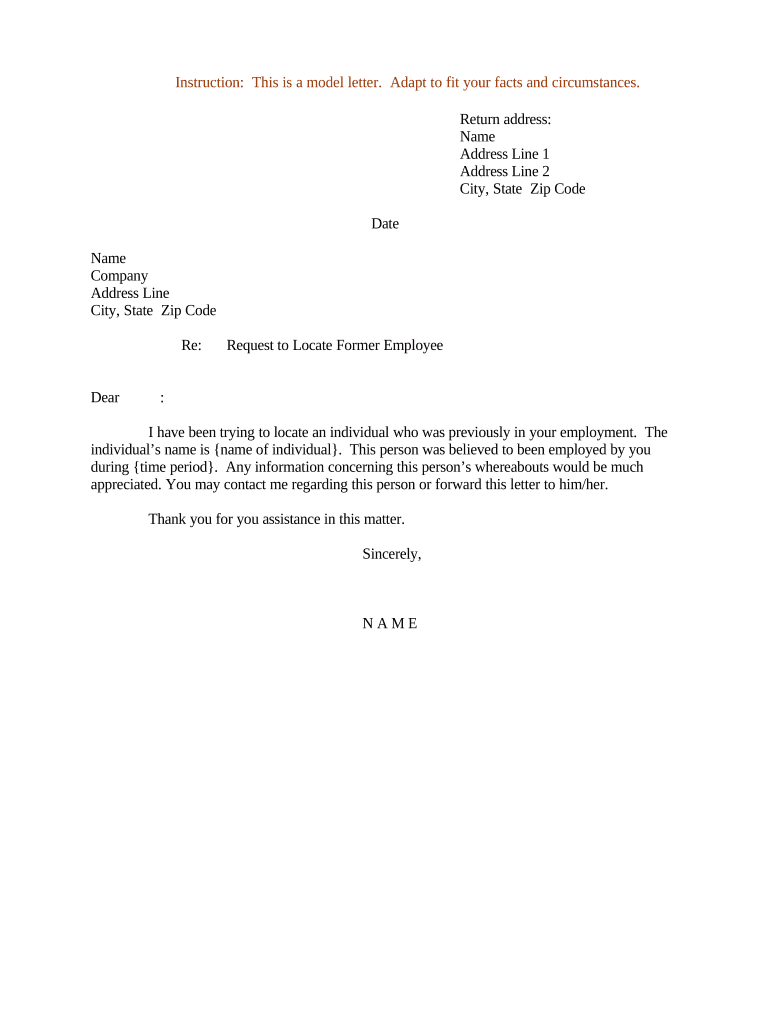
The Letter Requesting to Locate Former Employee is a formal written request employers, human resources teams, investigators, or authorized third parties use to ask prior employers, emergency contacts, or listed references for current contact details for a former worker. The document identifies the requester, the precise purpose for locating the person, and the specific data sought while recording authorization or the legal basis for outreach. It creates an auditable record used for payroll, benefits delivery, collections, service of process, or regulatory follow-up.

Why a Clear Locate Letter Matters

A well‑drafted Letter Requesting to Locate Former Employee documents intent, reduces rework, and supports lawful outreach. It preserves proof of reasonable efforts, minimizes privacy risk, and helps HR, payroll, and legal teams resolve outstanding obligations efficiently.

Why a Clear Locate Letter Matters

Who Typically Prepares and Receives These Letters

Common users include HR professionals, payroll administrators, investigators, and outside counsel handling post-employment matters and benefits recovery.

  • Human resources teams requesting forwarding addresses for final pay or benefit notices.
  • Payroll departments seeking correct mailing or direct-deposit contact details to avoid withholding errors.
  • Legal counsel or collection agencies needing updated contact details for service, litigation, or wage recovery.

Core Elements of a Professional Locate Letter

A professional Letter Requesting to Locate Former Employee is concise, reasoned, dated, identifies the requester, describes the data sought, and specifies permitted uses and retention to create a defensible record.

Clear Purpose

State the precise reason for locating the individual (final pay, benefits, legal service, investigation). Narrow purpose limits downstream use and supports lawful processing under privacy rules.
Requester ID

Include requester name, title, employer, contact phone and email, and mailing address. Identifying the requester supports verification and reduces risk of unauthorized inquiries for records.

Specific Data

List exact data requested: address, phone, email, forwarding address, or employer confirmation. Avoid open-ended requests that invite unnecessary personal data collection and state why each piece is needed.

Authorization

Document consent or legal basis. If the former employee signed a release, attach it; otherwise cite statutory authority or court order permitting contact to avoid privacy violations.

Delivery Method

Choose traceable delivery: certified mail, courier, or secure eDelivery with audit trail. Record tracking numbers and delivery receipts to prove reasonable efforts to locate for compliance.

Retention

Keep copies of the letter, responses, and proof of delivery according to retention policies. Retain documentation in line with IRS, HIPAA, or state-specific retention rules as applicable.

Step-by-Step: Preparing and Sending the Letter

Follow these steps to prepare and send a compliant, well-documented Letter Requesting to Locate Former Employee.

  • 01
    Prepare: Identify requester, reason, and lawful basis for contact.
  • 02
    Collect Data: List employee name, former employer, dates, and last known contacts.
  • 03
    Draft Letter: State purpose, data requested, consent status, and permissible uses.
  • 04
    Send & Record: Deliver via certified mail or secure eDelivery; retain proof.

Configuring an Electronic Workflow for Locate Letters

Configure an electronic workflow to automate delivery, authentication, and archival when sending the letter to locate a former employee.

Field Configuration
Template Library Use template library to standardize content and reduce errors.
Pre-fill Auto-populate fields from HR systems
Authentication Require email + SMS code or SSO
Archival Save signed PDF and audit trail

Typical Digital Sending and Tracking Workflow

A simple workflow helps standardize requests, maintain compliance, and capture proof of outreach for locating former employees.

  • Upload: Attach template letter and relevant records.
  • Configure: Add recipient, fields, and authentication.
  • Send: Use traceable delivery or secure e-sign.
  • Archive: Store signed copy and delivery proof.

Platform Capabilities to Support Locate Letters

Use platforms that support secure delivery, audit trails, and configurable authentication to protect personal data during locate requests.

  • Formats: PDF, DOCX, HTML supported.
  • Integrations: HRIS, ATS, payroll, and case management.
  • Authentication: Email, SMS, KBA, SSO options.

Timing and Follow-up Expectations

Key timing considerations for sending and following up on a locate letter to meet legal, payroll, and investigative needs.

Initial Request:

Send promptly after separation to preserve forwarding options.

Follow-up:

Allow 7–14 days before second request or escalation.

Service Deadlines:

Comply with court or statutory service timing where applicable.

Tax Timing:

Provide updated TIN promptly to avoid backup withholding.

Recordkeeping:

Retain proof for at least three years or longer.

Simple Pricing and Feature Comparison for eSignature Providers

Comparison of common eSignature plan features and starting prices to support selecting a platform for secure, auditable delivery of locate letters.

signNow DocuSign Adobe Sign PandaDoc HelloSign
Starting Price $8/user/mo $15/user/mo $14/user/mo $19/user/mo $15/user/mo
Free Trial 7-day free trial Varies by plan Varies by plan Varies by plan Varies by plan
Bulk Send Yes Yes Yes Yes No
Audit Trail Yes Yes Yes Yes Yes
HIPAA Compliant Yes Yes Yes No No

Common Preparation Pitfalls to Avoid

  • Failing to verify requester identity leads to unauthorized disclosures and privacy violations that can trigger regulatory complaints and civil exposure.
  • Requesting excessive personal data increases risk under state privacy laws and may violate the ESIGN consumer disclosure requirements for sensitive consumer-facing transactions.
  • Using unsecured email or unverified mailboxes can result in interception, incorrect delivery, and lost proof of reasonable efforts to locate.
  • Neglecting to record delivery evidence (tracking, return receipt, or audit log) often weakens follow-up legal actions and compliance audits.

Security and Compliance Controls to Use When Sending Locate Letters

Encryption: TLS 1.2/1.3 in transit.
Data at Rest: AES-256 encrypted storage in secure servers.
Authentication: Email, SMS, or multi-factor.
Audit Trail: Timestamp, IP, and action log.
BAA: Available for HIPAA-covered uses.
Compliance: SOC 2, ISO 27001, PCI DSS.

Potential Legal and Operational Risks

Privacy Complaint: Potential state and federal exposure.
Backup Withholding: Missing TIN triggers 24% withholding.
Delay in Pay: Late payment disputes possible.
Regulatory Penalties: I-9 or tax penalties apply.
Reputational Risk: Unlawful contact harms employer trust.
Documentation Gaps: Insufficient records weaken legal defense.

Frequently Asked Questions About Locate Letters

Answers to common questions about electronic delivery, notarization, data protection, retention, and consequences of incorrect information for locate letters.


Need help? Contact support

be ready to get more
Join over 28 million airSlate SignNow users