Establishing secure connection…Loading editor…Preparing document…

Employment Agreement Form

This template is fully customizable. Edit the text, fill out the fields, and send it for signature. Give it a try!
Employment Agreement Form

What the Employment Agreement Form Is and When It Applies

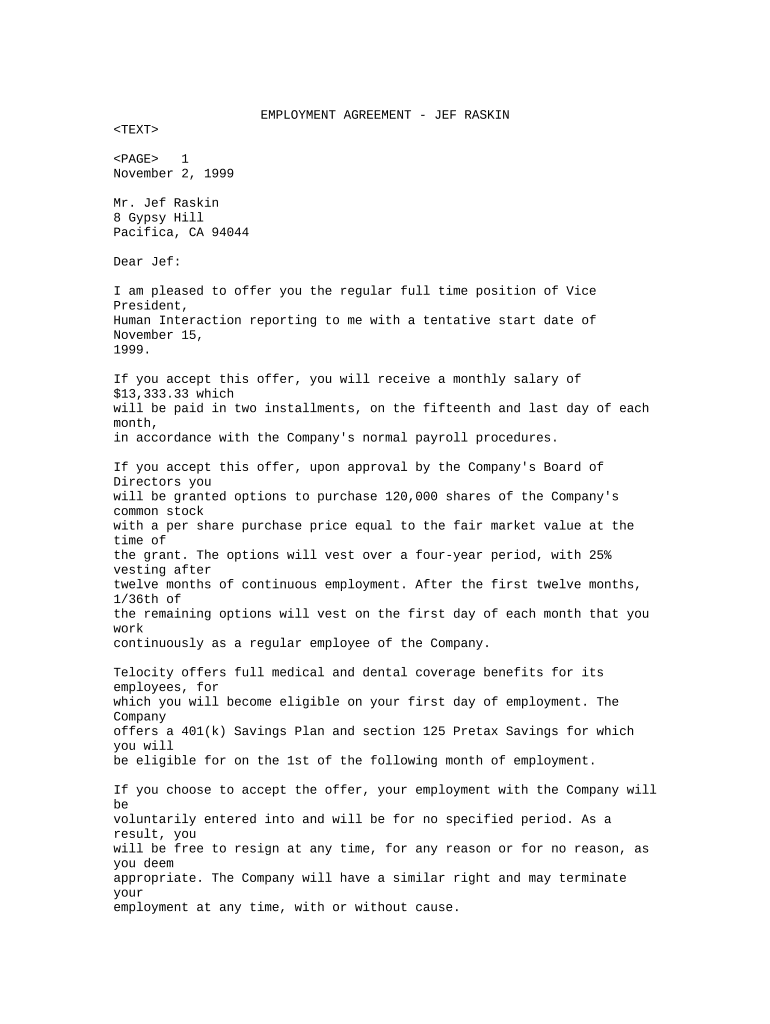
An Employment Agreement Form is a legally binding contract that sets the terms of the relationship between an employer and an individual worker. It typically covers position title, duties, compensation, benefits, confidentiality, noncompete or non-solicit clauses, term or at-will status, and termination conditions. Employers use a written agreement to reduce misunderstandings, document expectations, and evidence consent to key terms. Properly executed, an employment agreement helps both parties by clarifying obligations, limiting disputes, and supporting compliance with wage, tax, and recordkeeping rules under federal and state law.

Why a Written Employment Agreement Matters

A written Employment Agreement Form documents consent, defines rights and obligations, and creates clear evidence for enforcement or dispute resolution. It reduces ambiguity about pay, duties, confidentiality, and termination, and supports compliance with federal recordkeeping and tax rules.

Why a Written Employment Agreement Matters

Common users and stakeholders

Employers, HR and legal teams, hiring managers, independent contractors, and candidates all interact with Employment Agreement Forms at different stages of hiring and onboarding.

  • Small-business owners use standard templates to document at-will employment and basic compensation terms while minimizing legal expense.
  • Human resources teams use bespoke agreements for salaried roles, exempt positions, or roles with variable pay and benefits.
  • In-house counsel and external attorneys review executive and senior hires to include restrictive covenants, equity, and severance arrangements.

Choosing the correct template and ensuring authorized signers execute the form are critical to enforceability and downstream payroll, tax, and benefits administration.

Signatories and authorized roles

HR Manager

HR managers handle preparation, initial review, and version control for standard employment agreements. They coordinate benefit enrollment, payroll setup, and records retention to meet IRS, state labor, and internal policies.

Authorized Signatory

An authorized signatory (company officer or delegated manager) must have authority to bind the employer. Lack of authority can render an agreement voidable and create enforceability issues during disputes or audits.

Core sections to include in a professional Employment Agreement Form

A complete employment agreement groups clauses so responsibilities, compensation, and protections are clearly assigned and easy to enforce.

Position Details

Set the job title, reporting line, essential duties, and any conditions of employment such as travel, remote work, or FLSA exemption status.
Compensation

Specify salary or hourly rate, pay frequency, overtime eligibility, bonuses, equity grants, and payroll withholding instructions.

Benefits & Leave

Describe health benefits, retirement plans, PTO, parental leave, and eligibility timings for enrollment and employer contributions.

Confidentiality

Include nondisclosure obligations and handling of proprietary information during and after employment to protect business interests.

Termination

Define at-will status or fixed term, notice requirements, severance terms, and grounds for immediate termination where applicable.

Post-Term Restrictions

Add reasonable noncompete, non-solicit, or IP assignment clauses tailored to jurisdictional enforceability and business needs.

Essential form data elements

Employee name: Full legal name
Employer name: Legal business name
Effective date: MM/DD/YYYY
Compensation amount: Salary or hourly rate
Work location: City and state
Signatures: Typed or eSignature with date

Step-by-step: completing and executing the Employment Agreement

Use a clear sequence to prepare, review, sign, and store the agreement so obligations, onboarding, and compliance tasks proceed without delay.

  • 01
    Prepare draft: Populate fields and attach exhibits such as job description or compensation schedule.
  • 02
    Internal review: Have HR and counsel review for compliance, tax withholding, and restrictive covenant enforceability.
  • 03
    Send to signer: Deliver via secure email or eSignature platform with clear signing instructions.
  • 04
    Execute and store: Capture signatures, archive the signed PDF, and provision payroll and benefits.

How to set up an online signing workflow

Configure role-based fields, signer order, and authentication to match hiring and approval procedures before sending the agreement.

Field Configuration
Signer order Employee first, HR second, authorized officer last
Authentication Email link or SMS code for identity verification
Conditional fields Show severance or equity terms only for eligible roles
Audit trail Enable IP, timestamp, and action log capture

Where the Employment Agreement goes after signing

Routing and storage steps determine payroll setup, benefits enrollment, and legal recordkeeping obligations.

  • HR records: Signed copy stored in employee personnel file
  • Payroll: Payroll team receives compensation and withholding details
  • Legal: Counsel retains executed restrictive covenant copies
  • Benefits: Benefits administrator uses effective date for eligibility

Digital signing and technical requirements

Use a platform that supports standard file formats, audit trails, and the authentication level your workflow requires.

  • File formats: PDF, DOCX supported
  • Integrations: Sync with HRIS and payroll systems
  • Compliance: ESIGN and UETA compatibility

Confirm the vendor supports data encryption in transit and at rest, audit trail export, and any industry addenda such as a BAA for HIPAA-covered employers.

Key legal risks if the agreement is incorrect or incomplete

Misclassification: Wage and hour exposure
Incorrect pay terms: Back pay liability
Unenforceable covenants: Lost IP or competitive protections
Missing signatures: Contract may be voidable
I-9 noncompliance: Civil fines apply
Tax reporting errors: Penalties and withholding issues

Common mistakes to avoid when preparing an employment agreement

  • Using vague compensation language without formulas for bonuses or commissions leads to disputes and possible wage claims.
  • Failing to verify signer authority for the employer risks unenforceable contracts and downstream compliance problems.
  • Applying a broad noncompete in a jurisdiction that limits such clauses may render the restriction void or trigger litigation.
  • Omitting the effective date or conflicting dates can create ambiguity about benefits eligibility and pay commencement.

Real-world examples of Employment Agreement use

Employment agreements are used across industries to onboard hires, document pay, and protect confidential information.

Martin Properties

A regional real estate firm shifted to online execution for staff and vendor contracts to cut turnaround.

  • The team reduced in-person signings.
  • The company reports faster onboarding and consistent recordkeeping while maintaining compliance with state notary and audit-trail requirements.

Fertility Centers of Illinois

A healthcare provider uses digital forms to manage clinician contracts alongside HIPAA compliance controls.

  • Secure signing was integrated with HR workflows.
  • This improved document tracking and ensured proper retention for clinical staff records under HIPAA and employer policies.

Practical drafting tips for reliable Employment Agreements

Adopt consistent language and review jurisdictional limits to ensure terms are enforceable and aligned to company policy.

Use clear, unambiguous language
Draft salary, bonus formulas, and notice provisions with precise calculations and examples where necessary to avoid interpretation disputes.
Limit restrictive covenants reasonably
Tailor noncompete and non-solicit clauses to the role, geography, and duration to improve enforceability in most states.
Document approvals
Keep an internal approval log showing who reviewed and authorized the agreement, which aids enforcement and audit defense.
Maintain change records
Record amendments as signed addenda to preserve the sequence of agreed changes and reduce ambiguity in employment history.

Timing considerations and deadlines tied to employment agreements

Some tasks must occur within fixed timeframes around hire date to meet federal requirements and onboarding schedules.

Offer expiration window:

State a clear expiration for offers to avoid ambiguity; commonly 7–14 days.

Start date:

Enter as MM/DD/YYYY; triggers payroll and benefits eligibility.

I-9 completion:

Complete Section 2 within 3 business days of hire (8 CFR §274a.2)

Benefits enrollment deadline:

Typically within 30–60 days of hire depending on plan rules

Probationary period end:

Specify duration to govern performance review and eligibility changes

eSignature vendor pricing and feature comparison for Employment Agreement workflows

Compare starting price and key capabilities relevant for signing employment agreements and managing onboarding documentation.

signNow DocuSign Adobe Sign PandaDoc HelloSign
Starting Price $8/user/mo $15/user/mo $14/user/mo $19/user/mo $15/user/mo
Free Trial 7-day free trial Varies by vendor Varies by vendor Varies by vendor Varies by vendor
Bulk Send Yes Yes Yes Yes No
Audit Trail Yes Yes Yes Yes Yes
HIPAA Compliant Yes Yes Yes No No

FAQs — common questions about Employment Agreement Forms

Answers address legal enforceability, signature methods, authentication, recordkeeping, and what to do when terms change.


Need help? Contact support

be ready to get more
Join over 28 million airSlate SignNow users