Establishing secure connection…Loading editor…Preparing document…

Letter of Withdrawal of Representation

This template is fully customizable. Edit the text, fill out the fields, and send it for signature. Give it a try!
Letter of Withdrawal of Representation

What a Letter of Withdrawal of Representation Is

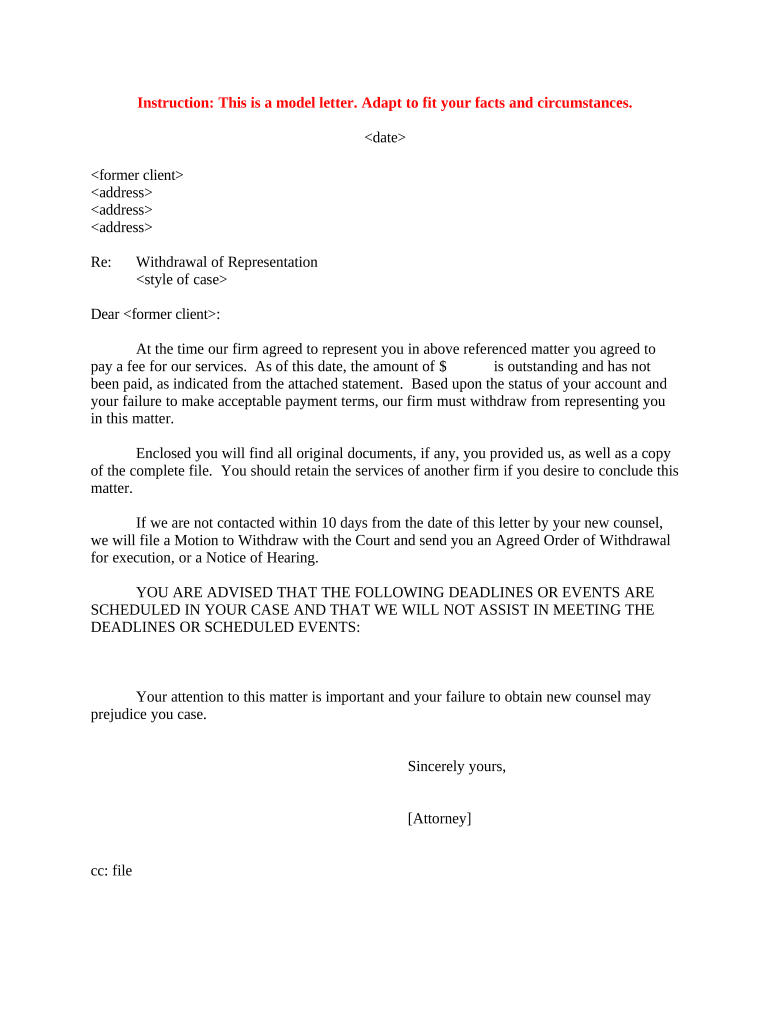
A Letter of Withdrawal of Representation is a formal written notice from an attorney or law firm stating that they will no longer act on behalf of a client in a particular matter. It typically identifies the case or matter, states the effective date of withdrawal, explains the reasons or status that permit withdrawal, and provides contact and file-transfer instructions. The letter protects both attorney and client by creating a clear record of termination, guiding successor counsel, and triggering any required court or administrative filings.

Why a Clear Withdrawal Letter Matters

A properly drafted Letter of Withdrawal of Representation documents the end of the attorney‑client relationship, reduces malpractice and disciplinary risk, and preserves client rights by stating effective dates and next steps. It also serves as evidence of notice to the client, opposing counsel, and the court where required by local rules.

Why a Clear Withdrawal Letter Matters

Who Typically Prepares and Receives this Letter

Common senders and recipients vary by context but share the goal of clear, documented notice.

  • Private law firms and solo practitioners — issue letters to clients, opposing counsel, and the court in active matters.
  • In-house counsel and corporate legal departments — notify business units, outside counsel, and compliance teams as needed.
  • Clients and successor counsel — receive the letter to confirm representation status and request files or transition assistance.

Tailor recipients to the case type (litigation, transactional, administrative) and follow applicable court rules for filing or service.

Core Elements to Include in the Letter of Withdrawal of Representation

A professional withdrawal letter is concise and covers identity, authority, timing, reason, case references, and instructions for the client and court or opposing parties.

Case or Matter

Identify the case name, docket number, or matter reference so recipients can immediately associate the withdrawal with the correct file.
Parties Named

List the client name exactly as on the file and opposing party or matter counterparties to avoid ambiguity about which client is affected.

Attorney Identity

Provide the attorney or firm name, bar number, address, telephone, and email so the recipient can identify who is withdrawing.

Effective Date

State the precise effective date of withdrawal using MM/DD/YYYY format and describe any actions that remain pending until that date.

Reasoning

Give a brief, professional reason for withdrawal if required by local ethics rules; use neutral language to avoid prejudice.

Next Steps

Explain file transfer procedures, deadlines for the client to obtain new counsel, and whether the firm will respond to urgent communications.

Essential Data Fields to Verify Before Sending

Client Name: Exact legal name
Case Number: Court docket ID
Attorney Info: Bar number
Effective Date: MM/DD/YYYY
Recipient List: Counsel and court
Signature Type: Wet or e-sign

Step-by-Step: Preparing and Issuing the Letter

Follow these steps to prepare, approve, and distribute a withdrawal letter consistent with professional and court obligations.

  • 01
    Confirm Authority: Verify firm authority to withdraw under retainer and rules.
  • 02
    Draft Letter: Include case ID, date, reason, and next steps.
  • 03
    Client Notice: Send directly to client and obtain delivery proof.
  • 04
    File with Court: File or move for leave to withdraw if required.

Configure an Online Workflow for the Withdrawal Letter

Set up a digital workflow when issuing the Letter of Withdrawal of Representation to capture signatures, automated notices, and audit logs.

Field Mapping Auto-populate case name and docket number
Signer Authentication Choose email, SMS, or advanced auth
Template Locking Prevent edits after approval
Automatic Notices Email client and opposing counsel on completion
Record Storage Save signed copy to secure archive

Where to Send the Letter of Withdrawal of Representation

Distribution depends on case type and local rules; ensure each recipient receives a signed copy and proof of delivery is retained.

  • Client: Deliver directly with read receipt or certified mail
  • Opposing Counsel: Serve opposing counsel by agreed method
  • Court Clerk: File notice or motion for leave to withdraw
  • Successor Counsel: Share file transfer and contact instructions

Digital Signing and eSubmission Considerations

When eSigning, choose a platform that provides a tamper-evident audit trail, secure signer authentication, and exportable signed records.

  • File Formats: PDF or DOCX compatible
  • Signer Authentication: Email, SMS code, or KBA
  • Integrations: Court e-filing and document storage

Retain copies of signed letters and verification materials (timestamps, IP, audit trail). Confirm local court e-filing rules before submitting electronically.

Timing and Deadlines to Watch

Timelines depend on jurisdiction and matter type; act promptly to protect clients and comply with court or administrative deadlines.

Immediate Notice Recommended:

Send to client and opposing counsel as soon as withdrawal is decided.

Court Motion Deadlines:

File for leave to withdraw when required by local rule.

File Transfer Window:

Provide reasonable time for client to retain successor counsel.

Notary/RON Window:

Complete notarization or RON before the effective date if needed.

Record Retention:

Keep evidence of service and signed letter per retention rules.

Common Preparation Mistakes to Avoid

  • Failing to verify the client’s current contact information can prevent effective service and create malpractice exposure.
  • Omitting the case or docket number makes the letter hard to match to the file and may delay court processing or successor counsel engagement.
  • Using vague language about the effective date or remaining responsibilities can lead to disputes over outstanding deadlines and obligations.
  • Not obtaining proof of delivery to the client, opposing counsel, or court leaves the sending attorney vulnerable to claims of improper notice.

Potential Consequences of an Incorrect or Untimely Withdrawal Letter

Professional Sanctions: Ethics complaints possible
Case Delay: Court may deny withdrawal
Client Harm: Missed deadlines risk prejudice
Malpractice Exposure: Negligent transition liability
Filing Rejection: Insufficient notice may be rejected
Disciplinary Record: Potential bar-related action

Practical Examples of Withdrawal Letters

Two short, realistic scenarios illustrate how a Letter of Withdrawal of Representation functions in practice and what each should contain.

Litigation Withdrawal

An attorney files a motion to withdraw after the client declines further representation and settlement is pending.

  • The attorney states the effective date and retains responsibility for limited steps.
  • The letter is served on the client, opposing counsel, and the clerk and includes file transfer instructions and proof of service retained.

Transactional Engagement

Counsel for a seller sends a withdrawal letter after a conflict emerges during escrow.

  • The letter names the transaction and gives an effective date.
  • It notifies escrow, opposing counsel, and the client, instructing escrow to hold closing funds until successor counsel confirms readiness and providing contact details for a timely handoff.

Typical Signers and Authors of the Letter

Managing Partner

A law firm managing partner or designated attorney prepares and signs withdrawal letters for active matters, coordinates internal approvals, and ensures compliance with firm policies and ethical rules.

In-House Counsel

Corporation in-house counsel notifies internal stakeholders and outside counsel when they withdraw from a specific engagement, often coordinating with compliance and records teams for file retention.

Practical Tips for Accurate and Efficient Withdrawal Letters

Follow these best practices to reduce risk and speed the transition when issuing a Letter of Withdrawal of Representation.

Confirm Client Contact
Verify the client's current mailing and email addresses before sending the letter and document proof of delivery using certified mail, tracked email, or the eSignature platform’s audit trail.
Follow Local Rules
Check the applicable court rules and state bar ethics opinions on withdrawals and file a motion for leave to withdraw where required to avoid rejection or sanctions.
Limit Substance
Avoid unnecessary disclosure of privileged or sensitive information in the letter; include only what is necessary to effect the withdrawal and to notify interested parties.
Preserve Evidence
Keep signed copies, delivery receipts, and audit logs for the retention period relevant to the matter, which may be required for later defense or regulatory review.

eSignature Pricing Snapshot for Managing Withdrawal Letters

Compare common eSignature vendor pricing and capabilities relevant to sending and archiving Letters of Withdrawal of Representation; signNow is listed first per vendor comparison practice.

signNow DocuSign Adobe Sign PandaDoc HelloSign
Starting Price $8/user/mo $15/user/mo $14/user/mo $19/user/mo $15/user/mo
Free Trial 7-day free trial Varies by plan Varies by plan Varies by plan Varies by plan
Bulk Send Yes Yes Yes Yes No
Audit Trail Yes Yes Yes Yes Yes
HIPAA Compliant Yes Yes Yes No No

Frequently Asked Questions About Withdrawal Letters

Answers to common questions about formality, eSignature, court filing, and retention when preparing a Letter of Withdrawal of Representation.


Need help? Contact support

be ready to get more
Join over 28 million airSlate SignNow users