Establishing secure connection…Loading editor…Preparing document…

Letter Requesting Extension to File Business Tax Forms

This template is fully customizable. Edit the text, fill out the fields, and send it for signature. Give it a try!
Letter Requesting Extension to File Business Tax Forms

What the Letter Requesting Extension to File Business Tax Forms Is

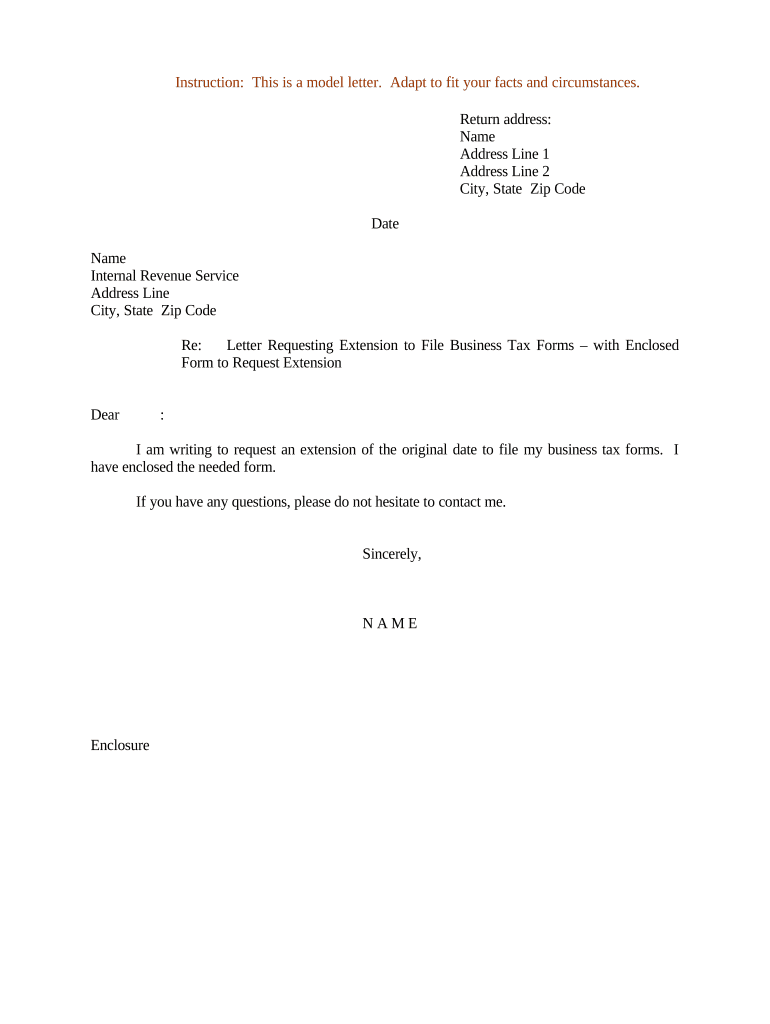
A Letter Requesting Extension to File Business Tax Forms is a written notice provided to a tax authority or payer that explains why a business cannot meet a filing deadline and requests additional time to submit required returns or information returns. Commonly used alongside or in place of formal extension forms when extra explanatory detail is needed, the letter documents the reason for delay, names the affected tax period and forms, and proposes a new filing date, helping create a clear audit trail for compliance and potential penalty mitigation.

Why a Clear Extension Letter Matters

A well‑drafted extension letter provides a documented basis for requesting extra time, signals good-faith compliance to tax authorities or payers, and can reduce risk of penalties by establishing intent and communication. It complements formal extension forms and supports follow-up correspondence if the IRS or state authority questions a late filing.

Why a Clear Extension Letter Matters

Who Typically Prepares and Sends These Letters

The letter should be signed by an authorized representative and retained with tax records to document the extension request and reason.

  • Small business owners handling their own filings and needing more time to collect records or finalize bookkeeping.
  • Certified public accountants or tax professionals submitting explanatory letters with or on behalf of clients.
  • Payroll or HR departments notifying payers about delayed information returns (1099, W-2) or corrected reporting.

Essential Parts of a Professional Extension Letter

A concise, formal letter should identify the filer, describe the forms and tax period, explain the reason for delay, state the requested extension period, and provide a contact for follow-up.

Sender ID

Full legal business name, EIN or TIN, mailing address, and contact phone or email to clearly identify the filer to the recipient.
Recipient

Name and address of the IRS office, state department of revenue, or payer to ensure the request reaches the correct processing unit.

Forms & Period

Specify the exact tax forms (for example, Form 7004 or information returns like 1099-NEC) and the tax year or period covered by the extension request.

Reason

Brief factual explanation for delay (e.g., missing records, natural disaster, system outage), avoiding speculative language while documenting material facts.

Requested Date

State the new proposed filing date or the statutory extension being requested and whether this is a request for an additional specific number of days or the full statutory extension.

Signature

Printed name, title, and signature of an authorized signer; include date signed and a direct phone or email for questions.

Step-by-Step: Drafting and Sending the Extension Letter

Follow these core steps to prepare and submit your extension request in a clear, traceable way.

  • 01
    Gather records: Collect EIN, return copies, and evidence supporting the delay.
  • 02
    Draft letter: State forms, period, reason, and requested date concisely.
  • 03
    Authorize signer: Ensure the signer has corporate authority and include title.
  • 04
    Send & retain: Mail or e‑submit and keep proof of delivery and a copy.

How to Configure an Online Extension Letter Workflow

Set up a repeatable online workflow to draft, sign, and store extension letters for consistency and auditability.

Field Configuration
Template Create reusable template with fixed and editable fields
Authentication Require email or SMS code for signer identity
Signature placement Add signature and date fields for authorized approver
Storage Save completed letter and certificate of completion

Distribution and eSubmission Considerations

Retain delivery records (emails, tracking numbers, portal confirmations) with the letter to document your extension request.

  • Email: Use certified or tracked email where possible
  • Registered mail: Provides return receipt and delivery proof
  • eSubmission: Upload to agency portal if available

Typical Routing: From Draft to Receipt

A controlled routing process ensures the letter moves from preparation to receipt with necessary approvals and verifiable delivery.

  • Create draft: Populate template with form numbers and period
  • Review & sign: Authorized representative reviews and signs
  • Send: Choose certified email, mail, or portal upload
  • Confirm: Capture delivery confirmation and store copy

Key Deadlines to Keep in Mind

Knowing relevant federal filing timelines helps determine when an extension letter should be sent and whether a formal extension form is also required.

Form 4868 (individual):

April 15 is the return deadline; extension filed on or before that date

Form 7004 (business):

Business extension requests are due by the original return due date

1099-NEC deadline:

January 31 for furnishing recipient copies and IRS filing

1099-MISC electronic:

March 31 when filing electronically with IRS

Follow-up timing:

Send extension letter as soon as delay is known to document good faith

Milestones After Sending an Extension Letter

Track a short set of milestones to ensure your extension request is processed and any follow-up actions are completed.

01

Acknowledgment

Record any agency or payer confirmation of receipt within days

02

Reminder

Follow up if no response after 14–30 days

03

File return

Submit the delayed return by the agreed or statutory extended date

04

Retain evidence

Keep delivery proof and related correspondence for audit

Common Mistakes to Avoid When Preparing the Letter

  • Vague reasons: Failing to provide a concrete explanation for delay often leads to follow-up requests and processing delays.
  • Missing identifiers: Omitting the EIN/TIN, taxpayer name, or exact form numbers makes it difficult for the agency to match the letter to filings.
  • Improper signer: Having someone without corporate authority sign the letter can invalidate the request and cause rejection.
  • No delivery proof: Sending without tracked mail or portal confirmation removes evidence of timely communication if penalties are assessed.

Penalties and Risks of an Incorrect or Late Request

Information return fines: IRC §6721 penalties may apply for late or incorrect 1099 filings
Increased penalties: Higher per‑form fines apply for extended delays or intentional disregard
Backup withholding: Missing or incorrect TINs can trigger 24% backup withholding
Interest accrual: Tax balances accrue interest until paid
I‑9 violations: Employment document issues can trigger DHS fines
Reputational risk: Repeated late filings can prompt closer scrutiny

Security and Legal Frameworks That Support Electronic Letters

ESIGN Act: 15 U.S.C. ch. 96 provides legal validity for e‑signatures
UETA: Uniform Electronic Transactions Act adopted in most states
HIPAA: BAA required when letters include protected health information
Encryption: TLS 1.2/1.3 in transit; AES‑256 at rest
Audit trail: Detailed logs capture signer identity and timestamps
SOC 2: SOC 2 Type II attests to security controls

eSignature Pricing Comparison for Managing Extension Letters

Vendor pricing and features vary; signNow is listed first to compare starting price, trial availability, and key capabilities relevant to distributing and storing signed extension letters.

signNow DocuSign Adobe Sign PandaDoc HelloSign
Starting Price $8/user/mo $15/user/mo $14/user/mo $19/user/mo $15/user/mo
Free Trial Yes, 7‑day trial No No Yes, limited Yes, limited
Bulk Send Yes Yes Yes Yes No
Audit Trail Yes Yes Yes Yes Yes
HIPAA Compliant Yes Yes Yes No No

Realistic Use Cases for Extension Letters

Two common scenarios show how a focused extension letter supports compliance and reduces downstream penalties.

Small Business Delay

A small retail business lost access to accounting records after a server outage and could not finalize year‑end 1099s

  • The CPA drafted an extension letter explaining the outage and proposed a two‑week filing date
  • The letter and delivery proof were retained with tax records, which helped mitigate late‑filing penalty assessments during IRS correspondence.

CPA Firm Exception

A CPA firm representing multiple clients needed additional time to reconcile contractor payments before issuing 1099-NEC forms

  • The firm sent standardized extension letters with supporting reconciliations to payers
  • Centralized templates and signed records reduced follow-up inquiries and provided a clear audit trail for each client engagement.

Frequently Asked Questions About Extension Letters

Answers to common questions about when, how, and where to send a Letter Requesting Extension to File Business Tax Forms.


Need help? Contact support

be ready to get more
Join over 28 million airSlate SignNow users