Establishing secure connection…Loading editor…Preparing document…

Promotional Letter for Insurance

This template is fully customizable. Edit the text, fill out the fields, and send it for signature. Give it a try!
Promotional Letter for Insurance

What a Promotional Letter for Insurance Is and When It’s Used

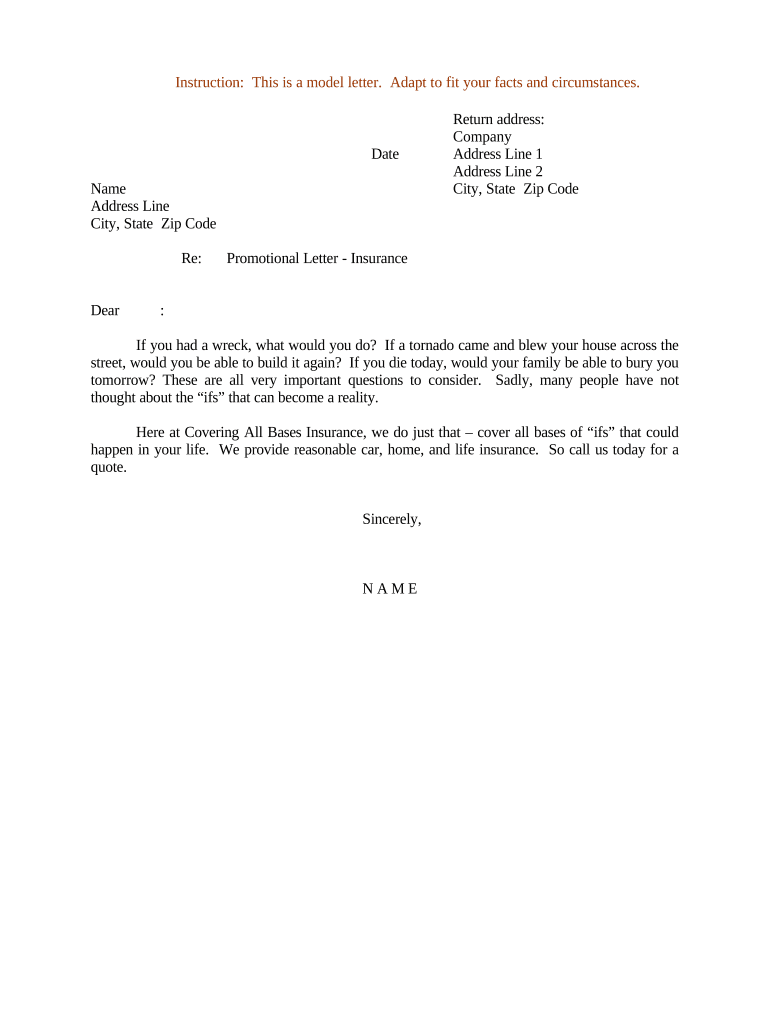
A Promotional Letter for Insurance is a written communication used by insurers, brokers, or agents to present policy options, rate changes, endorsements, or limited-time offers to prospective or existing policyholders. It typically summarizes coverage features, eligibility criteria, and any conditions that apply, and it may include a request for consent, acknowledgement, or a signature to confirm receipt. While promotional letters can be delivered electronically, they are distinct from policy contracts and do not by themselves create coverage unless explicitly combined with binding policy documents and the parties’ required signatures.

Why a Clear Promotional Letter Matters

A concise promotional letter improves customer understanding, documents communications, and reduces follow-up enquiries by clarifying offer terms and next steps.

Why a Clear Promotional Letter Matters

Who Typically Prepares and Receives These Letters

The document is most often prepared by insurance agents, brokerages, marketing teams, and in-house policy administrators.

  • Insurance agents and brokers who communicate new offerings and endorsements to clients.
  • Marketing and customer-retention teams sending segmented offers to insured populations.
  • Policy administrators and compliance officers documenting outreach to regulated customers.

Core Elements to Include in a Professional Letter

A well-structured promotional letter balances clear offer language with legal disclaimers and a simple method for the recipient to confirm receipt or express interest.

Header

Agency or insurer name, mailing address, and a clear subject line identifying the type of offer and policy series, if applicable.
Recipient

Full insured or prospect name and mailing or email address; include policy number when relevant to link the letter to existing coverage.

Offer Details

Concise description of the product, pricing, term, and any eligibility requirements; avoid ambiguous or promotional-only language that could be misleading.

Limitations

Material exclusions, effective dates, cancellation windows, and any conditions that may affect coverage or pricing.

Legal Notice

Consumer disclosures required by federal law, for example electronic consent details under 15 U.S.C. §7001 for consumer-facing records.

Signature Block

Designated signer name and title, date line, and clear instruction whether an electronic signature or acknowledgement suffices.

Required Information and Quick Field Checklist

Policy Number: Policy identifier
Insured Name: Full legal name
Effective Date: MM/DD/YYYY
Coverage Summary: Short description
Contact Details: Phone and email
Signature Block: Signer and date

Step-by-Step: Create and Send a Promotional Letter

Follow this simple sequence to prepare, approve, and deliver a compliant promotional letter with a preserved audit trail.

  • 01
    Draft: Prepare content and attach required disclosures.
  • 02
    Review: Legal or compliance reviews headline terms and disclaimers.
  • 03
    Consent: Obtain electronic consent for consumer-facing records when required.
  • 04
    Send: Distribute via chosen channel and retain the audit record.

Configuring an Online Completion Workflow

Set up fields and authentication to match your compliance and operational requirements before distribution.

Field Configuration
Template Name Standardize letter templates for reuse and version control
Recipient Authentication Email link or SMS code; choose stronger ID proofing for sensitive offers
Signature Type Simple e-signature or PKI-based digital signature as required
Notification Options Set reminders, expiry, and escalation for unsigned letters

Where to Send or File Completed Letters

Decide routing according to internal records, regulatory requirements, and the recipient’s preference for paper or electronic delivery.

  • To Recipient: Email PDF copy with signed audit trail
  • To Insurer Records: Save to company policy file or document management system
  • To CRM: Attach completed letter to policyholder CRM record
  • To Compliance Archive: Retain for regulatory audit and dispute resolution

Technical Formats and Integration Considerations

Choose platforms and formats that preserve signatures, metadata, and audit trails.

  • File Formats: PDF, DOCX supported
  • Integrations: CRM and cloud storage integrations
  • Authentication: Email, SMS, KBA options

Timelines, Deadlines, and Typical Processing Expectations

Expect variable response and processing times; set recipient deadlines clearly and document delivery for compliance.

Response Window:

Standard request periods are 14–30 days

Effective Timing:

Offer becomes effective on the signed effective date

Consumer Disclosure:

Provide ESIGN consumer disclosure before obtaining consent (15 U.S.C. §7001(c))

Record Retention:

Keep signed copy per retention policy

Follow-up Reminders:

Send automated reminders prior to expiry

Key Milestones from Draft to Archive

A typical project moves through planning, approval, distribution, and long-term storage with clear handoffs at each stage.

01

Drafting Stage

Create content and identify compliance requirements

02

Approval Stage

Legal and underwriting confirmation of terms

03

Distribution Stage

Deliver electronically or in print with audit capture

04

Archival Stage

Store signed letter with policy records

Common Errors to Avoid

  • Omitting the required consumer disclosure before obtaining electronic consent, which can render e-consent noncompliant.
  • Using ambiguous offer language that could be interpreted as a binding policy modification rather than a promotional communication.
  • Failing to link the letter to the correct policy number or customer record, causing processing delays and disputes.
  • Neglecting to retain an audit trail (timestamp, IP, signer identity) when accepting electronic acknowledgements.

Penalties and Legal Risks of Incorrect Letters

ESIGN Noncompliance: Invalid consent
HIPAA Violation: Potential fines
Misleading Terms: Regulatory action
Data Breach: Incident reporting obligations
Contract Dispute: Possible rescission
Recordkeeping Failures: Audit penalties

Comparison: eSignature Pricing and Feature Highlights

A neutral view of common platform pricing and features relevant to processing promotional insurance letters; signNow is listed first per vendor-comparison convention.

signNow DocuSign Adobe Sign PandaDoc HelloSign
Starting Price $8/user/mo $15/user/mo $14/user/mo $19/user/mo $15/user/mo
Free Trial 7-day free trial, no card Varies by vendor Varies by vendor Varies by vendor Varies by vendor
Bulk Send Yes Yes Yes Yes No
Audit Trail Yes Yes Yes Yes Yes
HIPAA Compliant Yes Yes Yes No No
Envelope Cap No cap 100 envelopes/user/year Varies by plan Varies by plan Varies by plan

Real-World Examples of Remote Signature Use

These examples illustrate how organizations use secure electronic delivery and audit trails to document customer communications and consent.

Optica Ventures LLC

Optica standardized its client outreach to reduce confusion and speed responses.

  • The interface was simple for clients.
  • According to Brian Fitzgibbons, COO, the solution improved customer experience while keeping compliance and recordkeeping consistent across transactions.

Fertility Centers of Illinois

The center moved patient authorizations online for convenience and auditability.

  • API integration supported existing workflows.
  • John Butler, Founder, noted that the team appreciated responsive support, a reliable API, and confidence in compliance when handling sensitive records.

Frequently Asked Questions

Answers to common legal, technical, and process questions about preparing, signing, and storing promotional insurance letters.


Need help? Contact support

be ready to get more
Join over 28 million airSlate SignNow users