Establishing secure connection…Loading editor…Preparing document…

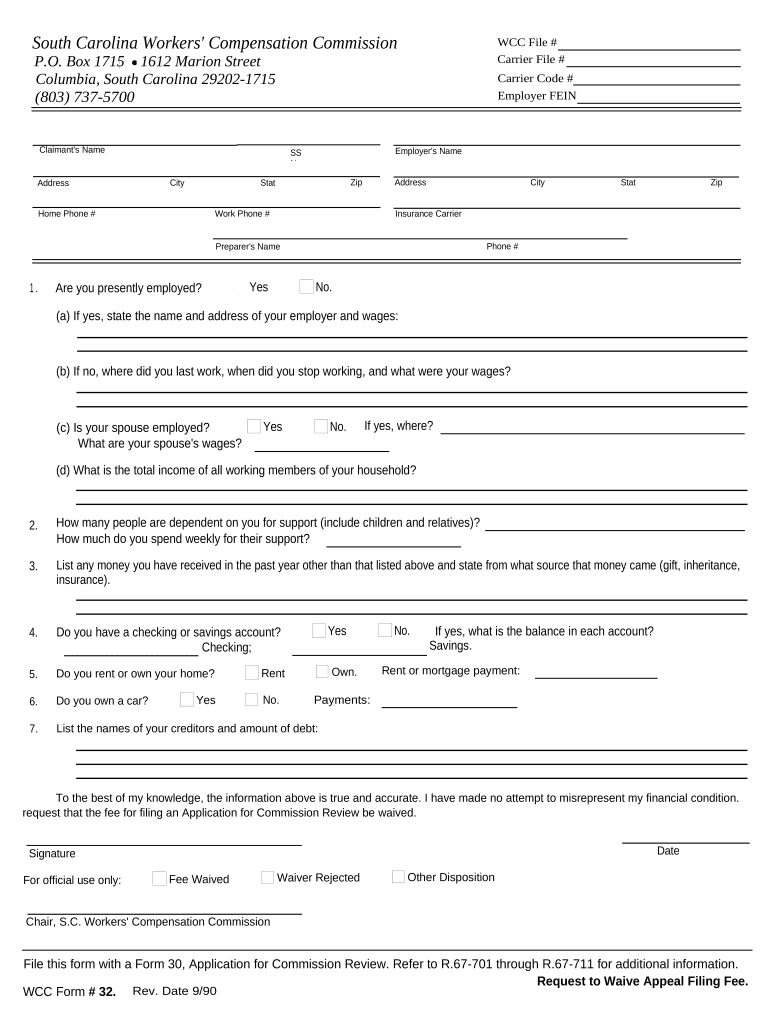
South Carolina Request to Waive Appeal Filing Fee

This template is fully customizable. Edit the text, fill out the fields, and send it for signature. Give it a try!
South Carolina Request to Waive Appeal Filing Fee

What the South Carolina Request to Waive Appeal Filing Fee Is

The South Carolina Request to Waive Appeal Filing Fee is a court form used by parties who cannot afford the statutory fee required for filing an appeal in South Carolina appellate or trial courts. It asks the filer to certify financial hardship and provide supporting information such as income, assets, and monthly expenses. The court reviews the request under state statutes and local rules and may grant full or partial waiver, require an affidavit, or deny the request. When approved, the waiver relieves the filer of all or part of the appellate filing fee and related costs.

Why Use a Fee Waiver Request in an Appeal

Use this request when you lack funds to pay an appeal filing fee; it enables courts to assess indigency and may waive fees to preserve access to appellate review. A granted waiver reduces upfront costs and avoids dismissal for nonpayment of filing fees.

Why Use a Fee Waiver Request in an Appeal

Who Typically Prepares and Submits the Request

Typical users who file this request include litigants proceeding pro se, attorneys representing indigent clients, and legal aid organizations.

  • Self-represented defendants or plaintiffs with no reasonable disposable income available for filing fees
  • Attorneys appointed under indigent defense programs seeking fee waivers for clients
  • Nonprofit legal aid clinics preparing supporting affidavits and financial disclosures

Step-by-Step: Complete and File the Waiver Request

Follow these steps to complete and submit a South Carolina fee-waiver request accurately to the clerk or court.

  • 01
    Gather Documents: Collect income, asset, and expense records to support hardship claim
  • 02
    Complete Form: Fill each field, use MM/DD/YYYY for dates, and attach evidence
  • 03
    Sign/Affirm: Sign or swear to the affidavit per form instructions before filing
  • 04
    File/Serve: Submit to the clerk with copies; serve opposing parties if required

Configure an Electronic Workflow for the Waiver Request

Configure your online workflow to collect signatures, supporting attachments, and authenticated attestations before submitting to the court clerk.

Field Configuration
Collect Attachments Require PDF upload for pay stubs and bills
Signer Authentication Email link with optional SMS code verification
Signature Type Typed name or draw signature accepted
Auto-attach Audit Include timestamp, IP, and completion certificate

From Preparation to Court Decision: The Typical Flow

This flow shows how an online waiver request moves from preparation to court review and final clerk action.

  • Prepare Packet: Assemble form, evidence, and affidavit; check signatures
  • Submit to Clerk: File in person, by mail, or e-file where available
  • Court Review: Judge or clerk reviews financial disclosures and supporting documents
  • Decision Issued: Order grants, partially grants, or denies the waiver request

Platform Features to Support Court-Ready Electronic Submission

Use a signing platform that supports PDF upload, secure attachments, timestamped audit trails, and simple signer authentication for court-ready records.

  • File Formats: Accept PDF and DOCX
  • Integrations: Works with cloud storage and case management
  • Security: AES-256 at rest; TLS 1.2/1.3 in transit

Essential Elements of a Complete Waiver Request

A professional waiver request combines clear financial disclosures, supporting evidence, proper signatures, and court-ready formatting to maximize the chance of approval.

Affidavit

Attach a signed affidavit describing financial hardship, events leading to indigency, and a statement of truth under penalty of perjury, using exact dates and amounts where possible.
Financials

Provide itemized income and expense schedules, recent pay stubs or benefits statements, and bank statements covering at least the last three months to substantiate claims.

Assets

Disclose ownership of real property, vehicles, and investments; state values, mortgages or liens, and explain why assets are encumbered or cannot reasonably fund filing fees.

Household

List all household members contributing to or dependent on income, noting relationships and any shared financial obligations that affect available funds for fees and payment schedules.

Notarization

If the form or local rule requires an oath, follow notary procedures or obtain a jurat; include the notary's seal and date in the designated block.

Court Info

Include the court name, case number, party names, and appellant counsel information so the clerk can associate the waiver with the proper record and contact details.

Security and Privacy Considerations for Electronic Submissions

Encryption: TLS 1.2/1.3; AES-256 at rest
HIPAA: Business associate agreement available
Audit Trail: Captures IP, timestamps, action logs
Authentication: Email link, SMS code, and 2FA options
Access Controls: Role-based permissions and SSO support
Retention: Exportable PDFs and audit logs retained

Legal Risks and Consequences of Errors

Denial Risk: Waiver can be denied
Perjury Exposure: False statements may incur criminal penalties
Fee Accrual: Fees may remain due if denied
Delay: Incomplete forms delay review
Service Issues: Failure to serve causes procedural problems
Recordkeeping: Poor records hinder appeals

Common Preparation Pitfalls to Avoid

  • Providing vague income descriptions without supporting documents often results in requests being returned for clarification or denied for insufficient evidence.
  • Failing to list all household members and their income sources can understate resources and lead to waiver denial.
  • Omitting recent bank statements or offering outdated pay stubs weakens credibility and may prompt a court to request additional proof.
  • Not following local court formatting rules, including failure to use required forms or seals, can cause administrative rejection.

Timing and Deadlines to Watch

Observe court-specific filing deadlines and service timelines; missing deadlines can affect appellate rights and case scheduling.

Filing Deadline:

File the waiver when filing the appeal or as permitted by local rules

Service Requirement:

Serve opposing parties if the court requires notice

Clerk Processing:

Clerk may docket and forward request for judicial review

Order Timeframe:

Courts commonly issue a ruling within days to weeks

Appeal Impact:

An approved waiver allows appeal filing without upfront payment

Key Milestones From Filing to Decision

Key procedural milestones from request filing through court decision illustrate typical processing stages and responsible parties.

01

Prepare and Sign

Complete form and attach income documentation before submission

02

File with Clerk

Submit in person, by mail, or via permitted e-file system

03

Clerk Review

Clerk checks completeness and may docket for judicial consideration

04

Judicial Decision

Judge issues order granting, partial, or denying relief

Typical eSignature Vendor Pricing and Core Capabilities

Compare typical vendor pricing and core capabilities for e-signature solutions used to submit waiver requests and court filings electronically.

signNow DocuSign Adobe Sign PandaDoc HelloSign
Starting Price $8/user/mo $15/user/mo $14/user/mo $19/user/mo $15/user/mo
Free Trial 7-day free trial, no credit card required Varies by vendor Varies by vendor Varies by vendor Varies by vendor
Bulk Send Yes Yes Yes Yes No
Audit Trail Yes Yes Yes Yes Yes
HIPAA Compliant Yes Yes Yes No No
Envelope Cap No envelope cap 100 envelopes/user/year Varies by plan Varies by plan Varies by plan

Representative Cases Illustrating Outcomes

Real-world examples show how accurate documentation and timely filing affect outcomes in fee-waiver requests in South Carolina.

Municipal Appeal

A lone appellant provided three months of pay stubs and bank statements with a completed waiver form signed under oath.

  • Judge granted a full waiver on review.
  • The approval eliminated the need to pay the appellate filing fee and allowed the appeal to proceed. The clerk docketed the appeal the same week, avoiding dismissal for nonpayment and preserving appellate rights.

Civil Defense Appeal

A litigant seeking indigent status included a sworn affidavit, monthly expense list, and documentation of public benefits to substantiate inability to pay.

  • Court partially waived fees and ordered installment payments.
  • Partial relief allowed the appeal to proceed while recognizing limited ability to pay; the appellant submitted payments per schedule and preserved the record for appellate review without full upfront payment.

Practical Tips to Improve Acceptance and Avoid Delays

Follow best practices to improve acceptance odds and reduce processing delays for waiver requests in South Carolina.

Provide contemporaneous financial evidence
Attach recent pay stubs, benefits notices, three months of bank statements, and a detailed monthly expense list. Documents should be legible, dated, and directly tied to the amounts stated on the waiver form to avoid follow-up requests.
Use correct dates and formats
Enter all dates as MM/DD/YYYY, avoid abbreviating months, and double-check arithmetic in income and expense totals. Consistent formatting reduces clerical errors and clarifies timelines relevant to indigency determinations.
Attach witness or third-party statements
Where applicable, include affidavits from third parties confirming circumstances such as job loss, medical hardship, or inability to access funds. These statements bolster credibility and provide context beyond raw financial numbers.
Verify local court rules before filing
Review county-specific filing procedures, required forms, and any electronic submission standards. Some clerks require additional cover sheets or case citations; failure to follow local protocols can cause administrative rejection or delays.

Frequently Asked Questions and Troubleshooting

Common questions about preparing, submitting, and following up on a South Carolina Request to Waive Appeal Filing Fee are answered below.


Need help? Contact support

be ready to get more
Join over 28 million airSlate SignNow users