Establishing secure connection…Loading editor…Preparing document…

SC Financial Declaration

This template is fully customizable. Edit the text, fill out the fields, and send it for signature. Give it a try!
SC Financial Declaration

What the SC Financial Declaration Is and When It Applies

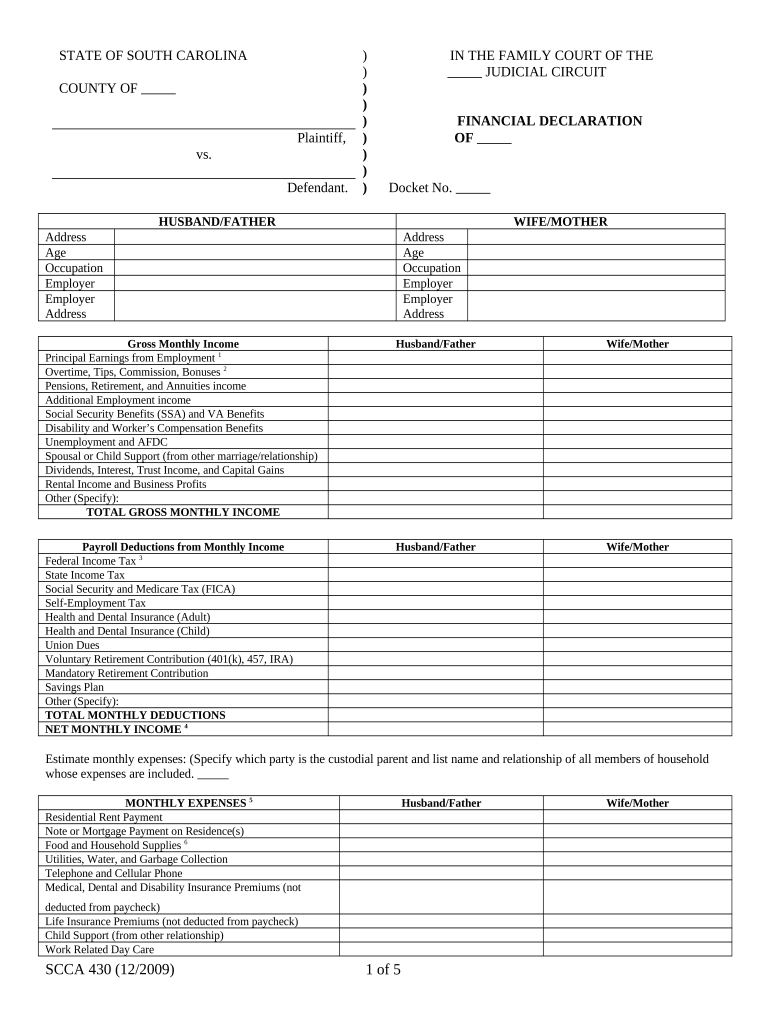
The SC Financial Declaration is a standardized financial disclosure used to report income, assets, liabilities, and support obligations for legal, administrative, or underwriting purposes in the United States. Depending on context it may be used in family court, regulatory filings, loan underwriting, or benefits determinations. The form collects identifying information, account balances, real property values, debts, monthly income and expense detail, and signature attestations. Accurate completion supports legal compliance and decision-making; incomplete or inconsistent entries can result in delays or administrative follow-up.

Why a Complete SC Financial Declaration Matters

A properly completed SC Financial Declaration establishes a clear record of financial status for courts, agencies, or lenders, enabling accurate assessments and consistent decision-making. It supports compliance with disclosure obligations under statutes and institutional policies.

Why a Complete SC Financial Declaration Matters

Who Typically Prepares and Reviews This Declaration

Common preparers and reviewers include parties to legal proceedings, loan applicants, case managers, and compliance officers.

  • Individuals completing litigation or family court disclosures, often required by court rule and counsel oversight.
  • Loan officers and underwriters using the form to verify borrower financial condition during credit decisions.
  • Agency case workers and benefits administrators who evaluate eligibility and need consistent financial detail.

Ensure the person completing the form has access to bank statements, pay records, and supporting documents before signing.

Core Sections Included in a Professional SC Financial Declaration

A complete declaration organizes information into standard sections to make review straightforward and auditable.

Identification

Full legal name, date of birth, address, and taxpayer identification to tie the record to an individual or entity.
Income

Monthly and annual income lines including wages, self-employment receipts, investment income, and benefits with specified reporting periods.

Assets

Cash, bank accounts, retirement accounts, vehicles, and real property with current values and account identifiers where required.

Liabilities

Mortgages, loans, credit card balances, and other debts with creditor names, balances, and monthly payments.

Monthly Budget

Recurring expenses such as housing, utilities, child care, transportation, and healthcare to show cash flow and ability to pay.

Attestation

Signature block, date, and any notarization or witness lines plus a statement attesting to the document's accuracy under penalty of perjury.

Essential Fields You Must Provide

Full Legal Name: Exact as on ID
Social Security Number: Enter last four or full as required
Current Address: Street, city, state, ZIP
Income Breakdown: Monthly and annual totals
Account Balances: Provide current balances
Signature and Date: Signer must date

Step-by-Step: How to Complete the SC Financial Declaration

Follow these sequential steps to assemble information, complete fields, and finalize the declaration for submission.

  • 01
    Gather Documents: Collect pay stubs, statements, and tax forms.
  • 02
    Complete Fields: Enter values and explain large transactions.
  • 03
    Attach Evidence: Upload supporting PDFs or scans.
  • 04
    Sign and Verify: Sign, notarize if required, and retain copies.

How to Customize and Submit the Form Online

Configure an online workflow that enforces required fields, collects attachments, and records a complete audit trail for e-submission.

Field Online Setting
Required Fields Make identification and attestation mandatory
Attachment Rules Require specific file types and minimum pages
Signer Order Set sequence for multi-party signing
Authentication Enable email or SMS verification

Options for Sharing, Signing, and Submitting Electronically

Choose a delivery and signing method that meets legal and organizational requirements for identity verification and record retention.

  • Email Link: Simple, low-friction option
  • Secure Portal: Preferred for sensitive records
  • In-Person Kiosk: Useful when witness required

Confirm that the chosen method preserves an audit trail (timestamps, IP, signer identity) and complies with any industry rules such as HIPAA or court orders.

Where to File or Send the Completed Declaration

Destination depends on the use case: court filing, lender submission, agency upload, or internal records. Follow the receiving party's instructions exactly.

  • Court Filings: Submit via court e-filing system or attach physically per local court rules
  • Lender Submission: Upload to lender portal or email to designated underwriting address
  • Agency Upload: Follow agency portal requirements and confirmation protocols
  • Internal Records: Store in encrypted document management with access controls

Timelines and Typical Processing Expectations

Be aware of response and filing deadlines tied to the declaration; missing deadlines can affect proceedings or approvals.

Court Discovery Deadline:

Submit by the court-ordered date; confirmations may be required

Loan Underwriting Window:

Provide within lender-requested timeframe to avoid application hold

Agency Review Period:

Processing varies by agency—expect multiple business days

Notarization Timing:

Complete notarization near signing date to ensure validity

Record Retention Start:

Retention period begins on the signed effective date

Common Preparation Errors to Avoid

  • Omitting supporting documents, which triggers verification delays and requests for corrected filings from reviewers or courts.
  • Rounding or estimating balances without footnotes, causing inconsistencies between account statements and the declared totals.
  • Using informal names or nicknames that do not match government ID or tax records, resulting in identity verification failures.
  • Failing to notarize or obtain required witnesses when local rules mandate them, which can render the declaration inadmissible.

Penalties and Risks from Inaccurate Declarations

Filing Penalties: Civil sanctions possible
Tax Consequences: Backup withholding triggered
Court Sanctions: Contempt or fines possible
Contract Risk: Credit denials or rescission
Criminal Exposure: Fraud charges for willful misstatement
Delays: Processing holds and requests

How to Save, Export, and Archive the Completed Declaration

Choose file formats and storage methods that preserve integrity, permit reproduction, and meet receiving-party requirements.

PDF/A Export

Export a flattened, PDF/A copy to preserve appearance and prevent accidental edits; this is standard for long-term archival and court submissions.

Editable DOCX

Maintain an editable DOCX master for internal updates but never use it as the authoritative signed record once executed.

Signed Certificate

Keep the signed certificate or audit trail that records timestamps, signer authentication method, and IP addresses for evidentiary support.

Encrypted Storage

Store final records in encrypted, access-controlled repositories with regular backups and retention policies aligned to legal requirements.

eSignature Vendor Comparison for Executing the SC Financial Declaration

Key platform differences often affect authentication, compliance attachments, and cost per user. signNow appears first in the table below for direct comparison.

signNow DocuSign Adobe Sign PandaDoc HelloSign
Starting Price $8/user/mo $15/user/mo $14/user/mo $19/user/mo $15/user/mo
Free Trial 7-day free trial Varies by plan Varies by plan Varies by plan Varies by plan
Bulk Send Yes Yes Yes Yes No
Audit Trail Yes Yes Yes Yes Yes
HIPAA Compliant Yes Yes Yes No No

Frequently Asked Questions About the SC Financial Declaration

Answers to common questions about signing, notarization, electronic submission, and correcting mistakes when completing the declaration.


Need help? Contact support

be ready to get more
Join over 28 million airSlate SignNow users