Establishing secure connection…Loading editor…Preparing document…

Satisfaction of Judgment

This template is fully customizable. Edit the text, fill out the fields, and send it for signature. Give it a try!
Satisfaction of Judgment

What a Satisfaction of Judgment Is

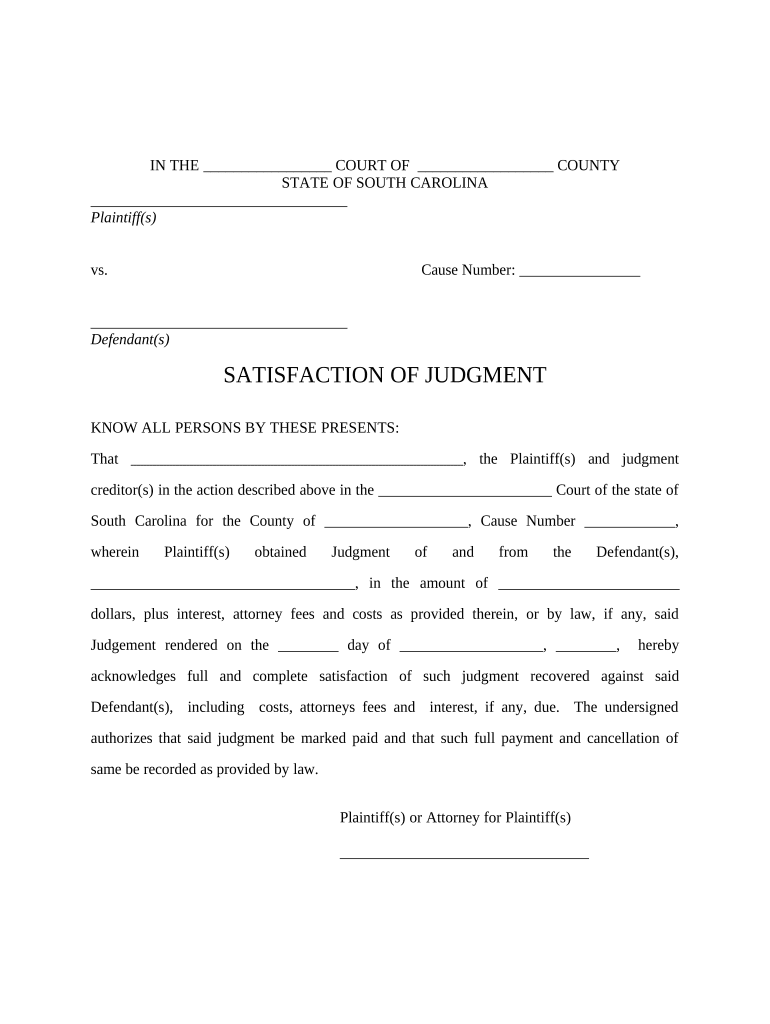
Satisfaction of Judgment is a recorded legal document filed after a judgment debtor fully pays or otherwise satisfies a court judgment. It formally notifies the court and public records that the judgment has been satisfied, removes or reduces judgment lien effects, and updates the judgment docket. Credit reporting and lien status may also be affected. Typically prepared by the judgment creditor or their attorney, the form includes case identifiers, payment confirmation, and a dated signature acknowledging satisfaction. Filing requirements vary by jurisdiction and may affect priority of liens.

Why Filing a Satisfaction Matters

Recording a Satisfaction of Judgment clears the public record, releases or reduces liens, and documents final disposition of the debt. It provides proof for credit reporting and title searches, limits post-judgment enforcement actions, and creates an auditable record of payment or release.

Why Filing a Satisfaction Matters

Who Prepares and Uses This Document

Typical users include judgment creditors, debtor representatives, clerks, and attorneys who handle post-judgment matters involving enforcement and release.

  • Judgment creditors asserting payment and releasing lien rights to clear title.
  • Debtors seeking proof of satisfaction for credit reporting and property sales.
  • Title companies and lenders verifying lien status during real estate transactions.

Core Elements Every Professional Satisfaction Should Include

Essential elements of a professional Satisfaction of Judgment focus on clear case identification, payment proof, lien description, signer authority, notarization where required, and recording details.

Case Details

Include court name, case number, judgment date, and parties' full legal names so clerks and title searchers can accurately match the satisfaction to the original judgment record.
Payment Proof

Specify payment date, amount, method, receipt or account reference, and who confirmed payment; attach supporting receipts or a creditor affidavit when available to avoid future disputes.

Lien Description

Identify the judgment lien's recorded instrument number or property description and state whether lien is fully released, partially satisfied, or subordinated to other encumbrances.

Signer Authority

Show the signatory's role (creditor, attorney) and provide a printed name, title, and contact information; corporations should include an officer's name and authority statement.

Notarization

Include notary acknowledgment if the local recording office or statute requires it; some jurisdictions accept unsworn creditor statements instead of notarization.

Recording Info

Add space for recorder stamp, filing date, and county clerk notes; accurate recorder data ensures public index updates and clear chain-of-title records.

Step-by-Step: Prepare, Sign, and Record

Use this step-by-step sequence to prepare, sign, and record a Satisfaction of Judgment efficiently and accurately.

  • 01
    Gather Info: Collect case number, payment proof, and parties' names.
  • 02
    Draft Form: Complete fields with exact docket and payment details.
  • 03
    Authenticate: Sign and notarize if required by jurisdiction.
  • 04
    Record: File with county recorder or court clerk and obtain stamp.

Typical Filing and Submission Flow

Filing a Satisfaction of Judgment follows a simple routing process from creditor to recorder with optional electronic submission.

  • Prepare Document: Draft satisfaction with accurate case and payment details.
  • Sign: Authorized party signs; notarize if statute requires.
  • Submit: Deliver to county recorder or court clerk in proper county.
  • Confirm: Obtain recorded copy and update title or lien records.

Configuring an Online Workflow for Satisfactions

Configure online workflows to capture signer identity, record attachments, and send the recorded satisfaction to interested parties automatically.

Field Configuration
Signer Authentication Email plus SMS code or KBA where required.
Notary Integration Enable RON or upload notarized acknowledgment.
Auto-fill Case Data Use templates or CSV import to populate fields.
Post-Recording Distribution Automatically email recorded PDF to parties.

Technical Considerations for Electronic Submission

Choose platforms that support PDF recording, secure storage, and reliable audit trails for electronic satisfaction documents.

  • File Formats: PDF/A and DOCX supported.
  • Integrations: Connect with county systems or CRMs.
  • Security: AES-256 at rest and TLS in transit.

Timeline Items and Time-Sensitive Steps

Key deadlines relate to filing and recording the satisfaction, distributing copies, and updating related lien records promptly.

Record Promptly:

File with county recorder as soon as payment is acknowledged.

Provide Copies:

Send recorded copy to debtor and title companies promptly.

Title Updates:

Allow time for title index updates; timing varies by county.

Credit Reporting:

Debtor may need recorded proof to correct credit reports.

Statute Limits:

Be aware of limitation periods for lien challenges and reconveyances.

Common Pitfalls to Avoid

  • Incomplete case identifiers lead to clerks misfiling the document, delaying recording and failing to clear the intended judgment lien in public records.
  • Omitting payment proof or relying on verbal confirmation increases the risk of disputes and may require supplemental affidavits to prove satisfaction.
  • Using an incorrect legal name for creditor or debtor can prevent title companies from finding the recorded satisfaction, complicating property transactions.
  • Failing to notarize where required or neglecting county-specific formatting often causes rejection and necessitates re-filing with additional fees.

Risks and Consequences of Errors

Unreleased Lien: Lien remains against property.
Title Issues: Transfers may be delayed.
Credit Harm: Debtor credit unresolved.
Re-filing Costs: Additional fees and time.
Court Sanctions: Rare, but possible for false statements.
Proof Burden: Extra affidavits or hearings required.

eSignature Vendor Comparison for Satisfaction Workflows

Comparison of common eSignature vendors and features relevant to preparing and signing Satisfaction of Judgment documents.

signNow DocuSign Adobe Sign PandaDoc HelloSign
Starting Price $8/user/mo $15/user/mo $14/user/mo $19/user/mo $15/user/mo
Free Trial 7-day free trial Varies by plan Varies by plan Varies by plan Varies by plan
Bulk Send Yes (Premium) Yes Yes Yes No
Audit Trail Yes Yes Yes Yes Yes
HIPAA Compliant Yes (BAA) Yes (BAA) Yes (BAA) No No

Frequently Asked Questions

Frequently asked questions about preparing, signing, and recording a Satisfaction of Judgment, including electronic signing and common pitfalls.


Need help? Contact support

be ready to get more
Join over 28 million airSlate SignNow users