Establishing secure connection…Loading editor…Preparing document…

South Carolina Consent to Name Change

This template is fully customizable. Edit the text, fill out the fields, and send it for signature. Give it a try!
South Carolina Consent to Name Change

What the South Carolina Consent to Name Change is and when it’s used

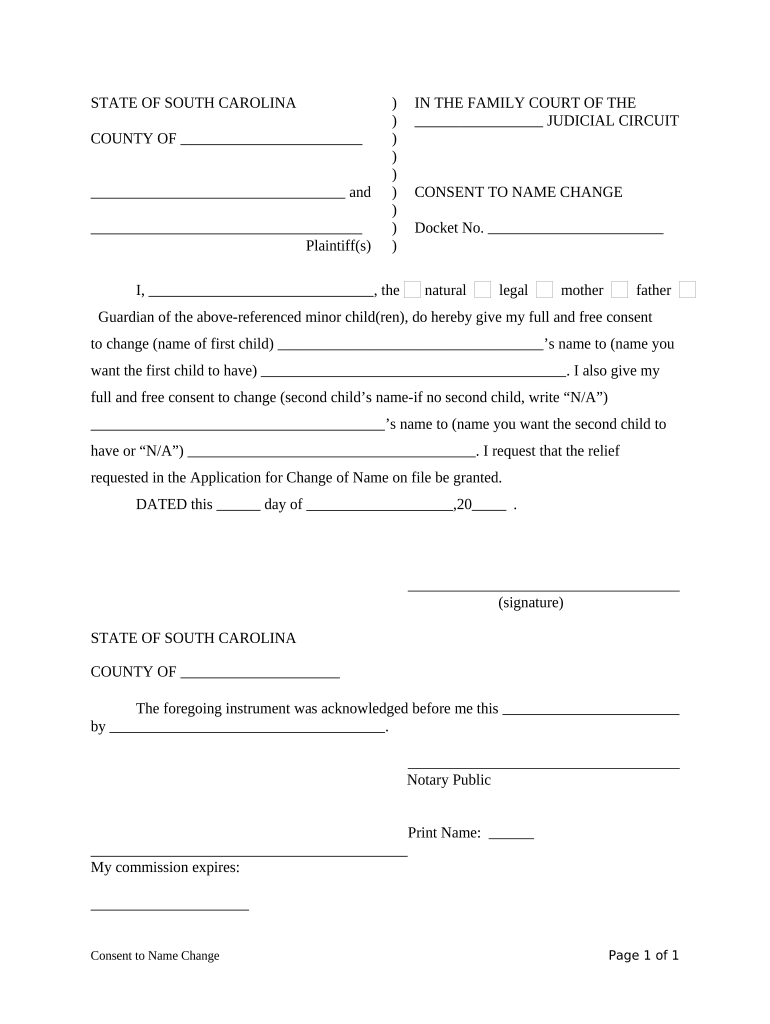
The South Carolina Consent to Name Change is a written declaration from a person with legal authority—commonly a parent, guardian, or the affected adult—agreeing to a proposed legal name change and authorizing the court to enter the change. It is most often required when a minor’s name is being changed or when a non-petitioning parent must authorize a change. The document typically accompanies a court petition, must be signed by the consenting party, and is commonly notarized before filing with the county clerk or family court. Requirements can vary by county and case type.

Why a clear, compliant consent matters

A properly completed consent creates an enforceable record, reduces the chance of contested hearings, and speeds the court’s ability to grant the requested name change while documenting the consenting party’s intent and authority.

Why a clear, compliant consent matters

Who commonly prepares and signs this consent

Typical parties and professionals involved before and after filing.

  • Parent or legal guardian who has decision-making authority for the minor and must document agreement with the petition.
  • Family law or probate attorneys preparing petitions, advising on evidence, and ensuring the consent meets court rules.
  • Court clerks and judges who review the consent alongside the petition for completeness and procedural compliance.

Roles vary by case; contested matters may require additional affidavits or hearings.

Step-by-step: completing and filing the consent

Follow these core steps to prepare a court-ready consent to name change.

  • 01
    Gather documents: Birth certificate and custody documents if relevant.
  • 02
    Complete form: Fill every required field accurately.
  • 03
    Notarize signature: Sign before a notary if state or court requires.
  • 04
    File with court: Submit to the county clerk or family court as instructed.

Typical submission and review flow

This sequence shows the usual path from preparation to court order for a name change consent.

  • Prepare: Complete consent and gather supporting paperwork.
  • Sign: Consenting party signs in required format.
  • Notarize: Obtain notarization if required by court rules.
  • File and serve: File with clerk and serve other parties per local rules.

Configuring an electronic workflow for the consent

Set up fields and authentication to match legal and court requirements when using an eSignature workflow.

Field Configuration
Signature Type Typed, drawn, or uploaded signature image allowed
Authentication Email link or SMS code; increase strength as needed
Notarization Requirement In-person or remote notarization per state rules
Storage & Access Secure PDF with audit trail and access logs

Security and compliance considerations

Encryption: TLS 1.2/1.3 in transit, AES-256 at rest
Audit Trail: Captures timestamps, IP, and signer actions
HIPAA: BAA required for protected health information
ESIGN / UETA: Platform must support legal e-signature standards
Certifications: SOC 2 Type II and ISO 27001 available
File Formats: PDF, DOCX, and HTML preservation supported

Consequences of defective or missing consent

Denial of Petition: Court may refuse to grant the name change
Hearing Required: Additional court proceedings and delays
Costs Lost: Filing fees and attorney costs not refunded
Perjury Risk: False statements can create legal exposure
Identity Mismatch: Inconsistent names can block record updates
Record Challenges: Third parties may decline documentation updates

Frequent preparation mistakes to avoid

  • Using initials or shortened names instead of full legal names creates ambiguity and often prompts court requests for clarification.
  • Failing to notarize a consent where required leads to immediate rejection or a requirement to re-execute the document in presence of a notary.
  • Entering inconsistent dates between the petition and consent can trigger notices and delay scheduling of hearings or final orders.
  • Not serving or providing notice to the other parent or interested parties per local rules can result in contested proceedings.

Practical tips for accurate and efficient completion

Follow these best practices to reduce friction and avoid common court objections.

Verify identity documents
Confirm names and birth dates against certified records, and attach copies when local rules require proof of identity.
Use full legal names
Avoid nicknames, initials, or abbreviations; courts prefer the exact legal name as it appears on official documents.
Check county rules
Local clerks may have specific forms, fee waivers, or procedural checklists—follow county-specific instructions closely.
Keep certified copies
Maintain a notarized original and several certified copies for issuing agencies like Social Security and DMV.

Core components of a professional consent document

A court-ready consent combines clear parties, authoritative language, and supporting verification elements to meet judicial review standards.

Parties

Identify the consenting adult and the minor by full legal name and relationship to avoid ambiguity.
Current Identity

Include the minor's current legal name, date of birth, and identifying details such as birth county.

Proposed Name

State the exact new full name and any intended use or limitations, such as middle name retention.

Consent Language

Use explicit wording indicating voluntary consent and authority to consent under relevant custody orders.

Notary Block

Provide a notary acknowledgement formatted for the state and include the notary's commission details.

Attachments

Attach supporting documentation like birth certificates, custody orders, or prior court decrees where applicable.

Technical delivery and platform requirements

Digital workflows should match the legal requirements for signature, notarization, and document preservation.

  • Integrations: Salesforce, NetSuite, Google Workspace supported
  • Formats: PDF, DOCX, HTML accepted and exportable
  • Authentication: Email, SMS code, and advanced options available

Confirm that chosen tools produce a tamper-evident signed PDF with a complete audit trail and retention capabilities.

eSignature vendor pricing and capability snapshot

Compare core pricing and core capabilities commonly considered for legal forms and notarization workflows; signNow is listed first per comparisons.

signNow DocuSign Adobe Sign PandaDoc HelloSign
Starting Price $8/user/mo $15/user/mo $14/user/mo $19/user/mo $15/user/mo
Free Trial 7-day free trial, no card Varies by plan Varies by plan Varies by plan Varies by plan
Bulk Send Yes Yes Yes Yes No
Audit Trail Yes Yes Yes Yes Yes
HIPAA Compliant Yes Yes Yes No No
Envelope Cap No cap 100 envelopes/user/year Varies by plan Varies by plan Varies by plan

FAQs: common questions about consent and execution

Answers cover execution, notarization, electronic signatures, and steps to correct common defects in a consent to name change.


Need help? Contact support

be ready to get more
Join over 28 million airSlate SignNow users