Establishing secure connection… Loading editor… Preparing document…
Navigation

Fill and Sign the Self Inspection 497318541 Form
Fill and Sign the Self Inspection 497318541 Form

How it works

Open the document and fill out all its fields.
Apply your legally-binding eSignature.
Save and invite other recipients to sign it.

Rate template

4.4
37 votes
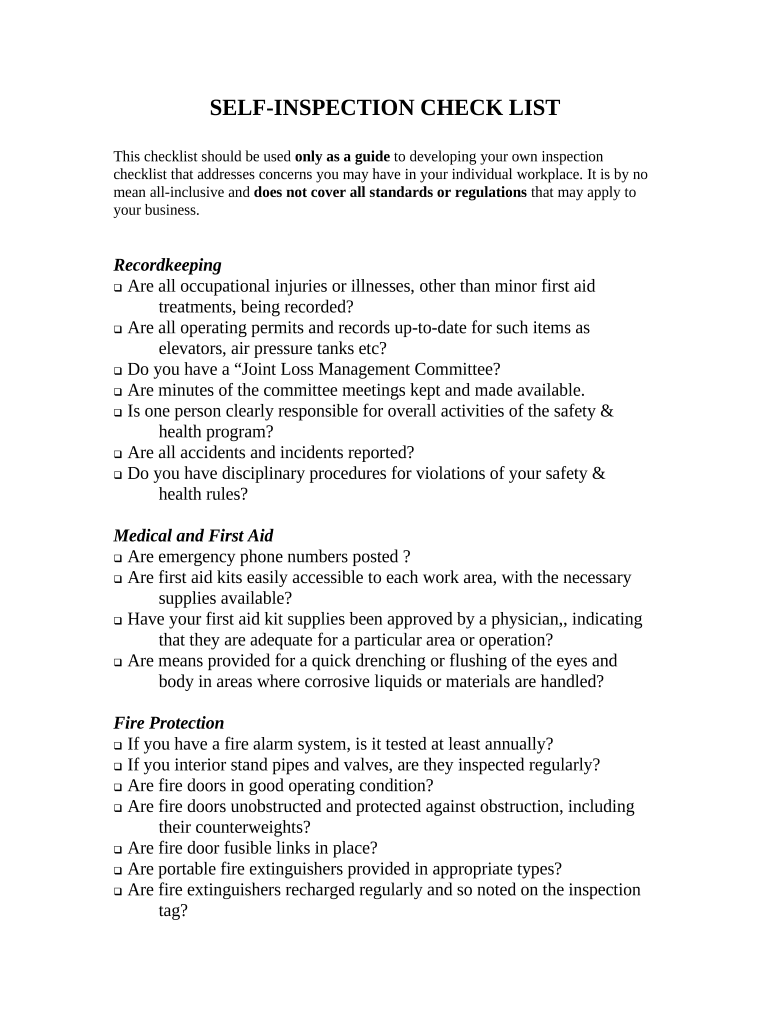
SELF-INSPECTION CHECK LIST This checklist should be used only as a guide to developing your own inspection checklist that addresses concerns you may have in your individual workplace. It is by no mean all-inclusive and does not cover all standards or regulations that may apply to your business. Recordkeeping  Are all occupational injuries or illnesses, other than minor first aid treatments, being recorded?  Are all operating permits and records up-to-date for such items as elevators, air pressure tanks etc?  Do you have a “Joint Loss Management Committee?  Are minutes of the committee meetings kept and made available.  Is one person clearly responsible for overall activities of the safety & health program?  Are all accidents and incidents reported?  Do you have disciplinary procedures for violations of your safety & health rules? Medical and First Aid  Are emergency phone numbers posted ?  Are first aid kits easily accessible to each work area, with the necessary supplies available?  Have your first aid kit supplies been approved by a physician,, indicating that they are adequate for a particular area or operation?  Are means provided for a quick drenching or flushing of the eyes and body in areas where corrosive liquids or materials are handled? Fire Protection  If you have a fire alarm system, is it tested at least annually?  If you interior stand pipes and valves, are they inspected regularly?  Are fire doors in good operating condition?  Are fire doors unobstructed and protected against obstruction, including their counterweights?  Are fire door fusible links in place?  Are portable fire extinguishers provided in appropriate types?  Are fire extinguishers recharged regularly and so noted on the inspection tag?  Are employees periodically instructed in the proper use of portable fire extinguishers and fire protection procedures? Personal Protective Clothing and Equipment  Are protective goggles or face shields provided and worn where there is a danger of flying particles or corrosive materials?  Are approved safety glasses required to be worn at all times in areas where there is a risk of eye injuries?  Are protective gloves, aprons, shields or other means provided and required where employees could be cut or where there is a reasonably anticipated exposure to corrosive liquids, chemicals, blood, or other potentially infectious materials?  Are hard hats provided and worn when there is a danger of falling objects?  Is appropriate foot protection required where there is a risk of foot injuries from hot or corrosive materials, falling objects, or crushing or penetrating injuries?  Are approved respirators provided for regular or emergency use as required?  Is all personal protective equipment maintained in a sanitary condition and ready for use?  Do you have an eye wash station for quick drenching of the eyes in areas where employees are exposed to corrosive materials?  Is protection against occupational noise exposure provided when the sound levels exceed limits? General Work Environment  Are all work areas clean, sanitary and orderly?  Are work surfaces kept dry or appropriate means taken to assure the surfaces are slip-resistant?  Is combustible scrap, debris and waste stored safely and removed from the worksite promptly?  Are accumulations of combustible dust routinely removed from the work areas?  Are covered metal waste cans used for oily and paint-soaked rags?  Are paint spray booths, dip tanks and spray areas cleaned regularly?  Are all toilets and washing facilities clean and sanitary?  Are all work areas adequately illuminated?  Are pits and floor openings covered or otherwise guarded? Walkways  Are aisles and passageways kept clear?  Are aisles and walkways marked as appropriate?  Are wet surfaces covered with a non-slip material?  Is there safe clearance for walking in aisles where motorized or mechanical handling equipment is operating?  Are spilled materials cleaned up immediately?  Are standard guardrails provided wherever aisle or walkway surfaces are elevated above any floor or ground  Are bridges provided over conveyors and similar hazards? Floor and Wall Openings  Are floor openings guarded by a cover, guardrail?  Are toeboards installed around the edge of permanent floor openings (where persons may pass below the opening)?  Are unused portions of service pits or pits not in use covered or protected by guardrails or equivalent?  Are floor or wall openings in fire resistive construction provided with doors or covers compatible with the fire rating of the structure and also provided with self-closing devices? Stairs and Stairways  Are standards stair rails or handrails provided on all stairways having 4 or more risers?  Do stairway handrails have at least 3” of clearance between the rail and the wall or surface they are mounted on?  Are stairways at least 22” wide?  Are step risers on stairs uniform from top to bottom?  Are stairway handrails capable of withstanding a load of 200 pounds, applied within 2” of the top edge, in any downward or outward direction? Elevated Surfaces  Are signs posted, when appropriate, showing the elevated surface load capacity?  Are all surfaces elevated more than 30” above the ground provided with a standard guard?  Is material on elevated surfaces piled, stacked or racked in a manner to prevent it from tipping, falling, collapsing or rolling?  Are dockboards or bridge plates used when transferring materials between a loading dock and truck or rail car? Exiting or Egress  Are all exits marked with an exit sign and illuminated by a reliable light source?  Is the direction to exits, when not immediately apparent, marked with visible signs?  Are doors, passageways or stairways, that are neither exits not access to exits and which could be mistaken for exits, marked “Not An Exit”?  Are all exits kept free from obstructions?  Are there sufficient exits to permit prompt escape in the event of an emergency?  Are special precautions taken to protect employees during construction or repair operations? Exit Doors  Are doors which are required to serve as exits designed and constructed such that the way of exit is obvious/  Are exit doors operable from the direction of exit travel without the use of a key or any special knowledge or effort?  Are doors on cold storage rooms provided with an inside release mechanism, which will release the latch and open the door even when it is padlocked or otherwise locked on the outside?  Where exit doors open directly to any street, alley or other area where vehicles may be operated, are adequate barriers and warnings provided to prevent employees from stepping into the path of traffic?  Are doors that swing in both directions and are located between rooms where there is frequent traffic, provided with viewing ports in each door? Portable Ladders  Are all ladders maintained in good condition?  Are non-slip safety feet provided on each ladder?  Are ladder rungs and steps free from grease or oil?  Is it prohibited to place a ladder in front of doors opening toward the ladder except when the door is blocked, locked or guarded?  Is it prohibited to place ladders on boxes, barrels, or other unstable bases to gain additional height?  Are employees instructed to face the ladder while ascending or descending?  Are employees prohibited from using ladders that are broken, missing steps, rungs or cleats, or otherwise defective?  Are employees instructed not to use the top step of the stepladder as a step?  When portable ladders are used to gain access to elevated platforms, roofs, etc., does the ladder always extend at least 3’ above the elevated surface?  Are all ladders inspected periodically for damage?  Are the rungs of ladders uniformly spaced at 12” center to center? Hand Tools and Equipment  Are all tools, used by the employees at the workplace, in good condition?  Are hand tools such as chisels, & punches, which may develop mushroomed heads during use, reconditioned or replaced as necessary/  Are broken or fractured handles on hammers, axes and similar tools replaced immediately?  Are worn or bent wrenches replaced as necessary?  Are appropriate safety glasses, face shields, etc., used while using hand tools or equipment which might be subject to breakage or could result in flying parts such as metal from chisels?  Are tools stored in dry, secure locations where they won’t be tampered with?  Are grinders, saws and similar equipment provided with appropriate safety guards?  Are power tools used with the correct shield, guard or other attachment as recommended by the manufacturer?  Are portable circular saws equipped with guards above and below the blade?  Are portable circular saws checked to assure that the guard is not wedged in the up position?  Are rotating or moving parts of equipment guarded to prevent physical contact?  Are all cord-connected, electrically operated tools and equipment effectively grounded or of the approved double insulted type.  Are effective guards in place over belts, pulleys, chains, sprockets, and gears?  Are portable fans provided with full guards or screens with openings not larger than ½”?  Is hoisting equipment available and used for lifting heavy objects, and are ratings and characteristics appropriate for that task?  Are ground fault circuit interrupters provided on all temporary electrical 15 & 20-ampere circuits used during periods of construction? Abrasive Wheel Equipment- Grinders  Is the work rest adjusted to within 1/8” of the face of the abrasive wheel?  Is the adjustable tongue guard on the top side of the grinder used and kept adjusted to within ¼” of the wheel?  Do side guards cover the spindle end, nut and flange and 75% of the wheel diameter?  Are bench and pedestal grinders permanently mounted?  Are goggles and or face shields worn while grinding?  Is the maximum RPM rating of each abrasive wheel compatible with the RPM rating of the grinder motor?  Are fixed or permanently mounted grinders connected to their supply system with metal conduit or other permanent wiring?  Does each grinder have it’s own on-off control?  Before new abrasive wheels are mounted, are they visually inspected and ring tested/ Machine Guarding  Is there a training program to instruct employees on the safe methods of machine operation?  Is there a regular program of inspection to assure the safe operation of machinery and equipment?  Is sufficient clearance provided around and between machines to allow for safe operations, set up and servicing?  Is there a power shut-off switch within reach of the operator’s station?  Can all power sources to each machine be locked out for safe maintenance or set-up?  Are all non-current carrying metal parts of electrically operated equipment properly grounded/  Are foot-operated switches guarded or arranged to prevent accidental operation from personnel or falling objects?  Are all emergency stop buttons colored red?  Are all pulleys and belts within 7’ of the floor properly guarded?  Are all moving chains and gears guarded?  Are methods provided to protect the operator and other employees in the machine area from hazards created at the point of operation?  Are machine guards secure and so arranged so that they do not pose a hazard by their use?  Are provisions made to prevent machines from automatically re-starting following a restoration of power after a power outage?  Are saws used for ripping equipped with an anti-kick back device and spreader bar?  Are radial arm saws so arranged so that the cutting head will gently return to the back of the table when released? Lockout/Tagout Procedures  Is there a program that describes the procedures for safely locking out machinery and equipment prior to repairs, routine maintenance and setup?  Are employees properly trained in the correct lockout techniques?  Does the lockout program include all energy sources such as electrical, pneumatic, hydraulic, and all other stored energy? Welding, Cutting and Brazing  Are only authorized and trained personnel permitted to use welding, cutting and brazing equipment?  Are compressed gas cylinders regularly examined for obvious signs of defects, rusting or leakage?  Are cylinders kept away from heat sources?  Are all hoses, regulators and valves checked periodically for wear or defects?  Are electrodes removed from the holder when not in use?  Are firewatchers assigned when welding or cutting is performed in locations where there is a danger of fires starting?  Is eye protection worn whenever welding or cutting operations are performed? Compressed Gas Cylinders  Are compressed gas cylinders stored in the upright position and secured to prevent them from being knocked over?  Are fuel cylinders and oxygen cylinders stored at least 20 feet apart or separated by a non-combustible petition at least 5’ high and with a fire rating of at least ½ hour?  Are valve protection caps in place when cylinders are transported, moved or stored? Industrial Trucks – Forklifts  Are only trained employees allowed to operate powered industrial trucks/  Are forklifts trucks with extended lifts equipped with an overhead guard?  Are forklift trucks maintained in good operating condition and are repairs performed in a timely manner? Spraying Operations  Is adequate ventilation assured before spray operations begin?  Is mechanical ventilation provided when spraying operations are conducted in confined areas?  Is the spray area at least 20’ feet from any flames, sparks, operating electric motors or other ignition sources?  Are “No Smoking” signs posted in any spray area or booth?  Is approved respiratory equipment provided and used when spraying operations are undertaken?  Are spray booth filters checked on a regular schedule and replaced when necessary? Confined Space Entry  Is there a plan for assuring the safety and health of employees when they are required to enter into any confined workspace?  Are all the provisions of the Confined Space Entry program strictly adhered to by all employees?  Are employees trained in the hazards of working in confined spaces?  Is documentation kept to assure that the correct procedures have been followed whenever anyone has had to enter into a confined space? Flammable & Combustible Materials  Are proper containers used for storage and handling of flammable and combustible materials?  Are drums of flammable liquids grounded and bonded to containers when dispensing?  Do storage rooms for flammable and combustible liquids have explosion proof wiring and lights?  Is there a portable fire extinguisher, rated at least 6# BC, located within 75’ of any refueling area? Hazardous and Toxic Substances  Are all employees who might be exposed to hazardous materials during the course of their work, properly trained as required by the Worker’s Right To Know Law”?  Are Materials Safety Data Sheets (MSDS’), available for all hazardous materials used in the facility?  Is proper personnel protective equipment available and utilized to protect employees working with hazardous or toxic materials?  Do employees understand the reasons for use and limitations of the personnel protective equipment?  Are all containers of such materials properly labeled to indicate their content? Electrical Requirements  Are live parts of all electrical equipment operating at 50 volts or more adequately guarded to prevent accidental contact?  Are all metal non-current carrying parts of fixed equipment grounded?  Are exposed non-current carrying metals parts of cord & plug connected equipment grounded?  Is flexible cord being used in place of required fixed wiring?  Are disconnects in electrical service panels legibly marked to indicate their purpose?  Are flexible cords used free from splices, cracks in insulation and fraying?  Are ground fault circuit interrupters used on all 15-20 ampere circuits for construction sites that are not a part of the permanent wiring of the building or structure?  Are flexible cords connected to devices and fittings so that strain relief is provided which will prevent pull from being directly transmitted to the joints or terminal screws? 

Useful advice on finalizing your ‘Self Inspection 497318541’ digitally

Are you fed up with the trouble of managing documents? Look no further than airSlate SignNow, the leading eSignature platform for individuals and businesses. Wave goodbye to the tedious routine of printing and scanning files. With airSlate SignNow, you can effortlessly finalize and sign documents online. Utilize the robust features integrated into this user-friendly and affordable platform and transform your method of document management. Whether you need to sign documents or collect eSignatures, airSlate SignNow takes care of everything effortlessly, with just a few clicks.

Adhere to this comprehensive guide:

  1. Sign in to your account or register for a complimentary trial with our service.
  2. Select +Create to upload a file from your device, cloud storage, or our template library.
  3. Open your ‘Self Inspection 497318541’ in the editor.
  4. Click Me (Fill Out Now) to finalize the document on your end.
  5. Add and assign fillable fields for additional parties (if needed).
  6. Proceed with the Send Invite options to solicit eSignatures from others.
  7. Download, print your copy, or convert it into a reusable template.

Don’t fret if you need to work with your colleagues on your Self Inspection 497318541 or send it for notarization—our solution offers everything necessary to accomplish such tasks. Create an account with airSlate SignNow today and enhance your document management to new levels!

Here is a list of the most common customer questions. If you can’t find an answer to your question, please don’t hesitate to reach out to us.

Need help? Contact Support

The best way to complete and sign your self inspection 497318541 form

Save time on document management with airSlate SignNow and get your self inspection 497318541 form eSigned quickly from anywhere with our fully compliant eSignature tool.

How to Sign a PDF Online How to Sign a PDF Online

How to fill out and sign forms online

In the past, dealing with paperwork took lots of time and effort. But with airSlate SignNow, document management is easy and fast. Our robust and user-friendly eSignature solution allows you to effortlessly fill out and eSign your self inspection 497318541 form online from any internet-connected device.

Follow the step-by-step guide to eSign your self inspection 497318541 form template online:

  • 1.Register for a free trial with airSlate SignNow or log in to your account with password credentials or SSO authorization option.
  • 2.Click Upload or Create and add a file for eSigning from your device, the cloud, or our form library.
  • 3.Click on the file name to open it in the editor and use the left-side toolbar to complete all the blank fields accordingly.
  • 4.Drop the My Signature field where you need to approve your sample. Type your name, draw, or import a picture of your regular signature.
  • 5.Click Save and Close to finish modifying your completed form.

After your self inspection 497318541 form template is ready, download it to your device, save it to the cloud, or invite other individuals to electronically sign it. With airSlate SignNow, the eSigning process only takes several clicks. Use our powerful eSignature tool wherever you are to manage your paperwork effectively!


How to Sign a PDF Using Google Chrome How to Sign a PDF Using Google Chrome

How to complete and sign paperwork in Google Chrome

Completing and signing documents is easy with the airSlate SignNow extension for Google Chrome. Adding it to your browser is a quick and effective way to deal with your forms online. Sign your self inspection 497318541 form template with a legally-binding eSignature in just a few clicks without switching between applications and tabs.

Follow the step-by-step guidelines to eSign your self inspection 497318541 form template in Google Chrome:

  • 1.Go to the Chrome Web Store, search for the airSlate SignNow extension for Chrome, and install it to your browser.
  • 2.Right-click on the link to a document you need to approve and select Open in airSlate SignNow.
  • 3.Log in to your account using your credentials or Google/Facebook sign-in buttons. If you don’t have one, you can start a free trial.
  • 4.Use the Edit & Sign toolbar on the left to complete your template, then drag and drop the My Signature option.
  • 5.Upload a photo of your handwritten signature, draw it, or simply enter your full name to eSign.
  • 6.Verify all the details are correct and click Save and Close to finish modifying your form.

Now, you can save your self inspection 497318541 form sample to your device or cloud storage, send the copy to other people, or invite them to electronically sign your document with an email request or a secure Signing Link. The airSlate SignNow extension for Google Chrome improves your document processes with minimum time and effort. Try airSlate SignNow today!


How to Sign a PDF in Gmail How to Sign a PDF in Gmail How to Sign a PDF in Gmail

How to fill out and sign documents in Gmail

Every time you get an email with the self inspection 497318541 form for signing, there’s no need to print and scan a file or download and re-upload it to a different tool. There’s a much better solution if you use Gmail. Try the airSlate SignNow add-on to rapidly eSign any paperwork right from your inbox.

Follow the step-by-step guide to eSign your self inspection 497318541 form in Gmail:

  • 1.Visit the Google Workplace Marketplace and look for a airSlate SignNow add-on for Gmail.
  • 2.Set up the program with a corresponding button and grant the tool access to your Google account.
  • 3.Open an email with an attached file that needs signing and utilize the S sign on the right panel to launch the add-on.
  • 4.Log in to your airSlate SignNow account. Opt for Send to Sign to forward the file to other parties for approval or click Upload to open it in the editor.
  • 5.Place the My Signature field where you need to eSign: type, draw, or import your signature.

This eSigning process saves efforts and only takes a few clicks. Take advantage of the airSlate SignNow add-on for Gmail to update your self inspection 497318541 form with fillable fields, sign paperwork legally, and invite other people to eSign them al without leaving your mailbox. Boost your signature workflows now!


How to Sign a PDF on a Mobile Device How to Sign a PDF on a Mobile Device How to Sign a PDF on a Mobile Device

How to fill out and sign documents in a mobile browser

Need to rapidly submit and sign your self inspection 497318541 form on a mobile phone while working on the go? airSlate SignNow can help without the need to set up extra software applications. Open our airSlate SignNow tool from any browser on your mobile device and add legally-binding electronic signatures on the go, 24/7.

Follow the step-by-step guidelines to eSign your self inspection 497318541 form in a browser:

  • 1.Open any browser on your device and go to the www.signnow.com
  • 2.Register for an account with a free trial or log in with your password credentials or SSO option.
  • 3.Click Upload or Create and add a file that needs to be completed from a cloud, your device, or our form collection with ready-made templates.
  • 4.Open the form and fill out the empty fields with tools from Edit & Sign menu on the left.
  • 5.Add the My Signature field to the sample, then enter your name, draw, or upload your signature.

In a few simple clicks, your self inspection 497318541 form is completed from wherever you are. Once you're finished editing, you can save the file on your device, create a reusable template for it, email it to other people, or invite them eSign it. Make your paperwork on the go fast and effective with airSlate SignNow!


How to Sign a PDF on iPhone How to Sign a PDF on iPhone

How to complete and sign paperwork on iOS

In today’s business world, tasks must be accomplished quickly even when you’re away from your computer. Using the airSlate SignNow app, you can organize your paperwork and approve your self inspection 497318541 form with a legally-binding eSignature right on your iPhone or iPad. Install it on your device to close deals and manage forms from anyplace 24/7.

Follow the step-by-step guidelines to eSign your self inspection 497318541 form on iOS devices:

  • 1.Go to the App Store, find the airSlate SignNow app by airSlate, and set it up on your device.
  • 2.Open the application, tap Create to upload a template, and choose Myself.
  • 3.Opt for Signature at the bottom toolbar and simply draw your signature with a finger or stylus to eSign the sample.
  • 4.Tap Done -> Save right after signing the sample.
  • 5.Tap Save or use the Make Template option to re-use this paperwork in the future.

This process is so easy your self inspection 497318541 form is completed and signed in just a few taps. The airSlate SignNow application works in the cloud so all the forms on your mobile device are kept in your account and are available whenever you need them. Use airSlate SignNow for iOS to boost your document management and eSignature workflows!


How to Sign a PDF on Android How to Sign a PDF on Android

How to fill out and sign forms on Android

With airSlate SignNow, it’s easy to sign your self inspection 497318541 form on the go. Install its mobile app for Android OS on your device and start enhancing eSignature workflows right on your smartphone or tablet.

Follow the step-by-step guide to eSign your self inspection 497318541 form on Android:

  • 1.Open Google Play, find the airSlate SignNow app from airSlate, and install it on your device.
  • 2.Log in to your account or register it with a free trial, then add a file with a ➕ option on the bottom of you screen.
  • 3.Tap on the imported file and select Open in Editor from the dropdown menu.
  • 4.Tap on Tools tab -> Signature, then draw or type your name to electronically sign the template. Fill out blank fields with other tools on the bottom if needed.
  • 5.Use the ✔ key, then tap on the Save option to finish editing.

With an intuitive interface and full compliance with main eSignature laws and regulations, the airSlate SignNow app is the perfect tool for signing your self inspection 497318541 form. It even works offline and updates all document changes once your internet connection is restored and the tool is synced. Complete and eSign forms, send them for approval, and make multi-usable templates whenever you need and from anyplace with airSlate SignNow.

Sign up and try Self inspection 497318541 form
  • Close deals faster
  • Improve productivity
  • Delight customers
  • Increase revenue
  • Save time & money
  • Reduce payment cycles

