Establishing secure connection…Loading editor…Preparing document…

Ohio Affidavit in Proof of Service

This template is fully customizable. Edit the text, fill out the fields, and send it for signature. Give it a try!
Ohio Affidavit in Proof of Service

What the Ohio Affidavit in Proof of Service Is

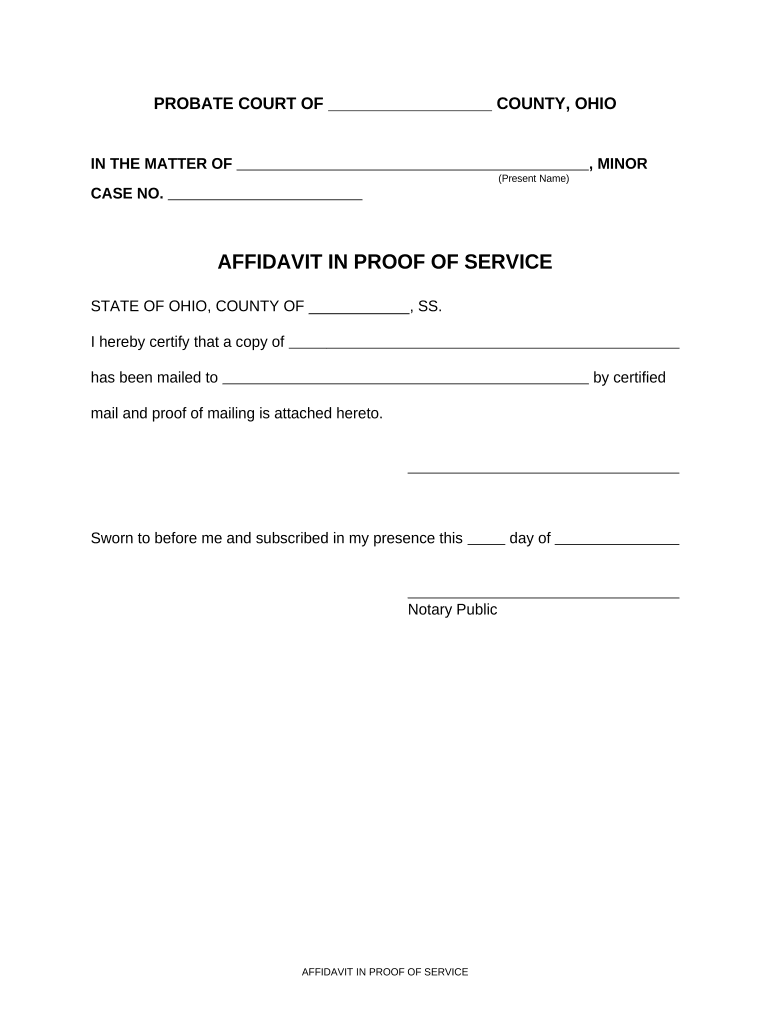
The Ohio Affidavit in Proof of Service is a sworn statement filed with the court or opposing counsel to confirm that a party or document was properly served. It records who was served, when and where service occurred, the method used, and the server's certification under oath. The affidavit supports jurisdictional and notice requirements and becomes part of the case record used by judges and clerks to verify that service requirements under civil procedure were satisfied.

Why a Clear Affidavit Matters for Your Case

A complete affidavit establishes proof of service, reduces disputes over notice, and helps avoid delays or dismissal. It creates a sworn record the court can rely on when scheduling hearings or entering default judgments.

Why a Clear Affidavit Matters for Your Case

Who Typically Prepares and Files This Affidavit

Several roles commonly prepare or file an affidavit in proof of service depending on case type and local rule.

  • Private process servers — Deliver and document service for plaintiffs and attorneys.
  • Attorneys and paralegals — Prepare and file the affidavit that accompanies pleadings or motions.
  • Court clerks or self-represented parties — File the affidavit with the clerk after service is complete.

Choose the preparer based on who performed service and the court's local rules; courts expect accurate, sworn statements that match the underlying service events.

Roles Who Sign and Certify the Affidavit

Court Clerk — Case Administration

Clerks review filed affidavits for completeness and accept them into the case record; they do not verify factual accuracy but will flag obvious deficiencies for correction before docketing.

Process Server — Service Provider

The server who completed service must sign under oath, provide a factual narrative of how service occurred, and supply contact information; sworn statements from neutral servers carry weight for courts evaluating service validity.

Step-by-Step: Completing the Ohio Affidavit in Proof of Service

Follow these four core steps to create a usable affidavit that complies with court expectations and reduces the risk of refusal or dispute.

  • 01
    Prepare Document: Open the template and enter the case caption and court information.
  • 02
    Record Service Details: List the recipient, address, date, time, and method of service precisely.
  • 03
    Swear and Sign: The server signs under oath before a notary or authorized official.
  • 04
    File or Serve: File the affidavit with the court clerk and provide copies to other parties.

Core Elements of a Professional Ohio Affidavit in Proof of Service

A well-constructed affidavit includes standardized elements so clerks and judges can confirm service quickly and objectively.

Court Identification

Full court name, county, case caption, and case number placed at the top for correct docketing and record linkage.
Service Narrative

A concise, chronological account of who was served, where, when, and how the document was delivered or mailed.

Recipient Details

Recipient's full legal name and service address, including apartment or suite numbers and any identifying descriptors.

Server Credentials

Name, company (if applicable), address, and contact information of the person who performed service; business or process server ID if used.

Oath Language

A sworn statement under penalty of perjury with space for the server's signature and notary or official verification.

Exhibits and Proof

Attachments such as delivery receipts, certified mail return cards, or photographs referenced in the affidavit for substantiation.

Required Data Elements at a Glance

Case Caption: Court and parties
Case Number: Assigned docket number
Person Served: Full legal name
Service Date/Time: MM/DD/YYYY and time
Method of Service: Personal, mail, posted
Notary Block: Signature and seal

How to Configure an Online Affidavit Workflow

When using an e-signature platform or e-filing workflow, confirm settings for authentication, file formats, and notary or witness steps.

Field Configuration
Authentication Email link, SMS code, or KBA
Signature Type Electronic signature or wet sign
Notary Support Enable RON or local notary block
File Format PDF/A preferred for court filing

Where to File and How the Filing Process Works

After notarization, the affidavit must be routed to the correct court or opposing counsel per local rules; methods vary by county and court.

  • File with Clerk: Submit the original affidavit to the county clerk for docketing.
  • Provide Copies: Serve copies to opposing counsel or parties as required by court rules.
  • eFile Where Allowed: Use the court's e-filing system if the county accepts electronic affidavits.
  • Retain Proof: Keep stamped or confirmation copies for your case file.

Digital Signing and eSubmission Considerations

Ensure platform capabilities match court and local rule requirements before submitting an electronic affidavit.

  • File formats: PDF, PDF/A, Word DOCX supported
  • Integrations: Connects with case management and storage solutions
  • Authentication: Email, SMS, KBA, or advanced options

Verify that the chosen platform supports notarization workflows, preserves an audit trail, and stores a tamper-evident version for court use.

Timing: When to File Your Affidavit

File the affidavit within the timeframe required by the court or applicable rule so it is available before hearings or default entry deadlines.

Before Hearing:

File prior to the scheduled hearing per court order.

After Service:

Serve affidavit and file promptly to confirm notice.

Default Proceedings:

Provide proof of service before seeking default judgment.

Rule Deadlines:

Observe local civil rule timeframes for service and filing.

Court Requests:

Respond immediately if the clerk requests clarification.

Consequences of an Incorrect or Incomplete Affidavit

Invalid Service: Service may be rejected
Case Delay: Hearings postponed
Contempt Risk: Possible sanctions for false statements
Additional Costs: Repeat service fees
Loss of Relief: Default or relief may be denied
Perjury Exposure: Criminal penalties possible

Common Mistakes to Avoid When Preparing Proof of Service

  • Using imprecise service descriptions (for example, 'left at address' without details) that invite factual challenges or contradictory affidavits.
  • Failing to notarize or include the required oath language where the court or local rule requires an acknowledgment or sworn signature.
  • Mismatching the case caption or case number between the affidavit and other filings, which can lead to misfiling or delayed docketing.
  • Omitting server contact details or failing to attach supporting exhibits like certified mail return receipts or photos that corroborate the service claim.

Practical Tips for Accurate, Efficient Affidavits

Follow consistent procedures and keep organized evidence to support every affidavit you file.

Use Full Legal Names and Addresses
Always record full legal names, complete street addresses, and any apartment or suite numbers to eliminate ambiguity about who was served.
Attach Corroborating Evidence
Include copies of certified mail receipts, delivery confirmations, photographs, or timestamped logs to strengthen the affidavit's factual basis.
Notarize Promptly
Have the server sign and notarize the affidavit as soon as practicable to avoid issues with recollection or challenge to the sworn testimony.
Keep Tamper-Evident Records
Retain a locked electronic copy with an audit trail and a stamped paper original to preserve admissibility and provenance.

eSignature Pricing Comparison for Completing Affidavits

Platform pricing and capabilities vary; signNow is shown first for ease of comparison. Check vendor plans for the features you need such as notarization workflows, bulk send, and HIPAA BAAs.

signNow DocuSign Adobe Sign PandaDoc HelloSign
Starting Price $8/user/mo $15/user/mo $14/user/mo $19/user/mo $15/user/mo
Free Trial 7-day free trial Varies by plan/vendor Varies by plan/vendor Varies by plan/vendor Varies by plan/vendor
Bulk Send Yes (Business Premium) Varies by plan Varies by plan Varies by plan Varies by plan
Audit Trail Yes Yes Yes Yes Yes
HIPAA Compliant Yes (BAA available) Varies by plan Varies by plan Varies by plan Varies by plan

Frequently Asked Questions About the Ohio Affidavit in Proof of Service

Answers to common concerns about validity, notarization, e-signing, and what to do when errors appear on a filed affidavit.


Need help? Contact support

be ready to get more
Join over 28 million airSlate SignNow users