Establishing secure connection…Loading editor…Preparing document…

Second Amendment Agreement

This template is fully customizable. Edit the text, fill out the fields, and send it for signature. Give it a try!
Second Amendment Agreement

What the Second Amendment Agreement Is and When it Applies

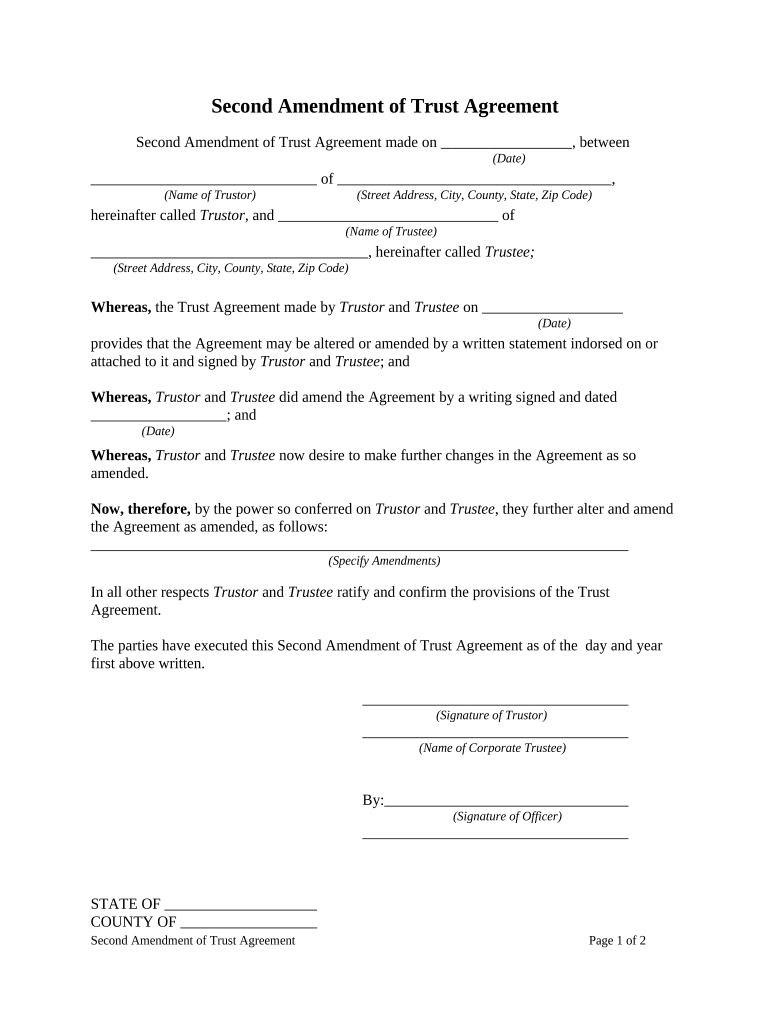
A Second Amendment Agreement is a written amendment that modifies specific provisions of a previously executed contract or agreement. It typically references the original agreement by title and date, describes the clauses being changed, and records the mutually agreed amendments while leaving unchanged provisions intact. The document is signed by the same parties or their authorized signatories and becomes effective on the stated effective date or upon execution, depending on the amendment language and any governing-law provisions specified.

Why a Formal Second Amendment Agreement Matters

A clear, signed amendment reduces ambiguity by documenting agreed changes, preserves the original agreement’s integrity, and establishes the effective date and scope of modifications. It also provides an auditable record for compliance, future disputes, and regulatory review under applicable commerce and contract laws.

Why a Formal Second Amendment Agreement Matters

Who Typically Prepares and Signs This Amendment

Each signer should confirm authority to bind their organization and verify that the amendment does not conflict with other executed agreements or regulatory obligations.

  • Corporate Legal Teams — Use standardized amendment language to preserve existing contract structure and limit unintended changes.
  • Finance or Treasury — Modify payment schedules, rates, or security provisions consistent with loan agreements and financial covenants.
  • Real Estate Parties — Adjust lease terms, extend lease periods, or change options without creating a new lease document.

Core Elements to Include in a Professional Second Amendment Agreement

A robust amendment is concise yet explicit, references the original agreement, specifies amended language, and clearly sets the effective date and signatory authority.

Title and Reference

Identify the document as the Second Amendment, cite the original agreement title and execution date, and list parties to avoid ambiguity.
Recitals

Briefly state the background and purpose of the amendment, explaining why changes are being made and confirming that other terms remain in force.

Amendment Clauses

Specify exact clause numbers and provide the substitute language or strike-through text so the precise contractual change is legally enforceable.

Effective Date

State the effective date using MM/DD/YYYY format or tie effectiveness to execution conditions such as receipt of approvals or filings.

Signatory Block

Include printed name, title, company name, signature line, and date for each party; note any required corporate approvals or board resolutions.

Miscellaneous

Include governing law, representation that no other modifications apply, and a merger clause clarifying the amendment’s relationship to the original agreement.

Required Information and Standard Declarations

Party Names: Full legal names
Original Agreement: Title and date
Amended Sections: Clause identifiers
Effective Date: MM/DD/YYYY
Signatures: Authorized signers
Governing Law: State name

Step-by-Step: Completing a Second Amendment Agreement

Follow these steps to prepare, review, and execute a compliant amendment that clearly alters only the intended terms.

  • 01
    Confirm Authority: Verify each signer has authority to bind the party before drafting.
  • 02
    Reference Original: Cite the original agreement title and date on the amendment header.
  • 03
    Insert Changes: State the exact text being replaced or added and identify clause numbers.
  • 04
    Sign and Date: Obtain signatures and enter execution dates for all parties.

Where and How to File or Distribute the Executed Amendment

After execution, route copies to contracting parties, maintain an executed original, and file with any parties or registries that require notice.

  • Internal Records: Store executed originals in contract repository or legal file.
  • Counterparties: Provide fully executed copies to each contractual party immediately.
  • Third Parties: Send to lenders or insurers if amendment affects collateral or coverage.
  • Public Filing: Record with county or registry only if amendment alters a recorded instrument.

Digital Signing and Sharing: Platform and Format Considerations

For regulated records consider platforms offering HIPAA or 21 CFR Part 11 compliance and options for remote online notarization where permitted.

  • File Formats: PDF or Word DOCX are standard, preserving formatting and trackable changes.
  • Authentication: Email links, SMS codes, or advanced signer authentication ensure signer attribution.
  • Audit Trail: Capture timestamps, IP addresses, and action logs for evidentiary value.

How to Configure an Online Amendment Workflow

Set up a simple, auditable routing workflow that collects signatures in the correct order and stores the executed amendment with the original agreement record.

Field Configuration
Upload Document PDF or DOCX; final, non-editable version
Signer Order Sequential or parallel per contract terms
Authentication Level Email-only or SMS/2FA depending on risk
Retention Settings Automated storage to contract repository

Typical Timing and Deadline Considerations

Track execution timing and any notice or approval periods required by the original contract to ensure the amendment is effective and enforceable.

Approval Window:

Observe any internal governance or board approval timelines.

Notice Requirements:

Follow notice periods previously agreed in the original contract.

Effective Date:

Specify explicit date or condition that triggers effectiveness.

Recording Deadlines:

If amending a recorded instrument, file per county deadlines.

Renewal or Term Impact:

Confirm how amendment affects renewal or termination dates.

Common Preparation and Execution Errors to Avoid

  • Vague Amendment Language — Failing to state precise replaced text or clause numbers creates interpretive disputes and litigation risk.
  • Mismatched Parties or Names — Using informal or abbreviated legal names can void or complicate enforcement when identity is contested.
  • Missing Authority Evidence — Executing without recorded corporate approval, board minutes, or delegated authority increases the risk of later challenge.
  • Incorrect Effective Date — Omitting or misdating the effective date can create gaps in obligations or conflicting enforcement periods.

Consequences of Incorrect or Incomplete Amendments

Contractual Dispute: Breach claims or litigation
Unenforceability: Amendment may be held void
Regulatory Exposure: Noncompliance penalties
Financial Loss: Unexpected liabilities
Operational Disruption: Interrupted performance
Recordkeeping Gaps: Audit or discovery risk

eSignature Pricing and Feature Comparison for Signing an Amendment

Compare common plan starting prices and core capabilities for high-volume and single-document amendment signing. signNow is listed first for reference.

signNow DocuSign Adobe Sign PandaDoc HelloSign
Starting Price $8/user/mo $15/user/mo $14/user/mo $19/user/mo $15/user/mo
Free Trial 7-day free trial No No Yes, limited Yes, limited
Bulk Send Yes Yes Yes Yes No
Audit Trail Yes Yes Yes Yes Yes
HIPAA Compliant Yes Yes Yes No No

Frequently Asked Questions About Second Amendment Agreements

Answers to common concerns about drafting, execution, enforceability, and digital signing for amendments to existing contracts.


Need help? Contact support

be ready to get more
Join over 28 million airSlate SignNow users