Establishing secure connection…Loading editor…Preparing document…

Transcript Request Form

This template is fully customizable. Edit the text, fill out the fields, and send it for signature. Give it a try!
Transcript Request Form

What the Transcript Request Form Is

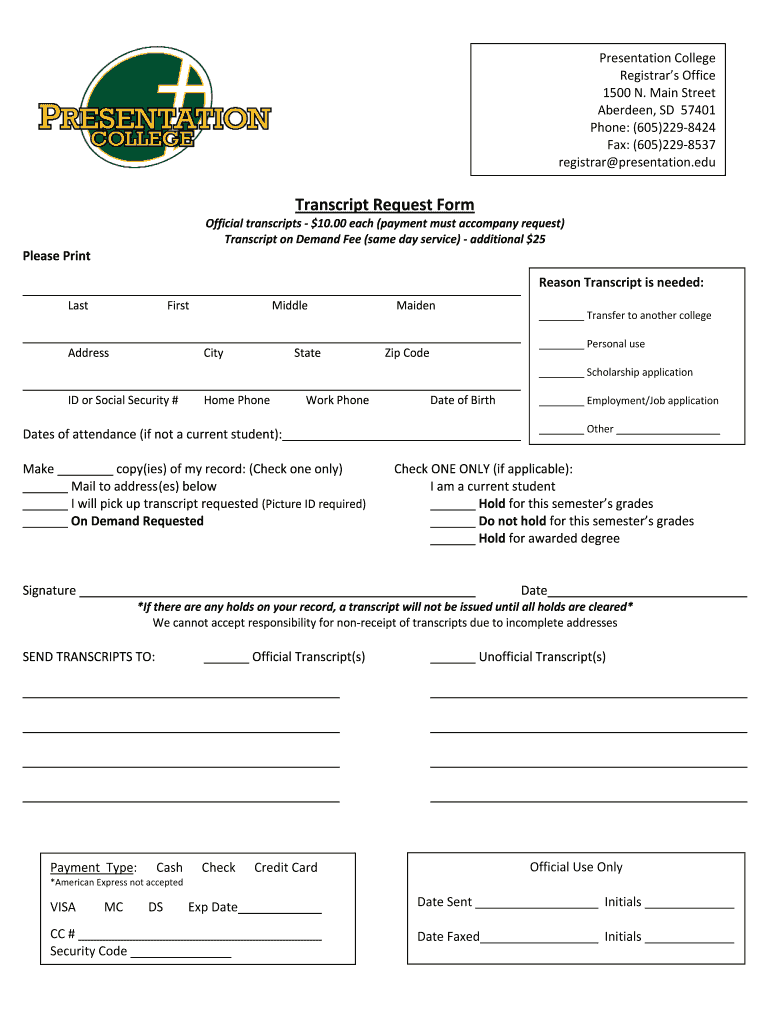
A Transcript Request Form is a formal written authorization used by students, alumni, and authorized third parties to ask an academic institution to prepare and deliver an official academic transcript. The form identifies the requester and student, specifies the transcript type (official or unofficial), lists the recipient and delivery method, and documents any required payment or authorization. Institutions use the completed form to verify identity, confirm records, and log fulfillment. Electronic versions increasingly replicate paper forms while adding audit trails and authentication to meet institutional and legal requirements.

Why a Clear Transcript Request Form Matters

A well-written form reduces processing time, prevents misdelivery, and documents consent for release of education records. Proper completion supports FERPA compliance and helps institutions verify identity, collect fees, and create an auditable record acceptable under ESIGN (15 U.S.C. ch. 96) and UETA where applicable.

Why a Clear Transcript Request Form Matters

Who Typically Completes or Receives Transcript Requests

Students, alumni, registrars, and receiving organizations all rely on the Transcript Request Form to initiate and authorize transcript releases.

  • Current students and alumni requesting official or unofficial transcripts for applications or personal records.
  • Registrar and records office staff who verify identity, assess holds, and process the release.
  • Employers, graduate schools, licensing boards or third-party verifiers requesting certified delivery to an address or agency.

Different roles use the same form for distinct purposes: requester authorization, institutional verification, and recipient acceptance or receipt.

Essential Elements to Include on a Professional Transcript Request Form

A professional form groups requester and student identifiers, delivery instructions, authentication and authorization, payment details, and processing options so records staff can complete requests without follow-up.

Requester Details

Name, relationship to student, contact phone and email, and mailing address so the records office can confirm identity and communicate about the request and any issues during processing.
Student Identifiers

Full legal name, student ID or institutional ID number, date of birth, and last attended term to ensure staff locate the correct academic record without ambiguity or mismatch.

Recipient & Delivery

Recipient name, institution or agency, physical or electronic address, and preferred delivery method (mail, secure portal, electronic upload) to prevent misrouting and meet recipient requirements.

Transcript Type

Specify official or unofficial transcript, number of copies, and whether seals or certified copies are required so fulfillment meets external application or licensing criteria.

Authorization & Consent

A clear release statement, printed name, signature, and date documenting consent to release education records in compliance with FERPA and any institutional policy.

Payment & Fees

Fee amount, payment method, and fee waiver or special handling instructions to allow the registrar’s office to process payment and avoid fulfillment delays.

Required Data Fields at a Glance

Student Name: Full legal name
Student ID: Institutional ID number
Date of Birth: MM/DD/YYYY preferred
Recipient Info: Name and delivery address
Signature: Signed and dated
Payment: Fee amount/method

Step-by-Step: Completing the Transcript Request Form

Follow these sequential steps to reduce processing time and ensure the registrar can verify identity, accept payment, and deliver the correct record without follow-up.

  • 01
    Identify the Student: Enter full legal name and institution ID exactly as shown on records.
  • 02
    Provide Recipient: List recipient name and full mailing or electronic delivery details.
  • 03
    Select Transcript Type: Choose official or unofficial and note any certification or sealing requirements.
  • 04
    Authorize and Pay: Sign, date, and include payment information or fee waiver documentation.

Where to Send or File the Completed Form

Routes vary by institution; use the registrar’s published methods to avoid delays and ensure secure delivery.

  • Registrar Portal: Upload the completed form and payment through the institution’s secure online portal.
  • Registrar Email: Email as instructed only when the office permits electronic submission and identifies acceptable attachment types.
  • Postal Mail: Send a signed paper form to the registrar’s mailing address for sealed official copies.
  • In-Person Drop-off: Deliver a signed form at the records office counter when same-day processing or identity verification is needed.

Digital Submission and System Requirements

Many institutions accept electronic requests; verify the registrar’s accepted formats and authentication requirements before submitting.

  • Accepted Formats: PDF or DOCX preferred; scanned signatures must be legible.
  • Authentication: Photo ID, institutional login, or multi-factor authentication may be required.
  • Integrations: Cloud uploads (Google Drive, Box) and SIS integrations are commonly supported.

Confirm whether the registrar requires original ink signatures, notarization, or a specific secure delivery method; follow those rules to avoid processing delays or rejection.

Timelines, Deadlines, and Typical Processing Expectations

Processing time and delivery speed depend on institution workload, request completeness, and chosen delivery method; plan ahead for application deadlines.

Standard Processing Time:

Typically 3–7 business days for complete requests; times vary by term and office capacity.

Expedited Options:

Some institutions offer 24–48 hour rush processing for an extra fee when available.

Academic Term Cutoffs:

Requests near semester close or graduation require earlier submission to include final grades.

Delivery Lead Time:

Allow additional transit time for mail or third-party verifiers — international delivery may take weeks.

Payment Holds:

Outstanding balances commonly suspend processing until resolved.

Common Mistakes to Avoid

  • Submitting incomplete identifiers such as nicknames or missing student ID causes delays while staff verify records and request clarification.
  • Entering an incorrect recipient address or email leads to misdelivery or returned transcripts if the recipient rejects the format or lacks a secure portal.
  • Failing to include a current signature or required authorization prevents release under FERPA and often requires a corrected, signed form to proceed.
  • Assuming acceptance of scanned signatures when the institution requires original ink or notarized consent for certain certified or sealed copies.

Risks and Consequences of Incorrect Requests

Processing Delays: Extended turnaround
Misdelivery: Record sent to wrong recipient
Privacy Breach: FERPA or HIPAA exposure
Additional Fees: Rush or reissuance charges
Application Misses: Deadlines missed
Record Rejection: Recipient may reject format

eSignature Provider Comparison for Transcript Requests

When choosing an eSignature vendor to support transcript request workflows, consider price, bulk send, audit trails, HIPAA support, and any envelope or usage caps.

signNow DocuSign Adobe Sign PandaDoc HelloSign
Starting Price $8/user/mo $15/user/mo $14/user/mo $19/user/mo $15/user/mo
Free Trial 7-day free trial Varies by plan Varies by plan Varies by plan Varies by plan
Bulk Send Yes (Business Premium) Yes Yes Yes No
Audit Trail Yes Yes Yes Yes Yes
HIPAA Compliant Yes Yes Yes No No

Frequently Asked Questions About Transcript Requests

Answers to common questions about completing, submitting, and correcting Transcript Request Forms while addressing legal and processing concerns.


Need help? Contact support

be ready to get more
Join over 28 million airSlate SignNow users