Establishing secure connection… Loading editor… Preparing document…
Navigation

Fill and Sign the Trust Agreement to Hold Funds for Minor Resulting from Settlement of a Personal Injury Action Filed on Behalf of Minor Form
Fill and Sign the Trust Agreement to Hold Funds for Minor Resulting from Settlement of a Personal Injury Action Filed on Behalf of Minor Form

How it works

Open the document and fill out all its fields.
Apply your legally-binding eSignature.
Save and invite other recipients to sign it.

Rate template

4.5
42 votes
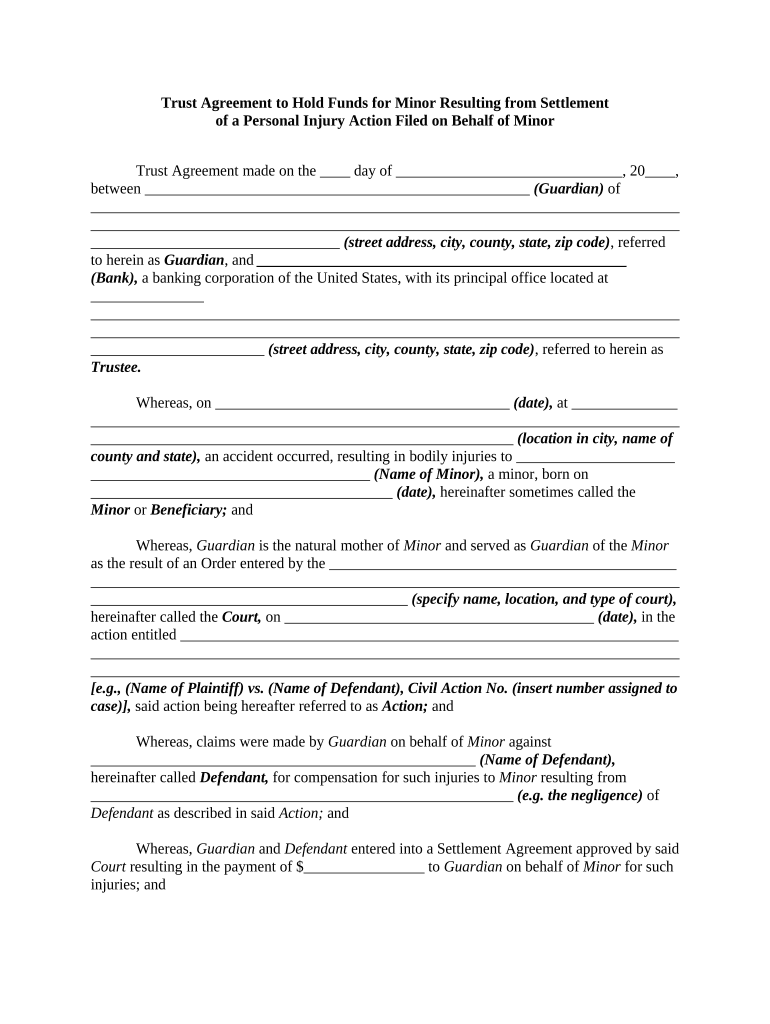
Trust Agreement to Hold Funds for Minor Resulting from Settlement of a Personal Injury Action Filed on Behalf of Minor Trust Agreement made on the ____ day of ______________________________, 20____, between ___________________________________________________ (Guardian) of ______________________________________________________________________________ ______________________________________________________________________________ _________________________________ (street address, city, county, state, zip code) , referred to herein as Guardian , and _________________________________________________ (Bank), a banking corporation of the United States, with its principal office located at _______________ ______________________________________________________________________________ ______________________________________________________________________________ _______________________ (street address, city, county, state, zip code) , referred to herein as Trustee. Whereas, on _______________________________________ (date), at ______________ ______________________________________________________________________________ ________________________________________________________ (location in city, name of county and state), an accident occurred, resulting in bodily injuries to _____________________ _____________________________________ (Name of Minor), a minor, born on ________________________________________ (date), hereinafter sometimes called the Minor or Beneficiary; and Whereas, Guardian is the natural mother of Minor and served as Guardian of the Minor as the result of an Order entered by the ______________________________________________ ______________________________________________________________________________ __________________________________________ (specify name, location, and type of court), hereinafter called the Court, on _________________________________________ (date), in the action entitled __________________________________________________________________ ______________________________________________________________________________ ______________________________________________________________________________ [e.g., (Name of Plaintiff) vs. (Name of Defendant), Civil Action No. (insert number assigned to case)], said action being hereafter referred to as Action; and Whereas, claims were made by Guardian on behalf of Minor against ___________________________________________________ (Name of Defendant), hereinafter called Defendant, for compensation for such injuries to Minor resulting from ________________________________________________________ (e.g. the negligence) of Defendant as described in said Action; and Whereas, Guardian and Defendant entered into a Settlement Agreement approved by said Court resulting in the payment of $________________ to Guardian on behalf of Minor for such injuries; and Whereas, this Trust is being formed to manage said $_____________ until Minor reaches the age of ______________ (e.g., 25); and Whereas, this Trust Agreement has been approved by the Court and is irrevocable and may not be altered or amended in any manner, without an Order of the Court; and Whereas, the Trustee is willing to carry out the duties enumerated in this Agreement; Now, therefore, for and in consideration of the mutual covenants contained in this Agreement, and other good and valuable consideration, the receipt and sufficiency of which is hereby acknowledged, Guardian and the Trustee agree as follows: 1. Transfer in Trust Guardian transfers and delivers to Trustee the sum of $_______________. The receipt of the said sum is hereby acknowledged by Trustee. This property, together with any other property that may later become subject to this Trust, shall constitute the trust estate and is hereinafter referred to as the Trust Estate. The Trust Estate shall be held, administered, and distributed in accordance with the terms of this trust instrument. The Trustee is authorized to accept additional gifts of property from third persons, whether by lifetime gift, will, codicil, or by the proceeds of life insurance. Any such gift shall be held by Trustee under the terms of this trust instrument. 2. Disposition of Principal and Income For as long as Beneficiary is under the age of _________ (e.g., 25) years, the income from the Trust Estate shall be added to principal. However, the Trustee may pay to or apply for the benefit of the Beneficiary so much of the principal and income as the Trustee deems necessary for the support, health, maintenance, and education of the Beneficiary. The Trustee shall distribute the net income of the Trust Estate to the Beneficiary, annually or at more frequent intervals, from the time the Beneficiary attains the age of _______ (e.g., 25) until the termination of the Trust. At the time of the termination of the Trust, the entire Trust Estate shall be distributed to Beneficiary free of any Trust. In addition to distributions of net income of the Trust Estate , Trustee shall pay to or apply for the Beneficiary's benefit such sums out of the principal of the Trust Estate as the Trustee considers necessary for the Beneficiary's support, health, maintenance, and education until the termination of this Trust. When the beneficiary attains the age of ________ (e.g., 25) years, the Trustee shall distribute to Beneficiary the entire undistributed balance of the Trust Estate . 3. Death of Beneficiary If the Beneficiary dies before attaining the age of ________ (e.g., 25) years, the Trustee shall distribute the undistributed balance of the Trust Estate to the heirs-at-law of the Beneficiary. 4. Powers of Trustee The Trustee shall have the following powers in addition to those conferred by law: A. To invest and reinvest all or any part of the Trust Estate in such common or preferred stocks, shares of investment trust and investment companies, bond, debentures, mortgages, deeds of trust, notes, real estate, or other property as the Trustee, in the Trustee's sole discretion, may determine to be reasonable, advisable, expedient, or proper. B. To continue to hold in the form in which received (or the form to which changed by reorganization, split, stock dividend, or other like occurrence) any securities or other property the Trustee may at any time acquire under the trust created by this instrument. C. To continue to hold any property including any shares of any Trustee's own stock and to operate at the risk of the Trust Estate any business that the Trustee receives or acquires under the Trust. D. To have and exercise all rights, powers, and privileges of an owner with respect to the securities held in trust, including, but not limited to, the powers to vote, give proxies, and pay assessment; to participate in voting trusts, pooling agreements, foreclosures, reorganizations, consolidations, mergers, and liquidations; incident to such participation, to deposit securities with and transfer title to any protective or other committee on such terms as the Trustee may deem advisable; and to exercise or sell stock subscription or conversion rights. E. To buy and sell options, write options, establish and maintain margin accounts, and to sell securities "short against the box." F. To hold securities or other property in the Trustee's name as Trustee under the Trust created by this instrument, or in the Trustee's own name or in the name of a nominee; or the Trustee may hold securities unregistered in such condition that ownership will pass. G. To manage, control, grant options on, sell, convey, exchange, partition, divide, improve, and repair Trust property. H. To lease Trust property for terms within or beyond the term of the Trust created by this instrument for any purpose. I. To lend money to any person provided that any such loan shall be adequately secured and shall bear a reasonable rate of interest. J. To loan or advance the Trustee's own funds to the Trust created by this instrument for any Trust purpose, with interest at current rates; to receive security for those loans in the form of a mortgage, pledge, deed of trust, or other encumbrance of any assets of the Trust; to purchase assets of the Trust at their fair market value as determined by an independent appraisal of those assets; and to sell property to the Trust at a price not in excess of its fair market value as determined by an independent appraisal. K. To release or restrict the scope of any power that the Trustee may hold in connection with the Trust created under this instrument, whether such power is expressly granted in the instrument or implied by law. L. To purchase bonds and to pay such premiums in connection with the purchase as the Trustee, in the Trustee's reasonable discretion, deems advisable; provided, however, that each premium shall be repaid periodically to principal out of the interest on the bond in such reasonable manner as the Trustee shall determine and, to the extent necessary, out of the proceeds of the sale or other disposition of the bond. M. To purchase bonds at such discount as the Trustee, in the Trustee's discretion, deems advisable; provided, however, that each discount shall be accumulated periodically as interest in such reasonable manner as the Trustee shall determine and to the extent necessary paid out of the proceeds on the sale or other disposition of the bond or out of principal. N. To borrow money and to encumber Trust property by mortgage, deed of trust, pledge, or otherwise to secure a loan to or for the benefit of the Trust for any Trust purpose. O. To determine, except as otherwise specifically provided in this Trust instrument, what part of the Trust Estate is principal and what part of the Trust Estate is income and to apportion and allocate receipts and expenditures between principal and income. P. To commence or defend, at the expense of the Trust, such litigation with respect to the Trust or any property of the Trust Estate as the Trustee may deem advisable; and to compromise or otherwise settle any claims or litigation against or in favor of the Trust. Q. To purchase and carry such insurance as Trustee deems advisable to protect the Trust Estate and Trustee personally against any losses. R. To employ such attorneys, accountants, and advisors as the Trustee deems necessary; and to act on the advice of such advisors without incurring liability for any action taken or refrained from pursuant to that advice. S. To withhold from distribution, without the payment of interests, all or any part of the Trust property, if the Trustee shall determine, in the Trustee's sole discretion, that the property may be subject to conflicting claims, to tax deficiencies, or to liabilities, contingent or otherwise, properly incurred in the administration of the Trust Estate. . T. To partition and distribute the Trust Estate , on any division or partial or final distribution of the Trust Estate , in undivided interests or in kind, or partly in cash and partly in kind, at valuations determined by the Tr ustee; to sell such property as the Trustee may, in the Trustee's discretion, deem necessary to make such divisions or distributions; in making any such divisions or partial or final distributions of the Trust Estate , the Trustee shall be under no obligation to make a pro rata division, or to distribute the same assets to beneficiaries similarly situated; the Trustee may, in the Trustee's sole discretion, make a non-pro rata division between trusts or shares and non-pro rata distributions to the Beneficiaries as long as the respective assets allocated to separate trusts or shares, or distributed to the Beneficiaries, have equivalent or proportionate fair market value. 5. Accrued Income Accrued or unpaid income from trust property, when received into the Trust, shall be treated as any other income. Accrued income or income held undistributed by the Trustee at the termination of this Trust shall go to the Beneficiary or Beneficiaries then entitled to receive the distributions of the Trust Estate in proportion to their interests in the Trust Estate . 6. Notice of Events Unless the Trustee shall receive from some person interested in this Trust written notice of any deaths, births, marriages, or other events on which the right to receive income or principal of the Trust Estate may depend, the Trustee shall incur no liability for any distributions made or omitted in good faith. 7. Spendthrift Provision No interests in the principal or income of the Trust created under this instrument shall be anticipated, assigned, encumbered, or subjected to creditor's claims or legal process before actual receipt by the Beneficiary. 8. Education Defined Whenever provision is made to pay for the education of a beneficiary, the term education shall include college and postgraduate study as long as, in the Trustee's discretion, such education is pursued to the advantage of the Beneficiary. In determining payments to be made to the Beneficiary for such education, the Trustee shall consider the Beneficiary's reasonably related living and traveling expenses. 9. Successor Trustees If for any reason __________________________________________ (Name of Trustee) shall cease to act as Trustee, a successor trustee shall be appointed by the Court. Any successor trustee shall succeed as Trustee as though originally named Trustee under this trust instrument. All authority, powers, and discretions conferred on the original Trustee under this trust instrument shall pass to any successor Trustee. No successor Trustee shall be responsible for the acts or omissions of any prior Trustee, nor shall any successor Trustee be under a duty to audit or investigate the accounts or administration of any prior Trustee. Unless requested in writing by a person having a present or future beneficial interest in the Trust, no successor Trustee shall have any duty to take any action to obtain redress for a breach of trust committed by any prior Trustee. 10. Bond of Trustee No bond shall be required of any person named in this instrument as Trustee for the faithful performance of its duties as Trustee. 11. Resignation of Trustee The Trustee may at any time resign from the duties created under this trust instrument on giving written notice to the person or persons then entitled to receive income payments from the Trust and to the parents or guardians of any minor beneficiary or beneficiaries who may be entitled or authorized to receive income payments from the Trust at that time. Notices may be mailed to the addresses of such persons last known to the Trustee. The resignation shall take effect days after the date of mailing of the notice. 12. Compensation of Trustee The Trustee shall be entitled to reasonable compensation from time to time for the Trustee's ordinary services rendered under this Agreement, for any extraordinary services performed by the Trustee, and for all services in connection with the termination of the Trust, either in whole or in part. 13. Accounting The Trustee shall make an _________________________ (e.g., annual) accounting regarding the transactions of the Trust by delivering a written report to the legal guardian of any minor beneficiary, if living, and to all adult income beneficiaries . Unless one or more interested persons shall deliver a written objection to the Trustee within _________ (e.g., 90) days of receipt of the Trustee's account, the account shall be deemed settled, final, and conclusive in respect to all transactions disclosed in the account as to all Beneficiaries of the Trust, including any unborn and unascertained Beneficiaries. After settlement of the account by reason of the expiration of the _________ (e.g., 90) -day period or by agreement of the parties, the Trustee shall no longer be liable to any Beneficiary of the Trust, including any unborn or unascertained Beneficiaries, with respect to transactions disclosed in the account, except for the Trustee's intentional wrongdoing or fraud. 14. Governing Law The validity of this Trust and the construction of its provisions shall be governed by the laws of ______________________________________________ (name of state) , regardless of any change of residence of the Trustee or any Beneficiary, or the appointment or substitution of a Trustee residing or doing business in another state. Witness our signatures as of the day and date first above stated. ____________________________________ Guardian ____________________________________ Trustee By_________________________________ ____________________________________ (Name and Office in Corporation) STATE OF ________________________________________ COUNTY OF _____________________________ Personally appeared before me, the undersigned authority in and for the said county and state, on this ____day of __________________________________, 20____, within my jurisdiction, the within named ____________________________________ (Bank Representative), who acknowledged that he is ______________________________ (title) of _________________________________________________________ (Trustee) , a banking corporation of the United States, and that for and on behalf of the said Bank, and as its act and deed, he executed the above and foregoing instrument, after first having been duly authorized by said corporation so to do. ____________________________________ NOTARY PUBLIC My commission expires: ____________________ STATE OF ___________________________________________ COUNTY OF ______________________________ Personally appeared before me, the undersigned authority in and for the said County and State, _________________________________________ (date) , within my jurisdiction, the within - named _________________________________________________ (Guardian) , as Guardian of _____________________________________________________ (Name of Minor) who acknowledged that she executed the above and foregoing instrument. __________________________________________ NOTARY PUBLIC My Commission Expires: ______________________

Practical advice on setting up your ‘Trust Agreement To Hold Funds For Minor Resulting From Settlement Of A Personal Injury Action Filed On Behalf Of Minor’ online

Are you fed up with the inconvenience of managing paperwork? Search no further than airSlate SignNow, the premier electronic signature solution for both individuals and businesses. Bid farewell to the monotonous task of printing and scanning documents. With airSlate SignNow, you can effortlessly finalize and sign documents online. Take advantage of the powerful tools integrated into this user-friendly and cost-effective platform and transform your method of paperwork handling. Whether you need to authorize forms or gather electronic signatures, airSlate SignNow manages everything seamlessly, requiring just a handful of clicks.

Follow this step-by-step instruction:

  1. Sign in to your account or sign up for a complimentary trial with our service.
  2. Click +Create to upload a file from your device, cloud storage, or our template library.
  3. Open your ‘Trust Agreement To Hold Funds For Minor Resulting From Settlement Of A Personal Injury Action Filed On Behalf Of Minor’ in the editor.
  4. Click Me (Fill Out Now) to prepare the document on your part.
  5. Add and designate fillable fields for other participants (if necessary).
  6. Proceed with the Send Invite options to request eSignatures from others.
  7. Save, print your version, or convert it into a reusable template.

Don’t be concerned if you need to collaborate with your teammates on your Trust Agreement To Hold Funds For Minor Resulting From Settlement Of A Personal Injury Action Filed On Behalf Of Minor or send it for notarization—our solution provides everything you require to accomplish such tasks. Register with airSlate SignNow today and enhance your document management to new levels!

Here is a list of the most common customer questions. If you can’t find an answer to your question, please don’t hesitate to reach out to us.

Need help? Contact Support

The best way to complete and sign your trust agreement to hold funds for minor resulting from settlement of a personal injury action filed on behalf of minor form


Save time on document management with airSlate SignNow and get your trust agreement to hold funds for minor resulting from settlement of a personal injury action filed on behalf of minor form eSigned quickly from anywhere with our fully compliant eSignature tool.

How to Sign a PDF Online How to Sign a PDF Online

How to complete and sign documents online

Previously, coping with paperwork required pretty much time and effort. But with airSlate SignNow, document management is quick and simple. Our powerful and easy-to-use eSignature solution enables you to effortlessly fill out and eSign your trust agreement to hold funds for minor resulting from settlement of a personal injury action filed on behalf of minor form online from any internet-connected device.

Follow the step-by-step guidelines to eSign your trust agreement to hold funds for minor resulting from settlement of a personal injury action filed on behalf of minor form template online:

  • 1.Register for a free trial with airSlate SignNow or log in to your account with password credentials or SSO authorization option.
  • 2.Click Upload or Create and add a file for eSigning from your device, the cloud, or our form library.
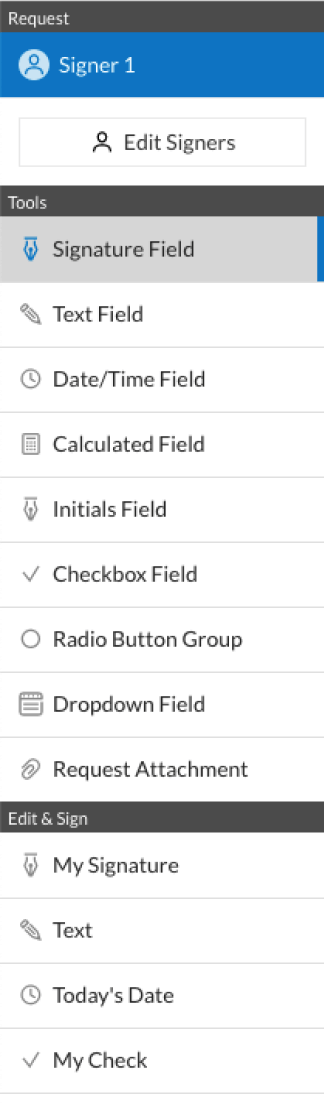
  • 3.Click on the document name to open it in the editor and use the left-side menu to complete all the empty areas accordingly.
  • 4.Put the My Signature field where you need to approve your form. Provide your name, draw, or upload an image of your handwritten signature.
  • 5.Click Save and Close to finish editing your completed form.

Once your trust agreement to hold funds for minor resulting from settlement of a personal injury action filed on behalf of minor form template is ready, download it to your device, export it to the cloud, or invite other people to eSign it. With airSlate SignNow, the eSigning process only takes a couple of clicks. Use our powerful eSignature tool wherever you are to deal with your paperwork successfully!


How to Sign a PDF Using Google Chrome How to Sign a PDF Using Google Chrome

How to fill out and sign forms in Google Chrome

Completing and signing paperwork is easy with the airSlate SignNow extension for Google Chrome. Adding it to your browser is a quick and efficient way to manage your paperwork online. Sign your trust agreement to hold funds for minor resulting from settlement of a personal injury action filed on behalf of minor form sample with a legally-binding electronic signature in a couple of clicks without switching between applications and tabs.

Follow the step-by-step guidelines to eSign your trust agreement to hold funds for minor resulting from settlement of a personal injury action filed on behalf of minor form template in Google Chrome:

  • 1.Navigate to the Chrome Web Store, locate the airSlate SignNow extension for Chrome, and install it to your browser.
  • 2.Right-click on the link to a document you need to sign and select Open in airSlate SignNow.
  • 3.Log in to your account with your credentials or Google/Facebook sign-in buttons. If you don’t have one, sign up for a free trial.
  • 4.Utilize the Edit & Sign toolbar on the left to fill out your template, then drag and drop the My Signature field.
  • 5.Insert a picture of your handwritten signature, draw it, or simply type in your full name to eSign.
  • 6.Verify all information is correct and click Save and Close to finish modifying your paperwork.

Now, you can save your trust agreement to hold funds for minor resulting from settlement of a personal injury action filed on behalf of minor form template to your device or cloud storage, email the copy to other people, or invite them to electronically sign your form via an email request or a secure Signing Link. The airSlate SignNow extension for Google Chrome improves your document workflows with minimum effort and time. Start using airSlate SignNow today!


How to Sign a PDF in Gmail How to Sign a PDF in Gmail How to Sign a PDF in Gmail

How to complete and sign forms in Gmail

When you get an email containing the trust agreement to hold funds for minor resulting from settlement of a personal injury action filed on behalf of minor form for approval, there’s no need to print and scan a file or download and re-upload it to another program. There’s a much better solution if you use Gmail. Try the airSlate SignNow add-on to promptly eSign any documents right from your inbox.

Follow the step-by-step guide to eSign your trust agreement to hold funds for minor resulting from settlement of a personal injury action filed on behalf of minor form in Gmail:

  • 1.Visit the Google Workplace Marketplace and find a airSlate SignNow add-on for Gmail.
  • 2.Set up the tool with a related button and grant the tool access to your Google account.
  • 3.Open an email with an attachment that needs approval and use the S symbol on the right sidebar to launch the add-on.
  • 4.Log in to your airSlate SignNow account. Opt for Send to Sign to forward the file to other people for approval or click Upload to open it in the editor.
  • 5.Put the My Signature option where you need to eSign: type, draw, or import your signature.

This eSigning process saves time and only takes a couple of clicks. Utilize the airSlate SignNow add-on for Gmail to update your trust agreement to hold funds for minor resulting from settlement of a personal injury action filed on behalf of minor form with fillable fields, sign documents legally, and invite other individuals to eSign them al without leaving your mailbox. Enhance your signature workflows now!


How to Sign a PDF on a Mobile Device How to Sign a PDF on a Mobile Device How to Sign a PDF on a Mobile Device

How to complete and sign paperwork in a mobile browser

Need to rapidly submit and sign your trust agreement to hold funds for minor resulting from settlement of a personal injury action filed on behalf of minor form on a smartphone while doing your work on the go? airSlate SignNow can help without the need to set up additional software programs. Open our airSlate SignNow solution from any browser on your mobile device and create legally-binding eSignatures on the go, 24/7.

Follow the step-by-step guidelines to eSign your trust agreement to hold funds for minor resulting from settlement of a personal injury action filed on behalf of minor form in a browser:

  • 1.Open any browser on your device and follow the link www.signnow.com
  • 2.Register for an account with a free trial or log in with your password credentials or SSO authentication.
  • 3.Click Upload or Create and pick a file that needs to be completed from a cloud, your device, or our form catalogue with ready-made templates.
  • 4.Open the form and complete the empty fields with tools from Edit & Sign menu on the left.
  • 5.Put the My Signature field to the form, then enter your name, draw, or upload your signature.

In a few easy clicks, your trust agreement to hold funds for minor resulting from settlement of a personal injury action filed on behalf of minor form is completed from wherever you are. As soon as you're done with editing, you can save the file on your device, build a reusable template for it, email it to other individuals, or invite them electronically sign it. Make your documents on the go speedy and productive with airSlate SignNow!


How to Sign a PDF on iPhone How to Sign a PDF on iPhone

How to fill out and sign forms on iOS

In today’s business community, tasks must be completed quickly even when you’re away from your computer. With the airSlate SignNow app, you can organize your paperwork and sign your trust agreement to hold funds for minor resulting from settlement of a personal injury action filed on behalf of minor form with a legally-binding eSignature right on your iPhone or iPad. Set it up on your device to close deals and manage documents from anyplace 24/7.

Follow the step-by-step guidelines to eSign your trust agreement to hold funds for minor resulting from settlement of a personal injury action filed on behalf of minor form on iOS devices:

  • 1.Open the App Store, search for the airSlate SignNow app by airSlate, and set it up on your device.
  • 2.Launch the application, tap Create to upload a template, and select Myself.
  • 3.Choose Signature at the bottom toolbar and simply draw your autograph with a finger or stylus to eSign the form.
  • 4.Tap Done -> Save after signing the sample.
  • 5.Tap Save or use the Make Template option to re-use this document later on.

This method is so straightforward your trust agreement to hold funds for minor resulting from settlement of a personal injury action filed on behalf of minor form is completed and signed in just a couple of taps. The airSlate SignNow application works in the cloud so all the forms on your mobile device are kept in your account and are available any time you need them. Use airSlate SignNow for iOS to boost your document management and eSignature workflows!


How to Sign a PDF on Android How to Sign a PDF on Android

How to complete and sign documents on Android

With airSlate SignNow, it’s easy to sign your trust agreement to hold funds for minor resulting from settlement of a personal injury action filed on behalf of minor form on the go. Set up its mobile app for Android OS on your device and start boosting eSignature workflows right on your smartphone or tablet.

Follow the step-by-step guide to eSign your trust agreement to hold funds for minor resulting from settlement of a personal injury action filed on behalf of minor form on Android:

  • 1.Navigate to Google Play, search for the airSlate SignNow app from airSlate, and install it on your device.
  • 2.Log in to your account or create it with a free trial, then add a file with a ➕ option on the bottom of you screen.
  • 3.Tap on the uploaded file and select Open in Editor from the dropdown menu.
  • 4.Tap on Tools tab -> Signature, then draw or type your name to eSign the template. Fill out empty fields with other tools on the bottom if needed.
  • 5.Utilize the ✔ button, then tap on the Save option to finish editing.

With an easy-to-use interface and total compliance with primary eSignature requirements, the airSlate SignNow app is the best tool for signing your trust agreement to hold funds for minor resulting from settlement of a personal injury action filed on behalf of minor form. It even works offline and updates all record adjustments when your internet connection is restored and the tool is synced. Fill out and eSign forms, send them for approval, and generate multi-usable templates anytime and from anyplace with airSlate SignNow.

Sign up and try Trust agreement to hold funds for minor resulting from settlement of a personal injury action filed on behalf of minor form
  • Close deals faster
  • Improve productivity
  • Delight customers
  • Increase revenue
  • Save time & money
  • Reduce payment cycles