Establishing secure connection…Loading editor…Preparing document…

Agreement Terminating Trust After Disclaimer by Beneficiary

This template is fully customizable. Edit the text, fill out the fields, and send it for signature. Give it a try!
Agreement Terminating Trust After Disclaimer by Beneficiary

What the Agreement Terminating Trust After Disclaimer by Beneficiary Is

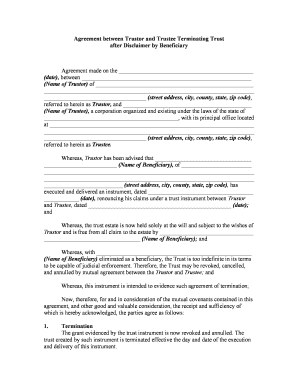
The Agreement Terminating Trust After Disclaimer by Beneficiary is a legal instrument used when a beneficiary formally disclaims some or all of their interest in a trust and the parties agree to terminate the trust or redistribute trust property accordingly. It documents the beneficiary's disclaimer, confirms the trust administration steps taken by the trustee, and records how assets are to be transferred, distributed, or reconveyed. The agreement helps create a clear, contemporaneous record for probate and tax purposes and reduces ambiguity about successor beneficiaries, property disposition, and trustee authority following the disclaimer.

Why this agreement matters for trust administration

This agreement preserves the disclaimer record, clarifies successor distributions, and provides a documented termination route to avoid contested probate or creditor confusion. It supports trustee action and helps satisfy filing, tax, and beneficiary-notice requirements.

Why this agreement matters for trust administration

Who typically prepares or signs this agreement

Estate attorneys, trustees, personal representatives, and beneficiaries commonly use this agreement to reflect a beneficiary disclaimer and the resulting termination or reallocation of trust property.

  • Estate attorneys and law firms handling trust administration and disclaimers in probate and nonprobate estates.
  • Trustees and successor fiduciaries who must execute transfers, reconveyances, or distributions after a disclaimer.
  • Beneficiaries who disclaim interests and need a formal record of the disclaimer and resulting property disposition.

Primary roles involved

Estate Attorney

An attorney prepares and reviews the agreement, confirms the disclaimer complies with state law, advises on tax consequences, and often files related probate or trust court documents to reflect termination or distribution.

Trustee

A trustee implements the agreement's terms, executes transfers or reconveyances, notifies successor beneficiaries and creditors as required, and retains records supporting the fiduciary decision-making process.

Essential information the agreement must include

Trust Identifier: Trust name and date
Trustee Details: Name and contact
Beneficiary Details: Disclaiming party name
Disclaimer Reference: Date and instrument reference
Property Description: Assets or accounts identified
Effective Date: MM/DD/YYYY format

Key legal risks of a deficient agreement

Invalid Disclaimer: State law rejection
Tax Liability: Unexpected income or gift tax
Creditor Claims: Increased exposure
Probate Delay: Extended administration time
Signature Defects: Noncompliant execution
Incorrect Dates: Affects statute limitations

Common preparation errors to avoid

  • Failing to confirm the disclaimer complied with state statute and deadlines, which can render the disclaimer ineffective and undo the intended termination.
  • Listing ambiguous property descriptions that do not match account or deed records, causing transfer or title problems for successor recipients.
  • Overlooking required notarization, witness, or probate-court filing steps in jurisdictions that treat trust termination or disclaimers as documentary acts.
  • Neglecting tax reporting implications, including whether distributions trigger income, gift, or estate tax reporting for the trust or successor beneficiaries.

Illustrative scenarios showing how the agreement is used

Two practical examples show common outcomes when a beneficiary disclaims and a trustee needs to terminate a trust or reallocate assets.

Probate-Avoidance Example

A beneficiary formally disclaims a residual interest, documented contemporaneously

  • Trustee records the disclaimer and prepares a termination agreement
  • The agreement reallocates assets to contingent beneficiaries, minimizing probate filing and providing a clear transfer trail for title and account custodians.

Real Property Transfer Example

A beneficiary disclaims an interest in real property held in trust

  • Trustee executes termination and reconveys title per trust terms
  • The recorded termination agreement and deed clarify ownership, reducing title insurer objections when successor beneficiaries sell or refinance the property.

Step-by-step: Completing the agreement

Follow these sequential steps to prepare, execute, and record an agreement terminating a trust after a beneficiary disclaimer.

  • 01
    Confirm Disclaimer: Verify the beneficiary executed a valid disclaimer instrument.
  • 02
    Prepare Agreement: Draft terms reflecting distributions and trustee actions.
  • 03
    Sign and Notarize: Execute with required signatures, witnesses, or notarization.
  • 04
    Record and Notify: File deeds/accounts and notify successors and creditors.

How the termination process typically flows

This overview outlines the core operational steps trustees and attorneys follow after a beneficiary disclaimer.

  • Review Trust Terms: Identify termination provisions and contingent beneficiaries.
  • Evaluate Disclaimer: Confirm compliance with state disclaimer rules.
  • Draft Agreement: Specify effective date, transfers, and releases.
  • Implement Transfers: Convey assets, update account records, and retain proof.

Core clauses to include in a professional agreement

Include these elements to ensure clarity, reduce litigation risk, and provide a complete record of the disclaimer and termination actions.

Recitals

A concise factual background describing the trust, original beneficiary interest, and the precise disclaimer instrument, including dates and signature references to establish context.
Disclaimer Confirmation

A clause acknowledging the beneficiary's signed disclaimer, confirming it was voluntary, effective, and identifying any statutory basis or probate documentation relied upon by the parties.

Termination Terms

Clear language describing the trust termination mechanics, which assets are distributed or reconveyed, and the timing and conditions for final trustee actions.

Distribution Instructions

Specific identification of successor beneficiaries and the manner of distribution, including cash, property, or right to disclaim further, to prevent later title or accounting disputes.

Representations

Trustee and beneficiary representations about authority, absence of pending claims, and factual statements that support enforceability and reduce potential challenges.

Execution Formalities

Signature blocks, notarization and witness clauses, and a statement identifying any required filings or recordings to complete transfers and provide public notice.

Configuring a typical e-signature workflow

Below are recommended field settings and authentication choices when sending the agreement for electronic execution.

Field Configuration
Signer Order Sequential signing to ensure trustee review first
Authentication Email link plus optional SMS code for added assurance
Audit Trail Enable automatic timestamps, IP logging, and activity history
Reminders Auto reminders every three days until completion

Technical and platform considerations for e-execution

Choose an eSignature platform that supports audit trails, notarization or RON workflows if required, and secure storage for executed documents.

  • Document Formats: PDF or DOCX preferred
  • Integrations: Connectors for custody and title services
  • Authentication: Email, SMS, or higher-assurance methods

Retain the final signed copy with the audit trail and any recording or notarization data to satisfy courts, title companies, and tax reviewers.

How this agreement differs from related trust documents

Compare common document options to pick the correct instrument for a disclaimer-related termination or reallocation.

Criteria Standard Trust Termination Termination After Disclaimer
Purpose planned wind-up response to beneficiary disclaimer
Trigger trustee decision or condition valid beneficiary disclaimer
Recording optional often required for real property
Typical Counsel general trust counsel probate or estate counsel

Frequently asked questions about execution and enforceability

Answers to common questions about validity, notarization, tax impacts, and next steps when a beneficiary disclaims and a trustee seeks to terminate a trust.


Need help? Contact support

be ready to get more
Join over 28 million airSlate SignNow users