Establishing secure connection… Loading editor… Preparing document…
Navigation

Fill and Sign the Trust Company Corner in Trust Location Delaware Stands Out Form
Fill and Sign the Trust Company Corner in Trust Location Delaware Stands Out Form

How it works

Open the document and fill out all its fields.
Apply your legally-binding eSignature.
Save and invite other recipients to sign it.

Rate template

4.4
39 votes
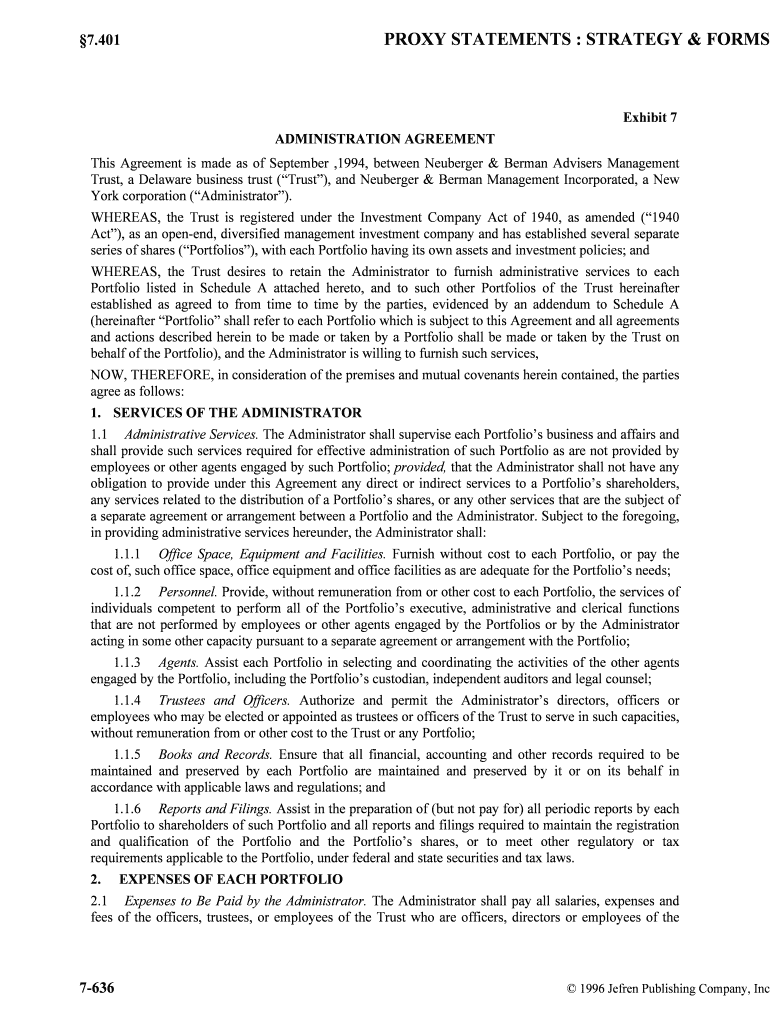
§7.401PROXY STATEMENTS : STRATEGY & FORMS 7-636 © 1996 Jefren Publishing Company, Inc Exhibit 7 ADMINISTRATION AGREEMENT This Agreement is made as of September ,1994, between Neuberger & Berman Advisers Manageme nt Trust, a Delaware business trust (“Trust”), and Neuberger & Berman Management Incorporated, a Ne w York corporation (“Administrator”). WHEREAS, the Trust is registered under the Investment Company Act of 1940, as amended (“1940 Act”), as an open-end, diversified management investment company and has established severa l separate series of shares (“Portfolios”), with each Portfolio having its own assets and investment policies; and WHEREAS, the Trust desires to retain the Administrator to furnish administrative service s to each Portfolio listed in Schedule A attached hereto, and to such other Portfolios of the Trust here inafter established as agreed to from time to time by the parties, evidenced by an adde ndum to Schedule A (hereinafter “Portfolio” shall refer to each Portfolio which is subject to this Agreement and all agreements and actions described herein to be made or taken by a Portfolio shall be made or taken by the Trust on behalf of the Portfolio), and the Administrator is willing to furnish such services, NOW, THEREFORE, in consideration of the premises and mutual covenants herein contained, the parties agree as follows: 1. SERVICES OF THE ADMINISTRATOR1.1 Administrative Services. The Administrator shall supervise each Portfolio’s business and affairs and shall provide such services required for effective administration of such Portfolio as are not provi ded by employees or other agents engaged by such Portfolio; provided, that the Administrator shall not have any obligation to provide under this Agreement any direct or indirect services to a Portfolio’s shareholders, any services related to the distribution of a Portfolio’s shares, or any other services that are the subject of a separate agreement or arrangement between a Portfolio and the Administrator. Subject to the foregoing, in providing administrative services hereunder, the Administrator shall: 1.1.1 Office Space, Equipment and Facilities. Furnish without cost to each Portfolio, or pay the cost of, such office space, office equipment and office facilities as are adequate for the Portfolio’s needs; 1.1.2 Personnel. Provide, without remuneration from or other cost to each Portfolio, the services of individuals competent to perform all of the Portfolio’s executive, administrative and c lerical functions that are not performed by employees or other agents engaged by the Portfolios or by the Administ rator acting in some other capacity pursuant to a separate agreement or arrangement with the Portfolio; 1.1.3 Agents. Assist each Portfolio in selecting and coordinating the activities of the other agents engaged by the Portfolio, including the Portfolio’s custodian, independent auditors and legal counsel; 1.1.4 Trustees and Officers. Authorize and permit the Administrator’s directors, officers or employees who may be elected or appointed as trustees or officers of the Trust to serve in such capacities, without remuneration from or other cost to the Trust or any Portfolio; 1.1.5 Books and Records. Ensure that all financial, accounting and other records required to be maintained and preserved by each Portfolio are maintained and preserved by it or on it s behalf in accordance with applicable laws and regulations; and 1.1.6 Reports and Filings. Assist in the preparation of (but not pay for) all periodic reports by each Portfolio to shareholders of such Portfolio and all reports and filings required to maintain the registration and qualification of the Portfolio and the Portfolio’s shares, or to meet other regulatory or tax requirements applicable to the Portfolio, under federal and state securities and tax laws. 2. EXPENSES OF EACH PORTFOLIO2.1 Expenses to Be Paid by the Administrator. The Administrator shall pay all salaries, expenses and fees of the officers, trustees, or employees of the Trust who are officers, directors or employe es of the CORPORATE RESTRUCTURING§7.401 October/November 1996 7-637 Administrator. If the Administrator pays or assumes any expenses of the Trust or a Portfolio not required to be paid or assumed by the Administrator under this Agreement, the Administrator shall not be obligated hereby to pay or assume §7.401PROXY STATEMENTS : STRATEGY & FORMS 7-638 © 1996 Jefren Publishing Company, Inc the same or any similar expense in the future; provided, that nothing herein contained shall be deemed to relieve the Administrator of any obligation to the Trust or to a Portfolio under any sepa rate agreement or arrangement between the parties. 2.2 Expenses to Be Paid by the Portfolios. Each Portfolio shall bear all expenses of its operation, except those specifically allocated to the Administrator under this Agreement or under any separate agreement between such Portfolio and the Administrator. Expenses to be borne by such Portfolio shall include both expenses directly attributable to the operation of that Portfolio and the offering of its shares, as well as the portion of any expenses of the Trust that is properly allocable to such Portfolio in a manner approved by the trustees of the Trust (“Trustees”). Subject to any separate agreement or arra ngement between the Trust or a Portfolio and the Administrator, the expenses hereby allocated to each Portfolio, and not to the Administrator, include, but are not limited to: 2.2.1 Custody. All charges of depositories, custodians, and other agents for the transfer, receipt, safekeeping, and servicing of its cash, securities, and other property; 2.2.2 Shareholder Servicing. All expenses of maintaining and servicing shareholder accounts, including, but not limited to, the charges of any shareholder servicing agent, dividend disbursing agent or other agent (other than the Administrator hereunder) engaged by a Portfolio to service shareholder accounts; 2.2.3 Shareholder Reports. All expenses of preparing, setting in type, printing and distributing reports and other communications to shareholders of a Portfolio; 2.2.4 Prospectuses. All expenses of preparing, setting in type, printing and mailing annual or more frequent revisions of a Portfolio’s Prospectus and SAI and any supplements thereto and of supplying them to shareholders of the Portfolio and Account holders; 2.2.5 Pricing and Portfolio Valuation. All expenses of computing a Portfolio’s NAV per share, including any equipment or services obtained for the purpose of pricing shares or valuing the Portfolio’s investment portfolio; 2.2.6 Communications. All charges for equipment or services used for communications between the Administrator or the Portfolio and any custodian, shareholder servicing agent, portfolio ac counting services agent, or other agent engaged by a Portfolio; 2.2.7 Legal and Accounting Fees. All charges for services and expenses of a Portfolio’s legal counsel and independent auditors; 2.2.8 Trustees’ Fees and Expenses. All compensation of Trustees other than those affiliated with the Administrator, all expenses incurred in connection with such unaffiliated Trustees’ servi ces as Trustees, and all other expenses of meetings of the Trustees or committees thereof; 2.2.9 Shareholder Meetings. All expenses incidental to holding meetings of shareholders, including the printing of notices and proxy materials, and proxy solicitation therefor; 2.2.10 Federal Registration Fees. All fees and expenses of registering and maintaining the registration of the Trust and each Portfolio under the 1940 Act and the registration of each Portfolio’s shares under the Securities Act of 1933 (the “1933 Act”), including all fees and expenses incurred in connection with the preparation, setting in type, printing, and filing of any Registration Statement, Prospectus and SAI under the 1933 Act or the 1940 Act, and any amendments or supplements that ma y be made from time to time; 2.2.11 State Registration Fees. All fees and expenses of qualifying and maintaining the qualification of the Trust and each Portfolio and of each Portfolio’s shares for sale under sec urities laws of various states or jurisdictions, and of registration and qualification of each Portfolio under all other CORPORATE RESTRUCTURING§7.401 October/November 1996 7-639 laws applicable to a Portfolio or its business activities (including registering the Portfolio as a broker- dealer, or any officer of the Portfolio or any person as agent or salesman of the Portfolio in any state); 2.2.12 Share Certificates. All expenses of preparing and transmitting a Portfolio’s share certificates, if any; §7.401PROXY STATEMENTS : STRATEGY & FORMS 7-640 © 1996 Jefren Publishing Company, Inc 2.2.13Confirmations. All expenses incurred in connection with the issue and transfer of a Portfolio’s shares, including the expenses of confirming all share transactions; 2.2.14 Bonding and Insurance. All expenses of bond, liability, and other insurance coverage required by law or regulation or deemed advisable by the Trustees, including, without limi tation, such bond, liability and other insurance expense that may from time to time be all ocated to the Portfolio in a manner approved by the Trustees; 2.2.15 Brokerage Commissions. All brokers’ commissions and other charges incident to the purchase, sale or lending of a Portfolio’s securities; 2.2.16 Taxes. All taxes or governmental fees payable by or with respect to a Portfolio to federal, state or other governmental agencies, domestic or foreign, including stamp or other transfer taxes; 2.2.17 Trade Association Fees. Its proportionate share of all fees, dues and other expense. incurred in connection with the Trust’s membership in any trade association or other investment organization; 2.2.18 Nonrecurring and Extraordinary Expenses. Such nonrecurring and extraordinary expenses as may arise, including the costs of actions, suits, or proceedings to which the Portfolio i s a party and the expenses a Portfolio may incur as a result of its legal obligation to provide indemnifica tion to the Trust’s officers, Trustees and agents; 2.2.19 Organizational Expenses. All organizational expenses of each Portfolio paid or assessed by the Administrator, which such Portfolio shall reimburse to the Administrator at such time or times and subject to such condition or conditions as shall be specified in the Prospectus and SAI pursuant to which such Portfolio makes the initial public offering of its shares; and 2.2.20 Investment Advisory Services. Any fees and expenses for investment advisory services that may be incurred or contracted for by a Portfolio. 3. ADMINISTRATION FEE3.1 Fee. As compensation for all services rendered, facilities provided and expenses paid or assum ed by the Administrator to or for each Portfolio under this Agreement, such Portfolio shall pay the Administrator an annual fee as set out in Schedule B to this Agreement. 3.2 Computation and Payment of Fee. The administration fee shall accrue on each calendar day, and shall be payable monthly on the first business day of the next succeeding calendar month. T he dally fee accruals for each Portfolio shall be computed by multiplying the fraction of one divided by the number of days in the calendar year by the applicable annual administration fee rate (as set forth in Schedule B hereto), and multiplying this product by the NAV of such Portfolio, determined in the manner set forth in such Portfolio’s then-current Prospectus, as of the close of business on the last preceding business day on which such Portfolio’s NAV was determined.3.3 State Expense Limitation. If in any fiscal year a Portfolio’s operating expenses plus such Portfolio’s pro rata portion of the operating expenses of any Series of Advisers Managers Trust in which such Portfolio invests all or substantially all of its assets (“Aggregate Operating Expenses”), whic h includes any fees or expense reimbursements payable to the Administrator pursuant to this Agreement and any compensation payable to the Administrator pursuant to (i) the Management Agreement betwe en such Series and the Administrator, or (ii) any other agreement or arrangement with respect to such Portfolio, but excluding interest, taxes, brokerage commissions, litigation and indemnification expense s, and other extraordinary expenses not incurred in the ordinary course of such Portfolio’s business) exceed the lowest applicable percentage expense limitation imposed under the securities law and regulations of any state in which such Portfolio’s shares are qualified for sale (the “State Expense Limitation”), t hen the administration fee payable to the Administrator under this Agreement by such Portfolio shall be reduced by the amount of such excess; provided, that the Administrator shall have no obligation hereunder to CORPORATE RESTRUCTURING§7.401 October/November 1996 7-641 reimburse the Portfolio for any such expenses which exceed such administration fee. Any reduction in the administration fee shall be made monthly, by annualizing the Aggregate Operating Expenses of such Portfolio for each month as of the last day of such month. An adjustment shall be made on or §7.401PROXY STATEMENTS : STRATEGY & FORMS 7-642 © 1996 Jefren Publishing Company, Inc before the last day of the first month of the next succeeding fiscal year if Aggregate Operating Expenses for such Portfolio’s fiscal year do not exceed the State Expense Limitation or if for suc h fiscal year there is no applicable State Expense Limitation. 4. OWNERSHIP OF RECORDS All records required to be maintained and preserved by each Portfolio pursuant to the provisions or rules or regulations of the Securities and Exchange Commission (“SEC”) under section 31(a) of the 1940 Act and maintained and preserved by the Administrator on behalf of such Portfolio are the property of such Portfolio and shall be surrendered by the Administrator promptly on request by the Portfolio; provided, that the Administrator may at its own expense make and retain copies of any such records. 5. REPORTS TO ADMINISTRATOR Each Portfolio shall furnish or otherwise make available to the Administrator such copies of that Portfolio’s Prospectus, SAI, financial statements, proxy statements, reports, and other information relating to its business and affairs as the Administrator may, at any time or from ti me to time, reasonably require in order to discharge its obligations under this Agreement. 6. REPORTS TO EACH PORTFOLIO The Administrator shall prepare and furnish to each Portfolio such reports, statistical da ta and other information in such form and at such intervals as such Portfolio may reasonably request.7. OWNERSHIP OF SOFTWARE AND RELATED MATERIALS All computer programs, written procedures and similar items developed or acquired and used by t he Administrator in performing its obligations under this Agreement shall be the property of the Administrator, and no Portfolio will acquire any ownership interest therein or property rights wit h respect thereto. 8. CONFIDENTIALITY The Administrator agrees, on its own behalf and on behalf of its employees, agents and cont ractors, to keep confidential any and all records maintained and other information obtained here under which relate to any Portfolio or to any of a Portfolio’s former, current or prospective shareholders, except that the Administrator may deliver records or divulge information (a) when requested to do so by duly consti tuted authorities after prior notification to and approval in writing by such Portfolio (which approval wi ll not be unreasonably withheld and may not be withheld by such Portfolio where the Administrator advises such Portfolio that it may be exposed to civil or criminal contempt proceedings or other pe nalties for failure to comply with such request) or (b) whenever requested in writing to do so by such Portfolio. 9. THE ADMINISTRATOR’S ACTIONS IN RELIANCE ON PORTFOLIOS’ INSTRUCTIONS, LEGAL OPINIONS, ETC.; PORTFOLIOS’ COMPLIANCE WITH LAWS 9.1 The Administrator may at any time apply to an officer of the Trust for instructions, a nd may consult with legal counsel for a Portfolio or with the Administrator’s own legal counsel, in respect of any matter arising in connection with this Agreement; and the Administrator shall not be liable for any action taken or omitted to be taken in good faith and with due care in accordance with such instruct ions or with the advice or opinion of such legal counsel. The Administrator shall be protected in acti ng upon any such instructions, advice or opinion and upon any other paper or document delivered by a Portfolio or such legal counsel which the Administrator believes to be genuine and to have been si gned by the proper person or persons, and the Administrator shall not be held to have notice of any change of status or authority of any officer or representative of the Trust, until receipt of written notice thereof from the Portfolio. 9.2 Except as otherwise provided in this Agreement or in any separate agreement between the parties and except for the accuracy of information furnished to each Portfolio by the Administrator, ea ch Portfolio assumes full responsibility for the preparation, contents, filing and distribution of its Prospe ctus CORPORATE RESTRUCTURING§7.401 October/November 1996 7-643 and SAI, and full responsibility for other documents or actions required for compliance with all applicable requirements of the 1940 Act, the Securities Exchange Act of 1934, the 1933 Act, and any other applicable laws, rules and regulations of governmental authorities having jurisdiction over such Portfolio. §7.401PROXY STATEMENTS : STRATEGY & FORMS 7-644 © 1996 Jefren Publishing Company, Inc 10. SERVICES TO OTHER CLIENTS Nothing herein contained shall limit the freedom of the Administrator or any affiliat ed person of the Administrator to render administrative or shareholder services to other investment companie s, to act as administrator to other persons, firms, or corporations, or to engage in other business activities. 11. LIMITATION OF LIABILITY REGARDING THE TRUST The Administrator shall look only to the assets of each Portfolio for performance of this Agree ment by the Trust on behalf of such Portfolio, and neither the Trustees of the Trust nor any of the Trust’s officers, employees or agents, whether past, present or future shall be personally liable therefor. 12. INDEMNIFICATION BY PORTFOLIO Each Portfolio shall indemnify the Administrator and hold it harmless from and against any and all losses, damages and expenses, including reasonable attorneys’ fees and expenses, incurred by the Administrat or that result from (i) any claim, action, suit or proceeding in connection with the Adm inistrator’s entry into or performance of this Agreement with respect to such Portfolio; or (ii) any action taken or omission to act committed by the Administrator in the performance of its obligations hereunder wit h respect to such Portfolio; or (iii) any action of the Administrator upon instructions believed in good faith by i t to have been executed by a duly authorized officer or representative of the Trust with respect t o such Portfolio; provided, that the Administrator shall not be entitled to such indemnification in respect of actions or omissions constituting negligence or misconduct on the part of the Administrator or its empl oyees, agents or contractors. Before confessing any claim against it which may be subject to indem nification by a Portfolio hereunder, the Administrator shall give such Portfolio reasonable opportunity to defend against such claim in its own name or in the name of the Administrator. 13. INDEMNIFICATION BY THE ADMINISTRATOR The Administrator shall indemnify each Portfolio and hold it harmless from and against any and all losses, damages and expenses, including reasonable attorneys’ fees and expenses, incurred by such Portfolio which result from (i) the Administrator’s failure to comply with the terms of thi s Agreement with respect to such Portfolio; or (ii) the Administrator’s lack of good faith in performing its obligations hereunder with respect to such Portfolio; or (iii) the Administrator’s negligence or misconduct or its employees, agents or contractors in connection herewith with respect to such Portfolio. A Portfoli o shall not be entitled to such indemnification in respect of actions or omissions constituting negligence or misconduct on the part of that Portfolio or its employees, agents or contractors other than the Administrator unless such negligence or misconduct results from or is accompanied by negligence or misconduct on the part of the Administrator, any affiliated person of the Administrator, or any a ffiliated person of an affiliated person of the Administrator. Before confessing any claim against it which may be subject to indemnification hereunder, a Portfolio shall give the Administrator reasonable opport unity to defend against such claim in its own name or in the name of the Trust on behalf of such Portfolio. 14. EFFECT OF AGREEMENT Nothing herein contained shall be deemed to require the Trust or any Portfolio to take a ny action contrary to the Trust Instrument or By-laws of the Trust or any applicable law, regulation or order to which it is subject or by which it is bound, or to relieve or deprive the Trustees of their responsibility for and control of the conduct of the business and affairs of the Portfolio or Trust. 15. TERM OF AGREEMENT The term of this Agreement shall begin on the date first above written with respect to each Portfolio listed in Schedule A on the date hereof and, unless sooner terminated as hereinafter provided, this Agreement shall remain in effect through September , 1996. With respect to each Portfolio adde d by execution of an Addendum to Schedule A, the term of this Agreement shall begin on the date of such exec ution and, unless sooner terminated as hereinafter provided, this Agreement shall remain in effe ct to the date two CORPORATE RESTRUCTURING§7.401 October/November 1996 7-645 years after such execution. Thereafter, in each case this Agreement shall continue in effect with respect to each Portfolio from year to year, subject to the termination provisions and all other te rms and conditions hereof; provided, such continuance with respect to a Portfolio is approved at least annually by vote or written consent of the Trustees, including a majority of the Trustees who are not inte rested persons of either party hereto (“Disinterested §7.401PROXY STATEMENTS : STRATEGY & FORMS 7-646 © 1996 Jefren Publishing Company, Inc Trustees”); and provided further, that the Administrator shall not have notified a Portfolio in writing at least sixty days prior to the first expiration date hereof or at least sixty days pri or to any expiration date in any year thereafter that it does not desire such continuation. The Administrator shall furnish any Portfolio, promptly upon its request, such information as may reasonably be necessary to evaluate the terms of this Agreement or any extension, renewal or amendment thereof. 16. AMENDMENT OR ASSIGNMENT OF AGREEMENT Any amendment to this Agreement shall be in writing signed by the parties hereto; provided, that no such amendment shall be effective unless authorized on behalf of any Portfolio (i) by resolution of t he Trustees, including the vote or written consent of a majority of the Disinterested Truste es, or (ii) by vote of a majority of the outstanding voting securities of such Portfolio. This Agreement shall term inate automatically and immediately in the event of its assignment; provided, that with the consent of a Portfolio, the Administrator may subcontract to another person any of its responsibilities with respe ct to such Portfolio. 17. TERMINATION OF AGREEMENT This Agreement may be terminated at any time by either party hereto, without the payment of any penalty, upon at least sixty days’ prior written notice to the other party; provided, that in the case of termination by any Portfolio, such action shall have been authorized (i) by resolution of the Trustees, including the vote or written consent of the Disinterested Trustees, or (ii) by vote of a majority of the outstanding voting securities of such Portfolio. 18. USE OF NAME Each Portfolio hereby agrees that if the Administrator shall at any time for any rea son cease to serve as administrator to a Portfolio, such Portfolio shall, if and when requested by the Administ rator, thereafter refrain from using the name “Neuberger & Berman” or the initials “N&B” in connecti on with its business or activities, and the foregoing agreement of each Portfolio shall survive any terminat ion of this Agreement and any extension or renewal thereof. 19. INTERPRETATION AND DEFINITION OF TERMS Any question of interpretation of any term or provision of this Agreement having a counterpart in or otherwise derived from a term or provision of the 1940 Act shall be resolved by reference to suc h term or provision of the 1940 Act and to interpretation thereof, if any, by the United States courts or, in the absence of any controlling decision of any such court, by rules, regulations or orders of the SEC validl y issued pursuant to the 1940 Act. Specifically, the terms “vote of a majority of the out standing voting securities,” “interested persons,” “assignment” and “affiliated person,” as used in this Agre ement shall have the meanings assigned to them by section 2(a) of the 1940 Act. In addition, when the effect of a requirement of the 1940 Act reflected in any provision of this Agreement is modified, interpret ed or relaxed by a rule, regulation or order of the SEC, whether of special or of general applica tion, such provision shall be deemed to incorporate the effect of such rule, regulation or order. 20. CHOICE OF LAW This Agreement is made and to be principally performed in the State of New York, and except insofar as the 1940 Act or other federal laws and regulations may be controlling, this Agreement shall be governed by, and construed and enforced in accordance with, the internal laws of the State of New York. 21. CAPTIONS The captions in this Agreement are included for convenience of reference only and in no way define or delineate any of the provisions hereof or otherwise affect their construction or effect. 22. EXECUTION IN COUNTERPARTS This Agreement may be executed simultaneously in counterparts, each of which shall be deemed an CORPORATE RESTRUCTURING§7.401 October/November 1996 7-647 original, but all of which together shall constitute one and the same instrument. §7.401PROXY STATEMENTS : STRATEGY & FORMS 7-648 © 1996 Jefren Publishing Company, Inc IN WITNESS WHEREOF, the parties hereto have caused this Agreement to be signed by thei r respective officers thereunto duly authorized and their respective seals to be hereunto affixed, as of the day and year first above written. NEUBERGER & BERMAN ADVISERS MANAGEMENT TRUST Attest: By _________________________________________ ____________________________________________ ____________________________________________ Secretary Title NEUBERGER & BERMAN MANAGEMENT INCORPORATED Attest: By _________________________________________ ____________________________________________ ____________________________________________ Secretary Title CORPORATE RESTRUCTURING§7.401 October/November 1996 7-649 NEUBERGER & BERMAN ADVISERS MANAGEMENT TRUST ADMINISTRATION AGREEMENT SCHEDULE A The Portfolios of Neuberger & Berman Advisers Management Trust currently subject to this Agree ment are as follows: Liquid Asset Portfolio Growth Portfolio Balanced Portfolio Partners Portfolio Government Income Portfolio Limited Maturity Bond Portfolio September , 1994 NEUBERGER & BERMAN ADVISERS MANAGEMENT TRUSTADMINISTRATION AGREEMENT SCHEDULE B Compensation pursuant to Paragraph 3 of the Neuberger & Berman Advisers Management Trust Administration Agreement shall be the following percentage per annum of the average dai ly net assets of each Portfolio: Growth Portfolio 0.30% Partners Portfolio 0.30% Balanced Portfolio 0.30% Government Income Portfolio 0.40% Limited Maturity Bond Portfolio 0.40% Liquid Asset Portfolio 0.40% September , 1994

Helpful suggestions for finishing your ‘Trust Company Corner In Trust Location Delaware Stands Out’ online

Are you fed up with the stress of handling paperwork? Look no further than airSlate SignNow, the leading eSignature solution for individuals and businesses. Wave farewell to the monotonous process of printing and scanning documents. With airSlate SignNow, you can easily complete and sign paperwork online. Take advantage of the comprehensive tools embedded in this user-friendly and cost-effective platform, and transform your method of document management. Whether you need to authorize forms or gather signatures, airSlate SignNow simplifies the process, requiring just a few clicks.

Follow this comprehensive guide:

  1. Sign in to your account or sign up for a complimentary trial with our service.
  2. Click +Create to upload a file from your device, cloud storage, or our template collection.
  3. Open your ‘Trust Company Corner In Trust Location Delaware Stands Out’ in the editor.
  4. Click Me (Fill Out Now) to set up the document on your end.
  5. Add and assign fillable fields for other individuals (if necessary).
  6. Continue with the Send Invite options to solicit eSignatures from others.
  7. Save, print your version, or convert it into a reusable template.

Don’t fret if you need to collaborate with your colleagues on your Trust Company Corner In Trust Location Delaware Stands Out or send it for notarization—our platform provides you with everything required to accomplish such tasks. Register with airSlate SignNow today and elevate your document management to new levels!

Here is a list of the most common customer questions. If you can’t find an answer to your question, please don’t hesitate to reach out to us.

Need help? Contact Support

The best way to complete and sign your trust company corner in trust location delaware stands out form


Save time on document management with airSlate SignNow and get your trust company corner in trust location delaware stands out form eSigned quickly from anywhere with our fully compliant eSignature tool.

How to Sign a PDF Online How to Sign a PDF Online

How to complete and sign paperwork online

In the past, coping with paperwork required lots of time and effort. But with airSlate SignNow, document management is quick and simple. Our robust and user-friendly eSignature solution lets you effortlessly complete and eSign your trust company corner in trust location delaware stands out form online from any internet-connected device.

Follow the step-by-step guide to eSign your trust company corner in trust location delaware stands out form template online:

  • 1.Sign up for a free trial with airSlate SignNow or log in to your account with password credentials or SSO authorization option.
  • 2.Click Upload or Create and add a form for eSigning from your device, the cloud, or our form catalogue.
  • 3.Click on the file name to open it in the editor and utilize the left-side menu to fill out all the empty areas accordingly.
  • 4.Place the My Signature field where you need to approve your form. Provide your name, draw, or import an image of your regular signature.
  • 5.Click Save and Close to finish modifying your completed document.

As soon as your trust company corner in trust location delaware stands out form template is ready, download it to your device, export it to the cloud, or invite other people to electronically sign it. With airSlate SignNow, the eSigning process only requires a couple of clicks. Use our robust eSignature solution wherever you are to manage your paperwork productively!


How to Sign a PDF Using Google Chrome How to Sign a PDF Using Google Chrome

How to complete and sign forms in Google Chrome

Completing and signing paperwork is easy with the airSlate SignNow extension for Google Chrome. Adding it to your browser is a fast and efficient way to manage your forms online. Sign your trust company corner in trust location delaware stands out form sample with a legally-binding electronic signature in a couple of clicks without switching between tools and tabs.

Follow the step-by-step guidelines to eSign your trust company corner in trust location delaware stands out form in Google Chrome:

  • 1.Navigate to the Chrome Web Store, locate the airSlate SignNow extension for Chrome, and install it to your browser.
  • 2.Right-click on the link to a document you need to approve and choose Open in airSlate SignNow.
  • 3.Log in to your account using your credentials or Google/Facebook sign-in buttons. If you don’t have one, you can start a free trial.
  • 4.Utilize the Edit & Sign menu on the left to fill out your sample, then drag and drop the My Signature field.
  • 5.Upload an image of your handwritten signature, draw it, or simply type in your full name to eSign.
  • 6.Make sure all information is correct and click Save and Close to finish editing your form.

Now, you can save your trust company corner in trust location delaware stands out form template to your device or cloud storage, email the copy to other people, or invite them to electronically sign your document via an email request or a protected Signing Link. The airSlate SignNow extension for Google Chrome enhances your document workflows with minimum time and effort. Try airSlate SignNow today!


How to Sign a PDF in Gmail How to Sign a PDF in Gmail How to Sign a PDF in Gmail

How to complete and sign documents in Gmail

When you receive an email containing the trust company corner in trust location delaware stands out form for signing, there’s no need to print and scan a document or download and re-upload it to a different program. There’s a better solution if you use Gmail. Try the airSlate SignNow add-on to promptly eSign any documents right from your inbox.

Follow the step-by-step guidelines to eSign your trust company corner in trust location delaware stands out form in Gmail:

  • 1.Navigate to the Google Workplace Marketplace and look for a airSlate SignNow add-on for Gmail.
  • 2.Install the program with a corresponding button and grant the tool access to your Google account.
  • 3.Open an email containing an attachment that needs signing and utilize the S key on the right sidebar to launch the add-on.
  • 4.Log in to your airSlate SignNow account. Select Send to Sign to forward the file to other people for approval or click Upload to open it in the editor.
  • 5.Put the My Signature option where you need to eSign: type, draw, or upload your signature.

This eSigning process saves time and only requires a couple of clicks. Take advantage of the airSlate SignNow add-on for Gmail to update your trust company corner in trust location delaware stands out form with fillable fields, sign paperwork legally, and invite other parties to eSign them al without leaving your mailbox. Enhance your signature workflows now!


How to Sign a PDF on a Mobile Device How to Sign a PDF on a Mobile Device How to Sign a PDF on a Mobile Device

How to fill out and sign documents in a mobile browser

Need to rapidly submit and sign your trust company corner in trust location delaware stands out form on a mobile phone while working on the go? airSlate SignNow can help without the need to install extra software apps. Open our airSlate SignNow solution from any browser on your mobile device and add legally-binding electronic signatures on the go, 24/7.

Follow the step-by-step guidelines to eSign your trust company corner in trust location delaware stands out form in a browser:

  • 1.Open any browser on your device and follow the link www.signnow.com
  • 2.Create an account with a free trial or log in with your password credentials or SSO option.
  • 3.Click Upload or Create and pick a file that needs to be completed from a cloud, your device, or our form collection with ready-made templates.
  • 4.Open the form and complete the empty fields with tools from Edit & Sign menu on the left.
  • 5.Add the My Signature area to the form, then enter your name, draw, or add your signature.

In a few simple clicks, your trust company corner in trust location delaware stands out form is completed from wherever you are. As soon as you're finished editing, you can save the document on your device, build a reusable template for it, email it to other people, or ask them to eSign it. Make your paperwork on the go speedy and efficient with airSlate SignNow!


How to Sign a PDF on iPhone How to Sign a PDF on iPhone

How to complete and sign forms on iOS

In today’s business community, tasks must be completed quickly even when you’re away from your computer. Using the airSlate SignNow application, you can organize your paperwork and sign your trust company corner in trust location delaware stands out form with a legally-binding eSignature right on your iPhone or iPad. Install it on your device to conclude agreements and manage forms from just about anywhere 24/7.

Follow the step-by-step guidelines to eSign your trust company corner in trust location delaware stands out form on iOS devices:

  • 1.Go to the App Store, find the airSlate SignNow app by airSlate, and set it up on your device.
  • 2.Launch the application, tap Create to import a template, and select Myself.
  • 3.Choose Signature at the bottom toolbar and simply draw your autograph with a finger or stylus to eSign the sample.
  • 4.Tap Done -> Save right after signing the sample.
  • 5.Tap Save or use the Make Template option to re-use this document later on.

This method is so easy your trust company corner in trust location delaware stands out form is completed and signed in just a couple of taps. The airSlate SignNow app works in the cloud so all the forms on your mobile device are kept in your account and are available whenever you need them. Use airSlate SignNow for iOS to improve your document management and eSignature workflows!


How to Sign a PDF on Android How to Sign a PDF on Android

How to complete and sign paperwork on Android

With airSlate SignNow, it’s easy to sign your trust company corner in trust location delaware stands out form on the go. Install its mobile application for Android OS on your device and start enhancing eSignature workflows right on your smartphone or tablet.

Follow the step-by-step guidelines to eSign your trust company corner in trust location delaware stands out form on Android:

  • 1.Go to Google Play, find the airSlate SignNow app from airSlate, and install it on your device.
  • 2.Sign in to your account or create it with a free trial, then upload a file with a ➕ option on the bottom of you screen.
  • 3.Tap on the imported file and choose Open in Editor from the dropdown menu.
  • 4.Tap on Tools tab -> Signature, then draw or type your name to eSign the sample. Complete empty fields with other tools on the bottom if needed.
  • 5.Utilize the ✔ key, then tap on the Save option to end up with editing.

With an easy-to-use interface and full compliance with main eSignature standards, the airSlate SignNow application is the perfect tool for signing your trust company corner in trust location delaware stands out form. It even works offline and updates all document modifications once your internet connection is restored and the tool is synced. Fill out and eSign documents, send them for approval, and generate multi-usable templates whenever you need and from anywhere with airSlate SignNow.

Sign up and try Trust company corner in trust location delaware stands out form
  • Close deals faster
  • Improve productivity
  • Delight customers
  • Increase revenue
  • Save time & money
  • Reduce payment cycles

