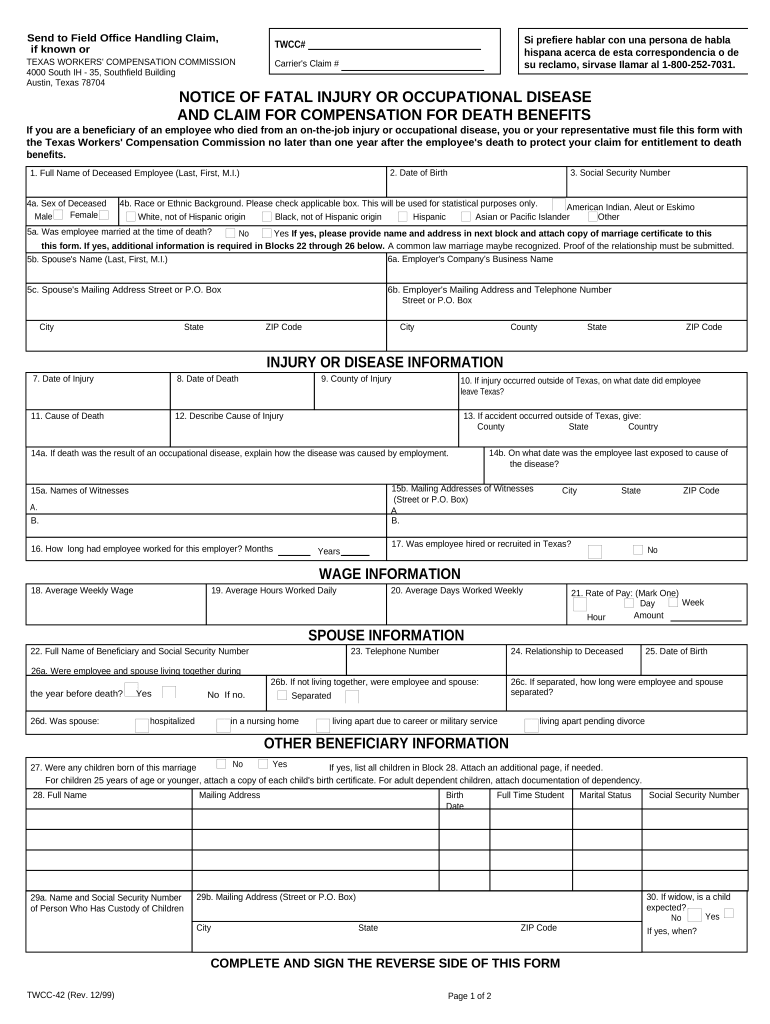
Texas Notice of Fatal Injury and Claim for Compensation
What this Texas notice and claim form is for
Why filing this notice matters for survivors and estates
Prompt submission preserves legal rights to workers’ compensation or related benefits, starts official processing, and helps prevent delays. Accurate and complete information reduces the chance of administrative rejection or later disputes regarding eligibility and benefit amounts.
Who typically completes and files this form
This form is usually completed by an immediate family member, estate representative, or employer when a work-related death has occurred.
- Immediate family members filing on behalf of a deceased worker and seeking survivor benefits.
- Personal representatives or executors managing the decedent’s estate and filing claims.
- Employers or safety officers reporting a fatal workplace incident to insurers or regulatory bodies.
Choose the filer whose authority or legal status best matches the claimant relationship and attach proof of identity or representation as required.
Step-by-step: completing and filing the notice
-
01Gather documents: Collect death certificate, medical records, and employer incident report.
-
02Complete form: Fill all required fields accurately and attach supporting documents.
-
03Review and sign: Confirm names, dates, relationships, and sign in the designated block.
-
04Submit: Send to the insurer or designated state office by permitted delivery method.
The submission and review flow at a glance
-
Filer submits: Claimant or representative sends completed notice and attachments.
-
Intake review: Carrier or agency verifies completeness and identity.
-
Investigation: Factual and medical review to determine compensability.
-
Decision issued: Claim accepted, denied, or additional information requested.
Online workflow settings to streamline processing
| Field | Configuration |
|---|---|
| Authentication | Use email plus SMS code for signer verification |
| Required Attachments | Make death certificate and employer report mandatory uploads |
| Notifications | Enable email confirmations and reviewer alerts |
| Retention | Set long-term archival and access controls |
Technical and integration considerations for eSubmission
Choose a platform that supports common document formats, secure authentication, and integrations with case management systems.
- Formats supported: PDF and DOCX
- Integrations: CRM and case management
- Mobile support: Signing on smartphones
Ensure the chosen platform meets legal and privacy requirements for the document type and that e-submission preserves an auditable record.
Timing considerations and recommended response windows
Immediate reporting:
Report the fatality to the employer and insurer as soon as possible after discovery.
Claim filing:
File dependent claim promptly; delays can complicate evidence collection.
Documentation:
Provide death certificate and medical records early to speed adjudication.
Requests for information:
Respond to agency requests quickly to avoid administrative denial.
Appeals timeline:
Check appeal deadlines before disputing determinations; they are strictly enforced.
Consequences of incomplete or incorrect filings
Frequent preparation errors to avoid
- Using abbreviated or inconsistent names that do not match official records, which delays identity verification and benefits processing.
- Failing to attach the death certificate or relevant medical records, leading to immediate intake requests and slower decisions.
- Listing the wrong claimant relationship or failing to include proof of representation, which can cause eligibility disputes.
- Submitting unsigned or undated forms, or using initials instead of the required full signature, prompting rejection or re-submission.
Realistic examples of how the notice is used
Hospital Benefits Coordinator
After a work-related transport incident, the coordinator assembles the death certificate and shift report
- Files the notice to the insurer within days
- The package clarifies dependent eligibility and shortens administrative follow-up by consolidating required proofs.
Construction Foreman Representative
A foreman submits the notice with OSHA and incident reports
- Attaches crew witness statements
- Early submission enables the insurer to coordinate medical documentation and expedite survivor benefit review.
Practical tips for accurate and efficient filing
Sample eSignature vendor comparison for filing and signing needs
| signNow | DocuSign | Adobe Sign | PandaDoc | HelloSign | |
|---|---|---|---|---|---|
| Starting Price | $8/user/mo | $15/user/mo | $14/user/mo | $19/user/mo | $15/user/mo |
| Free Trial | 7-day free trial | Varies | Varies | Varies | Varies |
| Bulk Send | Yes | Yes | Yes | Yes | No |
| Audit Trail | Yes | Yes | Yes | Yes | Yes |
| HIPAA Compliant | Yes | Yes | Yes | No | No |
Frequently asked questions and practical answers
-
Who may file this notice?
An immediate family member, legal representative, executor, or employer representative normally files. Identify your relationship and attach proof such as marriage certificates, birth certificates, or letters testamentary to establish standing.
-
What supporting documents are required?
Typical attachments include the death certificate, medical records or autopsy report related to the workplace injury, employer incident report, and proof of relationship or representation. Missing documentation is the most common cause of initial intake requests.
-
Can the form be e-signed and submitted online?
Electronic signatures are frequently accepted where the receiving agency or insurer permits eSubmission. Use a secure eSignature platform that provides an audit trail, identity verification, and tamper-evident records.
-
What if I discover an error after submission?
Contact the receiving agency or insurer immediately to report the error and provide corrected information. Many offices allow amendment or supplemental filings, but delays can affect processing timelines.
-
How long before a benefits decision?
Processing time varies by agency, insurer, and case complexity. Expect initial intake review promptly, with full determinations taking additional time if investigations or medical reviews are necessary.
-
Who should I contact if my claim is denied?
Request a written reason for denial and review appeal rights. Appeals deadlines are strict; consult legal counsel or a workers’ compensation advocate to evaluate next steps and filing requirements.