Establishing secure connection… Loading editor… Preparing document…
Navigation

Fill and Sign the Universal Document Mgmt Systems Inc Form S 1
Fill and Sign the Universal Document Mgmt Systems Inc Form S 1

How it works

Open the document and fill out all its fields.
Apply your legally-binding eSignature.
Save and invite other recipients to sign it.

Rate template

4.7
60 votes
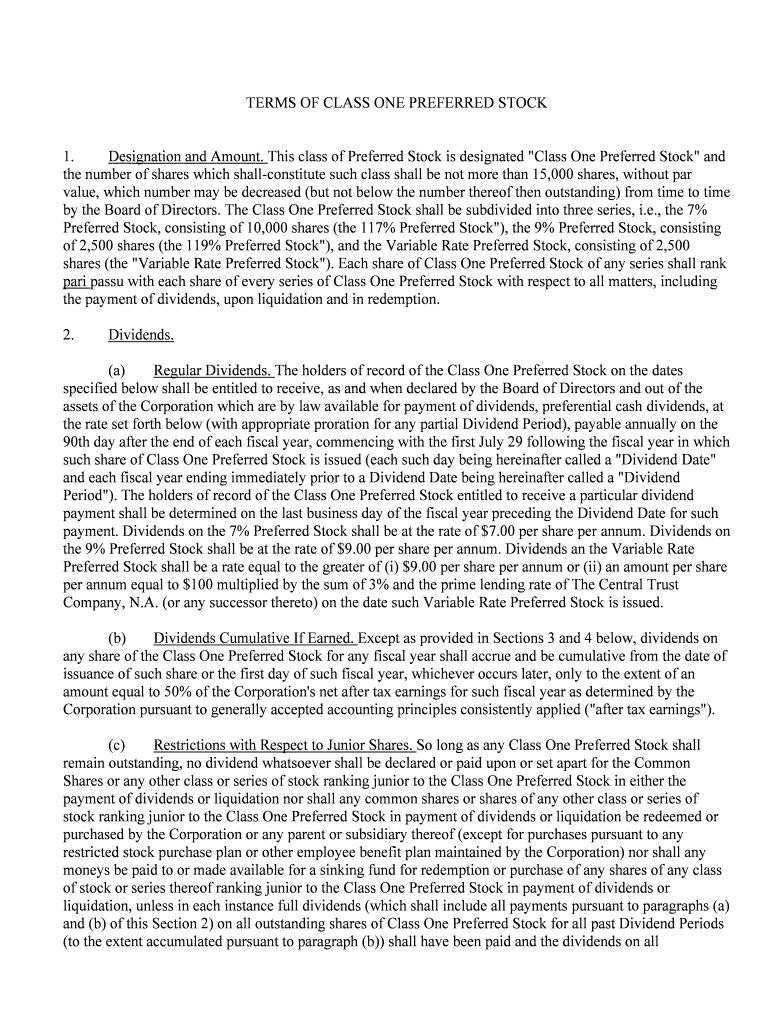
TERMS OF CLASS ONE PREFERRED STOCK 1. Designation and Amount. This class of Preferred Stock is designated "Class One Preferred Stock" and the number of shares which shall-constitute such class shall be not more than 15,000 shares, without par value, which number may be decreased (but not below the number thereof then outstanding) from time to time by the Board of Directors. The Class One Preferred Stock shall be subdivided into three series, i.e., the 7% Preferred Stock, consisting of 10,000 shares (the 117% Preferred Stock"), the 9% Preferred Stock, consisting of 2,500 shares (the 119% Preferred Stock"), and the Variable Rate Preferred Stock, consisting of 2,500 shares (the "Variable Rate Preferred Stock"). Each share of Class One Preferred Stock of any series shall rank pari passu with each share of every series of Class One Preferred Stock with respect to all matters, including the payment of dividends, upon liquidation and in redemption. 2. Dividends. (a) Regular Dividends. The holders of record of the Class One Preferred Stock on the dates specified below shall be entitled to receive, as and when declared by the Board of Directors and out of the assets of the Corporation which are by law available for payment of dividends, preferential cash dividends, at the rate set forth below (with appropriate proration for any partial Dividend Period), payable annually on the 90th day after the end of each fiscal year, commencing with the first July 29 following the fiscal year in which such share of Class One Preferred Stock is issued (each such day being hereinafter called a "Dividend Date" and each fiscal year ending immediately prior to a Dividend Date being hereinafter called a "Dividend Period"). The holders of record of the Class One Preferred Stock entitled to receive a particular dividend payment shall be determined on the last business day of the fiscal year preceding the Dividend Date for such payment. Dividends on the 7% Preferred Stock shall be at the rate of $7.00 per share per annum. Dividends on the 9% Preferred Stock shall be at the rate of $9.00 per share per annum. Dividends an the Variable Rate Preferred Stock shall be a rate equal to the greater of (i) $9.00 per share per annum or (ii) an amount per share per annum equal to $100 multiplied by the sum of 3% and the prime lending rate of The Central Trust Company, N.A. (or any successor thereto) on the date such Variable Rate Preferred Stock is issued. (b) Dividends Cumulative If Earned. Except as provided in Sections 3 and 4 below, dividends on any share of the Class One Preferred Stock for any fiscal year shall accrue and be cumulative from the date of issuance of such share or the first day of such fiscal year, whichever occurs later, only to the extent of an amount equal to 50% of the Corporation's net after tax earnings for such fiscal year as determined by the Corporation pursuant to generally accepted accounting principles consistently applied ("after tax earnings").(c) Restrictions with Respect to Junior Shares. So long as any Class One Preferred Stock shall remain outstanding, no dividend whatsoever shall be declared or paid upon or set apart for the Common Shares or any other class or series of stock ranking junior to the Class One Preferred Stock in either the payment of dividends or liquidation nor shall any common shares or shares of any other class or series of stock ranking junior to the Class One Preferred Stock in payment of dividends or liquidation be redeemed or purchased by the Corporation or any parent or subsidiary thereof (except for purchases pursuant to any restricted stock purchase plan or other employee benefit plan maintained by the Corporation) nor shall any moneys be paid to or made available for a sinking fund for redemption or purchase of any shares of any class of stock or series thereof ranking junior to the Class One Preferred Stock in payment of dividends or liquidation, unless in each instance full dividends (which shall include all payments pursuant to paragraphs (a) and (b) of this Section 2) on all outstanding shares of Class One Preferred Stock for all past Dividend Periods (to the extent accumulated pursuant to paragraph (b)) shall have been paid and the dividends on all outstanding shares of Class One Preferred Stock for the then current Dividend Period shall have been paid or declared and sufficient funds set apart for payment thereof and all required payments under Section 4 below shall have been made.(d) Interest-on Dividends. Accumulations of dividends on any shares of Class One Preferred Stock payable pursuant to paragraph (b) of this Section 2 shall not bear interest.(e) Equality of Shares. No dividend shall be paid upon or declared or set apart for any shares of Class one Preferred Stock for any Dividend Period unless at the same time a like proportionate dividend (reflecting the applicable dividend rates) for the same Dividend Period shall be paid upon or declared or set apart for all shares of Class One Preferred Stock then outstanding and entitled to receive such dividend.(f) Dividends Pro Rata. All dividends declared on the Class One Preferred Stock for any Dividend Period and on any class or series of stock ranking on a parity with the Class One Preferred Stock as to dividends shall be declared pro rata so that the amounts of dividends per share declared for such period on the Class One Preferred Stock and on any class or series of stock ranking on a parity with the Class One Preferred Stock as to dividends that were outstanding during such period shall in all cases bear to each other the same proportions that the aggregate dividend amounts of the respective classes or series of such stock for such period bear to each other. All such dividends shall be allocated first to accumulated but unpaid dividends and then to current dividends.(g) Set Apart for Payment. As used herein, the phrase "set apart for payment" in respect of the payment of dividends shall not be construed as requiring deposit of any funds in trust or in any special account, but shall merely mean that out of the funds available for the payment of dividends, a sum sufficient for the payment of dividends on the Class One Preferred Stock shall be reserved by appropriate notation on the books of the corporation.3. Liquidation Preference. (a) General. The Class One Preferred Stock shall be preferred over the Common Shares and any other class or series of stock ranking junior to the Class One Preferred Stock as to distribution of assets in the event of any liquidation or dissolution or winding up of the Corporation, and in that event the holders of the Class One Preferred Stock shall be entitled to receive, after payment or provision for payment of the debts and other liabilities of the Corporation, out of the assets of the corporation available for distribution to its shareholders, $100 per share (the "Stated Value"), and no more, together with an amount equal to all dividends accumulated and unpaid thereon to the date of final distribution (for which purpose the pro rata portion of any dividend for the then current Dividend Period shall be deemed to be accumulated), for every share of the Class One Preferred Stock held by them before any distribution of the assets shall*be made to the holders of the Common Shares or any other class or series of stock ranking junior to the Class One Preferred Stock as to distribution of assets. Upon any liquidation, dissolution or winding up of the Corporation, after payment shall have been made in full on the Class One Preferred Stock as provided in the preceding sentence, but not prior thereto, the Common Shares or any other series or class of stock ranking junior to the Class One Preferred Stock as to distribution for assets shall, subject to the respective terms and provisions, if any, applying thereto, be entitled to receive any and all assets remaining to be paid or distributed and the Cl ass One Preferred Stock shall not be entitled to share therein. (b) Distributions Pro Rata. If upon any liquidation or dissolution or winding up of the Corporation the amounts payable on or with respect to the Class One Preferred Stock are not paid in full, the holders of shares of Class One Preferred Stock together with all classes or series of stock ranking on a parity with the Class One Preferred Stock as to distribution of assets shall share pro rata in any distribution of assets in respect of the shares held by them upon such distribution in proportion to the amounts that would have been distributable to each such class or series if all amounts payable on or with respect to the Class One Preferred Stock and any other class or series of stock that so ranks on a parity with the Class one Preferred Stock had been paid in full. (c) Merger or consolidation. Neither the merger or consolidation of the Corporation with another corporation nor the sale or lease of all or substantially all of the assets of the corporation shall be deemed to be a liquidation or dissolution or winding up of the Corporation.(d) Notice Required. Written notice of any voluntary or involuntary liquidation, dissolution or winding up of the affairs of the Corporation, stating the payment date and the place where the distributable amount shall be payable and stating the anticipated amount of any such distributable amount, shall be given by mail, postage prepaid, not less than thirty (30) days prior to the payment date stated therein, to the holders of record of the Class One Preferred Stock at their respective addresses as the same shall then appear on the books of the Corporation.4. Redemption. (a) Mandatory Redemption. The shares of Class One Preferred Stock are subject to mandatory sinking account redemption (the shares to be redeemed to be selected as provided in paragraph 4(c) below) at the price of $100 per share, plus an amount equal to any dividends accumulated and unpaid thereon to the date fixed for redemption (the "Redemption Date") (for which purpose the pro rata portion of any dividend for the then current Dividend Period shall be deemed to be accumulated) (the "Redemption Price"). For each fiscal year, commencing with the later of the fiscal year ending April 30, 1995 and the first fiscal year in which any share of Class One Preferred Stock is issued, not later than the 90th day after the end of such fiscal year, the Corporation shall deposit funds to the sinking account in an amount equal to the after tax earnings for such fiscal year in excess of the sum of (i) $200,000, and (ii) an amount equal to all dividends paid on the Class One Preferred Stock with respect to such fiscal year plus all cash amounts previously paid during such fiscal year in optional redemption of shares of Class One Preferred Stock or the principal of Subordinated Notes issued pursuant to the Note Purchase Agreement between the Corporation and Oce-van der Grinten, N.V., dated as of October 28, 1991. Such funds shall be used as promptly as possible for the redemption of shares of Class One Preferred Stock as contemplated by this Section 4(a), to the extent not prohibited by applicable law. Notwithstanding the foregoing, the Corporation shall not be required to deposit to the sinking account in respect of any fiscal year any amount determined as provided above if and to the extent the sum of such amount and all cash amounts payable in redemption of the principal of such Subordinated Notes with respect to such fiscal year plus any dividends paid on the Class One Preferred Stock with respect to such fiscal year would exceed 60% of the corporation's after tax earnings for such fiscal year. (b) Optional Redemption. The Corporation may redeem all or any part of the shares of Class One Preferred Stock at its election expressed by resolution of the Board of Directors, at any time upon not less than thirty (30) days prior notice to the holders of record of the Class One Preferred Stock to be redeemed, given by mail, at the Redemption Price, plus an amount equal to any dividends accumulated and unpaid thereon to the Redemption Date (for which purpose the pro rata portion of any dividend for the then current Dividend Period shall be deemed to be accumulated).(c) Notice, etc. (i) In order to facilitate the redemption of any shares of Class one Preferred Stock that may be chosen for redemption, the Board of Directors shall be authorized to exercise its discretion to cause the transfer books of the Corporation to be closed as to such shares not more than fifty (50) days prior to the designated Redemption Date and not prior to the giving of the notice referred to in clause (4)(b) above. (ii) If less than all outstanding shares of Class One Preferred Stock are to be redeemed, the redemption shall be made to the extent funds are available first with respect to any outstanding shares of Variable Rate Preferred Stock, second with respect to any outstanding shares of 9% Preferred Stock and third with respect to any outstanding shares of 7% Preferred Stock and within each such series either pro rata, by lot or in some other equitable manner as may be prescribed by resolution of the Board of Directors. (iii) Any notice of redemption mailed to a holder of Class One Preferred Stock at his address as the same shall appear on the books of the Corporation shall be conclusively presumed to have been given, whether or not the holder receives the notice. Each such notice shall state the Redemption Date; the number of shares of Class One Preferred Stock to be redeemed, and, if less than all shares of Class One Preferred Stock held by such holder are to be redeemed, the number of such shares to be redeemed from him and the fact that a new certificate or certificates representing any unredeemed shares shall be issued without cost to such holder; the Redemption Price applicable to the shares to be redeemed; the place or places where such shares are to be surrendered; and that dividends on shares to be redeemed will cease to accrue on the Redemption Date. No defect in any such notice to any holder of Class one Preferred Stock shall affect the validity of the proceedings for the redemption of any other shares of such Class One Preferred Stock. (d) Deposit of Funds. The Corporation shall provide moneys for the payment of the Redemption Price of the shares called for redemption pursuant to paragraph (a) or (b) of this Section 41 by depositing the amount thereof on or before the Redemption Date for the account of the holders of the Class One Preferred Stock entitled thereto with a bank or trust company located in New York, New York or Cincinnati, Ohio, and having capital and surplus of at least fifty million dollars ($50,000,000). From and after the date fixed in any such notice as the Redemption Date (unless default shall be made by the corporation in providing moneys sufficient for the payment of the -Redemption Price pursuant to such notice), all dividends on the Class One Preferred Stock called for redemption shall cease to accrue and all rights of the holders thereof as shareholders of the Corporation, except the right to receive the Redemption Price as hereinafter provided, shall cease and terminate. After the deposit of such amount with such bank or trust company, the respective holders of record of the Class One Preferred Stock to be redeemed shall be entitled on and after the Redemption Date to receive the Redemption Price at any time upon actual delivery to such bank or trust company of (i) certificates for the number of shares to be redeemed, duly endorsed in blank or accompanied by proper instruments of assignment and transfer thereof duly endorsed in blank or (ii) if such certificates have been lost, such documentation with respect thereto as the Corporation may reasonably require. Any interest accrued on funds so deposited shall be paid to the Corporation from time to time and the holders of shares of Class One Preferred Stock to be redeemed shall have no claim to any such interest. Any moneys so deposited which shall remain unclaimed by the holders of such Class One Preferred Stock at the end of two (2) years after the Redemption Date shall be paid by such bank or trust company to the Corporation. After such repayment to the Corporation, the holders of the shares so called for redemption shall look only to the Corporation as general-creditors for the payment thereof, subject to applicable escheat laws.(e) Retirement of Shares. Any shares of Class One Preferred Stock redeemed pursuant to the provisions of this section 4 shall be retired. 5. Voting Rights. No holder of Class One Preferred Stock shall be entitled to vote on any matter submitted to the shareholders of the corporation for their vote, waiver, release or other action, except as may be otherwise expressly required by law or provided for herein. 6. No Senior Preferred Stock. The Corporation shall not issue any series of Preferred Stock ranking senior or equal to the Class one Preferred Stock as to either dividends or liquidation without the consent of the holders of a majority of the outstanding shares of Class One Preferred Stock. 7. Amendment. So long as any share of Class One Preferred Stock is outstanding, the Articles of Incorporation of the Corporation shall not be amended in any manner which would materially alter or change the powers, preferences or special rights of the Class One Preferred Stock so as to affect them adversely without the affirmative vote of the holders of a majority of the outstanding shares of Class One Preferred Stock, voting separately as a class.

Practical tips for completing your ‘Universal Document Mgmt Systems Inc Form S 1 ’ online

Are you fed up with the inconvenience of managing paperwork? Look no further than airSlate SignNow, the leading eSignature solution for individuals and businesses. Bid farewell to the tedious process of printing and scanning documents. With airSlate SignNow, you can effortlessly fill out and sign documents online. Take advantage of the robust features integrated into this user-friendly and affordable platform and transform your approach to document management. Whether you need to approve forms or gather eSignatures, airSlate SignNow manages it all seamlessly, with just a few clicks.

Follow these step-by-step instructions:

  1. Sign in to your account or initiate a free trial with our service.
  2. Click +Create to upload a file from your device, cloud storage, or our form library.
  3. Open your ‘Universal Document Mgmt Systems Inc Form S 1 ’ in the editor.
  4. Click Me (Fill Out Now) to prepare the form on your end.
  5. Add and assign fillable fields for others (if needed).
  6. Continue with the Send Invite settings to request eSignatures from others.
  7. Save, print your copy, or convert it into a reusable template.

No problem if you need to collaborate with your colleagues on your Universal Document Mgmt Systems Inc Form S 1 or send it for notarization—our solution provides everything you need to complete such tasks. Sign up with airSlate SignNow today and elevate your document management to a new standard!

Here is a list of the most common customer questions. If you can’t find an answer to your question, please don’t hesitate to reach out to us.

Need help? Contact Support

The best way to complete and sign your universal document mgmt systems inc form s 1

Save time on document management with airSlate SignNow and get your universal document mgmt systems inc form s 1 eSigned quickly from anywhere with our fully compliant eSignature tool.

How to Sign a PDF Online How to Sign a PDF Online

How to complete and sign documents online

In the past, dealing with paperwork took pretty much time and effort. But with airSlate SignNow, document management is quick and simple. Our powerful and user-friendly eSignature solution enables you to easily complete and eSign your universal document mgmt systems inc form s 1 online from any internet-connected device.

Follow the step-by-step guidelines to eSign your universal document mgmt systems inc form s 1 template online:

  • 1.Register for a free trial with airSlate SignNow or log in to your account with password credentials or SSO authorization option.
  • 2.Click Upload or Create and import a form for eSigning from your device, the cloud, or our form collection.
  • 3.Click on the document name to open it in the editor and utilize the left-side menu to fill out all the blank fields accordingly.
  • 4.Place the My Signature field where you need to eSign your form. Type your name, draw, or upload an image of your regular signature.
  • 5.Click Save and Close to finish editing your completed form.

After your universal document mgmt systems inc form s 1 template is ready, download it to your device, export it to the cloud, or invite other people to electronically sign it. With airSlate SignNow, the eSigning process only takes several clicks. Use our powerful eSignature solution wherever you are to manage your paperwork efficiently!


How to Sign a PDF Using Google Chrome How to Sign a PDF Using Google Chrome

How to fill out and sign forms in Google Chrome

Completing and signing paperwork is easy with the airSlate SignNow extension for Google Chrome. Adding it to your browser is a quick and effective way to deal with your forms online. Sign your universal document mgmt systems inc form s 1 sample with a legally-binding eSignature in just a couple of clicks without switching between tools and tabs.

Follow the step-by-step guide to eSign your universal document mgmt systems inc form s 1 form in Google Chrome:

  • 1.Go to the Chrome Web Store, locate the airSlate SignNow extension for Chrome, and add it to your browser.
  • 2.Right-click on the link to a form you need to sign and select Open in airSlate SignNow.
  • 3.Log in to your account with your credentials or Google/Facebook sign-in buttons. If you don’t have one, sign up for a free trial.
  • 4.Use the Edit & Sign menu on the left to fill out your sample, then drag and drop the My Signature option.
  • 5.Add a picture of your handwritten signature, draw it, or simply type in your full name to eSign.
  • 6.Make sure all information is correct and click Save and Close to finish modifying your form.

Now, you can save your universal document mgmt systems inc form s 1 sample to your device or cloud storage, send the copy to other individuals, or invite them to electronically sign your document via an email request or a secure Signing Link. The airSlate SignNow extension for Google Chrome improves your document processes with minimum effort and time. Try airSlate SignNow today!


How to Sign a PDF in Gmail How to Sign a PDF in Gmail How to Sign a PDF in Gmail

How to complete and sign forms in Gmail

Every time you get an email with the universal document mgmt systems inc form s 1 for signing, there’s no need to print and scan a document or download and re-upload it to a different tool. There’s a better solution if you use Gmail. Try the airSlate SignNow add-on to promptly eSign any paperwork right from your inbox.

Follow the step-by-step guidelines to eSign your universal document mgmt systems inc form s 1 in Gmail:

  • 1.Go to the Google Workplace Marketplace and find a airSlate SignNow add-on for Gmail.
  • 2.Install the tool with a corresponding button and grant the tool access to your Google account.
  • 3.Open an email containing an attached file that needs signing and utilize the S symbol on the right panel to launch the add-on.
  • 4.Log in to your airSlate SignNow account. Opt for Send to Sign to forward the file to other people for approval or click Upload to open it in the editor.
  • 5.Place the My Signature option where you need to eSign: type, draw, or upload your signature.

This eSigning process saves time and only requires a couple of clicks. Take advantage of the airSlate SignNow add-on for Gmail to update your universal document mgmt systems inc form s 1 with fillable fields, sign paperwork legally, and invite other people to eSign them al without leaving your inbox. Enhance your signature workflows now!


How to Sign a PDF on a Mobile Device How to Sign a PDF on a Mobile Device How to Sign a PDF on a Mobile Device

How to complete and sign documents in a mobile browser

Need to quickly complete and sign your universal document mgmt systems inc form s 1 on a mobile phone while doing your work on the go? airSlate SignNow can help without needing to set up extra software programs. Open our airSlate SignNow tool from any browser on your mobile device and create legally-binding electronic signatures on the go, 24/7.

Follow the step-by-step guide to eSign your universal document mgmt systems inc form s 1 in a browser:

  • 1.Open any browser on your device and go to the www.signnow.com
  • 2.Create an account with a free trial or log in with your password credentials or SSO option.
  • 3.Click Upload or Create and import a file that needs to be completed from a cloud, your device, or our form collection with ready-made templates.
  • 4.Open the form and fill out the empty fields with tools from Edit & Sign menu on the left.
  • 5.Add the My Signature field to the form, then type in your name, draw, or upload your signature.

In a few easy clicks, your universal document mgmt systems inc form s 1 is completed from wherever you are. When you're done with editing, you can save the document on your device, generate a reusable template for it, email it to other individuals, or invite them electronically sign it. Make your paperwork on the go fast and productive with airSlate SignNow!


How to Sign a PDF on iPhone How to Sign a PDF on iPhone

How to complete and sign forms on iOS

In today’s corporate environment, tasks must be done quickly even when you’re away from your computer. With the airSlate SignNow mobile app, you can organize your paperwork and approve your universal document mgmt systems inc form s 1 with a legally-binding eSignature right on your iPhone or iPad. Set it up on your device to conclude contracts and manage documents from just about anywhere 24/7.

Follow the step-by-step guide to eSign your universal document mgmt systems inc form s 1 on iOS devices:

  • 1.Open the App Store, search for the airSlate SignNow app by airSlate, and set it up on your device.
  • 2.Launch the application, tap Create to add a template, and choose Myself.
  • 3.Opt for Signature at the bottom toolbar and simply draw your signature with a finger or stylus to eSign the sample.
  • 4.Tap Done -> Save right after signing the sample.
  • 5.Tap Save or utilize the Make Template option to re-use this document in the future.

This method is so straightforward your universal document mgmt systems inc form s 1 is completed and signed in a couple of taps. The airSlate SignNow app works in the cloud so all the forms on your mobile device remain in your account and are available any time you need them. Use airSlate SignNow for iOS to boost your document management and eSignature workflows!


How to Sign a PDF on Android How to Sign a PDF on Android

How to fill out and sign paperwork on Android

With airSlate SignNow, it’s simple to sign your universal document mgmt systems inc form s 1 on the go. Install its mobile app for Android OS on your device and start enhancing eSignature workflows right on your smartphone or tablet.

Follow the step-by-step guidelines to eSign your universal document mgmt systems inc form s 1 on Android:

  • 1.Open Google Play, search for the airSlate SignNow app from airSlate, and install it on your device.
  • 2.Sign in to your account or register it with a free trial, then add a file with a ➕ option on the bottom of you screen.
  • 3.Tap on the uploaded document and choose Open in Editor from the dropdown menu.
  • 4.Tap on Tools tab -> Signature, then draw or type your name to electronically sign the template. Complete blank fields with other tools on the bottom if necessary.
  • 5.Utilize the ✔ button, then tap on the Save option to finish editing.

With an easy-to-use interface and full compliance with primary eSignature standards, the airSlate SignNow app is the best tool for signing your universal document mgmt systems inc form s 1 . It even works offline and updates all form modifications when your internet connection is restored and the tool is synced. Complete and eSign documents, send them for eSigning, and generate re-usable templates anytime and from anyplace with airSlate SignNow.

Sign up and try Universal document mgmt systems inc form s 1
  • Close deals faster
  • Improve productivity
  • Delight customers
  • Increase revenue
  • Save time & money
  • Reduce payment cycles

