Establishing secure connection…Loading editor…Preparing document…

Virginia Nonstock Corporation

This template is fully customizable. Edit the text, fill out the fields, and send it for signature. Give it a try!
Virginia Nonstock Corporation

What a Virginia Nonstock Corporation Is

A Virginia Nonstock Corporation is a corporate entity organized under Virginia law that issues no stock and is commonly used for nonprofit, mutual benefit, or membership organizations. Articles of incorporation are filed with the Virginia State Corporation Commission to create the entity; bylaws and a registered agent are required, and governance is by directors and members or another designated body. The entity can be tax-exempt if it meets federal requirements and files with the IRS, and many formation steps and signature approvals may be completed electronically when permitted by law.

Why Choose the Nonstock Structure in Virginia

A nonstock corporation suits organizations focused on mission, membership, or mutual benefit rather than investor returns. It separates governance from equity, supports tax-exempt objectives when eligible, and provides limited liability for directors and officers.

Why Choose the Nonstock Structure in Virginia

Who Commonly Forms a Virginia Nonstock Corporation

Professional advisors (attorneys, CPAs) and registered agents commonly assist with formation, filings, and compliance to ensure state and federal obligations are met.

  • Nonprofits and charities focused on public or charitable programs
  • Member-based organizations such as trade associations or cooperatives
  • Foundations, social clubs, and civic or community groups

Core Components of a Professional Articles Package

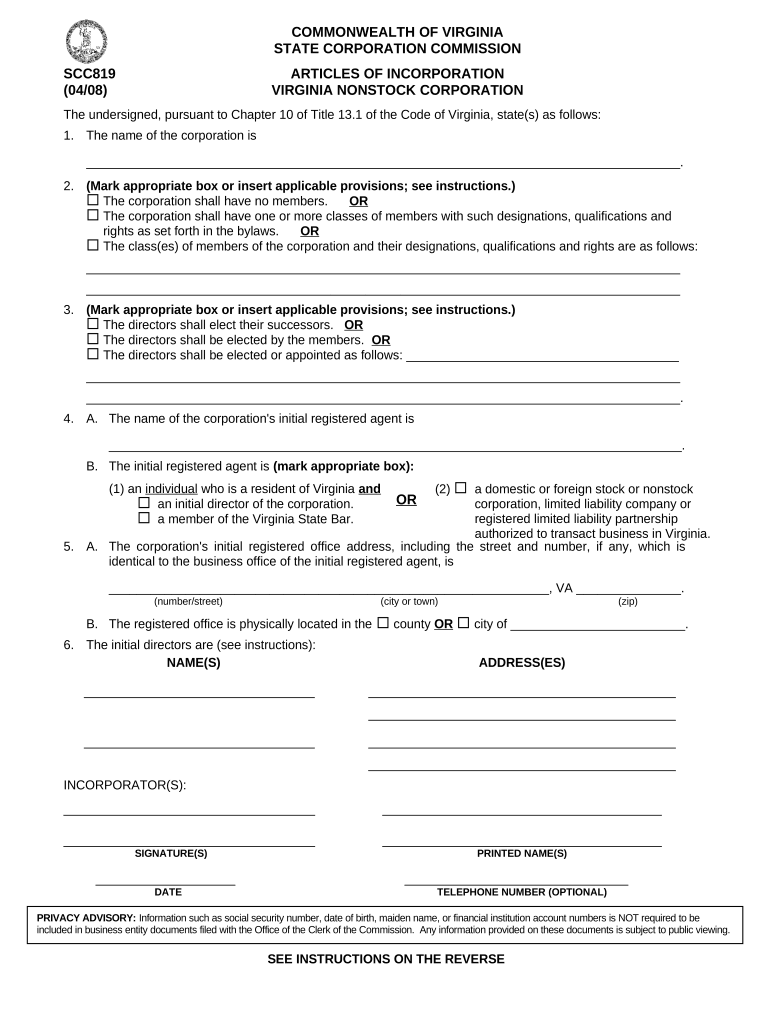
A complete formation packet for a Virginia Nonstock Corporation typically includes the Articles of Incorporation, initial bylaws, registered agent acceptance, organizer signatures, and documentation of the corporation’s purpose and membership rules.

Articles

Signed document filed with the Virginia State Corporation Commission stating name, purpose, registered agent, and incorporator details.
Bylaws

Internal governance rules covering directors, meetings, voting, membership classes, and officer roles.

Registered Agent

Name and Virginia street address of the agent authorized to receive service of process.

Organizers

Individual(s) who sign and submit formation documents and adopt initial corporate acts.

Purpose Statement

Clear description of nonprofit or membership objectives to support tax-exemption applications if applicable.

Initial Resolution

Board or incorporator resolutions adopting bylaws and authorizing filing and bank account setup.

Step-by-Step: Filing a Virginia Nonstock Corporation

Follow these core steps to form the corporation and complete required post-filing actions.

  • 01
    Gather Information: Confirm name availability, registered agent, incorporators, and purpose.
  • 02
    Prepare Articles: Draft articles with required fields and incorporator signature(s).
  • 03
    File with SCC: Submit articles to the Virginia State Corporation Commission and pay filing fee.
  • 04
    Adopt Bylaws: Hold initial meeting, adopt bylaws, and record corporate resolutions.

How to Set Up an Online Filing and Signature Workflow

Configure an online workflow to collect signatures, attach bylaws, and preserve an audit trail for the formation package.

Field Configuration
Authentication Use email verification or SMS code to attribute signer identity.
Template Create reusable Articles and Bylaws templates to reduce repetitive entry errors.
Conditional Fields Show fields only when relevant, e.g., tax-exempt questions for nonprofits.
Audit Trail Enable timestamp, IP, and action logs for legal-proof records.

Where to File and How Documents Move Through the Process

Understand filing endpoints and the routing sequence so each signer receives the correct document at the right time.

  • Submit to SCC: File Articles with the Virginia State Corporation Commission for legal formation.
  • Record Bylaws: Keep bylaws in corporate records; no public filing required.
  • Apply for EIN: Request EIN from the IRS for tax and banking purposes.
  • State & Local Filings: Register for any required state tax or charitable solicitation registrations.

Timing and Processing Expectations

Processing times and recurring filing obligations depend on method of submission and state requirements; plan for both initial processing and annual compliance.

Effective Date:

Effective upon filing unless a future date is specified on the articles.

SCC Processing:

Processing time varies by submission method and SCC workload.

Annual Requirements:

Virginia entities file annual registrations and pay fees; timing varies with state rules.

IRS Filings:

Apply promptly for EIN and tax-exempt status to meet federal deadlines.

Charitable Registration:

Charitable solicitation reporting deadlines vary by state and organization size.

Key Formation Milestones

Track these numbered stages from formation through initial compliance to reduce administrative risk and ensure smooth operations.

01

Reserve/Name Check

Confirm name availability and reserve if required before filing.

02

File Articles

File with Virginia SCC to legally form the corporation.

03

Initial Meeting

Adopt bylaws and elect directors at the first organizational meeting.

04

Register Taxes

Obtain EIN and file for any state and federal tax registrations needed.

eSignature Vendor Pricing and Capability Snapshot

Compare common plan starting prices and basic capability differences relevant to document-heavy formation and nonprofit workflows.

signNow DocuSign Adobe Sign PandaDoc HelloSign
Starting Price $8/user/mo $15/user/mo $14/user/mo $19/user/mo $15/user/mo
Free Trial 7-day free trial, no card Yes Yes Yes Yes
Bulk Send Yes Yes Yes Yes No
Audit Trail Yes Yes Yes Yes Yes
HIPAA Compliant Yes Yes Yes No No

Security and Compliance Controls to Protect Formation Records

Transport Encryption: TLS 1.2/1.3
Data at Rest: AES-256 encryption
Third-Party Audits: SOC 2 Type II
Health Data: HIPAA compliant (BAA required)
Regulated Records: 21 CFR Part 11 compliance available
eSignature Law: ESIGN and UETA compliant

Common Penalties and Legal Risks to Avoid

Incorrect TIN: Backup withholding 24% triggers
Late Information Returns: $60 per form (IRC §6721)
Intentional Disregard: $660+ per form, no cap
I-9 Violations: $281–$2,789 per violation
Missing Notarization: May void acknowledgments or delay recording
Name Mismatch: Bank account and IRS processing delays

Frequent Preparation Errors to Watch For

  • Using different name formats across filings causes IRS and banking delays
  • Omitting a registered agent street address (PO Boxes insufficient)
  • Failing to adopt bylaws at the initial meeting delays governance
  • Neglecting state charitable registration where solicitation occurs

Technical Considerations for eSigning Formation Documents

Ensure the chosen eSignature platform supports necessary integrations and compliance for corporate formation workflows.

  • Integrations: Salesforce, NetSuite, Microsoft 365 supported
  • Formats: PDF, DOCX, and form imports supported
  • Advanced Auth: SMS, KBA, and enterprise SSO available

Real-World Examples of Online Formation and Signing

Organizations across sectors have used digital workflows to complete formation and governance tasks while preserving compliance and audit trails.

Martin Properties

Tim Martin used online signing to complete formation documents remotely and close quickly

  • Mobile and offline signing supported
  • I can process and execute all of these documents online with 100% compliance and built-in security, which lets us complete formation steps without in-person meetings and speeds delivery to partners.

Fertility Centers of Illinois

John Butler integrated eSignatures with back office systems to route corporate approvals

  • NetSuite integration reduced manual entry
  • The airSlate SignNow team has been exceptional, responsive, the API has been great, and we're extremely happy that we chose airSlate SignNow as a company.

Practical Tips for Accurate and Efficient Completion

Apply consistent naming and verification practices to reduce delays and ensure records match across agencies and banks.

Standardize Names
Use one legal name format across all filings, bank accounts, and IRS applications to avoid mismatches.
Use Templates
Create and reuse templates for articles and bylaws to minimize manual errors and omissions.
Record Audit Trails
Preserve timestamps, IP addresses, and signer authentication logs for legal evidence and future audits.
Confirm Local Rules
Verify state-specific notary, witness, and charitable registration requirements before soliciting funds or recording property.

Frequently Asked Questions About Virginia Nonstock Corporations

Answers to common legal, filing, and eSignature questions to help you avoid delays and preserve enforceability.


Need help? Contact support

be ready to get more
Join over 28 million airSlate SignNow users