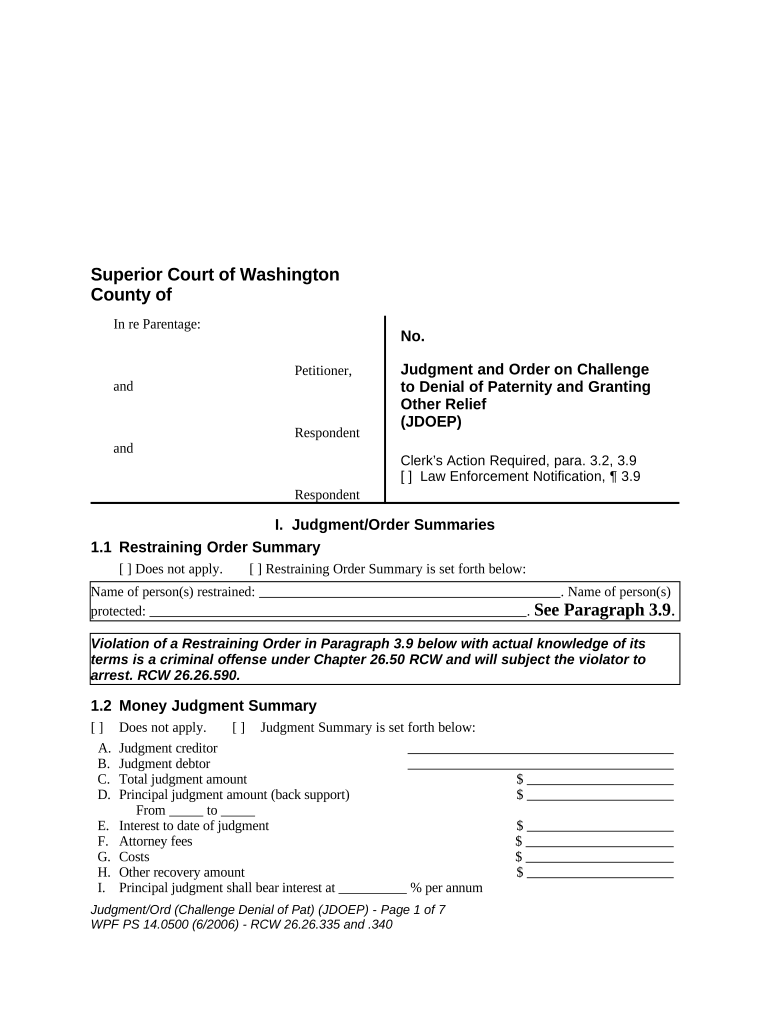
Superior Court of Washington
County of
In re Parentage:
Petitioner,
and
Respondent
and
Respondent No.
Judgment and Order on Challenge
to Denial of Paternity and Granting
Other Relief
(JDOEP)
Clerk’s Action Required, para. 3.2, 3.9
[ ] Law Enforcement Notification, ¶ 3.9
I. Judgment/Order Summaries
1.1 Restraining Order Summary
[ ] Does not apply. [ ] Restraining Order Summary is set forth below:
Name of person(s) restrained: . Name of person(s)
protected: . See Paragraph 3.9 .
Violation of a Restraining Order in Paragraph 3.9 below with actual knowledge of its
terms is a criminal offense under Chapter 26.50 RCW and will subject the violator to
arrest. RCW 26.26.590.
1.2 Money Judgment Summary
[ ] Does not apply. [ ] Judgment Summary is set forth below:
A. Judgment creditor
B. Judgment debtor
C. Total judgment amount $
D. Principal judgment amount (back support) $
From _____ to _____
E. Interest to date of judgment $
F. Attorney fees $
G. Costs $
H. Other recovery amount $
I. Principal judgment shall bear interest at __________ % per annum
J udgment /O rd (Challenge Denial of Pat) (JDOEP) - Page 1 of 7
WPF PS 14.0500 (6/200 6 ) - RCW 26.26.335 and .340
J. Attorney fees, costs and other recovery amounts shall bear interest at __________ % per annum
K. Attorney for judgment creditor
L. Attorney for judgment debtor
II. Basis
This matter has come before the court on petitioner’s Petition for Challenge to Denial of Paternity. The
court considered the case record and has previously entered its Findings of Fact and Conclusions of Law.
This action affects the paternity of _____________________________ [Name of Child] _______ [Age
on the date of this order].
III. Order
It is Ordered:
3.1 Challenge to Denial of Paternity
[ ] This proceeding to challenge the Denial of Paternity was not timely begun and is
dismissed.
[ ] The Petition for Challenge to Denial of Paternity is granted, the Denial of Paternity is
declared invalid because it was signed under fraud, duress or material mistake of fact and
the Acknowledgment of Paternity is void.
[ ] The Petition for Challenge to Denial of Paternity is denied.
3.2 Determination of Paternity Based Upon Genetic Testing
[ ] Does not apply.
[ ] Based upon genetic testing in this proceeding, the father and child relationship [ ] exists
[ ] does not exist between the acknowledged father and is in the child’s best interest.
[ ] Based upon genetic testing in this proceeding, _________________________ [Name] is
the father of the child.
[ ] At the time the acknowledgment [ ] and denial of paternity were signed, genetic tests
were performed indicating the acknowledged father was not excluded as the father of the
child based upon a probability of paternity of _________ per cent. This test result was
not challenged in this proceeding.
3.3 Father’s Obligation for Child Support
[ ] Effective as of _______________________ [Date], the acknowledged father [ ] is [ ] is
not relieved from any obligation to pay child support under the child support order
entered on _____________________ [Date].
[ ] ___________________________ [Name] shall pay child support as set forth in the
Order of Child Support which [ ] is attached [ ] is filed separately.
3.4 Judgment
(Note - do not repeat this judgment in the Order of Child Support WPF PS 01.0500.)
[ ] Does not apply.
[ ] _______________________________ [Name] shall have judgment against
______________________ [Name] in the total amount of $______________ as follows:
J udgment /O rd (Challenge Denial of Pat) (JDOEP) - Page 2 of 7
WPF PS 14.0500 (6/200 6 ) - RCW 26.26.335 and .340
[ ] $_______________ for genetic testing costs.
[ ] $_______________ for guardian ad litem fees.
[ ] $_______________ for attorney fees.
[ ] $_______________ costs.
[ ] $_______________ for other fees and expenses.
[ ] Other:
[ ] _________________________________ [Name] shall have judgment against
______________________________ [Name] for _________________________ in the
amount of $_______________.
3.5 Judgment for Back Child Support
(Note - do not repeat this judgment in the Order of Child Support.)
[ ] _________________________________ [Name] is awarded a judgment against
________________________ [Name] in the amount of $__________________, for back
child support for the period from _______________ [Date] to _______________ [Date].
[ ] The unpaid support due to _________________________________ [Name] by
______________________________ [Name] is waived and will not be collected by
____________________________ [Name]. This does not waive any support owing to
the state as a result of payment of public assistance.
[ ] All support due under temporary court orders has been paid.
[ ] Unpaid support due under a court or administrative order is preserved for collection and
is not merged in or extinguished by this order.
[ ] Other:
[ ] Collection Limitation Against Wages:
The back child support provision above shall be paid at a rate of at least $__________
per month beginning __________________ [Date]. So long as the payments for current
support, back support and the judgment are timely, collection against the judgment
debtor’s wages, excluding bonuses and other lump sum payments, shall be limited to
$_______________ per month (for current support, back support and judgment). This
limitation terminates if a single payment is past due . This provision does not
limit or bar the state of Washington from using other collection remedies available to it
by law, including, but not limited to, certification for collection to the Internal Revenue
Service. Payment shall be made to:
[ ] Wage Withholding Action:
[ ] Withholding action may be taken against wages, earnings, assets, or benefits,
and liens enforced against real and personal property under the child support
statutes of this or any other state, without further notice to the judgment debtor at
J udgment /O rd (Challenge Denial of Pat) (JDOEP) - Page 3 of 7
WPF PS 14.0500 (6/200 6 ) - RCW 26.26.335 and .340
any time after entry of an order by the court, except as limited by the Collection
Limitation Against Wages paragraph above.
[ ] Wage withholding, by notice of payroll deduction or other income withholding
action under Chapter 26.18 RCW or Chapter 74.20 RCW, without further notice
to the judgment debtor, is delayed until a payment is past due, because:
[ ] there is good cause not to require immediate income withholding.
[ ] the parties have reached a written agreement which the court approves
that provides for an alternative arrangement. (See below):
[ ] Judgment and Back Support Payments Shall Be Made to:
[ ]
[ ] Washington State Support Registry
P.O. Box 45868
Olympia, Washington 98504
Phone: 1-800-922-4306
1-800-442-5437
3.6 Jurisdiction Over the Child
The court has jurisdiction over the child as set forth in the Findings of Facts and Conclusions of
Law.
3.7 Residential Schedule/Parenting Plan
[ ] The primary residence of the child shall be with ______________________ [Name],
who is designated custodian solely for the purpose of other state and federal statutes.
[ ] The residential plan/parenting plan signed by the court on __________________ [Date]
is adopted and incorporated by reference.
[ ] ______________________________ [Name] shall be designated the custodian of the
child, and the child shall reside with _______________________ [Name] at all times.
[ ] Determination of residential time of ________________________________ [Name]
with the child is denied.
[ ] Other:
3.8 Amendment of Birth Certificate
The birth certificate of the child, __________________________ [Name], [ ] shall [ ] shall not
be amended by the Washington State Registrar of Vital Statistics by removing the acknowledged
father’s name from the birth certificate and by changing the child’s surname to
____________________________ [Surname].
[ ] The Washington State Registrar of Vital Statistics shall amend the child’s birth
certificate to identify _____________________________ [Name] as the child’s father.
J udgment /O rd (Challenge Denial of Pat) (JDOEP) - Page 4 of 7
WPF PS 14.0500 (6/200 6 ) - RCW 26.26.335 and .340
3.9 Continuing Restraining Order
[ ] Does not apply.
[ ] A continuing restraining order is entered as follows:
[ ] ______________________________ [Name] is restrained and enjoined from
disturbing the peace of the other party.
[ ] _______________________________ [Name] is restrained and enjoined
from going onto the grounds of or entering the home, work place or school of
the other party, or the day care or school of the following named children:
_______________________________________________________________
[ ] _____________________________ [Name] is restrained and enjoined from
knowingly coming within or knowingly remaining within _________________
[Distance] of the home, work place or school of the other party, or the day care or
school of these children:
_______________________________________________________________ .
Other: ________________________________________________________.
[ ] _____________________________ [Name] is restrained and enjoined from
molesting, assaulting, harassing or stalking _____________________ [Name].
(The following firearm restrictions apply if this box is checked: Effective
immediately and continuing as long as this continuing restraining order is in
effect, the restrained person may not possess a firearm or ammunition.
18. U.S.C. § 922(g)(8). A violation of this federal firearms law carries a
maximum possible penalty of 10 years in prison and a $250,000 fine. An
exception exists for law enforcement officers and military personnel when
carrying department/government-issue firearms. 18 U.S.C. § 925(a)(1).)
[ ] Other:
Violation of a Restraining Order in Paragraph 3.9 with actual knowledge of its terms is
a criminal offense under Chapter 26.50 RCW and will subject the violator to arrest.
RCW 26.26.130.
[ ] Clerk’s Action . The clerk of the court shall forward a copy of this order, on or
before the next judicial day, to______________________________________ [name
of the appropriate law enforcement agency] which shall enter this order into any
computer-based criminal intelligence system available in this state used by law
enforcement agencies to list outstanding warrants. ( A law enforcement information
sheet must be completed by the party or the party’s attorney and provided with
this order before this order will be entered into the law enforcement computer
system .)
Service
[ ] The restrained party or attorney appeared in court or signed this order; service of this
order is not required.
[ ] The restrained party or attorney did not appear in court; service of this order is required.
Expiration
This restraining order expires on: [Month/Day/Year].
This restraining order supersedes all previous temporary restraining orders in this cause
number.
[ ] Any temporary restraining order previously entered in this cause number is terminated.
J udgment /O rd (Challenge Denial of Pat) (JDOEP) - Page 5 of 7
WPF PS 14.0500 (6/200 6 ) - RCW 26.26.335 and .340
Clerk’s Action . The clerk of the court shall forward a copy of this order, on or before the next
judicial day, to: ______________________________ law enforcement agency where
Petitioner resides which shall enter this order into any computer-based criminal intelligence
system available in this state used by law enforcement agencies to list outstanding warrants.
Full Faith and Credit
Pursuant to 18 U.S.C. § 2265, a court in any of the 50 states, the District of Columbia, Puerto
Rico, any United States territory, and any tribal land within the United States shall accord full
faith and credit to the order.
3.10 Protection Order
[ ] Does not apply.
[ ] The parties shall comply with the Order for Protection signed by the court on this date,
_____________________________ in this cause number. The Order for Protection
signed by the court is approved and incorporated as part of this decree.
3.11 Other
Dated: _________________________________ ______________________________________
Judge/Commissioner
J udgment /O rd (Challenge Denial of Pat) (JDOEP) - Page 6 of 7
WPF PS 14.0500 (6/200 6 ) - RCW 26.26.335 and .340
Presented by: Approved for entry:
Notice of presentation waived:
_______________________________________ _____________________________________
Signature of Party or Lawyer/WSBA No. Signature of Party or Lawyer/WSBA No.
_______________________________________ _____________________________________
Print or Type Name Date Print or Type Name Date
Approval required in Public Assistance Case.
The DSHS’ Division of Child Support Received Signature of Party or Lawyer/WSBA No.
Notice required by RCW 26.23.130. This order
has been reviewed and approved as to:
Print or Type Name Date
[ ] Current Child Support
[ ] Back Child Support
[ ] Medical Support
[ ] Other:
_______________________________________
Deputy Prosecuting Attorney/WSBA No.
_______________________________________
Print or Type Name Date
J udgment /O rd (Challenge Denial of Pat) (JDOEP) - Page 7 of 7
WPF PS 14.0500 (6/200 6 ) - RCW 26.26.335 and .340
Helpful hints on preparing your ‘Washington Denial’ online
Are you weary of the difficulties of dealing with paperwork? Look no further than airSlate SignNow, the leading electronic signature solution for individuals and small businesses. Bid farewell to the monotonous task of printing and scanning documents. With airSlate SignNow, you can effortlessly fill out and sign documents online. Take advantage of the comprehensive features included in this user-friendly and cost-effective platform and transform your approach to document handling. Whether you need to sign forms or collect electronic signatures, airSlate SignNow manages it all effortlessly, with just a few clicks.
Follow this comprehensive guide:
Log in to your account or sign up for a complimentary trial with our service.
Click +Create to upload a document from your device, cloud storage, or our template library.
Open your ‘Washington Denial’ in the editor.
Click Me (Fill Out Now) to prepare the document on your end.
Insert and allocate fillable fields for others (if required).
Advance with the Send Invite settings to request eSignatures from others.
Save, print your version, or convert it into a reusable template.
No need to worry if you need to collaborate with others on your Washington Denial or send it for notarization—our solution has all you need to complete such tasks. Create an account with airSlate SignNow today and elevate your document management to new levels!
FAQs
Here is a list of the most common customer questions. If you can’t find an answer to your question, please don’t hesitate to reach out to us.
Washington Denial refers to the specific legal framework and regulations governing electronic signatures in Washington state. Understanding Washington Denial is crucial for businesses that operate within the state to ensure compliance when using eSignature solutions like airSlate SignNow.
airSlate SignNow is designed to meet the legal standards set forth by Washington Denial for electronic signatures. Our platform ensures that all eSignatures are secure, verifiable, and meet the necessary legal requirements for enforceability in Washington.
airSlate SignNow provides a range of features tailored for businesses navigating Washington Denial, including customizable templates, advanced security measures, and real-time tracking of document statuses. These features help ensure that your eSignature process is both efficient and compliant.
Yes, airSlate SignNow offers a free trial for new users, including those in Washington looking to navigate Washington Denial. During the trial, you can explore all features and see how our platform can enhance your document signing process.
airSlate SignNow offers flexible pricing plans designed to accommodate businesses of all sizes in Washington. Our plans are affordable and are structured to provide maximum value while ensuring compliance with Washington Denial regulations.
Absolutely! airSlate SignNow seamlessly integrates with a variety of popular business tools, enabling you to maintain compliance with Washington Denial while enhancing your workflow. This helps streamline your processes and improve efficiency.
For businesses in Washington facing Denial issues, airSlate SignNow offers a secure, user-friendly platform to manage eSignatures efficiently. By utilizing our service, you can reduce turnaround times, improve accuracy, and ensure compliance with local regulations.
The best way to complete and sign your washington denial form

Save time on document management with airSlate SignNow and get your washington denial form eSigned quickly from anywhere with our fully compliant eSignature tool.
How to complete and sign documents online
In the past, dealing with paperwork required lots of time and effort. But with airSlate SignNow, document management is quick and easy. Our robust and easy-to-use eSignature solution allows you to easily complete and electronically sign your washington denial form online from any internet-connected device.
Follow the step-by-step guidelines to eSign your washington denial form template online:
1.Sign up for a free trial with airSlate SignNow or log in to your account with password credentials or SSO authentication.
2.Click Upload or Create and import a file for eSigning from your device, the cloud, or our form collection.
3.Click on the file name to open it in the editor and utilize the left-side toolbar to fill out all the blank fields appropriately.
4.Drop the My Signature field where you need to eSign your sample. Type your name, draw, or import a picture of your handwritten signature.
5.Click Save and Close to finish modifying your completed form.
After your washington denial form template is ready, download it to your device, export it to the cloud, or invite other people to electronically sign it. With airSlate SignNow, the eSigning process only takes a couple of clicks. Use our robust eSignature solution wherever you are to handle your paperwork successfully!
How to fill out and sign paperwork in Google Chrome
Completing and signing documents is easy with the airSlate SignNow extension for Google Chrome. Adding it to your browser is a fast and efficient way to manage your paperwork online. Sign your washington denial form sample with a legally-binding eSignature in just a few clicks without switching between programs and tabs.
Follow the step-by-step guide to eSign your washington denial form template in Google Chrome:
1.Go to the Chrome Web Store, find the airSlate SignNow extension for Chrome, and install it to your browser.
2.Right-click on the link to a document you need to eSign and select Open in airSlate SignNow.
3.Log in to your account with your credentials or Google/Facebook sign-in buttons. If you don’t have one, sign up for a free trial.
4.Use the Edit & Sign menu on the left to complete your sample, then drag and drop the My Signature option.
5.Upload an image of your handwritten signature, draw it, or simply enter your full name to eSign.
6.Make sure all the details are correct and click Save and Close to finish modifying your paperwork.
Now, you can save your washington denial form sample to your device or cloud storage, send the copy to other people, or invite them to eSign your form with an email request or a protected Signing Link. The airSlate SignNow extension for Google Chrome improves your document workflows with minimum time and effort. Start using airSlate SignNow today!
How to fill out and sign paperwork in Gmail
When you get an email containing the washington denial form for approval, there’s no need to print and scan a file or download and re-upload it to another program. There’s a much better solution if you use Gmail. Try the airSlate SignNow add-on to quickly eSign any paperwork right from your inbox.
Follow the step-by-step guidelines to eSign your washington denial form in Gmail:
2.Install the tool with a corresponding button and grant the tool access to your Google account.
3.Open an email with an attached file that needs signing and utilize the S symbol on the right panel to launch the add-on.
4.Log in to your airSlate SignNow account. Select Send to Sign to forward the file to other parties for approval or click Upload to open it in the editor.
5.Place the My Signature option where you need to eSign: type, draw, or import your signature.
This eSigning process saves time and only takes a couple of clicks. Take advantage of the airSlate SignNow add-on for Gmail to update your washington denial form with fillable fields, sign documents legally, and invite other parties to eSign them al without leaving your mailbox. Enhance your signature workflows now!
How to complete and sign paperwork in a mobile browser
Need to rapidly complete and sign your washington denial form on a smartphone while working on the go? airSlate SignNow can help without the need to set up extra software apps. Open our airSlate SignNow solution from any browser on your mobile device and add legally-binding eSignatures on the go, 24/7.

Follow the step-by-step guidelines to eSign your washington denial form in a browser:
1.Open any browser on your device and go to the www.signnow.com
2.Create an account with a free trial or log in with your password credentials or SSO authentication.
3.Click Upload or Create and add a file that needs to be completed from a cloud, your device, or our form collection with ready-made templates.
4.Open the form and complete the blank fields with tools from Edit & Sign menu on the left.
5.Add the My Signature field to the sample, then type in your name, draw, or upload your signature.
In a few simple clicks, your washington denial form is completed from wherever you are. When you're done with editing, you can save the document on your device, build a reusable template for it, email it to other people, or invite them eSign it. Make your documents on the go fast and effective with airSlate SignNow!

How to fill out and sign paperwork on iOS
In today’s business world, tasks must be accomplished rapidly even when you’re away from your computer. With the airSlate SignNow mobile app, you can organize your paperwork and sign your washington denial form with a legally-binding eSignature right on your iPhone or iPad. Set it up on your device to conclude agreements and manage documents from just about anywhere 24/7.
Follow the step-by-step guidelines to eSign your washington denial form on iOS devices:
1.Open the App Store, find the airSlate SignNow app by airSlate, and set it up on your device.
2.Launch the application, tap Create to add a template, and select Myself.
3.Select Signature at the bottom toolbar and simply draw your signature with a finger or stylus to eSign the sample.
4.Tap Done -> Save right after signing the sample.
5.Tap Save or use the Make Template option to re-use this document in the future.
This process is so easy your washington denial form is completed and signed within a couple of taps. The airSlate SignNow app works in the cloud so all the forms on your mobile device are kept in your account and are available whenever you need them. Use airSlate SignNow for iOS to improve your document management and eSignature workflows!

How to complete and sign forms on Android
With airSlate SignNow, it’s easy to sign your washington denial form on the go. Install its mobile app for Android OS on your device and start improving eSignature workflows right on your smartphone or tablet.
Follow the step-by-step guidelines to eSign your washington denial form on Android:
1.Open Google Play, search for the airSlate SignNow application from airSlate, and install it on your device.
2.Sign in to your account or register it with a free trial, then import a file with a ➕ key on the bottom of you screen.
3.Tap on the uploaded file and select Open in Editor from the dropdown menu.
4.Tap on Tools tab -> Signature, then draw or type your name to eSign the template. Fill out empty fields with other tools on the bottom if needed.
5.Utilize the ✔ button, then tap on the Save option to finish editing.
With an intuitive interface and total compliance with major eSignature laws and regulations, the airSlate SignNow application is the perfect tool for signing your washington denial form. It even operates offline and updates all record adjustments once your internet connection is restored and the tool is synced. Complete and eSign forms, send them for eSigning, and generate re-usable templates anytime and from anywhere with airSlate SignNow.
We use cookies to improve security, personalize the user experience, enhance our marketing activities (including cooperating with our 3rd party partners) and for other business use. Click here to read our Cookie Policy. By clicking “Accept“ you agree to the use of cookies.... Read moreRead less