Establishing secure connection…Loading editor…Preparing document…

West Virginia Petition

This template is fully customizable. Edit the text, fill out the fields, and send it for signature. Give it a try!
West Virginia Petition

What a West Virginia Petition Is and where it applies

A West Virginia Petition is a formal written request filed with a West Virginia court or administrative body asking the tribunal to grant specified relief. Petitions commonly initiate civil claims, family law matters, probate proceedings, or administrative appeals and must identify parties, state material facts and legal grounds, specify the relief requested, and attach required exhibits or verifications. Proper captioning, service of process, and compliance with West Virginia Rules of Civil Procedure or local court rules are essential to avoid rejection and to move the matter forward on the court docket.

Why accuracy and clarity matter in a petition

A clear West Virginia Petition frames the dispute, establishes jurisdiction, triggers procedural timelines, and creates an official record that supports enforceable judicial relief while reducing procedural rejections and delays.

Why accuracy and clarity matter in a petition

Who typically prepares and files petitions

Typical filers include attorneys, self-represented litigants, agencies, and third-party representatives handling matters in West Virginia courts.

  • Attorneys representing clients in civil, family, probate, or administrative matters in West Virginia courts.
  • Pro se litigants filing petitions without counsel, often for small claims or family law relief.
  • Government agencies or boards seeking administrative review or enforcement actions under state law.

Step-by-step: complete, sign, and file a petition

Follow these core steps to complete, sign, and submit a West Virginia Petition accurately to avoid processing delays.

  • 01
    Draft: Prepare facts, legal grounds, and requested relief succinctly.
  • 02
    Attach Exhibits: Attach supporting documents and exhibit index.
  • 03
    Sign & Verify: Sign and include notarization or verification if required.
  • 04
    File & Serve: File with clerk, pay fees, and serve parties per rule.

Typical submission and routing workflow

Typical submission and routing steps for a West Virginia Petition, including electronic filing options and service of process considerations.

  • Upload Document: PDF or DOCX; include exhibits combined.
  • Prepare Filing: Complete cover sheet, fee waiver, and caption.
  • E-File or In-Person: Use court e-filing portal or clerk counter.
  • Service Confirmation: File proof of service promptly after service.

Configure an online workflow for petition filing

Configure an online petition workflow to collect signatures, attach exhibits, and route to clerks or opposing counsel automatically.

Field Configuration
Signer Authentication Email link or SMS code (two-factor optional)
Document Format PDF/A preferred; combine exhibits into single PDF
Routing Order Petitioner -> Clerk -> Respondent -> Hearing officer
Notification Settings Email confirmations and reminders at filing and service
Storage Location Secure cloud with audit trail, long-term archival option

Platform and technical requirements for eFiling and eSignatures

For electronic submission and eSignature, ensure the platform supports required file types, signer authentication, and audit trails.

  • Integrations: Salesforce, NetSuite, MS 365, Google Workspace
  • File Types: PDF, DOCX, HTML, Excel supported
  • Authentication: TLS 1.2/1.3 and two-factor options

Essential elements of a professional West Virginia Petition

A professional West Virginia Petition includes a clear caption, jurisdictional statement, concise facts, legal claims, specific relief requested, and appropriate verification or attorney signature blocks.

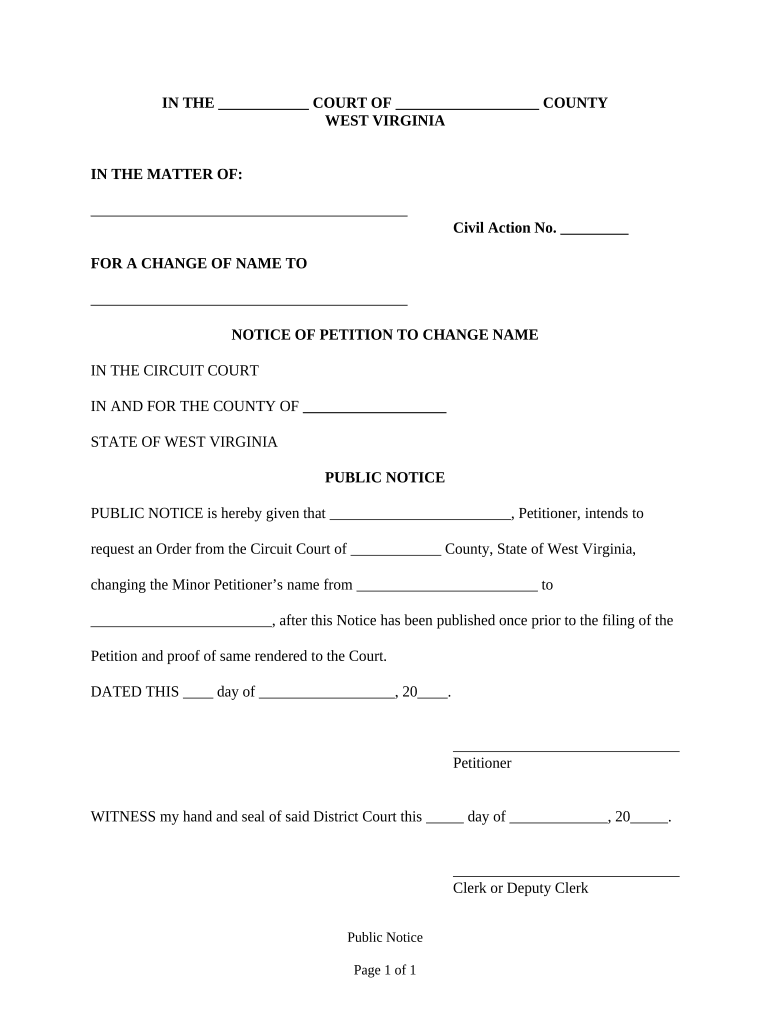
Caption

List court name, county, case number if known, and full party names. Accurate captions ensure the clerk assigns and routes the petition correctly and avoids misfiling.
Jurisdiction

Briefly explain the court's authority—statutory or subject matter jurisdiction—and venue. Include concise citations to applicable West Virginia statutes where relevant.

Statement of Facts

Chronologically summarize material facts with dates and locations. Avoid argument in facts; reserve legal analysis for the claims section to improve clarity.

Claims

State each legal claim or cause of action with the elements and supporting facts, and cite controlling statutes or cases to frame relief.

Relief Sought

Specify remedies requested (damages amounts, injunctive terms, declaratory language), and provide calculations or exhibits supporting monetary claims.

Verification

Include affidavit or sworn verification if required by rule, plus signature block for petitioner or counsel with date and contact information for service.

Common timing considerations for petitions

Deadlines for petitions depend on statutes, service timelines, and court schedules; confirm applicable time limits before filing.

Statute of Limitations:

Varies by claim; check state statutes.

Response Period:

Typically 20–30 days after service in many civil actions.

Hearing Scheduling:

Courts often schedule hearings 30–90 days after filing.

Emergency Relief:

Ex parte or emergency motions may be considered same day.

Filing Fees:

Clerk fees vary by court; fee waivers may be available.

Penalties and risks from incorrect petitions

Dismissal: Petition dismissed for defects.
Default Judgment: Failure to serve or respond.
Sanctions: Court-ordered monetary or case sanctions.
Service Failure: Improper service voids proceedings.
Perjury Exposure: False verification may lead to perjury.
Fee Loss: Filing fees may not be refunded.

Common preparation mistakes to avoid

  • Using incorrect party names or incomplete addresses commonly causes service delays and can result in dismissal or late default judgments.
  • Attaching unindexed exhibits or failing to reference exhibits by letter or number increases clerks' return requests and slows case progress.
  • Omitting a required verification, notarization, or statutory citation often results in the clerk rejecting the filing or a judge denying relief.
  • Failing to serve opponents properly or not filing proof of service on time creates exposure to default judgments and procedural sanctions.

Security and compliance essentials for electronic petitions

Encryption: TLS 1.2/1.3 in transit; AES-256 at rest
Certifications: SOC 2 Type II and ISO 27001 certified
Audit Trail: Tamper-evident audit trail with metadata
HIPAA: HIPAA compliant; BAA available where required
ESIGN/UETA: ESIGN and UETA legal compliance supported
Access Controls: Role-based access and multi-factor authentication

Typical plan pricing and basic capabilities across vendors

Compare common plan starting prices and basic features for popular eSignature vendors; signNow is listed first per the vendor comparison convention.

signNow DocuSign Adobe Sign PandaDoc HelloSign
Starting Price $8/user/mo $15/user/mo $14/user/mo $19/user/mo $15/user/mo
Free Trial 7-day trial Varies Varies Varies Varies
Bulk Send Yes Yes Yes Yes No
Audit Trail Yes Yes Yes Yes Yes
HIPAA Compliant Yes Yes Yes No No
Envelope Cap No cap 100 envelopes/user/year Varies Varies Varies

Real examples: how organizations handled petitions and intake online

These examples illustrate how electronic workflows and eSignatures were used to speed filing, secure records, and integrate with existing systems.

Martin Properties — Tim Martin

Martin Properties moved leasing and property petitions online to speed processing, reduce in-person steps, and ensure secure records.

  • Reduced turnaround time significantly for filings.
  • "I can process and execute all of these documents online with 100% compliance and built-in security. Whether on mobile or working offline, I can get forms back to their necessary parties efficiently."

Fertility Centers — John Butler

Fertility Centers standardized consent and intake petitions electronically to protect patient data and accelerate processing.

  • Improved integration with clinic systems and workflows.
  • "The airSlate SignNow team has been exceptional, responsive, the API has been great, and we're extremely happy that we chose airSlate SignNow as a company. Their support and API integration simplified document workflows for our clinic and compliance procedures."

Practical tips for accurate and efficient petition completion

Careful drafting, accurate service details, consistent recordkeeping, and using electronic workflows reduce procedural errors and speed case progress.

Verify party identities
Confirm legal names and contact information against government records or business registrations before filing. Incorrect names commonly cause service defects and can delay hearings or lead to dismissal without addressing the case merits.
Double-check jurisdiction and venue
Ensure the court selected has subject matter and personal jurisdiction. Venue mistakes frequently require refiling and cause additional costs; include statutory citations and brief jurisdictional facts to aid the clerk and judge.
Index exhibits clearly
Number or letter each exhibit, provide a table of contents, and reference exhibits precisely in the statement of facts. Well-organized exhibits reduce clerk queries and help opposing counsel and the judge review evidence efficiently.
Use secure eSign and storage
When using electronic signatures, confirm the platform meets ESIGN and UETA requirements, produces auditable certificates, and stores signed PDFs under secure encryption to preserve admissibility and chain-of-custody.

Typical signatories and responsible parties

Filing Attorney

An attorney prepares and signs petitions on behalf of a client, ensures compliance with West Virginia court rules, files with the clerk, serves opposing parties, and represents the client at hearings when necessary.

Pro Se Litigant

A self-represented party who files without counsel must follow the same procedural rules; courts expect litigants to meet deadlines and service requirements, and missing steps can lead to default or dismissal.

Frequently asked questions and troubleshooting

Answers to common questions about preparing, signing, notarizing, and filing a West Virginia Petition, and how to address common rejection reasons.


Need help? Contact support

be ready to get more
Join over 28 million airSlate SignNow users