Establishing secure connection…Loading editor…Preparing document…

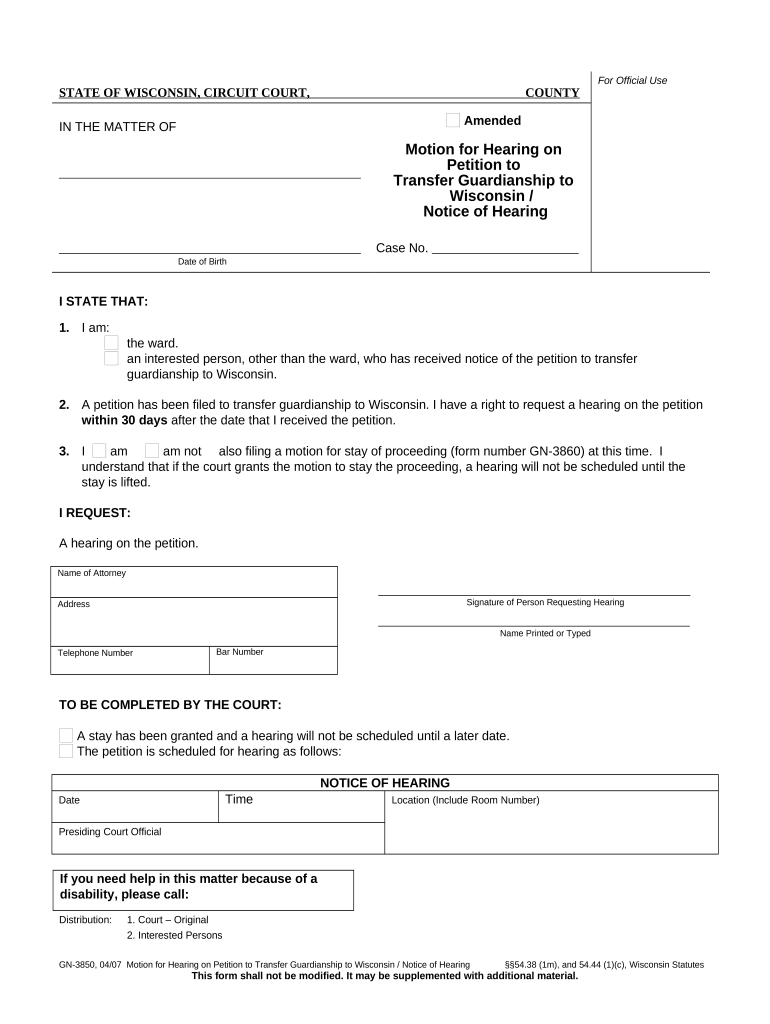
Wisconsin Motion Hearing

This template is fully customizable. Edit the text, fill out the fields, and send it for signature. Give it a try!
Wisconsin Motion Hearing

What a Wisconsin Motion Hearing Is and When It Applies

A Wisconsin Motion Hearing is a court proceeding in which a party asks a trial court or appellate court to decide a specific legal question by motion. Motions can request relief ranging from temporary restraining orders and discovery rulings to summary judgment and sanctions. Many motions are decided on written submissions and a limited oral argument; others require live testimony and exhibits. Wisconsin circuit courts and courts of appeals follow court-specific local rules for formatting, service, and scheduling. Timely filing, proper service, and adherence to page limits and local practice are essential for the motion to be considered.

Why a Well-Prepared Motion Hearing Matters

A clear, procedurally correct motion preserves legal rights, frames issues for the judge, and can resolve disputes without a full trial.

Why a Well-Prepared Motion Hearing Matters

Who Typically Prepares or Appears at a Wisconsin Motion Hearing

The following parties commonly prepare and participate in motion hearings in Wisconsin courts.

  • Private attorneys representing plaintiffs or defendants in civil and family cases; they draft motions, prepare exhibits, and present oral argument.
  • Self-represented litigants who file motions without counsel and must follow the same local rules and service requirements.
  • Court clerks and judicial staff who accept filings, set hearing dates, and enforce local formatting and filing rules.

Effective representation at a motion hearing depends on procedural compliance, supporting evidence, and clear legal argument.

Stepwise Checklist for Preparing and Filing a Motion in Wisconsin

Follow these core steps in sequence to prepare, serve, and present a motion consistent with Wisconsin court procedure.

  • 01
    Draft the motion: Prepare a clear statement of facts and legal argument.
  • 02
    Attach exhibits: Label and paginate each exhibit; reference them in text.
  • 03
    File and serve: E-file or deliver to court and serve opposing parties.
  • 04
    Appear at hearing: Bring courtesy copies and be ready for oral argument.

Essential Components of a Professional Wisconsin Motion

A properly organized motion helps the court quickly identify the relief requested, the supporting evidence, and the applicable legal authority.

Case Caption

Complete captioning includes court, county, docket number, and party names; use the exact caption from initiating pleadings to avoid confusion and ensure the clerk assigns the filing correctly.
Statement of Facts

Present only relevant, concise facts in chronological order with exhibit citations so the court can evaluate the context without extraneous detail or argument disguised as fact.

Legal Argument

Cite statutory or case law and apply legal standards to the facts; include short, direct headings for each legal issue to guide judicial review.

Relief Sought

Specify precise orders requested, statutory bases, and any proposed deadlines or conditions, so the court can enter a clear, enforceable order if it grants relief.

Exhibits and Evidence

Attach documentary evidence with an exhibit index and Bates or exhibit numbers; properly authenticated exhibits reduce the need for additional proof at hearing.

Certificate of Service

Include an affidavit or certificate stating how, when, and to whom documents were served, using method names (e-file, mail, hand-delivery) required by local rule.

Required Information Typically Included on Motion Filings

Party Names: Plaintiff and defendant full legal names
Docket Information: Court and case number
Motion Text: Precise relief requested
Exhibit List: Indexed attachments with identifiers
Service Statement: How and when documents were served
Signature: Signed by attorney or party

Consequences of Procedural Errors or Incomplete Motions

Missed Deadline: Motion barred
Improper Service: Dispositive relief delayed
Incorrect Caption: Clerk rejection possible
Unsigned Filing: Stricken or returned
Insufficient Notice: Hearing rescheduled
False Statements: Sanctions or sanctions motion

Common Pitfalls to Avoid When Preparing a Motion

  • Failing to follow local page limits and formatting requirements often leads to clerks returning filings or judges refusing to consider certain exhibits.
  • Omitting a certificate of service or serving the wrong party undermines notice and can result in a motion being delayed or denied.
  • Submitting unsigned or improperly dated documents is a frequent oversight that can cause the court to strike the filing or require re-service.
  • Relying on an e-signature method not accepted by the court or failing to retain a proper audit trail increases the risk the signature will be rejected.

Where to File and How Service Works for Wisconsin Motion Hearings

Understand where to file and the acceptable service methods to avoid procedural defects and preserve the hearing date.

  • E-Filing Portal: Use the court’s e-filing system where required.
  • Serve Counsel: Deliver filings to opposing counsel per rule.
  • Court Clerk: File-stamp originals with the clerk’s office.
  • Hearing Notice: Confirm scheduling and provide proof of service.

Typical Online Workflow Settings for Motion Filing and eSubmission

Configure your e-filing and signing workflow to match court expectations and maintain a complete record.

Field Setting
Document Upload PDF, text searchable
Signature Placement Designated signature blocks
Authentication Email plus optional SMS code
Certificate Generation Automatic audit trail

Digital Signing and Submission: Technical Considerations

Courts and clerks expect readable, tamper-evident files and a reliable audit trail for electronic submissions.

  • File Formats: PDF, PDF/A, DOCX accepted
  • Signature Evidence: Timestamp, IP, and audit trail
  • Integrations: Common integrations include Salesforce and NetSuite

Use a platform that preserves file integrity, captures signer attribution, and exports the required certificate of completion for the court record.

eSignature Vendor Comparison for Motion Filings and eSubmission

Common vendor features and entry-level pricing help evaluate platforms for preparing, signing, and storing motion documents.

signNow DocuSign Adobe Sign PandaDoc HelloSign
Starting Price $8/user/mo $15/user/mo $14/user/mo $19/user/mo $15/user/mo
Free Trial 7-day free trial Varies by vendor Varies by vendor Varies by vendor Varies by vendor
Bulk Send Yes Yes Yes Yes No
Audit Trail Yes Yes Yes Yes Yes
HIPAA Compliant Yes Yes Yes No No
Envelope Cap No cap 100 envelopes/user/year Varies Varies Varies

Frequently Asked Questions About Wisconsin Motion Hearings

Answers below address routine procedural questions, common errors, and electronic filing concerns for Wisconsin motion practice.


Need help? Contact support

be ready to get more
Join over 28 million airSlate SignNow users