Establishing secure connection…Loading editor…Preparing document…

New Jersey Wrongful Death Complaint

This template is fully customizable. Edit the text, fill out the fields, and send it for signature. Give it a try!
New Jersey Wrongful Death Complaint

Overview of the New Jersey Wrongful Death Complaint

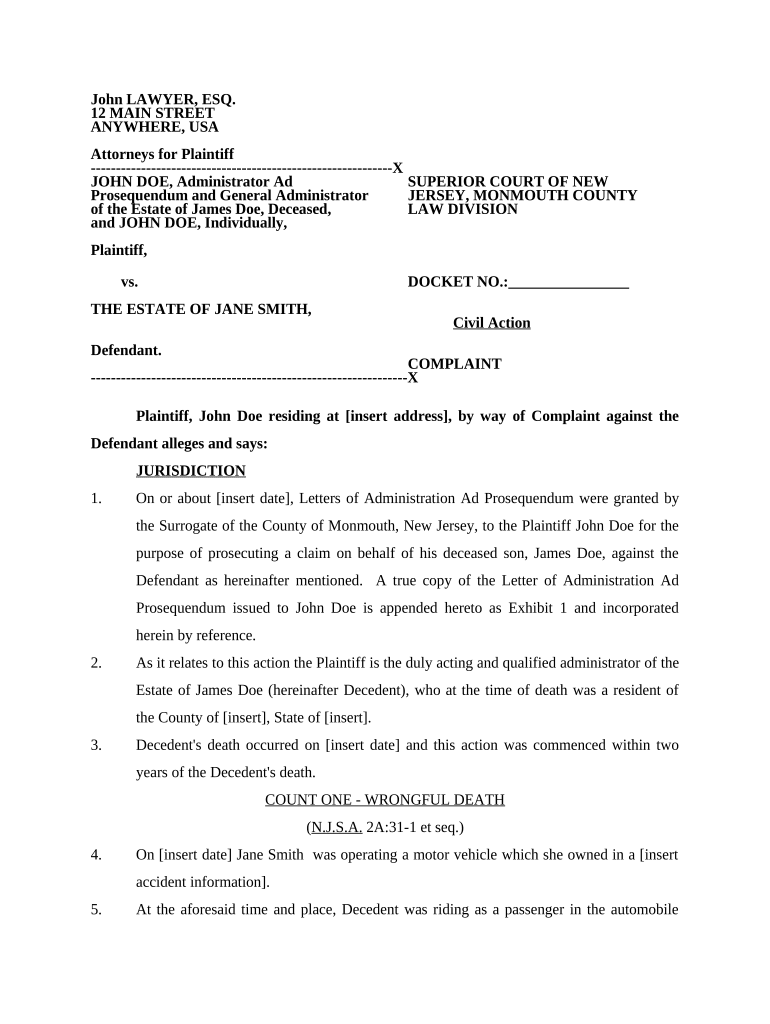
A New Jersey Wrongful Death Complaint is the initial civil pleading filed in New Jersey Superior Court to seek damages when a death is caused by another party’s negligence, wrongful act, or breach of duty. The complaint names the personal representative or statutory plaintiff, identifies defendants, alleges facts supporting liability, and specifies damages sought. It opens a civil case, triggers service of process, and starts the litigation timeline, including responsive pleadings, discovery, and potential settlement or trial. Proper parties, venue, and statutory claims must be stated to avoid dismissal.

Why this Complaint Matters in a Wrongful Death Claim

Filing a properly drafted Wrongful Death Complaint preserves statutory rights, notifies defendants of claims, and establishes the plaintiff’s legal basis for damages. It frames the scope of discovery and sets procedural deadlines under New Jersey court rules.

Why this Complaint Matters in a Wrongful Death Claim

Who Typically Prepares and Files This Complaint

The complaint is usually drafted by a plaintiff’s attorney or by a personal representative acting with counsel to ensure compliance with New Jersey law and court rules.

  • Personal representatives and estate executors initiating a claim on behalf of decedent’s estate and beneficiaries.
  • Plaintiffs’ attorneys who specialize in tort, wrongful death, or medical malpractice litigation in New Jersey.
  • Insurance adjusters and in-house counsel when litigation is anticipated and coordinated with outside counsel.

Step-by-Step: Preparing and Filing the Complaint

Follow a clear sequence to build a complaint that meets procedural and substantive requirements before filing or e-filing with the court.

  • 01
    Gather Records: Obtain death certificate, medical records, and investigative reports.
  • 02
    Identify Parties: Confirm personal representative, heirs, and defendant identities.
  • 03
    Draft Pleading: Allege facts, claims, and damages with legal citations where appropriate.
  • 04
    File and Serve: File with Superior Court and effectuate service per court rules.

Setting Up an Online Filing and e-Submission Workflow

Configure digital steps to prepare, sign, and submit the complaint using court e-filing and secure e-signature tools.

Field Configuration
Document Format PDF/A preferred for court filings; preserve metadata.
Signature Method Use an audit-trail e-signature that meets ESIGN/UETA tests.
Authentication Enable email+SMS or advanced authentication for attorney signers.
E-file Integration Map final PDF to the court e-filing portal in required packet format.

Digital Signing and Distribution Requirements

Choose a platform that supports court e-filing, secure e-signatures, and required integrations for document routing and storage.

  • File Formats: PDF, DOCX accepted depending on court portal.
  • Integrations: Connectors for Google Workspace, Microsoft 365, NetSuite.
  • Security: TLS in transit and AES-256 at rest.

Where to File and How Complaints Are Routed

Filing location and route depend on jurisdiction, venue, and whether the defendant is a resident or entity; use county-level Superior Court filing procedures.

  • Drafting: Prepare complaint and any civil cover sheet required by the county.
  • Filing: Submit via the Superior Court e-filing portal or in-person clerk’s office.
  • Service: Serve defendants per New Jersey Court Rules; proof of service required.
  • Response: Defendant must answer or move within the time allowed by court rules.

Key Timing Considerations and Deadlines

Understand statutory deadlines and court-imposed timelines to preserve claims and comply with procedural rules.

Statute of Limitations:

Varies by state; consult counsel to confirm applicable deadline

Service Deadline:

Serve defendants promptly after filing per court rules

Answer or Motion:

Defendant’s responsive deadline follows state court rules

Discovery Periods:

Scheduled by case management order after initial pleadings

Preservation Notice:

Issue preservation requests early to avoid spoliation risk

Key Milestones in a Wrongful Death Lawsuit

A typical case proceeds through discrete stages from pleading to resolution, each with distinct tasks and timelines.

01

Pleadings Filed

Complaint is filed and served; caption and parties are fixed.

02

Responsive Pleadings

Defendant answers or moves to dismiss; initial disputes framed.

03

Case Management

Court sets discovery schedule and milestone dates.

04

Discovery and Motions

Exchange of evidence, depositions, and dispositive motions occur.

Common Mistakes to Avoid When Preparing the Complaint

  • Misnaming parties or plaintiffs which can void service or standing.
  • Failing to state capacity of plaintiff, e.g., personal representative details.
  • Omitting crucial dates or factual specificity required to support claims.
  • Delaying service and missing statute of limitations deadlines.

Potential Risks and Consequences of Errors

Dismissal: Risk of dismissal for failure to state a claim or improper party designation.
Sanctions: Court sanctions may follow frivolous or noncompliant filings.
Statute Lapse: Missed filing deadlines can permanently bar recovery.
Service Defects: Improper service can delay or nullify proceedings.
Privacy Violations: Unauthorized disclosure of medical records can trigger HIPAA issues.
Evidence Loss: Failure to preserve evidence increases spoliation sanction risk.

Essential Information to Include on the Complaint

Decedent Name: Full legal name
Representative: Personal representative details
Defendants: Full legal names and addresses
Date of Death: MM/DD/YYYY
Jurisdiction: County and court name
Damages: Categories claimed

Primary Sections to Include in a Professional Complaint

A complete complaint organizes allegations and relief so the court and defendant can understand the legal and factual basis for recovery.

Caption

Court name, docket space, and formal party captions to identify the case and parties precisely on the court’s record.
Jurisdiction & Venue

Cite the statutory basis for venue and subject-matter jurisdiction to show the court has authority over the claim.

Factual Allegations

Chronological and specific allegations explaining how defendant’s conduct led to the decedent’s death, including dates, locations, and actors.

Causes of Action

Enumerate statutory and common-law claims such as negligence, wrongful act, or product liability with supporting elements.

Damages

Detail economic losses, loss of consortium, pain and suffering, and request for punitive damages where applicable.

Prayer and Jury Demand

State specific relief sought and whether a jury trial is demanded under applicable court rules.

Example Scenarios Showing Typical Uses

Realistic examples illustrate how facts translate into pleading strategies and typical case structures.

Motor Vehicle Fatality

A driver’s negligent lane change causes a fatal collision

  • Police and medical reports establish fault and injuries
  • The personal representative files a wrongful death complaint naming the driver and vehicle owner, seeking economic and non-economic damages and immediate discovery of event data recorders.

Medical Malpractice Death

Alleged surgical error leads to fatal complications

  • Expert medical records support causation and breach
  • Counsel files a complaint against the hospital and surgeon, attaches medical authorization, and pleads damages while moving to preserve operative records and testimony.

Who May Properly Sign or Authorize the Complaint

Personal Representative

The estate’s appointed personal representative or administrator signs pleadings on behalf of the estate; courts require proof of appointment when counsel files.

Plaintiff’s Counsel

An attorney of record may sign and file the complaint; signature certifies good-faith factual and legal basis under court rules.

Notarization and Witness Authentication Steps

If a signature or affidavit requires notarization or remote notarization, follow authentication and recording procedures carefully.

01

Confirm Requirement

Determine if the document or affidavit must be notarized for court acceptance.

02

Select Notary Type

Choose in-person or remote online notarization (RON) where permitted.

03

Identity Proofing

Use ID credential analysis, knowledge-based authentication, or MFA as required.

04

Video Recording

Retain A/V session if RON requires recording under state rules.

05

Notary Journal

Ensure the notary records the act and retains journal entries per state law.

06

Attach Acknowledgment

Include notary acknowledgement to create a self-proving record for court use.

07

Witnesses

Check if any witness signatures are required for supporting affidavits.

08

File Originals

Maintain originally executed documents for the court and for retention.

eSignature Vendor Comparison for Document Signing and eSubmission

Comparison of common eSignature vendors and core pricing/compliance features relevant to executing and submitting legal pleadings and supporting records.

signNow DocuSign Adobe Sign PandaDoc HelloSign
Starting Price $8/user/mo $15/user/mo $14/user/mo $19/user/mo $15/user/mo
Free Trial Yes, 7-day trial Varies by vendor Varies by vendor Varies by vendor Varies by vendor
Bulk Send Yes Yes Yes Yes No
Audit Trail Yes Yes Yes Yes Yes
HIPAA Compliant Yes Yes Yes No No

Frequently Asked Questions About the Complaint and eSigning

Answers to common procedural and eSignature questions that arise when preparing and submitting a New Jersey Wrongful Death Complaint.


Need help? Contact support

be ready to get more
Join over 28 million airSlate SignNow users