Rellenar Campo De Fecha Con airSlate SignNow

Elimina papeleo y mejora el procesamiento de documentos para mayor rendimiento y oportunidades ilimitadas. Disfruta de una estrategia superior para hacer negocios con airSlate SignNow.

Solución de firma electrónica galardonada

What it means to populate date field in documents

Populating a date field is the process of inserting a standardized date value into a form or contract field so the document records the relevant signing, effective, or execution date. This can be done manually by a signer, automatically by the platform when an action occurs, or by using templates and conditional logic to ensure consistent formatting across multiple documents. In regulated U.S. environments, automated date population helps preserve audit trails, reduce human error, and support records retention and compliance requirements when paired with secure eSignature platforms such as signNow.

Why consistent date population matters

Accurate date fields prevent disputes, support contract enforceability, and simplify archival processes while reducing administrative corrections.

Why consistent date population matters

Common challenges when populating date fields

  • Inconsistent date formats across signers can cause legal or processing delays and require manual normalization.
  • Manual entry increases risk of typographical errors or backdating that undermines integrity.
  • Time zone differences can result in mismatched effective dates for cross-state or global signers.
  • Missing or optional date fields can leave contracts ambiguous about execution or performance timelines.

Typical user roles for date population

Office Admin

An office administrator prepares agreements and templates, sets auto-fill rules for date fields, and audits completed documents to ensure dates match internal policies and regulatory requirements, reducing the need for corrections.

Field Agent

A field agent completes on-site forms and relies on mobile auto-population or timestamping to record service dates accurately, supporting billing and compliance with minimal manual entry.

Who typically populates date fields and why

Administrative staff, legal teams, sales operations, and field agents commonly handle date fields to ensure document timelines are recorded accurately.

  • Legal teams ensuring enforceable execution dates and version control.
  • Sales operations standardizing contract effective dates for revenue recognition.
  • Field agents capturing on-site completion dates for service records.

Consistent assignment of date fields improves downstream reporting, auditability, and coordination across teams handling signed records.

Key tools for reliable date population

Several platform capabilities contribute to accurate and auditable date fields, from validation and templates to server timestamps and conditional logic for complex workflows.

Field Validation

Enforces date format and prevents invalid entries or future/past constraints.

Server Timestamp

Records the exact signing moment independent of user device clocks.

Template Library

Stores predefined date fields and business rules for reuse across documents.

Conditional Logic

Automatically sets dates based on workflow triggers and role assignments.

API Mapping

Connects external systems to populate date fields during document creation.

Time Zone Handling

Normalizes dates across signer time zones for consistent records.

prepárate para obtener más

Elige una mejor solución

Integration features relevant to populate date field

Connecting populate date field logic with other systems ensures consistency across document sources, CRMs, and storage platforms while minimizing manual updates and reconciliation work.

CRM Sync

Automatically update date fields in contracts with values pulled from Salesforce or another CRM, ensuring signing dates match deal stages and reducing manual reconciliation across systems.

Google Docs Add-on

Populate date fields in templates authored in Google Docs directly when generating agreement PDFs, preserving formatting and applying server timestamps at signature events.

Cloud Storage Tracking

Keep date-stamped copies in Dropbox or Google Drive with filename conventions that include the execution date for easier retrieval and archival.

API Field Mapping

Use API calls to map external date values into document fields during generation, ensuring the source of truth drives the populated date consistently.
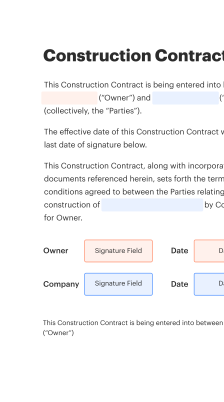
How populate date field works in eSignature workflows

The mechanism depends on the workflow: templates can auto-fill based on events, signer input can be validated and normalized, and server timestamps can be appended to guarantee timing integrity.

  • Template Defaults: Predefine date format and default values.
  • Signer Entry: Allow signer to enter date with validation.
  • Event Timestamp: Platform inserts server-side signing time.
  • Conditional Logic: Populate date when conditions are met.
Recoger firmas
24x
más rápido
Reduce los costos en
$30
por documento
Guardar hasta
40h
por empleado / mes

Step-by-step: populate date field in a document

Follow these core steps to add and control a date field so signers receive consistent values and the platform records an auditable timestamp.

  • 01
    Open Document: Upload or select the document template.
  • 02
    Add Date Field: Place a date field in the document where required.
  • 03
    Choose Mode: Select manual entry or automated timestamping.
  • 04
    Set Rules: Define format, default value, and access permissions.
prepárate para obtener más

Por qué elegir airSlate SignNow

  • Prueba gratuita de 7 días. Elige el plan que necesitas y pruébalo sin riesgos.
  • Precios honestos para planes completos. airSlate SignNow ofrece planes de suscripción sin cargos adicionales ni tarifas ocultas al renovar.
  • Seguridad de nivel empresarial. airSlate SignNow te ayuda a cumplir con los estándares de seguridad globales.
illustrations signature

Configuring automated workflows to populate date fields

Typical workflow settings control when and how date fields populate, how often reminders trigger, and what validation rules apply to signer-entered dates.

Setting Name Configuration
Reminder Frequency 48 hours
Auto-Fill Trigger On signature
Date Format MM/DD/YYYY
Timezone Normalization UTC conversion
Validation Rules No future dates

Platform and device requirements for date population

Ensure your platform and devices meet basic compatibility and security needs to support server timestamps, template logic, and field validation.

  • Supported Browsers: Latest versions recommended
  • Mobile OS: iOS and Android supported
  • Network Security: TLS 1.2+ connections

For secure, auditable date population in corporate and regulated contexts, maintain updated browsers and mobile OS, ensure TLS connectivity, and enforce role-based access to date controls and templates.

Security controls that support accurate date fields

Data Encryption: End-to-end encryption
Access Controls: Role-based permissions
Immutable Audit Trail: Tamper-evident logs
Time Stamping: Server-generated timestamps
Authentication: Multi-factor options
Document Locking: Post-signature protections

Industry examples showing populate date field in practice

Two brief examples illustrate common scenarios where automatic or controlled date population reduces errors and supports compliance.

Healthcare Release Form

A clinic uses templates with server-set timestamps to record patient consent dates

  • Template enforces MM/DD/YYYY format for consistency
  • Automating the date reduces manual entry errors and supports HIPAA-compliant recordkeeping

Resulting in clearer medical records and simpler audit responses.

Sales Contract Execution

A sales operations team applies conditional date auto-fill when a final signature is captured

  • The system inserts the execution date and signer timezone
  • This ensures billing and delivery windows align to the signed effective date

Leading to accurate revenue recognition and fewer billing disputes.

Best practices for secure and accurate populate date field workflows

Adopt consistent templates, server timestamps, and validation to reduce errors and maintain legally defensible records when populating date fields.

Standardize a single date format across templates
Choose an unambiguous format such as MM/DD/YYYY for U.S. contracts, enforce it at the template level, and apply validation rules so all signers provide entries that match the expected structure.
Prefer server-generated timestamps over manual entry
Configure the platform to append server-side signing timestamps that are independent of the signer device clock and retained in the audit trail to support evidentiary needs.
Lock date fields after population to prevent tampering
Set date fields to become read-only once populated or after the signing event, and ensure the action is recorded in an immutable audit log to deter unauthorized changes.
Document time zone and retention policies in templates
Clearly record whether dates are stored in local time or normalized to UTC and ensure retention schedules align with legal and organizational recordkeeping requirements.

FAQs about how to populate date field

Common questions about populating date fields and troubleshooting steps related to formats, timezones, templates, and auditability.

Quick capability comparison for populate date field features

A concise comparison of platform capabilities related to date field population, validation, timestamps, and integrations across leading vendors.

Platform signNow (Recommended) DocuSign Adobe Sign
Server Timestamps
Conditional Auto-Fill
CRM Integration Native Native Native
HIPAA Support Available Available Available
prepárate para obtener más

¡Obtenga firmas legalmente vinculantes ahora!

Retention, deadlines, and recordkeeping for populated date fields

Set clear retention timelines and retain audit logs that reference populated dates to meet legal and operational requirements in the U.S.

Short-term dispute window:

Maintain records for 1-2 years for routine disputes.

Standard contract retention:

Retain executed contracts for 6 years commonly.

HIPAA-related records:

Retain required health records per HIPAA timelines.

Education records:

Follow FERPA and institutional retention policies.

Audit log retention:

Store immutable logs for the full retention period.

Risks from incorrect or missing date fields

Contract Disputes: Enforceability issues
Compliance Failures: Regulatory exposure
Revenue Recognition Errors: Accounting inconsistencies
Audit Problems: Incomplete trails
Operational Delays: Approval bottlenecks
Data Integrity Loss: Alteration risks

Pricing and feature snapshot for populate date field capabilities

Overview of entry-level pricing and availability of specific features relevant to date population across common eSignature vendors; costs listed are typical starting points and may vary by contract or billing cycle.

Header signNow (Recommended) DocuSign Adobe Sign Dropbox Sign PandaDoc
Starting Price (monthly) From $8/user/month From $10/user/month From $9.99/user/month From $15/user/month From $19/user/month
Free Plan Availability No free tier; trial available Free trial available Free trial available Free plan with limited sends Free eSign plan available
API Access Included with paid plans Available via API plans Included with enterprise API available API included in business plans
Advanced Field Logic Conditional fields supported Conditional fields supported Conditional logic supported Basic logic Conditional fields supported
HIPAA-Ready Options Available for plans with BAAs Available with agreements Available enterprise options Available upon request Available enterprise options

Simplifica flujos de trabajo complejos

Crea, ejecuta y controla flujos de trabajo de cualquier dificultad, electrónicamente desde prácticamente cualquier lugar. La funcionalidad escalable de firma electrónica te permite compartir documentos con las personas adecuadas en la secuencia correcta y asignar roles a cada destinatario. Ejecuta flujos de trabajo de documentos más rápido y más simple que nunca.

Automatiza la gestión de documentos

Mejora los procedimientos de firma complejos con las capacidades altamente efectivas de airSlate SignNow para potenciar tu negocio. Controla tus flujos de trabajo de firma electrónica automatizados para asegurarte de que funcionen con la máxima eficiencia con avisos y recordatorios inmediatos.

Optimiza la comunicación en equipo

Reúne a los equipos en un entorno seguro y compartido. Gestiona documentos, usa plantillas de formularios y notificaciones para crear una mejor comunicación entre organizaciones. Libera a tus empleados de tener que realizar acciones repetitivas para que puedan centrarse en tareas valiosas y esenciales para el negocio.

Integra en tu marco existente

Ejecuta tus trabajos con una integración de primera clase. Combina Salesforce, Microsoft Teams y SharePoint en un flujo de negocio multifuncional. Conecta tu software a un sistema único para posibilidades ilimitadas y mayor rendimiento.

Mantente conforme con la seguridad de datos líder en el mercado

Siente confianza sabiendo que tu información permanece segura gracias a la última en seguridad de cifrado. airSlate SignNow cumple con GDPR y eIDAS y te ofrece transparencia en tu experiencia de firma electrónica con registros de auditoría admisibles en tribunales. Configura la autorización de usuarios y roles para controlar quién tiene acceso a qué.


walmart logo
exonMobil logo
apple logo
comcast logo
facebook logo
FedEx logo
esté listo para obtener más

¡Obtenga ahora firmas vinculantes desde el punto de vista jurídico!