Commercial Invoice Template Word for Operations

See your billing procedure become quick and effortless. With just a few clicks, you can perform all the required actions on your commercial invoice template word for Operations and other important documents from any device with web connection.

Award-winning eSignature solution

What a commercial invoice template Word for operations is and why it matters

A commercial invoice template in Word for operations standardizes how organizations document cross-border shipments, itemizing goods, HS codes, unit values, total value, incoterms, and billing details. Operations teams use these templates to ensure customs clearance, consistent accounting, and accurate landed-cost calculations. A well-structured Word template reduces manual errors, supports ERP and logistics integrations, and provides an editable starting point for audit trails and regulatory reporting across import/export workflows.

Legal standing and compliance considerations for commercial invoices

In the United States commercial invoices must meet customs and trade documentation requirements and are acceptable in electronic form when created and retained under ESIGN and UETA rules, with additional sector rules applying for regulated data types.

Legal standing and compliance considerations for commercial invoices

Common operational challenges when using commercial invoice templates

  • Inconsistent fields between departments create delays during customs review and reconciliation of shipment costs.
  • Incorrect HS codes or missing origin details lead to customs holds and additional duties or inspections.
  • Manually editing Word templates increases human error and creates version-control problems across teams.
  • Lack of audit-ready signatures and metadata complicates dispute resolution and post-shipment compliance checks.

Representative user profiles for operations-focused invoice templates

Jane Doe, Manager

Jane is an operations manager at a mid-size manufacturer who oversees export documentation and coordinates with freight forwarders. She needs a Word template that enforces required fields, is easy to edit per shipment, and produces documents that customs and finance teams accept without additional rework.

Carlos Reyes, Broker

Carlos is a customs broker who receives commercial invoices from many clients and requires a predictable format for quick HS code validation, origin checks, and electronic submission to customs systems. He relies on templates that include clearly labeled fields and consistent units and currency formats.

Teams and roles that rely on commercial invoice templates

Operations, logistics, customs brokers, and finance teams typically maintain and use commercial invoice templates to speed processing and ensure regulatory accuracy.

  • Operations coordinators handling shipment packaging and documentation across multiple carriers.
  • Customs brokers preparing filings, duty calculations, and clearance paperwork for import/export.
  • Accounts payable and billing teams reconciling commercial invoices with invoices and purchase orders.

Centralizing templates and applying consistent validation checks reduces misroutes, lowers hold times, and simplifies audits across international shipments.

Additional operational features to enhance invoice template workflows

Beyond core fields, include features that support integration, validation, and lifecycle management for commercial invoices used by operations and compliance teams.

Template mapping

Map ERP and order-management fields to template placeholders to automate population of invoice data and reduce manual entry.


Conditional sections

Include conditional sections for multiple commodity types, partial shipments, or special regulatory declarations to keep templates compact and relevant.

Pre-fill rules

Use pre-fill logic for repetitive fields like shipper and consignee details to speed creation and reduce typographical errors.

Localization support

Provide localized templates for language, currency, and regulatory differences across destination countries to ensure compliance and clarity.

Export to PDF/A

Enable PDF/A export for long-term archival and consistent rendering when sharing with customs or finance.

Signature metadata

Capture signer credentials, method, and timestamp to create an immutable record for audits and dispute resolution.

be ready to get more

Choose a better solution

Core features to include in a commercial invoice template for operations

Design templates with features that enforce accuracy, support customs, and integrate with downstream systems used by operations and finance teams.

Mandatory fields

Predefined fields for HS code, country of origin, unit price, total value, incoterms, consignee and consignor details ensure customs requirements are met and reduce rework.

Formatting rules

Consistent date, currency, and unit formats plus example entries reduce ambiguity and speed review by customs brokers and finance personnel.

Version control

Template versioning and change notes prevent outdated templates from circulating and maintain an audit trail for operational compliance.

Signature area

A clearly labeled signature block for authorized signers that supports e-signature metadata helps meet audit and legal acceptance requirements.
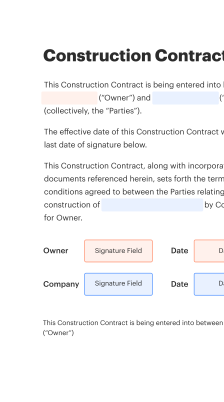
How to use the Word template within an operations workflow

Integrate the commercial invoice template into your shipment lifecycle to ensure a consistent document flow from order to customs clearance.

  • Populate: Fill template with PO and shipment data.
  • Validate: Confirm HS codes and values.
  • Sign: Apply authorized signature and date.
  • Share: Distribute to carrier, broker, and finance.
Collect signatures
24x
faster
Reduce costs by
$30
per document
Save up to
40h
per employee / month

Step-by-step: build a compliant commercial invoice template in Word

Follow these essential steps to create a reliable Word-based commercial invoice template for operations and customs processing.

  • 01
    Define fields: List required customs and commercial fields.
  • 02
    Standardize formats: Set consistent date, currency, and unit formats.
  • 03
    Add validation: Include examples and input constraints.
  • 04
    Finalize template: Lock layout and save as master file.
be ready to get more

Why choose airSlate SignNow

  • Free 7-day trial. Choose the plan you need and try it risk-free.
  • Honest pricing for full-featured plans. airSlate SignNow offers subscription plans with no overages or hidden fees at renewal.
  • Enterprise-grade security. airSlate SignNow helps you comply with global security standards.
illustrations signature

Automation settings for commercial invoice templates in operations workflows

Configure workflow defaults to automate reminders, approvals, and template selection so operations teams reduce manual steps and maintain consistency.

Setting Name Column Header For Automation Configuration Column Header Default Values
Email reminder frequency for signers 48 hours
Auto-select template by destination country Enabled
Approval chain for high-value shipments Two-step review
Signature authentication method Email OTP
Retention and archival period 7 years

Device and platform requirements for managing Word invoice templates

Commercial invoice templates in Word are compatible across desktop and cloud environments, but ensure supported software versions for reliable rendering and editing.

  • Windows desktop: Office 2016 or later
  • macOS desktop: Office 2016 or later
  • Cloud editing: Office 365 web editor

For mobile review use PDF exports or supported Word mobile apps; for secure signature capture prefer platforms offering mobile-friendly signing and audit logging to preserve evidentiary integrity.

Security and authentication elements to protect invoice documents

Encryption at rest: AES-256 standard
Encryption in transit: TLS 1.2+ required
Access controls: Role-based permissions
Audit logging: Immutable event trail
Authentication options: Email OTP or SSO
Document locks: Version control enforced

Practical operational examples using Word commercial invoice templates

Two concise case scenarios show how standardized templates reduce errors and speed customs clearance for different shipping profiles.

High-volume exporter

A mid-size electronics exporter standardized a Word commercial invoice template with mandatory HS code, unit value, and country-of-origin fields

  • Template includes automated placeholders for PO, incoterms, and consignee address
  • Standardization cut corrections and re-submissions by a third

Resulting in fewer customs holds and faster clearance times and lower logistics costs.

Per-shipment customs broker

A third-party customs broker received varied commercial invoices and created a normalized Word template to map client fields quickly

  • Template uses consistent field labels and a verification checklist
  • This improved validation speed and reduced explanation cycles

Ensures faster filings, fewer duty adjustments, and clearer audit records for each client.

Best practices to maintain secure and accurate commercial invoice templates

Adopt consistent controls and review routines to reduce errors, enhance compliance, and streamline operations when using Word-based commercial invoice templates.

Confirm commodity HS code and product description accuracy
Regularly validate HS codes against tariff schedules and include clear product descriptions to prevent misclassification and costly customs corrections during clearance.
Maintain centralized template governance and controlled access
Store master templates in a secure central location with role-based editing rights to prevent unauthorized changes and ensure only approved versions are used across operations.
Include audit metadata and signature provenance in every file
Capture signer identity, signature timestamps, and document version information so records are audit-ready and disputes can be resolved with evidence of authorization.
Validate currency, incoterms, and declared values before submission
Implement a pre-submission checklist to confirm currency codes, incoterms, and declared values are correct to reduce customs adjustments and unexpected duty assessments.

FAQs and troubleshooting for commercial invoice templates in operations

Answers to common questions and resolution steps to address template, formatting, signing, and compliance issues in operational use.

Feature comparison for eSignature and document workflows relevant to invoices

A concise feature matrix comparing signNow and other leading eSignature providers on capabilities that matter for commercial invoice operations.

Criteria signNow (Recommended) DocuSign
In-person signing support availability for enterprise customers
Bulk Send capabilities for repetitive invoices
HIPAA-compliant deployment options for regulated data Optional
API access and integration flexibility for ERP systems REST API REST API
be ready to get more

Get legally-binding signatures now!

Regulatory risks and operational penalties from poor invoices

Customs delays: Extended holds
Increased duties: Higher assessed taxes
Fines and penalties: Monetary sanctions
Shipment returns: Rejection by customs
Supply chain disruption: Delivery schedule impact
Audit exposure: Documentation gaps

Pricing and plan attributes across leading eSignature vendors for invoice workflows

Compare typical entry-level features, per-user costs, and enterprise capabilities to assess operational fit and total cost for invoice processing.

Plan / Vendor signNow (Recommended) DocuSign Adobe Sign PandaDoc HelloSign
Starting monthly fee per user $8 per user $10 per user $12 per user $19 per user $15 per user
Bulk sending and templates included Yes, templates and Bulk Send Template library only Templates and API access Templates only Templates plus Bulk Send
Advanced compliance and enterprise controls SAML SSO and audit logs SSO plus advanced compliance Enterprise-grade controls Role-based access Enterprise SSO available
API call limits and integration options Generous API quotas and REST endpoints Tiered API limits Robust APIs and SDKs API with limits REST API with webhooks
Free trial or free tier availability Free trial available Free trial available Trial available Free trial available Limited free tier
walmart logo
exonMobil logo
apple logo
comcast logo
facebook logo
FedEx logo
be ready to get more

Get legally-binding signatures now!