Create a Document Group Templates with SignNow

Easily work with various documents using document group templates. Merge documents, invite more signers and track all changes.

Award-winning eSignature solution

What creating document group templates means

Creating a document group templates setup centralizes reusable documents and field configurations so teams can deploy consistent agreements quickly. Group templates combine multiple related templates, signer roles, and permissions into a single package that reduces repetitive setup, preserves field placement, and enforces standard workflow rules. In regulated U.S. contexts, a group template helps maintain audit trails, version control, and uniform data capture across departments while supporting compliant electronic signing under ESIGN and UETA.

Why standardize with document group templates

Group templates cut setup time, enforce consistent field placement, and centralize access controls so teams reduce errors and maintain auditability in signing workflows.

Why standardize with document group templates

Common challenges before using group templates

  • Field placement drift across documents leads to inconsistent data collection and signer confusion.
  • Multiple document versions create version-control problems and increase legal exposure during audits.
  • Manually assigning roles and fields for each send wastes time and increases administrative errors.
  • Tracking compliance requirements across teams without standardized templates causes reporting gaps.

Typical user roles for managing group templates

HR Manager

Responsible for creating onboarding and policy bundles, the HR Manager defines signer roles, prepopulated fields, and retention rules. They check templates for legal and privacy requirements, coordinate version updates, and approve distribution to HR staff so new hires receive consistent paperwork.

Sales Operations

Sales Operations configures contract groups and pricing schedules, sets conditional fields for variable deals, and manages bulk send lists. They monitor usage metrics and coordinate with legal to update templates when terms or product bundles change.

Teams that benefit from document group templates

Departments that handle recurring agreements and forms adopt group templates to reduce setup time and enforce consistent workflows.

  • Human resources teams for onboarding, benefits enrollment, and policy acknowledgments.
  • Sales operations for quotes, NDAs, and recurring contract packages.
  • Legal and compliance teams overseeing standardized contract language and retention.

Central ownership and clear permissions let these teams ensure templates remain current and auditable across the organization.

Advanced features for group template management

Advanced capabilities help scale template use across larger teams, enable automation, and maintain strict governance controls for high-volume environments.

Reusable groups

Group multiple templates together so a single send includes all necessary documents, reducing manual bundling and ensuring consistent delivery of full agreement sets to signers.

Bulk Send

Enable sending a group template to many recipients in one operation with individualized fields and tracking, which scales routine transactions like offers, waivers, or consent forms.

Team Templates

Share template groups with predefined teams so authorized staff can send approved documents without requiring template ownership, preserving governance and simplifying distribution.

Conditional routing

Automate signer order and branching logic based on field values so different parties receive the correct documents and signing sequence without manual intervention.

Template-level permissions

Set granular permissions to control who can view, edit, send, or archive template groups, enabling separation of duties and compliance with internal policies.

Activity reporting

Capture usage metrics and detailed audit logs for each group template to monitor adoption, detect anomalies, and support compliance reviews.

be ready to get more

Choose a better solution

Core capabilities to include in group templates

When building a document group templates package, prioritize features that maintain consistency, security, and ease of use for teams and recipients.

Role templates

Predefine signer roles and role-specific fields so each recipient receives only the fields they must complete, reducing confusion and preventing accidental edits to other sections.

Conditional fields

Use conditional visibility and auto-population rules to present only relevant fields based on earlier answers, which simplifies forms and reduces data entry errors for signers.

Version control

Lock and track template versions so administrators can roll back changes, show change history, and ensure signers use an approved document revision for legal consistency.

Permission groups

Assign view, edit, and send permissions at the group level to control who can modify templates, who can send them, and who can access submitted documents.

How group templates operate in a typical workflow

A group template coordinates multiple templates, signer roles, and routing rules into a repeatable package for efficient sends.

  • Template bundle: Combine related documents into one group.
  • Role mapping: Map roles to specific documents and fields.
  • Routing order: Set sequential or parallel signing workflows.
  • Reuse: Apply group template to new recipients quickly.
Collect signatures
24x
faster
Reduce costs by
$30
per document
Save up to
40h
per employee / month

Quick steps to create a document group templates

Follow these concise steps to assemble and publish a group template for repeated use by your team.

  • 01
    Gather documents: Collect all related files and attachments.
  • 02
    Define roles: Assign signer roles and permissions.
  • 03
    Place fields: Add required fields and conditional logic.
  • 04
    Publish group: Save and share with the appropriate team.

Detailed management steps for group templates

Use this step grid to manage lifecycle tasks for document group templates from setup to archival.

01

Create base templates:

Draft each document separately.
02

Assemble group:

Combine templates into a single package.
03

Define roles:

Assign and map signer roles.
04

Set permissions:

Restrict edit and send rights.
05

Test workflow:

Run sample sends for validation.
06

Publish:

Make group available to users.
be ready to get more

Why choose airSlate SignNow

  • Free 7-day trial. Choose the plan you need and try it risk-free.
  • Honest pricing for full-featured plans. airSlate SignNow offers subscription plans with no overages or hidden fees at renewal.
  • Enterprise-grade security. airSlate SignNow helps you comply with global security standards.
illustrations signature

Recommended workflow settings for group templates

Configure these settings when you publish a document group templates package to ensure consistent routing, reminders, and retention behavior across sends.

Setting Name Configuration
Reminder Frequency 48 hours
Signing Order Mode Sequential routing
Template Group Name Pattern Department-YYYY-MM
Default Expiration Period 30 days
Storage Retention Policy 7 years

Supported platforms and device considerations

Group templates are designed to work across web, mobile, and tablet environments with consistent behavior for field rendering and signing.

  • Desktop browsers: Chrome, Edge, Safari supported
  • Mobile devices: iOS and Android apps available
  • PDF compatibility: Supports standard PDF formats

For complex templates with conditional logic or large bundles, test on target devices to confirm layout rendering and signer experience before broad deployment.

Security and protection features for group templates

Encryption at rest: AES-256 encryption
In-transit security: TLS 1.2+ protocols
Access controls: Role-based permissions
Audit logging: Comprehensive event trails
Document watermarking: Custom watermark options
Multi-factor auth: Optional two-step verification

Industry examples of group templates in use

Two practical examples show how group templates streamline repetitive workflows in regulated and high-volume contexts.

Case Study 1

A healthcare provider standardized intake and consent forms across five clinics to reduce manual entry errors and ensure HIPAA controls are applied consistently

  • Reusable template group contained intake, consent, and authorization forms
  • Reduced administrative time and improved compliance oversight

Resulting in faster patient processing and clearer audit trails for regulatory review.

Case Study 2

A mid-sized sales team created grouped proposal templates including quote, SOW, and order form to streamline negotiations and approvals

  • Conditional fields adjusted pricing and delivery terms automatically
  • Significantly shortened time-to-sign and reduced rework on proposals

Resulting in higher throughput for deal closures and predictable document storage.

Best practices for accurate and secure group templates

Adopt consistent governance and design standards to ensure templates remain reliable, auditable, and easy to use across teams.

Maintain a clear naming and versioning convention
Use structured names with dates and version numbers so administrators can immediately identify the current template. Enforce a retire-and-replace policy rather than editing active templates to preserve audit integrity and reduce signer errors.
Limit editing rights to a small administrator group
Restrict who can change templates to reduce accidental updates. Maintain a documented approval process for template changes that includes legal and compliance review before publishing to production.
Standardize field types and validation rules
Use explicit field validation (format, required vs optional) and consistent field labels to ensure data quality. Apply conditional logic to hide irrelevant fields and reduce signer confusion while capturing structured data for downstream systems.
Document retention and archival procedures
Define retention policies and a secure archival process with encrypted backups. Ensure templates include metadata for retention schedules and that the archive preserves full audit logs for compliance and legal discovery.

FAQs About creating document group templates

Common questions and troubleshooting tips for building and maintaining group templates, focused on practical fixes and governance guidance.

Feature comparison for group template capabilities

Compare how signNow and leading eSignature vendors support key group template and team features relevant to U.S. organizations.

Criteria signNow (Recommended) DocuSign Adobe Sign
Bulk Send capability
Team Templates availability
HIPAA-focused controls Configurable Add-on Configurable
API-based template grouping
be ready to get more

Get legally-binding signatures now!

Template lifecycle and important dates

Track creation, review, and retirement dates for group templates to support governance and audit readiness.

Template creation date:

Date of original template publication

Scheduled legal review date:

Annual compliance review required

Operational review timeline:

Quarterly usage and accuracy check

Retirement or replacement date:

Planned decommission or update date

Retention review checkpoint:

Review stored signed documents periodically

Risks when templates are unmanaged

Noncompliance fines: Regulatory penalties
Contract disputes: Enforceability issues
Data breaches: Exposure costs
Reputational loss: Customer distrust
Invalid signatures: Legal challenge
Operational delays: Business disruption

Pricing and plan comparison for template grouping

High-level pricing and plan details from major eSignature providers for organizations evaluating group template capabilities and scale.

Plan signNow (Recommended) DocuSign Adobe Sign HelloSign PandaDoc
Free tier availability Limited free trial No free tier Free trial Free tier Free trial
Starting monthly price From $8 per user From $10 per user From $9.99 per user From $15 per user From $19 per user
Bulk and team support Included in business plans Available in business plans Enterprise focus Business plans Business+ plans
Advanced compliance options Available with Business+ Enterprise add-on Enterprise plans Limited Enterprise only
API and developer access Available on paid plans Available Available Available Available on higher tiers

How to create Document Group Templates

airSlate SignNow offers two types of document grouping — Document Groups and Document Group Templates. The major difference between these two is that you can reuse Document Group Templates which is super convenient if a larger part of your processes and documents are routine in their nature.

User-friendly interface

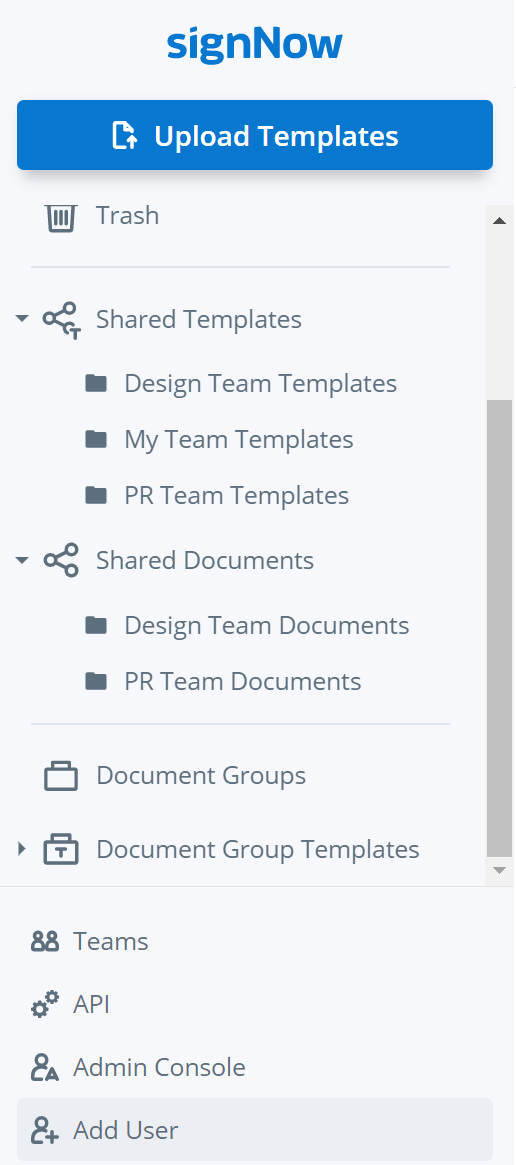
To start using Document Group Templates click on their folder in the left-hand menu of your airSlate SignNow account.
fill-guide-illustration

Ease of preparation

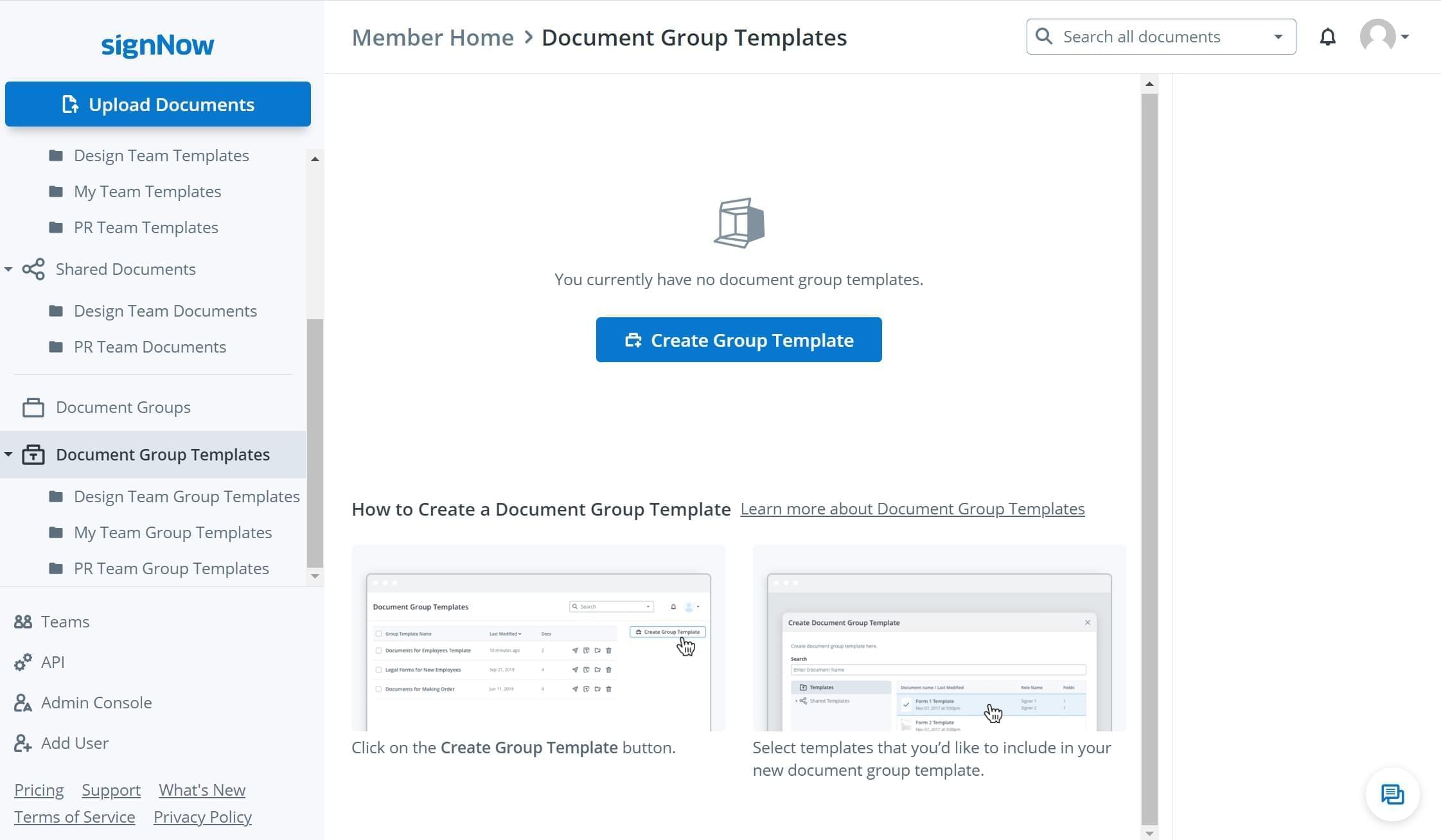
Click Create Group Template to select the document templates that you want to merge and send as one group.
fill-guide-illustration

Intuitive to the max

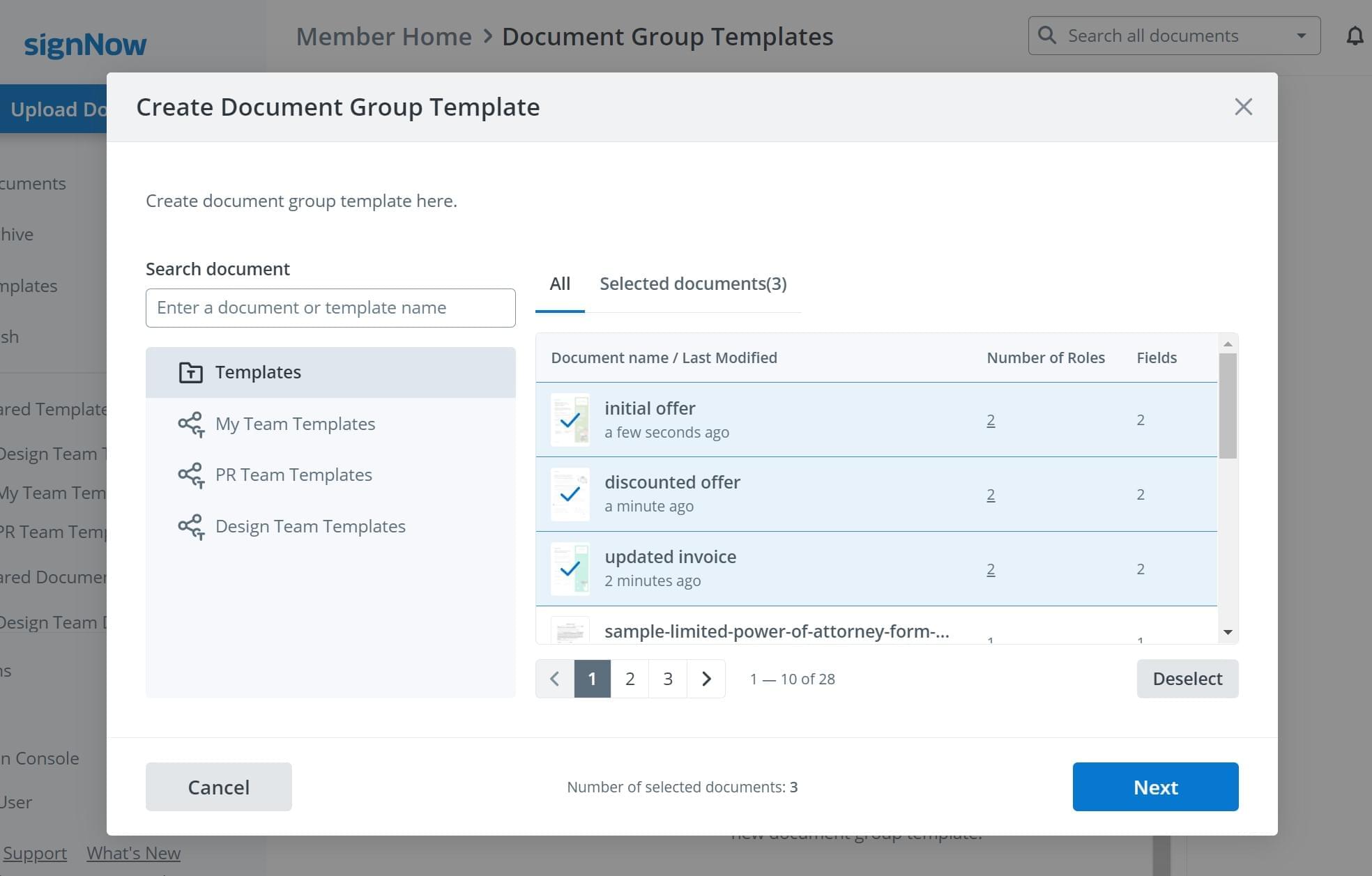
Now select the templates you intend to merge into one group. Note that you can choose your own templates, individual templates, or team templates used by other members of your airSlate SignNow team.
fill-guide-illustration

Convenient for multiparty eSigning

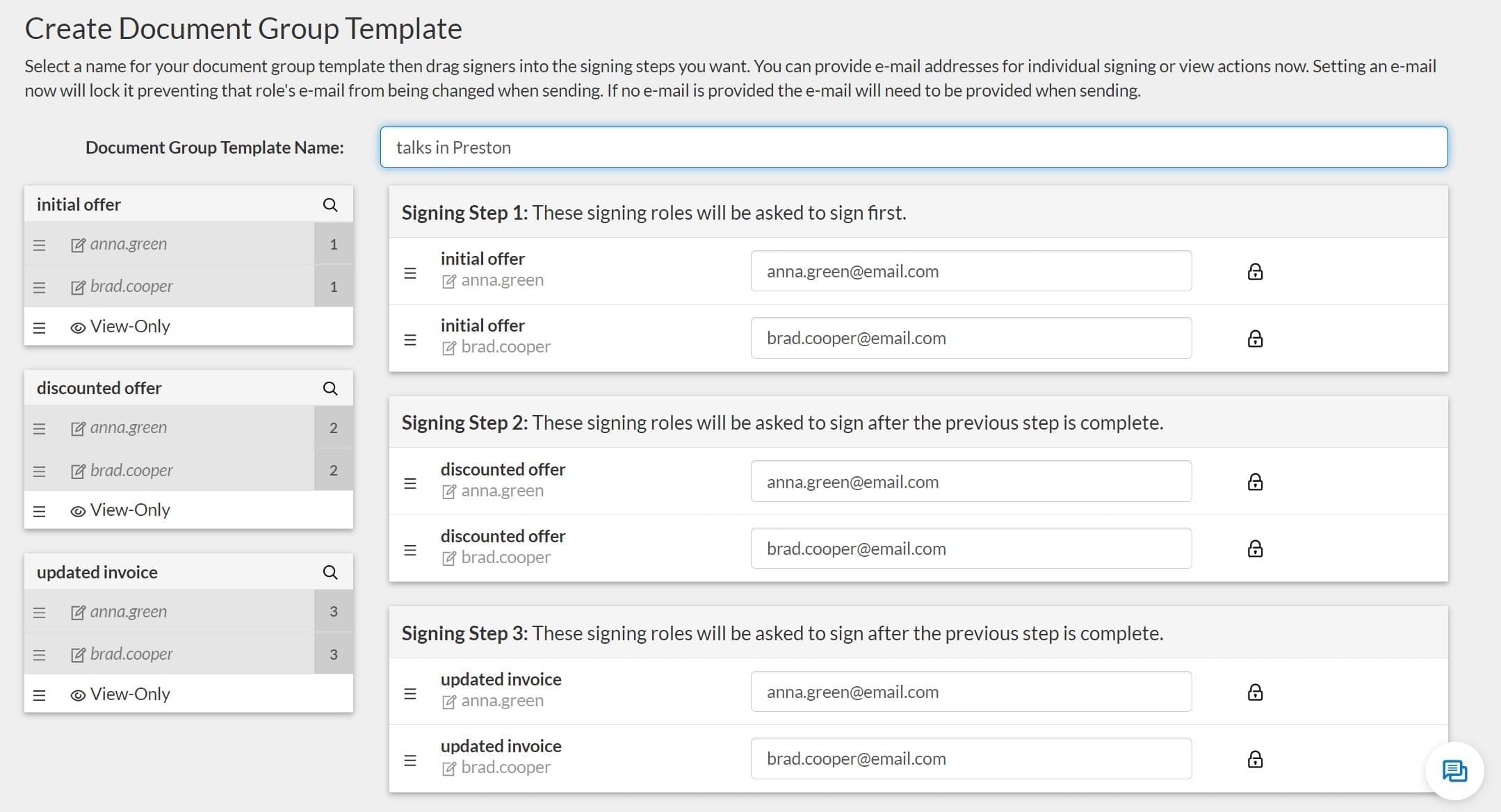
Once a Document Group Template is created, you can name it and set the eSigning order within this group.
fill-guide-illustration

Reminders and other extras

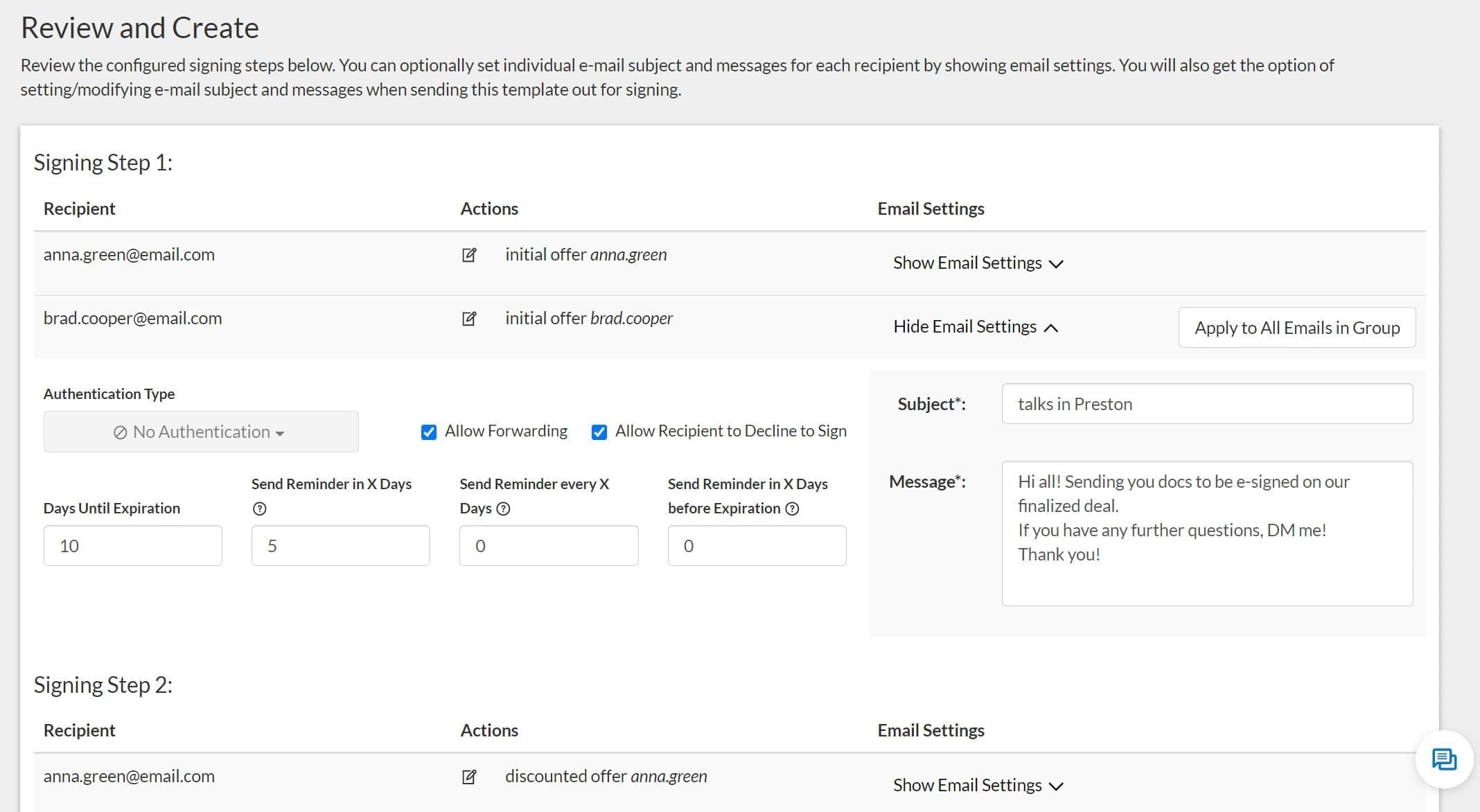
The next step is configuring your Document Group Template. Here you can check the signing steps, recipient emails, set reminders and expiration dates, and also set a password if necessary. You can also customize the subject and the text message to go with your Document Group Template.
fill-guide-illustration

Super easy management

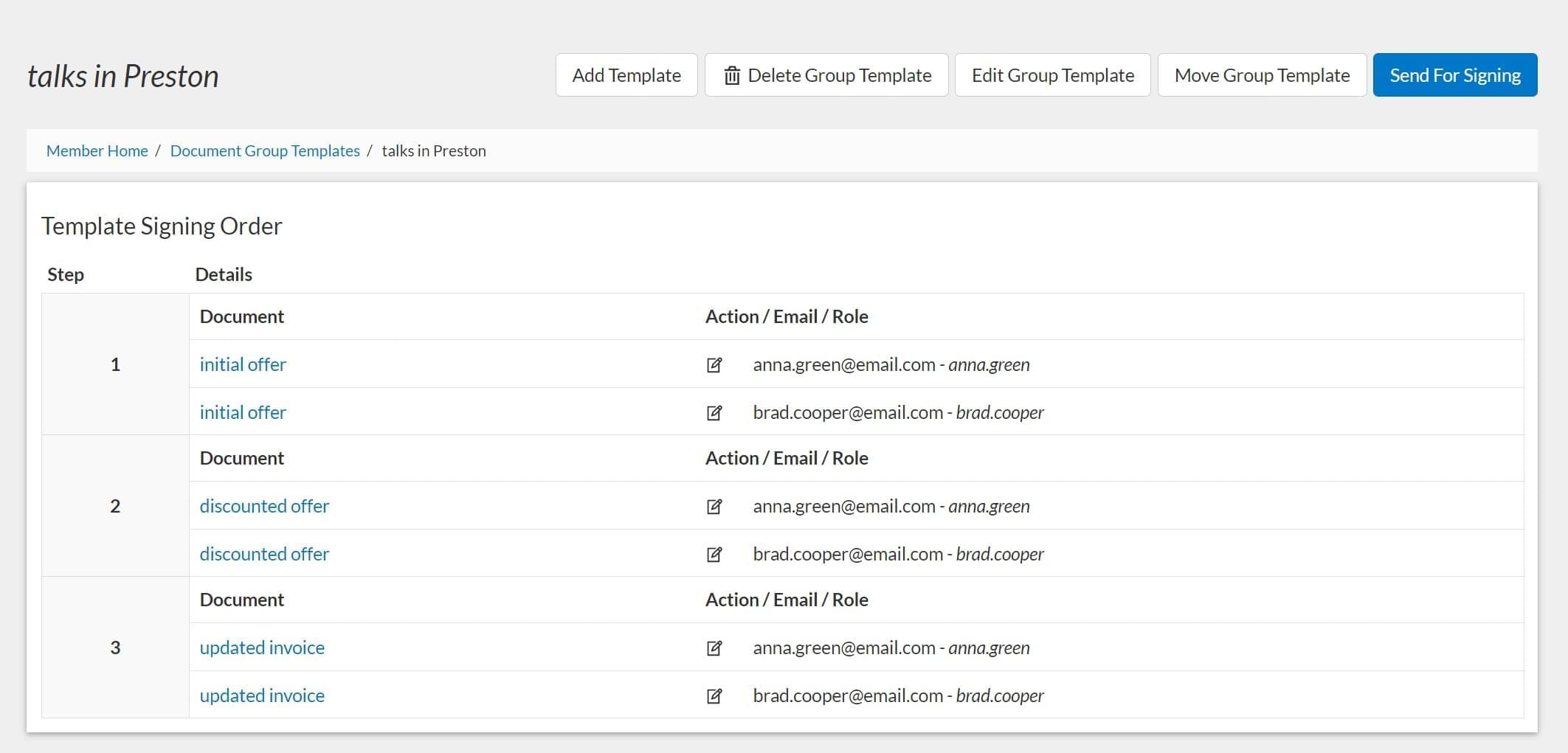
That’s it! Once your Document Group Template is generated, you can click Send For Signing, continue editing, or add another Document Group Template to your digital office.

fill-guide-illustration
walmart logo
exonMobil logo
apple logo
comcast logo
facebook logo
FedEx logo
be ready to get more

Get legally-binding signatures now!









