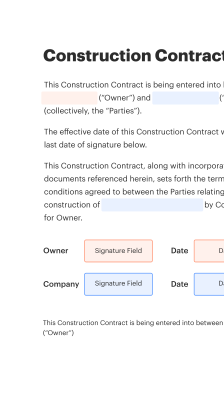
General Contractor Proposal Software for Procurement

Experience the ease of sending and eSigning documents. Empower your business with a cost-effective solution that enhances efficiency.

Award-winning eSignature solution

What general contractor proposal software for procurement does and why it matters

General contractor proposal software for procurement centralizes the creation, distribution, review, and acceptance of contractor bids and proposals used in sourcing construction services and materials. It organizes templates, pricing schedules, and subcontractor attachments while enabling electronic signature capture, audit trails, and version control. For procurement teams, the tool reduces manual tracking, enforces approval sequences, and stores procurement records for contract lifecycle management and compliance. When combined with secure eSignature capability it supports timely contract formation and retention of legally admissible records under U.S. electronic signature law.

Operational benefits procurement teams typically see

Using dedicated proposal software shortens procurement cycles, improves bid accuracy, and reduces administrative overhead by centralizing documents and automating approval workflows for general contractor engagements.

Operational benefits procurement teams typically see

Common procurement challenges addressed by proposal software

  • Fragmented bid materials cause version confusion and lead to contract errors and rework.
  • Manual routing for review creates bottlenecks and delays award decisions in tight timelines.
  • Inconsistent templates and fields complicate cost comparisons and compliance verification.
  • Insufficient audit trails make dispute resolution and regulatory review more time consuming.

Representative user profiles and responsibilities

Jordan Lee, Procurement Manager

Manages sourcing events and approval workflows for public and private projects. Uses proposal software to standardize bid documents, compare contractor submissions against budget line items, and retain procurement records for compliance and audit purposes. Coordinates with legal to finalize contract terms and signatures.

Taylor Ramos, General Contractor

Prepares and submits proposals in standardized templates, attaches required insurance and qualification documents, and tracks the status of submissions. Uses mobile signing where needed and accesses audit trails to confirm award decisions and contract execution timelines.

Teams and roles that typically use general contractor proposal software

Procurement and contract teams collaborate with contractors, estimators, and project managers to manage proposal intake and contract execution.

  • Procurement managers coordinating bid rounds and vendor selection.
  • Project managers reviewing scope, schedules, and contractor qualifications.
  • Estimators and contractors submitting standardized cost proposals and schedules.

Adoption improves handoffs between procurement, operations, and legal while keeping a centralized, auditable record of each sourcing event.

Core features that improve procurement accuracy and speed

A complete procurement proposal solution combines signature capture, templates, and controls to deliver consistency, compliance, and measurable time savings.

eSignature

Secure electronic signing that supports audit trails and U.S. legal requirements for electronic signatures, making signed proposals admissible and enforceable while capturing signer identity and timestamps.

Workflow Automation

Automated routing, conditional approvals, and reminders reduce manual oversight, enforce procurement policies, and accelerate decision-making when multiple approvers or departments must review proposals.

Custom Templates

Configurable templates with required fields and attachments standardize submissions, enforce completeness, and simplify comparison between contractor proposals during evaluation and scoring.

Audit Trail

Immutable logs record every action, from edits and views to signature events, producing a chronological record useful for audits, disputes, and regulatory compliance reviews.

Mobile Access

Native mobile and responsive web access allows contractors and approvers to review and sign proposals from tablets or smartphones, supporting field-based decision-makers and tight procurement timelines.

Role Permissions

Granular permissioning controls who can edit templates, view proposals, or execute signatures, supporting separation of duties and minimizing unauthorized contract changes.

be ready to get more

Choose a better solution

Essential integrations and document workflow capabilities

Integrations and workflow features enable procurement teams to embed the proposal process into existing document and CRM ecosystems for smoother operations.

Google Docs Integration

Sync proposal templates and live documents from Google Docs so procurement teams can maintain versioned templates in a familiar editor while ensuring the signed final version is captured and archived in the procurement system.

CRM Integration

Connect contractor and vendor records to your CRM so proposals, communication history, and contract statuses are linked to vendor profiles, improving vendor lifecycle management and reducing duplicate data entry across systems.

Dropbox and Cloud Storage

Automate storage of received proposals and executed contracts in Dropbox or other supported cloud repositories, ensuring consistent backup, centralized access, and simplified retention policies tied to procurement records.

Template Library

Maintain a centralized library of contract and bid templates with placeholders and required field validations so teams use standardized documents that reduce errors and speed up reviewer sign-off cycles.

How to create and use proposals online

This sequence outlines creating a proposal, collecting contractor inputs, routing approvals, and capturing final signatures.

  • Build template: Assemble standard fields and schedules.
  • Invite respondents: Send secure links to contractors.
  • Review submissions: Compare bids and check compliance.
  • Execute contract: Capture signatures and finalize documents.
Collect signatures
24x
faster
Reduce costs by
$30
per document
Save up to
40h
per employee / month

Quick setup steps for procurement teams

Follow these core steps to configure proposal intake and begin accepting contractor submissions digitally.

  • 01
    Create account: Register and verify administrative access.
  • 02
    Upload templates: Import RFP and bid templates with fields.
  • 03
    Configure approvals: Set routing rules and approver roles.
  • 04
    Publish and receive: Send invitations and accept electronic proposals.

Managing audit trails and procurement records

Follow these steps to ensure audit-ready records for each contractor proposal and executed contract.

01

Enable logging:

Activate full document activity logging.
02

Capture signer identity:

Require authentication for each signer.
03

Store snapshots:

Archive signed PDF snapshots automatically.
04

Export audit reports:

Generate chronological action reports on demand.
05

Retention policy:

Apply legal retention schedules to archives.
06

Access review:

Regularly audit user permissions and access logs.
be ready to get more

Why choose airSlate SignNow

  • Free 7-day trial. Choose the plan you need and try it risk-free.
  • Honest pricing for full-featured plans. airSlate SignNow offers subscription plans with no overages or hidden fees at renewal.
  • Enterprise-grade security. airSlate SignNow helps you comply with global security standards.
illustrations signature

Recommended workflow settings for procurement automation

These settings illustrate a typical configuration for approvals, reminders, and retention in a procurement-focused proposal workflow.

Setting Name Configuration
Document Approval Routing Sequence Policy Sequential approvals with two reviewer stages and escalation
Signer Authentication Method Selection Email verification with optional SMS two-factor for high-value contracts
Reminder Frequency and Escalation Window 48 hours initial reminder then escalation after seven days
Required Attachments and Validation Rules Insurance certificate and license required before routing
Retention and Archive Lifecycle Policy Seven-year retention in read-only archive with export options

Access and platform requirements for field and office use

Ensure users have supported browsers or mobile apps and up-to-date operating systems for reliable proposal creation, review, and signing.

  • Desktop Browsers: Chrome, Edge, Safari supported
  • Mobile Platforms: iOS and Android apps available
  • Minimum Network Requirements: Broadband or stable mobile data

For secure signing, require modern browsers with TLS support and recommend organizational SSO where available; mobile apps support offline viewing but require connectivity for signature verification and audit logging.

Security controls and document protection

Encryption at Rest: AES-256 encryption for stored documents
Encryption in Transit: TLS 1.2+ secure transmission
Access Controls: Role-based permissions and single sign-on
Data Residency: U.S.-based cloud storage options
Document Watermarking: Optional dynamic watermark on downloads
Audit Logging: Immutable action records for each document

Industry use cases for procurement of contractor proposals

Typical implementations demonstrate how procurement teams and contractors use proposal software to streamline sourcing, maintain compliance, and shorten award cycles.

Municipal Project Bid Intake

A city procurement office consolidates all contractor submissions into standardized templates to compare scope and pricing.

  • Uses automated compliance checks for insurance and licensing.
  • Reduces manual review time and prevents missing documents.

Resulting in faster bid awards and clearer audit records for public procurement oversight.

Large Commercial Redevelopment

A developer solicits multiple general contractor proposals for a phased redevelopment project using digital templates.

  • Integrates subcontractor schedules and cost breakdowns for consistent review.
  • Enables parallel approvals from finance and construction teams.

Leading to reduced procurement cycle times and documented decisions across stakeholders.

FAQs and troubleshooting for procurement proposal workflows

Answers to common questions procurement teams have about using proposal software, legal validity, and technical issues encountered during bidding and signing.

be ready to get more

Get legally-binding signatures now!

Regulatory and contractual risks to watch for

Invalid Signature: Potential unenforceability
Data Breach: Exposure of sensitive bidding data
Retention Failures: Noncompliance with recordkeeping
Unauthorized Access: Contract tampering risk
Procurement Audit Findings: Penalties or remedial actions
Missing Disclosures: Contractual disputes or rescission
walmart logo
exonMobil logo
apple logo
comcast logo
facebook logo
FedEx logo
be ready to get more

Get legally-binding signatures now!