Case Caption
Full court name, county, party names, and proposed case number; accurate caption prevents misfiling and ensures correct docket assignment.
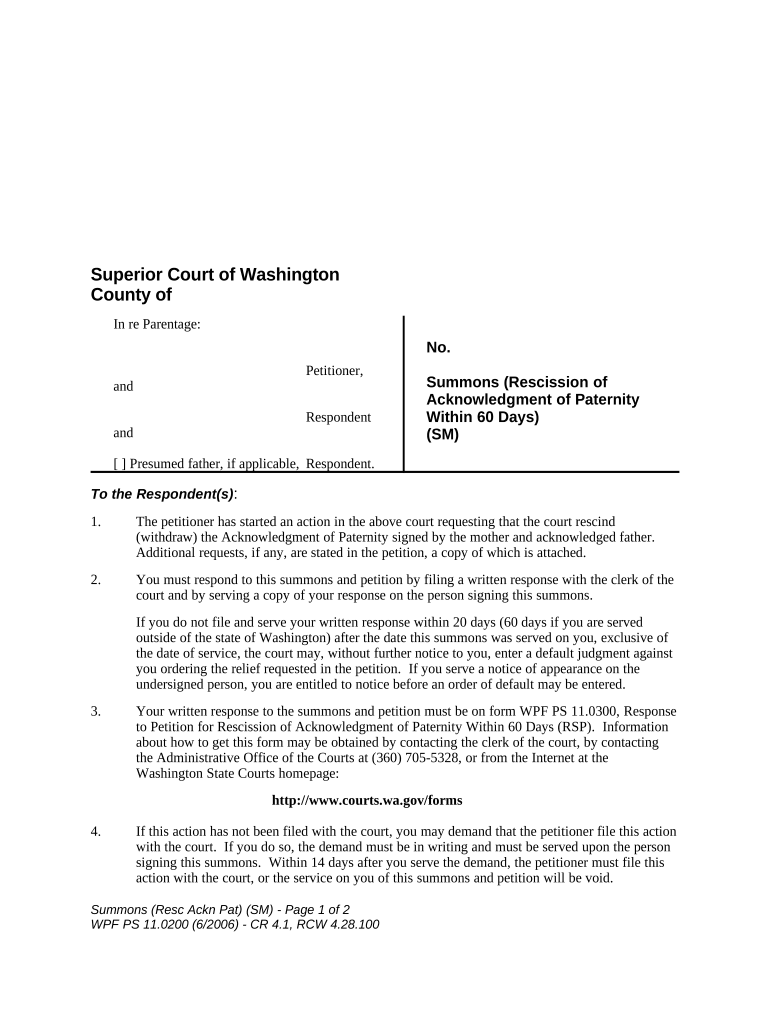
A properly prepared summons provides formal notice, ensures jurisdiction, and establishes the case caption and relief requested. Clear facts reduce administrative delay and avoid dismissals for procedural defects.

Parties should confirm local superior-court filing rules and service methods in the county where the child resides before filing.
| Field | Recommended Setting |
|---|---|
| Authentication | Email link + SMS code |
| Template | Use Washington-specific template |
| Notarization | RON or in-person per county rules |
| Routing Order | Petitioner → Attorney → File/Clerk |
Confirm county clerk e-filing rules and whether the court accepts electronically signed pleadings or requires original wet signatures or notarized filings.
State and local service deadlines vary; check county civil rules.
Processing often takes 1–5 business days depending on clerk workload.
Initial hearing dates vary by court; expect weeks to months.
Respondent typically has a set number of days to answer per court rule.
Keep filed copies per retention requirements and court rules.
Assemble petition, summons, and supporting records.
Submit originals and pay filing fee.
Complete service per county rules.
Court sets schedule and discovery obligations.
Full court name, county, party names, and proposed case number; accurate caption prevents misfiling and ensures correct docket assignment.
Plain notice language identifying the action (rescission of acknowledgment) and advising the respondent of required response obligations and timelines.
Concise factual paragraph explaining legal and factual bases for rescission without surplus argument; supports initial judicial review.
Attach the original acknowledgment, birth records, and any documentary evidence; label exhibits and refer to them in the petition.
Specify the method and address for service; include proof-of-service form for later filing with the clerk.
Clear, itemized request for rescission, orders regarding parentage, support, and any interim relief such as temporary orders or discovery.
| signNow | DocuSign | Adobe Sign | PandaDoc | HelloSign | |
|---|---|---|---|---|---|
| Starting Price | $8/user/mo | $15/user/mo | $14/user/mo | $19/user/mo | $15/user/mo |
| Free Trial | Yes, 7-day | Varies | Varies | Varies | Varies |
| Bulk Send | Yes | Yes | Yes | Yes | Varies |
| Audit Trail | Yes | Yes | Yes | Yes | Yes |
| HIPAA Compliant | Yes | Yes | Yes | No | No |