Establishing secure connection…Loading editor…Preparing document…

North Carolina Estate Account

This template is fully customizable. Edit the text, fill out the fields, and send it for signature. Give it a try!
North Carolina Estate Account

What the North Carolina Estate Account Is

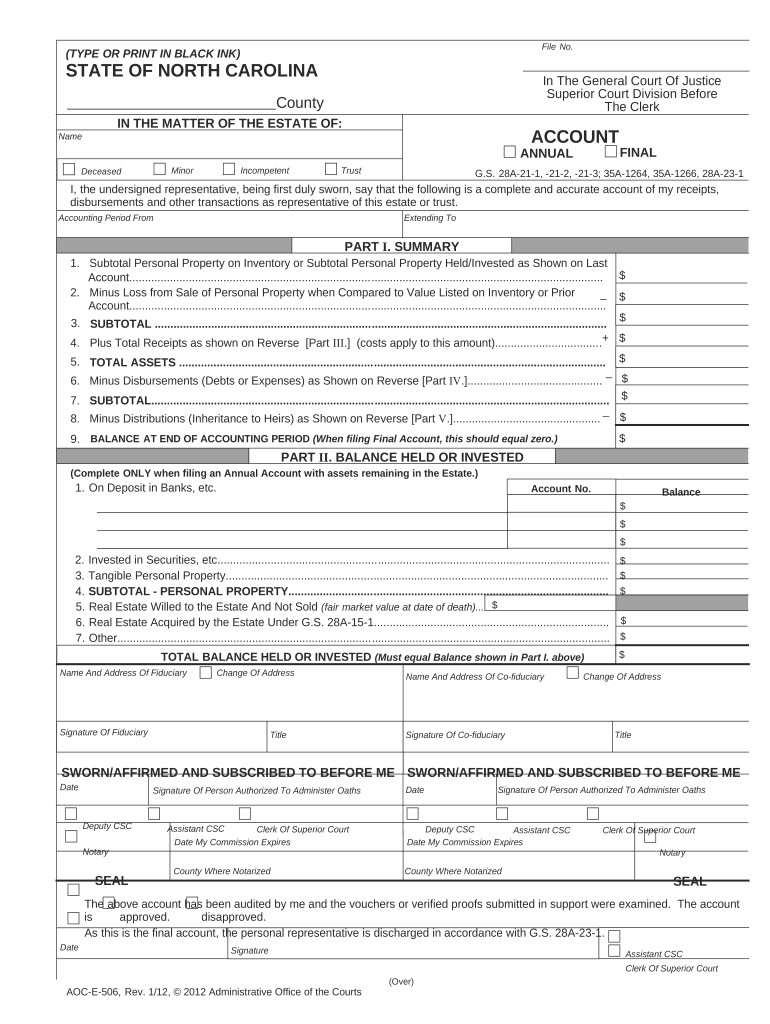
A North Carolina Estate Account is the formal accounting prepared by an executor or administrator to report a decedent's assets, receipts, expenses, and proposed distributions to beneficiaries and the probate court. It documents fiduciary actions during estate administration, supports payment of debts and taxes, and provides the court and heirs a transparent record of how estate property was handled.

Why an Estate Account Matters for Executors and Beneficiaries

Filing a clear, accurate estate account helps satisfy fiduciary duties, reduces disputes, supports court approval of distributions, and creates an auditable record for tax and creditor purposes.

Why an Estate Account Matters for Executors and Beneficiaries

Typical people and roles that prepare or review an estate account

Executors, administrators, counsel, and beneficiaries all interact with estate accounts at different stages.

  • Personal Representative or Executor — Prepares the account and certifies accuracy for the court.
  • Estate Attorney or Probate Counsel — Drafts the account package and manages filings and notices.
  • Beneficiaries and Creditors — Review the account to confirm proposed distributions and claims.

Each role has distinct responsibilities: the representative compiles, counsel ensures compliance, and beneficiaries review before approval.

Step-by-step: preparing a court-ready estate account

Follow these steps to assemble, review, and submit an estate account that meets typical probate requirements.

  • 01
    Gather Records: Collect death certificate, will, bank statements, and asset titles.
  • 02
    Prepare Inventory: Value and categorize probate assets and note nonprobate transfers.
  • 03
    Draft Account: Compile receipts, disbursements, and proposed distributions with exhibits.
  • 04
    File and Serve: File with the clerk and serve beneficiaries and creditors per court rules.

Configuring the digital workflow for an estate account

Set up your document workflow to collect signatures, attach exhibits, and produce an audit trail suitable for court review.

Field Configuration
Assign Signers Executor first, then attorney, then beneficiaries where required
Field Types Signature, date, initials, text blocks for inventory entries
Authentication Email + SMS or knowledge-based checks for higher assurance
Routing Order Sequential routing to capture attestations before filing

Technical considerations for digital completion and e‑filing

Ensure the signing platform supports required file formats, audit trails, and secure storage before eSubmission.

  • Formats: PDF and DOCX accepted for court filing
  • Integrations: Connectors for case management or cloud storage (Salesforce, NetSuite, Google Workspace)
  • Security: TLS and AES encryption with detailed audit logs

Confirm county clerk e‑filing rules and preserve an immutable copy with a per-signature audit trail for court records.

How electronic completion and delivery typically flows

A simple eSubmission workflow reduces physical handling while preserving court-grade evidence of signing events.

  • Upload Documents: Attach accounting, exhibits, and supporting records as PDFs
  • Place Fields: Add signature/date fields and supporting text blocks
  • Send to Signers: Email or secure link with authentication
  • Receive Audit Trail: Capture timestamps, IPs, and completion certificates

Typical timing expectations for estate accounting

Timing varies by county and complexity; use these typical milestones as planning benchmarks and confirm local rules with the clerk of superior court.

Initial Inventory:

Often prepared within 30–90 days of appointment; county rules vary

Creditor Notice Period:

Commonly a 90-day claims period in many jurisdictions; verify North Carolina statutes

Interim Accounting:

Requested as court directs; frequency depends on estate complexity

Final Accounting:

Occurs after creditor period closes and taxes are filed

Typical Duration:

Simple estates: 6–12 months; complex estates: 12–36 months

Key procedural milestones in estate accounting

A sequential timeline helps track filings, notices, and distribution steps required for court approval.

01

Appointment

Executor or administrator is appointed and receives authority

02

Inventory Filed

An inventory of probate assets is recorded with the clerk

03

Notice Period

Creditors and interested parties are given statutorily required notice

04

Final Accounting

Submit final account for court review and entry of discharge

Common preparation errors to avoid

  • Incomplete asset descriptions, which delay valuation and court review.
  • Omitted supporting documents like bank statements and title records, causing objections.
  • Mismatched names or dates that require amendments and prolong administration.
  • Failing to serve creditors or beneficiaries properly, which can invalidate distributions.

Primary legal and financial risks of an incorrect account

Fiduciary Liability: Court may surcharge fiduciary for losses
Delayed Distribution: Errors postpone beneficiary payment
Tax Penalties: Incorrect tax reporting can trigger IRS penalties
Creditor Claims: Unnoticed claims may require estate indemnification
Court Sanctions: Failure to comply may lead to sanctions
Invalid Transfers: Mistakes can void a proposed distribution

Security and compliance elements to include with digital filings

Encryption: TLS 1.2/1.3 in transit; AES-256 at rest
Audit Trail: Per-signature timestamps and IP addresses
Access Controls: Role-based permissions for sensitive exhibits
Retention: Immutable copies retained with version history
Regulatory Fit: ESIGN and UETA compliance for electronic signatures
Privacy: HIPAA BAA where health records are included

eSignature vendor comparison for estate accounting workflows

Compare common vendor pricing and capability indicators relevant to estate account preparation and secure signing; signNow is listed first per comparison conventions.

signNow DocuSign Adobe Sign PandaDoc HelloSign
Starting Price $8/user/mo $15/user/mo $14/user/mo $19/user/mo $15/user/mo
Free Trial 7-day free trial Varies by vendor Varies by vendor Varies by vendor Varies by vendor
Bulk Send Yes Yes Yes Yes No
Audit Trail Yes Yes Yes Yes Yes
HIPAA Compliant Yes Yes Yes No No
Envelope Cap No cap 100 envelopes/user/year Varies Varies Varies

Practical examples of digital estate accounting in use

These examples illustrate how teams digitize estate accounting to preserve evidence and speed review.

Tim Martin — Martin Properties

A regional executor team digitized estate ledgers for property-heavy estates to reduce paper handling.

  • The team used secure signatures to collect trustee attestations quickly.
  • "I can process and execute all of these documents online with 100% compliance and built-in security," — illustrating reduced turnaround and clearer audit trails for real property estates.

Brian Fitzgibbons — Optica Ventures LLC

A small fiduciary practice standardized accounting templates to reduce drafting time.

  • Templates ensured consistent inventory lines and calculation formats.
  • "The interface is simple and easy-to-use for our team; more importantly, it is just as easy for our customers," which supported timely beneficiary review and fewer court queries.

Practical tips for accurate and efficient estate accounting

Follow these practices to reduce revision cycles, limit objections, and present a court-ready account.

Document everything
Attach source documents for each receipt and disbursement, cross-referencing line items to reduce challenges and audits.
Use standardized templates
Consistent numbering, valuation methods, and exhibit labeling accelerate review and minimize clerical errors.
Verify identities and authorities
Confirm appointment orders and signatory authority before submitting to avoid rejected filings.
Preserve audit evidence
Retain per-signature audit logs, version history, and immutable copies in case of later disputes.

Who typically signs or certifies the account

Executor

The personal representative or executor signs to certify accuracy and to request court approval; signature attests to fiduciary duties and accuracy under penalty of law.

Estate Attorney

Legal counsel signs or files on the representative's behalf, certifying that the account complies with court rules and that notices were served as required.

Filing and distribution routing for an estate account

A clear routing plan ensures signers, reviewers, and the clerk receive documents in sequence and that the final package is complete for filing.

  • Prepare Package: Compile the account, exhibits, and verification
  • Secure Signatures: Collect executor and attorney signatures
  • Serve Parties: Deliver copies to beneficiaries and creditors
  • File with Court: Submit the signed account to the clerk for review

Penalties and enforcement risks

Late Filings: May prompt creditor advantage or court admonishment
Incorrect Reporting: Could lead to tax assessments and interest
Failure to Serve: Void distributions and extended administration risk
Fiduciary Exposure: Personal liability for breaches of duty
Court Rejection: Incomplete accounts are returned for correction
Increased Costs: Amendments and disputes raise attorney fees

Frequently asked questions about North Carolina Estate Accounts

Answers to common procedural, signing, and filing questions encountered when preparing an estate account in North Carolina.


Need help? Contact support

be ready to get more
Join over 28 million airSlate SignNow users