Establishing secure connection…Loading editor…Preparing document…

Affidavit Service Form

This template is fully customizable. Edit the text, fill out the fields, and send it for signature. Give it a try!
Affidavit Service Form

What the Affidavit Service Form Is and when it matters

An Affidavit Service Form documents how legal process or official notices were served to an individual or entity, and records the server's sworn statements. It identifies parties, the method and date of service, the documents delivered, and the location where service occurred. Courts, agencies, and private parties use it to prove notice was given when required. Proper completion supports admissibility in court, establishes the service timeline, and reduces disputes about whether or when a party received required documents.

Why a clear Affidavit Service Form matters

A correctly completed Affidavit Service Form provides verifiable evidence of notice, helps meet court or agency procedural requirements, and limits disputes about service timing or method.

Why a clear Affidavit Service Form matters

Who typically completes and relies on this form

Professionals and parties who regularly document legal notice or process service complete this form to establish a factual record before tribunals or agencies.

  • Process servers and private investigators who perform and certify personal or substituted service.
  • Attorneys and paralegals filing proof of service with courts or administrative agencies.
  • Court clerks, compliance officers, and in-house counsel who accept or evaluate proof of notice.

Common signatories and who prepares the affidavit

Process Server — Professional

A professional process server prepares the affidavit after completing service, noting method, date, time, and recipient details; their narrative supports admissibility and may reference attached return-of-service exhibits.

Affiant — Party or Agent

An affiant (the person who served or witnessed service) signs under oath and supplies identifying information; when notarized this person affirms factual matters for the record and potential cross-examination.

Key security and compliance elements to include

Encryption: TLS 1.2/1.3 in transit; AES-256 at rest
Audit Trail: Timestamp, IP, and action history
HIPAA Support: BAA required for protected health information
21 CFR Support: Controls for FDA-regulated electronic records
SOC 2 / ISO: SOC 2 Type II and ISO 27001 certifications
Accessibility: WCAG 2.0 Level AA conformance

Consequences of errors or omissions

Perjury Risk: False statements can lead to perjury charges
Form Rejection: Missing notary or signature invalidates acceptance
Missed Deadlines: Improper dates may forfeit procedural rights
Court Sanctions: Sanctions for fraudulent or misleading affidavits
Evidence Exclusion: Unverified service may be excluded at trial
Administrative Fines: Sanctions by agencies or licensing boards

Common preparation mistakes to avoid

  • Using informal names or initials instead of full legal names can cause identity disputes and rejection by courts.
  • Omitting the exact service method or using vague language like 'delivered' instead of 'personally served' or 'certified mail' invites questions.
  • Failing to notarize or to include the notary block when required by court rules makes the affidavit noncompliant.
  • Neglecting to attach exhibits (the served document or receipts) reduces the affidavit's evidentiary value and may require resubmission.

Step-by-step: completing the Affidavit Service Form

Follow these sequential steps to complete an Affidavit Service Form accurately and ensure admissible proof of service.

  • 01
    Prepare Document: Attach the served document and any related exhibits.
  • 02
    Identify Parties: Enter full legal names, addresses, and contact details.
  • 03
    Describe Service: State method (personal, mail, RON), date, time, and location.
  • 04
    Swear and Sign: Sign before authorized official; include notary or witness info.

Where the completed form goes and how it is used

After signing and notarizing as required, route the affidavit to the relevant filing location and retain a certified copy for your records.

  • Court Filing: File the affidavit with the court clerk in the related case file.
  • Agency Submission: Submit to the administering agency when service proves regulatory notice.
  • Opposing Counsel: Provide a conformed copy to opposing parties or counsel.
  • Record Retention: Keep an accessible copy per retention rules and legal holds.

Essential components of a professional Affidavit Service Form

A professional affidavit balances factual clarity with required authentication elements so courts and agencies can rely on the record without follow-up.

Caption

Case or matter caption linking the affidavit to the underlying proceeding; include docket or reference number if available.
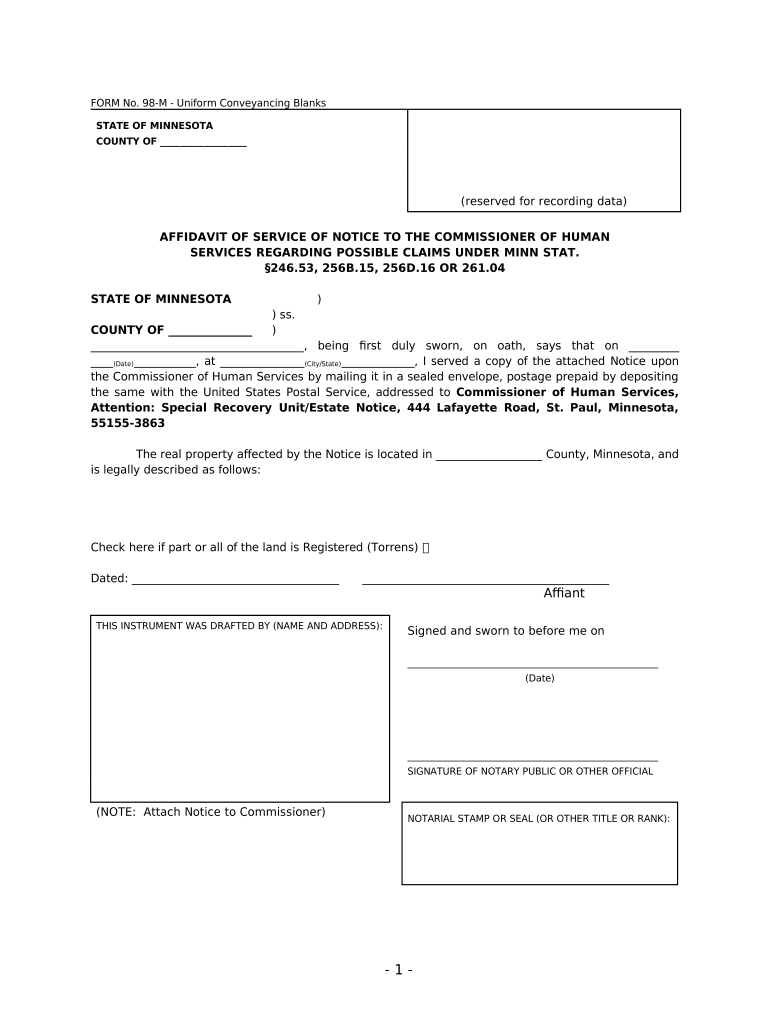
Affiant Details

Full legal name, address, contact information, and relation to the service event for identification and cross-checking.

Service Narrative

Concise description of the service steps, method used, date, time, and location, avoiding ambiguous or subjective language.

Document List

A clear inventory of the documents served, with exhibit labels and attached copies or tracking receipts when applicable.

Notary / Oath

Notary block or authorized official statement, including seal, commission details, or remote notarization session reference as required.

Signature Block

Affiant signature, printed name, and date; include witness signatures if the jurisdiction or court requires them.

Key deadlines and timing considerations after service

Observe court and regulatory deadlines tied to the service date; recording the exact service date starts many response and appeal windows.

Record Service Date:

Document the exact MM/DD/YYYY service date immediately

File Proof of Service:

Submit the affidavit with the court or agency per its prescribed timeline

Respondent Deadline:

Service date often triggers a fixed response window under procedural rules

Appeal Period:

Calculate appeal timing from service or judgment entry per applicable rules

Retention Start:

Retention periods typically begin on the service or filing date

Typical digital workflow settings for e-submission

Configure the online workflow so the affidavit, exhibits, and notarization metadata are captured and stored in a compliant manner.

Field Configuration
Authentication Email verification, SMS code, or stronger as required
Notarization In-person or RON depending on state allowance
Signature Fields Require signer name, signature, and date fields
Attachments Attach served document, tracking receipts, or exhibits

Technical considerations for eSubmission and storage

Choose a platform that supports required authentication, notarization capture, and secure storage for affidavits and exhibits.

  • Integrations: Salesforce, NetSuite, Microsoft 365, and Box supported
  • File Formats: PDF, DOCX, HTML, and Excel accepted
  • Authentication: Email, SMS, KBA, or SSO per plan

Comparing signNow and other eSignature vendors

Pricing and core feature availability vary across vendors; signNow is listed first for direct feature comparison across common buyer criteria.

signNow DocuSign Adobe Sign PandaDoc HelloSign
Starting Price $8/user/mo $15/user/mo $14/user/mo $19/user/mo $15/user/mo
Free Trial 7-day free trial Varies by plan Varies by plan Varies by plan Varies by plan
Bulk Send Yes Yes Yes Yes No
Audit Trail Yes Yes Yes Yes Yes
HIPAA Compliant Yes Yes Yes No No
Envelope Cap No cap 100 envelopes/user/year No cap No cap No cap

Real-world examples of use and outcomes

How organizations use affidavit service workflows to close loops and create admissible records in court or administrative matters.

Martin Properties — Lease Notices

Martin Properties documents notice delivery using remote workflows to serve tenants and record service events.

  • Eliminated in-person errands on site and shortened timelines.
  • The company reports consistent, auditable proof of service that reduced disputes and accelerated resolution of tenancy issues while preserving chain-of-custody for served documents.

Fertility Centers of Illinois — Patient Notices

Clinical administration records service of patient correspondence and consent-related notices with notarized affidavits when required.

  • Reduced physical paperwork handling across sites.
  • Maintaining digital affidavits with audit trails improved compliance readiness and simplified responses during audits and patient inquiries without changing clinical workflows.

Practical tips for accurate, efficient completion

Small procedural habits reduce rework and speed acceptance of affidavits by courts and agencies.

Use standard templates
Start from a jurisdiction-specific template to ensure required blocks and language are present; customize only as needed.
Capture exhibits
Attach the exact served document, tracking numbers, and delivery receipts to avoid later evidentiary challenges.
Record precise timestamps
Use MM/DD/YYYY and HH:MM AM/PM to avoid ambiguity about deadlines and response windows.
Confirm notarization rules
Check whether RON is permitted and follow state-specific identity-proofing and recording requirements.

Key milestones from service to final filing

A clear milestone sequence helps teams track obligations and prevents missed filings or appeal windows.

01

Service Performed

Affiant completes service and records date, time, method, and recipient details.

02

Affidavit Executed

Affiant signs under oath and adds notary or witness information as required.

03

File with Court

Submit the affidavit with the court clerk or agency within the required timeframe.

04

Provide Opposing Parties

Supply conformed copies to opposing counsel or relevant parties per procedural rules.

FAQs and troubleshooting for common issues

Answers to recurring questions about notarization, RON, corrections, and where to file completed affidavits.


Need help? Contact support

be ready to get more
Join over 28 million airSlate SignNow users