Establishing secure connection… Loading editor… Preparing document…
Navigation

Fill and Sign the After Detention Form
Fill and Sign the After Detention Form

How it works

Open the document and fill out all its fields.
Apply your legally-binding eSignature.
Save and invite other recipients to sign it.

Rate template

4.6
38 votes
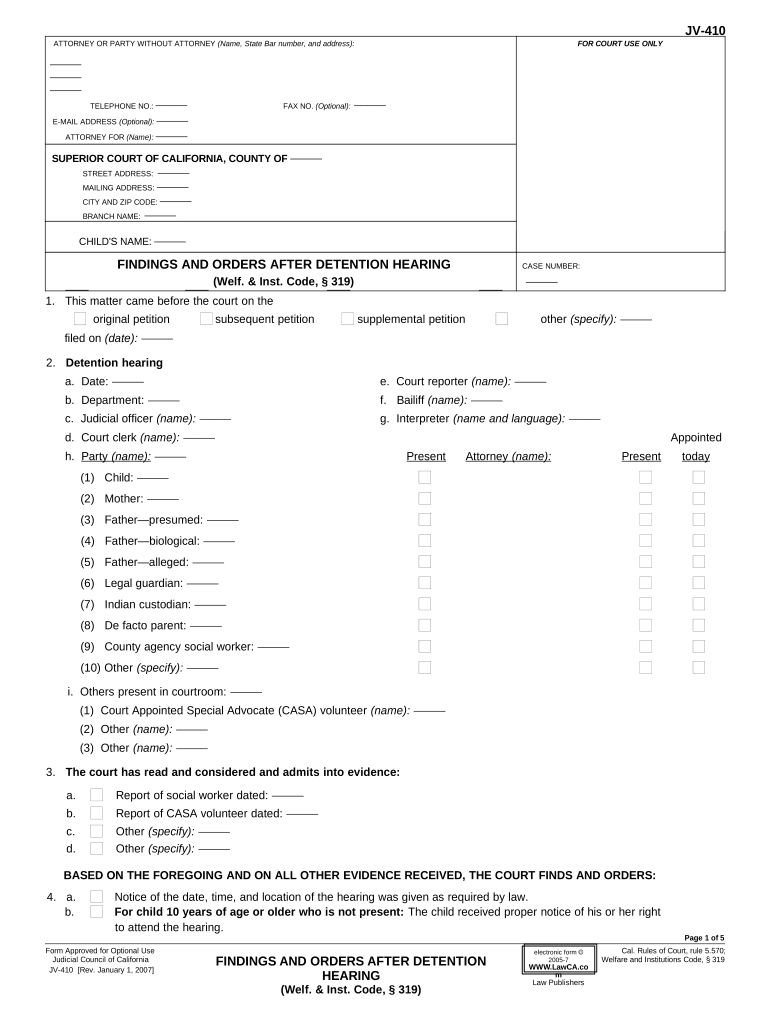
JV-410 ATTORNEY OR PARTY WITHOUT ATTORNEY (Name, State Bar number, and address): FOR COURT USE ONLY ––––– ––––– ––––– TELEPHONE NO.: ––––– FAX NO. (Optional): ––––– E-MAIL ADDRESS (Optional): ––––– ATTORNEY FOR (Name): ––––– SUPERIOR COURT OF CALIFORNIA, COUNTY OF ––––– STREET ADDRESS: ––––– MAILING ADDRESS: ––––– CITY AND ZIP CODE: ––––– BRANCH NAME: ––––– CHILD'S NAME: ––––– FINDINGS AND ORDERS AFTER DETENTION HEARING CASE NUMBER: (Welf. & Inst. Code, § 319) ––––– 1. This matter came before the court on the original petition subsequent petition supplemental petition other (specify): ––––– filed on (date): ––––– 2. Detention hearing a. Date: ––––– e. Court reporter (name): ––––– b. Department: ––––– f. Bailiff (name): ––––– c. Judicial officer (name): ––––– g. Interpreter (name and language): ––––– d. Court clerk (name): ––––– Appointed h. Party (name): ––––– Present Attorney (name): Present today (1) Child: ––––– (2) Mother: ––––– (3) Father—presumed: ––––– (4) Father—biological: ––––– (5) Father—alleged: ––––– (6) Legal guardian: ––––– (7) Indian custodian: ––––– (8) De facto parent: ––––– (9) County agency social worker: ––––– (10) Other (specify): ––––– i. Others present in courtroom: ––––– (1) Court Appointed Special Advocate (CASA) volunteer (name): ––––– (2) Other (name): ––––– (3) Other (name): ––––– 3. The court has read and considered and admits into evidence: a. Report of social worker dated: ––––– b. Report of CASA volunteer dated: ––––– c. Other (specify): ––––– d. Other (specify): ––––– BASED ON THE FOREGOING AND ON ALL OTHER EVIDENCE RECEIVED, THE COURT FINDS AND ORDERS: 4. a. Notice of the date, time, and location of the hearing was given as required by law. b. For child 10 years of age or older who is not present: The child received proper notice of his or her right to attend the hearing. Page 1 of 5 Form Approved for Optional Use Cal. Rules of Court, rule 5.570; Judicial Council of California Welfare and Institutions Code, § 319 JV-410 [Rev. January 1, 2007] electronic form ã 2005-7 WWW.LawCA.co m Law PublishersFINDINGS AND ORDERS AFTER DETENTION HEARING (Welf. & Inst. Code, § 319) JV-410 CHILD'S NAME: CASE NUMBER: ––––– ––––– 5. The attorney appointed to represent the child as the child's attorney of record is also appointed as the child's Child Abuse Prevention and Treatment Act guardian ad litem. 6. A Court Appointed Special Advocate is appointed for the child. 7. a. The child will not benefit from representation by an attorney, and the court further finds that: (1) the child understands the nature of the proceedings; (2) the child is able to communicate and advocate effectively with the court, other counsel, other parties, including social workers, and other professionals involved in the case; and (3) under the circumstances of the case, the child would not gain any benefit from being represented by counsel. b. A Court Appointed Special Advocate is appointed for the child, and that person is also appointed as the child's Child Abuse Prevention and Treatment Act guardian ad litem. Advisements and waivers 8. Paternity a. The court inquired of the mother others (names and relationships): ––––– as to the identity and address of all presumed or alleged fathers. All alleged fathers present during the hearing who had not previously submitted a Statement Regarding Paternity (Juvenile Dependency) (form JV-505) were provided with and ordered to complete form JV-505 and submit it to the court. b. The clerk of the court is ordered to provide the notice required by Welf. & Inst. Code, § 316.2 to (1) alleged father (name): ––––– (2) alleged father (name): ––––– (3) alleged father (name): ––––– 9. The court has informed and advised the mother biological father legal guardian presumed father alleged father Indian custodian other (specify): ––––– of the following: a. The right of the child and each parent, legal guardian, and Indian custodian to be present and to be represented by counsel at every stage of the proceedings and, if any of these parties are financially unable to retain counsel, any right to appointed counsel that exists, subject to the court's right to seek reimbursement. b. The right to be informed by the court of the following: • the contents of the petition; • the nature of and possible consequences of juvenile court proceedings; • the reasons for the initial detention and the purpose and scope of the detention hearing if the child is detained; • the right to have a child who is detained immediately returned to the home of the parent, legal guardian, or Indian custodian if the petition is not sustained; • that if the petition is sustained and the child is removed from the care of the parent, legal guardian, or Indian custodian, the time for services will commence on the date the petition is sustained or 60 days from the date of the initial removal, whichever is earlier; • that the time for services will not exceed 12 months for a child aged three years or over at the time of the initial removal; and • that the time for services will not exceed not exceed 6 months for a child under the age of three years or for the member of a sibling group that includes a child under the age of three years if the parent, legal guardian, or Indian custodian fails to participate regularly and make substantive progress in any court-ordered treatment program. c. The right to a hearing by the court on the issues presented by the petition. d. The right to assert the privilege against self-incrimination; to confront and cross-examine the persons who prepared reports or documents submitted to the court by the petitioner and the witnesses called to testify against the parent, legal guardian; or Indian custodian; to subpoena witnesses; and to present evidence on one's own behalf. [Rev. January 1, 2007] FINDINGS AND ORDERS AFTER DETENTION HEARING Page 2 of 5 (Welf. & Inst. Code, § 319) JV-410 CHILD'S NAME: CASE NUMBER: ––––– ––––– 10. The mother biological father legal guardian child presumed father alleged father Indian custodian other (specify): ––––– has knowingly and intelligently waived the right to a court trial on the issues, the right to assert the privilege against self-incrimination, the right to confront and cross-examine adverse witnesses, the right to subpoena witnesses, and the right to present evidence on one's own behalf. 11. CHILD NOT DETAINED a. Services that would prevent the need for further detention, including those set forth in item 13, are available. b. The child is returned to the custody of mother biological father legal guardian other (specify): ––––– presumed father alleged father Indian custodian 12. CHILD DETAINED a. Services that would prevent the need for further detention are not available. b. A prima facie showing has been made that the child comes within Welf. & Inst. Code, § 300. c. Continuance in the parent's or legal guardian's home is contrary to the child's welfare AND (select at least one): (1) there is a substantial danger to the physical health of the child or the child is suffering severe emotional damage, and there are no reasonable means by which the child's physical or emotional health may be protected without removing the child from the physical custody of the parent or legal guardian. (2) there is substantial evidence that a parent, legal guardian, or custodian of the child is likely to flee the jurisdiction of the court. (3) the child has left a placement in which he or she was placed by the juvenile court. (4) the child has been physically abused by a person residing in the home and is unwilling to return home. (5) the child has been sexually abused by a person residing in the home and is unwilling to return home. d. The child is detained, and temporary placement and care of the child is vested with the county child and family services agency pending the hearing under Welf. & Inst. Code, § 355 or further order of the court. e. The initial removal of the child from the home was necessary for the reasons stated on the record. f. The facts on which the court bases its decision to order the child detained are stated on the record. g. The child is placed in (1) the assessed home of a relative. (2) an emergency shelter. (3) other suitable licensed place. (4) a place exempt from licensure designated by the juvenile court. (5) the assessed home of a nonrelative, extended family member as defined in Welf. & Inst. Code, § 362.7. h. Services, including those set forth in item 13, are to be provided to the family as soon as possible to reunify the child with his or her family. i. Reasonable efforts were made to prevent or eliminate the need for removal from the home. j. Reasonable efforts were not made to prevent or eliminate the need for removal from the home. k. The child is removed from the Indian custodian or parent under applicable state law to prevent imminent physical damage or harm to the child. l. There is a relative who is able, assessed, and willing to care for the child. m. A relative who is able, assessed, and willing to care for the child is not available. This is a temporary finding and does not preclude later placement with a relative under Welf. & Inst. Code, § 361.3. [Rev. January 1, 2007] FINDINGS AND ORDERS AFTER DETENTION HEARING Page 3 of 5 (Welf. & Inst. Code, § 319) JV-410 CHILD'S NAME: CASE NUMBER: ––––– ––––– 13. The services below will be provided pending further proceedings: Presumed Biological Legal Indian Other Service Mother father father guardian custodian ( specify): a. Alcohol and drug testing b. Substance abuse treatment c. Parenting education d. (Specify): ––––– e. (Specify): ––––– f. (Specify): ––––– 14. Contact with the child is ordered as set forth in (check appropriate box and attach indicated form): a. Visitation Attachment: Parents, Legal Guardian, Indian Custodian, Other Important Person (form JV-400). b. Visitation Attachment: Sibling (form JV-401). c. Visitation Attachment: Grandparent (form JV-402). 15. The mother biological father legal guardian presumed father alleged father Indian custodian other (specify): ––––– must disclose to the county agency social worker the names, residency, and any known identifying information of any maternal or paternal relatives of the child. 16. The mother biological father legal guardian presumed father alleged father Indian custodian other (specify): ––––– must complete a Health and Education Questionnaire (form JV-225) or provide the necessary information for the county agency social worker to complete the form. 17. The mother biological father legal guardian presumed father alleged father Indian custodian other (specify): ––––– were provided with a Parental Notification of Indian Status (Juvenile Court) (form JV-130) and ordered to complete form JV-130 and to submit it to the court before leaving the courthouse today. 18. a. The child is or may be an Indian child and the county agency must provide, as required by law, notice of the proceeding and of the tribe's right to intervene in the proceeding to all identified tribes and to the Bureau of Indian Affairs if the identify or location of a parent, an Indian custodian, or a tribe cannot be determined. Proof of such notice must be filed with this court. b. There is reason to believe that the child may be of Indian ancestry, and the county agency must provide notice of the proceeding to the Bureau of Indian Affairs as required by law. Proof of such notice must be filed with this court. 19. Other findings and orders: a. See attached. b. (Specify): ––––– 20. The parents, legal guardians, and Indian custodians must keep the court, the agency, and their attorneys advised of their current addresses and telephone numbers and provide written notification of any changes to their mailing addresses. The parents, legal guardians, and Indian custodians present during the hearing who had not previously submitted a Notification of Mailing Address (form JV-140) or its equivalent were provided with and ordered to complete the form or its equivalent and to submit it to the court before leaving the courthouse today. [Rev. January 1, 2007] FINDINGS AND ORDERS AFTER DETENTION HEARING Page 4 of 5 (Welf. & Inst. Code, § 319) JV-410 CHILD'S NAME: CASE NUMBER: ––––– ––––– 21. The next hearing is scheduled as follows: Hearing date: ––––– Time: ––––– Dept: ––––– Room: ––––– a. Jursidictional hearing b. Dispositional hearing c. Settlement conference d. Mediation e. Other (specify): ––––– 22. All prior orders not in conflict with this order remain in full force and effect. 23. Number of pages attached: ––––– Date: ––––– ––––– JUDGE JUDGE PRO TEMPORE Date: ––––– ––––– COMMISSIONER REFEREE [Rev. January 1, 2007] FINDINGS AND ORDERS AFTER DETENTION HEARING Page 5 of 5 (Welf. & Inst. Code, § 319)

Helpful suggestions for completing your ‘After Detention’ online

Are you fed up with the inconvenience of managing paperwork? Look no further than airSlate SignNow, the premier digital signature solution for individuals and organizations. Bid farewell to the lengthy ordeal of printing and scanning documents. With airSlate SignNow, you can effortlessly fill out and sign paperwork online. Take advantage of the robust features embedded in this user-friendly and cost-effective platform and transform your document management experience. Whether you need to sign forms or collect signatures, airSlate SignNow simplifies the entire process with just a few clicks.

Adhere to this step-by-step guide:

  1. Access your account or register for a free trial with our service.
  2. Click +Create to upload a document from your device, cloud storage, or our form repository.
  3. Open your ‘After Detention’ in the editor.
  4. Click Me (Fill Out Now) to prepare the document on your end.
  5. Add and designate fillable fields for others (if necessary).
  6. Proceed with the Send Invite settings to request eSignatures from others.
  7. Save, print your version, or transform it into a reusable template.

Don’t fret if you need to collaborate with your coworkers on your After Detention or send it for notarization—our solution provides you with everything necessary to complete such tasks. Create an account with airSlate SignNow today and elevate your document management to new levels!

Here is a list of the most common customer questions. If you can’t find an answer to your question, please don’t hesitate to reach out to us.

Need help? Contact Support

The best way to complete and sign your after detention form

Save time on document management with airSlate SignNow and get your after detention form eSigned quickly from anywhere with our fully compliant eSignature tool.

How to Sign a PDF Online How to Sign a PDF Online

How to complete and sign documents online

In the past, working with paperwork took pretty much time and effort. But with airSlate SignNow, document management is quick and simple. Our powerful and user-friendly eSignature solution allows you to effortlessly fill out and eSign your after detention form online from any internet-connected device.

Follow the step-by-step guide to eSign your after detention form template online:

  • 1.Sign up for a free trial with airSlate SignNow or log in to your account with password credentials or SSO authorization option.
  • 2.Click Upload or Create and import a file for eSigning from your device, the cloud, or our form collection.
  • 3.Click on the file name to open it in the editor and utilize the left-side toolbar to complete all the empty areas appropriately.
  • 4.Drop the My Signature field where you need to eSign your sample. Provide your name, draw, or upload a photo of your regular signature.
  • 5.Click Save and Close to accomplish modifying your completed form.

As soon as your after detention form template is ready, download it to your device, save it to the cloud, or invite other people to electronically sign it. With airSlate SignNow, the eSigning process only requires a couple of clicks. Use our robust eSignature tool wherever you are to deal with your paperwork productively!


How to Sign a PDF Using Google Chrome How to Sign a PDF Using Google Chrome

How to complete and sign forms in Google Chrome

Completing and signing documents is easy with the airSlate SignNow extension for Google Chrome. Adding it to your browser is a fast and productive way to manage your forms online. Sign your after detention form sample with a legally-binding electronic signature in just a few clicks without switching between programs and tabs.

Follow the step-by-step guide to eSign your after detention form in Google Chrome:

  • 1.Go to the Chrome Web Store, find the airSlate SignNow extension for Chrome, and install it to your browser.
  • 2.Right-click on the link to a document you need to sign and choose Open in airSlate SignNow.
  • 3.Log in to your account with your password or Google/Facebook sign-in option. If you don’t have one, sign up for a free trial.
  • 4.Utilize the Edit & Sign menu on the left to complete your template, then drag and drop the My Signature field.
  • 5.Upload a picture of your handwritten signature, draw it, or simply enter your full name to eSign.
  • 6.Make sure all the details are correct and click Save and Close to finish modifying your form.

Now, you can save your after detention form sample to your device or cloud storage, email the copy to other individuals, or invite them to eSign your form with an email request or a secure Signing Link. The airSlate SignNow extension for Google Chrome enhances your document workflows with minimum time and effort. Start using airSlate SignNow today!


How to Sign a PDF in Gmail How to Sign a PDF in Gmail How to Sign a PDF in Gmail

How to fill out and sign forms in Gmail

Every time you receive an email containing the after detention form for approval, there’s no need to print and scan a document or download and re-upload it to another tool. There’s a much better solution if you use Gmail. Try the airSlate SignNow add-on to promptly eSign any paperwork right from your inbox.

Follow the step-by-step guide to eSign your after detention form in Gmail:

  • 1.Visit the Google Workplace Marketplace and locate a airSlate SignNow add-on for Gmail.
  • 2.Set up the tool with a corresponding button and grant the tool access to your Google account.
  • 3.Open an email containing an attachment that needs signing and use the S key on the right panel to launch the add-on.
  • 4.Log in to your airSlate SignNow account. Choose Send to Sign to forward the file to other parties for approval or click Upload to open it in the editor.
  • 5.Place the My Signature field where you need to eSign: type, draw, or upload your signature.

This eSigning process saves efforts and only requires a few clicks. Use the airSlate SignNow add-on for Gmail to update your after detention form with fillable fields, sign documents legally, and invite other people to eSign them al without leaving your mailbox. Improve your signature workflows now!


How to Sign a PDF on a Mobile Device How to Sign a PDF on a Mobile Device How to Sign a PDF on a Mobile Device

How to complete and sign documents in a mobile browser

Need to quickly submit and sign your after detention form on a mobile phone while working on the go? airSlate SignNow can help without needing to install extra software apps. Open our airSlate SignNow tool from any browser on your mobile device and create legally-binding electronic signatures on the go, 24/7.

Follow the step-by-step guidelines to eSign your after detention form in a browser:

  • 1.Open any browser on your device and follow the link www.signnow.com
  • 2.Register for an account with a free trial or log in with your password credentials or SSO option.
  • 3.Click Upload or Create and import a file that needs to be completed from a cloud, your device, or our form catalogue with ready-made templates.
  • 4.Open the form and complete the empty fields with tools from Edit & Sign menu on the left.
  • 5.Put the My Signature field to the sample, then type in your name, draw, or add your signature.

In a few simple clicks, your after detention form is completed from wherever you are. Once you're done with editing, you can save the document on your device, build a reusable template for it, email it to other people, or ask them to eSign it. Make your paperwork on the go speedy and productive with airSlate SignNow!


How to Sign a PDF on iPhone How to Sign a PDF on iPhone

How to complete and sign documents on iOS

In today’s business world, tasks must be done quickly even when you’re away from your computer. Using the airSlate SignNow application, you can organize your paperwork and approve your after detention form with a legally-binding eSignature right on your iPhone or iPad. Set it up on your device to conclude agreements and manage forms from anywhere 24/7.

Follow the step-by-step guide to eSign your after detention form on iOS devices:

  • 1.Go to the App Store, find the airSlate SignNow app by airSlate, and install it on your device.
  • 2.Launch the application, tap Create to add a template, and choose Myself.
  • 3.Select Signature at the bottom toolbar and simply draw your autograph with a finger or stylus to eSign the form.
  • 4.Tap Done -> Save right after signing the sample.
  • 5.Tap Save or use the Make Template option to re-use this document in the future.

This process is so simple your after detention form is completed and signed in just a couple of taps. The airSlate SignNow application works in the cloud so all the forms on your mobile device remain in your account and are available any time you need them. Use airSlate SignNow for iOS to boost your document management and eSignature workflows!


How to Sign a PDF on Android How to Sign a PDF on Android

How to fill out and sign paperwork on Android

With airSlate SignNow, it’s easy to sign your after detention form on the go. Set up its mobile app for Android OS on your device and start boosting eSignature workflows right on your smartphone or tablet.

Follow the step-by-step guidelines to eSign your after detention form on Android:

  • 1.Open Google Play, search for the airSlate SignNow app from airSlate, and install it on your device.
  • 2.Sign in to your account or create it with a free trial, then add a file with a ➕ key on the bottom of you screen.
  • 3.Tap on the imported file and select Open in Editor from the dropdown menu.
  • 4.Tap on Tools tab -> Signature, then draw or type your name to eSign the form. Complete empty fields with other tools on the bottom if needed.
  • 5.Use the ✔ key, then tap on the Save option to finish editing.

With a user-friendly interface and full compliance with primary eSignature laws and regulations, the airSlate SignNow application is the best tool for signing your after detention form. It even works offline and updates all record adjustments when your internet connection is restored and the tool is synced. Fill out and eSign documents, send them for eSigning, and generate re-usable templates anytime and from anyplace with airSlate SignNow.

Sign up and try After detention form
  • Close deals faster
  • Improve productivity
  • Delight customers
  • Increase revenue
  • Save time & money
  • Reduce payment cycles


