Establishing secure connection…Loading editor…Preparing document…

Complaint Against Contractor and Surety

This template is fully customizable. Edit the text, fill out the fields, and send it for signature. Give it a try!
Complaint Against Contractor and Surety

What a Complaint Against Contractor and Surety Is and When It’s Used

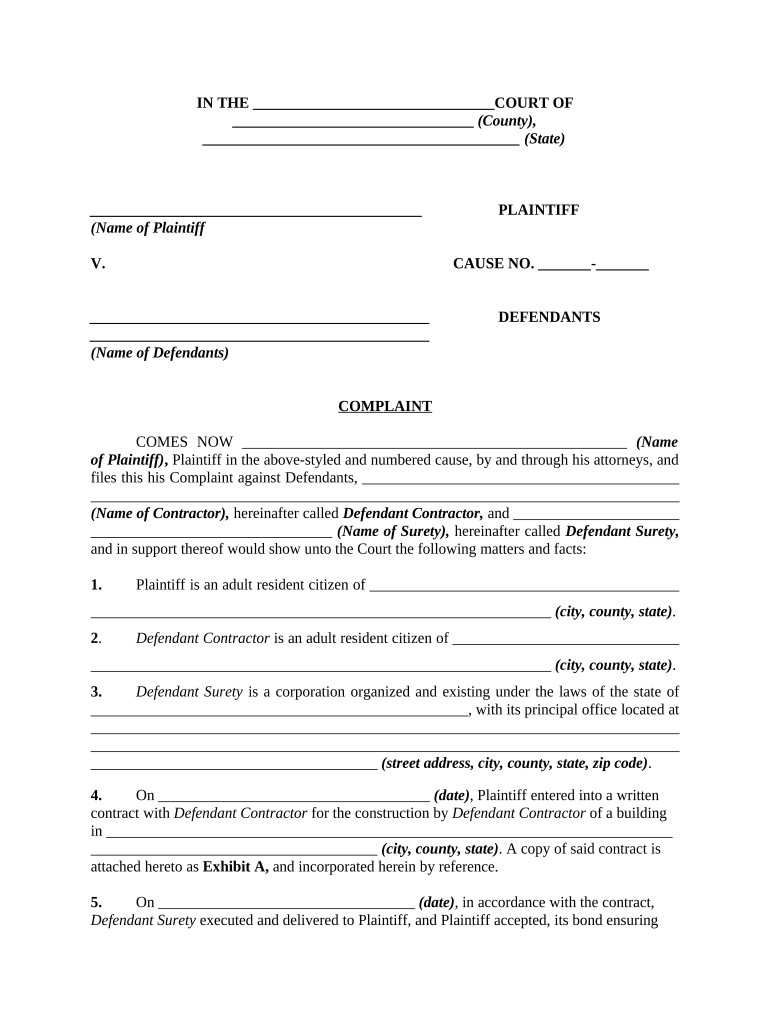
A Complaint Against Contractor and Surety is a civil pleading filed by a claimant who asserts that a contractor breached its contractual obligations and that the contractor’s surety bond must cover resulting damages. Typical claims allege defective work, nonpayment to subcontractors or suppliers, delay, or abandonment. The complaint names the contractor as the primary defendant and the surety as a secondary defendant that issued a performance or payment bond. Complaints set out facts, statutory or contract bases for relief, damages sought, and the claimant’s demand against the bond or surety.

Why Preparing a Clear Complaint Matters

A properly drafted complaint preserves rights against both the contractor and the bond, creates a clear record for the court and the surety, and begins the legal timeline for notice, response, and potential settlement.

Why Preparing a Clear Complaint Matters

Who Typically Files This Complaint and Why

Claimants include subcontractors, suppliers, project owners, and occasionally lenders or tenants seeking recovery when a bonded contractor fails to perform or pay.

  • Subcontractors and suppliers asserting unpaid invoices or lienable work on bonded projects
  • Project owners seeking completion or damages when a contractor defaults under a construction contract
  • Contract administrators or lenders enforcing bond obligations after contractor breach or abandonment

Filing the complaint triggers procedural deadlines and puts the surety on notice so the claimant can pursue relief under the bond and applicable statutes.

Who Signs and Files the Complaint

Claimant Representative

An authorized company officer, managing member, or attorney must sign the complaint and verify facts; the signer should be able to attest to the accuracy of damages and contractual relationships in case of verification or sanctions.

Legal Counsel

An attorney often prepares, signs, and files the complaint on behalf of the claimant, handles service on the contractor and surety, and manages compliance with notice, jurisdiction, and bond-specific procedural requirements.

Required Information and Fields to Include

Claimant Name: Legal entity name
Defendant Name: Contractor legal name
Surety Name: Bond issuer name
Contract Details: Contract date/amount
Damages Claimed: Itemized amounts
Relief Sought: Bond recovery / costs

Key Components of a Professional Complaint Against Contractor and Surety

A complete complaint organizes factual allegations, legal bases, and documentary support so courts and sureties can assess liability and promptly respond.

Caption and Parties

Clear caption naming claimant, contractor, and surety with accurate legal entity identifiers, addresses, and counsel contact information so service and notices reach the correct parties.
Jurisdiction and Venue

A concise jurisdictional statement explaining why the chosen court has subject matter and personal jurisdiction and why venue is proper under governing statutes or contract clauses.

Factual Allegations

Chronological account of contract formation, work performed or omitted, notice to contractor, specific defaults, and interactions with the surety.

Legal Causes of Action

Breach of contract, statutory bond claim, unjust enrichment, negligence, or other counts with statutory citations and concise element allegations.

Damages and Accounting

Itemized damages (labor, materials, change orders, delay, consequential losses) with calculations and documentary support such as invoices and lien statements.

Exhibits and Relief

Attach the contract, performance/payment bond, invoices, notices given, and a clear demand for judgment, bond recovery, interest, and attorney fees if available.

Step-by-Step: Preparing and Filing the Complaint

Follow these sequential steps to complete, serve, and pursue a complaint against a contractor and its surety.

  • 01
    Gather Documents: Collect contract, bond, invoices, notices, and communications supporting the claim.
  • 02
    Draft Complaint: Allege facts, causes of action, damages, and attach exhibits.
  • 03
    Serve Parties: Serve contractor and surety per jurisdictional service rules or bond terms.
  • 04
    File Proof: File complaint and proof of service with the court clerk to start the case.

Where to File and How the Case Proceeds

Know the proper court, service rules, and the surety’s contractual notice obligations before filing.

  • Select Court: File in state or federal court with jurisdiction over the contract or project.
  • Serve Contractor: Use personal, certified, or statutory service methods required by the jurisdiction.
  • Serve Surety: Serve surety per bond language and state service rules to trigger bond defenses.
  • File Proof: Submit proof of service and required bond notices to the court record.

Digital Filing and eSubmission Considerations

Many courts and agencies accept e-filed complaints and digitally signed attachments; confirm local e-filing rules before e-submission.

  • File Format: PDF preferred
  • Signature Type: Typed or e-signature
  • Authentication: Email + audit trail

When e-signing or e-filing, retain audit trails, original signed PDFs, and certificate of completion; check local court rules for acceptable e-signature types and notarization requirements.

Configuring an eSubmission Workflow for the Complaint

Set up an eSubmission workflow that secures signatures, stores exhibits, and logs audit information for court and surety.

Field Configuration
Signer Authentication Email verification; optional SMS code
Document Format Flattened PDF/A for court filings
Retention Settings Retain audit trail for minimum statutory periods
Integrations Link to case management or cloud storage

Common Mistakes That Delay Bond Claims and Complaints

  • Failing to identify the correct bond number or surety, which prevents the surety from locating the policy and delays response
  • Not providing contractually required preliminary notices to the contractor or surety before filing, leading to jurisdictional or procedural defenses
  • Using mismatched legal names or inaccurate party addresses that cause service rejections or improper service disputes
  • Submitting unsigned or incorrectly dated exhibits, undermining the evidentiary weight of invoices and notices

Potential Risks and Consequences of Errors

Statute Bar: Time-barred claim
Service Failure: Case dismissal risk
Bond Forfeiture: Loss of recovery opportunity
Sanctions: Court sanctions possible
Increased Costs: Higher litigation expenses
Re-file Delay: Extended resolution timeline

Real-World Context: How Organizations Use Bond Complaints

These brief examples show how project-based organizations rely on clear pleadings and e-submission to accelerate recovery or resolution.

Tim Martin — Martin Properties

The team documented contractor default and attached invoices and notices as exhibits to the complaint.

  • E-signing the exhibits preserved the audit trail and timestamps.
  • By organizing claims and using digital exhibits, counsel shortened discovery and achieved prompt negotiation with the surety.

Dan Rotelli — BIS

BIS assembled contract and bond documents, then served the surety per bond language to trigger the claims process.

  • Using standardized complaint templates ensured consistent allegations across projects.
  • The structured approach allowed the surety to respond timely and reduced contested issues about jurisdiction and notice.

Comparing eSignature Vendors for Preparing and Filing Complaints

When choosing an eSignature provider for complaint assembly and signature capture, compare basic pricing, bulk send capabilities, audit trails, HIPAA support, and envelope or usage limits.

signNow DocuSign Adobe Sign PandaDoc HelloSign
Starting Price $8/user/mo $15/user/mo $14/user/mo $19/user/mo $15/user/mo
Free Trial 7-day free trial No No Yes, limited Yes, limited
Bulk Send Yes Yes Yes Yes No
Audit Trail Yes Yes Yes Yes Yes
HIPAA Compliant Yes Yes Yes No No

Frequently Asked Questions About Filing a Complaint Against Contractor and Surety

Answers to common procedural, evidentiary, and eSignature questions that arise when preparing and filing complaints against contractors and their sureties.


Need help? Contact support

be ready to get more
Join over 28 million airSlate SignNow users