Establishing secure connection… Loading editor… Preparing document…
Navigation

Fill and Sign the Agreement Food Form
Fill and Sign the Agreement Food Form

How it works

Open the document and fill out all its fields.
Apply your legally-binding eSignature.
Save and invite other recipients to sign it.

Rate template

4.5
41 votes
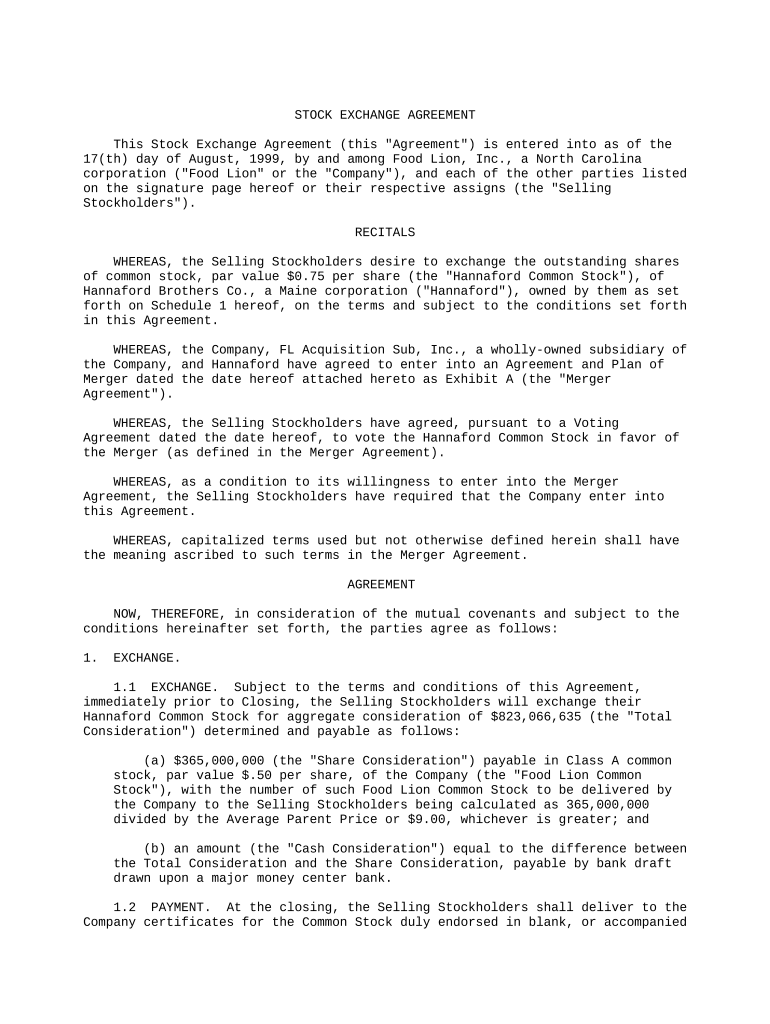
STOCK EXCHANGE AGREEMENT This Stock Exchange Agreement (this "Agreement") is entered into as of the 17(th) day of August, 1999, by and among Food Lion, Inc., a North Carolina corporation ("Food Lion" or the "Company"), and each of the other parties listed on the signature page hereof or their respective assigns (the "Selling Stockholders"). RECITALS WHEREAS, the Selling Stockholders desire to exchange the outstanding shares of common stock, par value $0.75 per share (the "Hannaford Common Stock"), of Hannaford Brothers Co., a Maine corporation ("Hannaford"), owned by them as set forth on Schedule 1 hereof, on the terms and subject to the conditions set forth in this Agreement. WHEREAS, the Company, FL Acquisition Sub, Inc., a wholly-owned subsidiary of the Company, and Hannaford have agreed to enter into an Agreement and Plan of Merger dated the date hereof attached hereto as Exhibit A (the "Merger Agreement"). WHEREAS, the Selling Stockholders have agreed, pursuant to a Voting Agreement dated the date hereof, to vote the Hannaford Common Stock in favor of the Merger (as defined in the Merger Agreement). WHEREAS, as a condition to its willingness to enter into the Merger Agreement, the Selling Stockholders have required that the Company enter into this Agreement. WHEREAS, capitalized terms used but not otherwise defined herein shall have the meaning ascribed to such terms in the Merger Agreement. AGREEMENT NOW, THEREFORE, in consideration of the mutual covenants and subject to the conditions hereinafter set forth, the parties agree as follows: 1. EXCHANGE. 1.1 EXCHANGE. Subject to the terms and conditions of this Agreement, immediately prior to Closing, the Selling Stockholders will exchange their Hannaford Common Stock for aggregate consideration of $823,066,635 (the "Total Consideration") determined and payable as follows: (a) $365,000,000 (the "Share Consideration") payable in Class A common stock, par value $.50 per share, of the Company (the "Food Lion Common Stock"), with the number of such Food Lion Common Stock to be delivered by the Company to the Selling Stockholders being calculated as 365,000,000 divided by the Average Parent Price or $9.00, whichever is greater; and (b) an amount (the "Cash Consideration") equal to the difference between the Total Consideration and the Share Consideration, payable by bank draft drawn upon a major money center bank. 1.2 PAYMENT. At the closing, the Selling Stockholders shall deliver to the Company certificates for the Common Stock duly endorsed in blank, or accompanied by a stock power or stock powers duly executed in blank, in proper form for transfer, and Food Lion shall issue and deliver to the Selling Stockholders the cash set forth in Section 1.2 and the Share Consideration. C-1 1.3 TAXES. The Selling Stockholders will be responsible for all sales and similar transfer taxes which may be due by the Selling Stockholders as a result of the exchange of the Common Stock or any reconveyance as set forth in Section 5 herein. 1.4 ADJUSTMENT. (a) The Total Consideration shall be adjusted to reflect fully the effect of any stock split, reverse split, stock dividend (including any dividend or distribution of securities convertible into Food Lion Common Stock), reorganization, recapitalization or other like change with respect to Food Lion Common Stock occurring after the date hereof and having a record or effective date prior to the Effective Time. (b) The Company agrees to give the Selling Stockholders written notice five Business Days prior to the Closing of the number of shares of Food Lion Common Stock outstanding as of the date of such notice and the number of shares of Food Lion Common Stock which may be issuable under any outstanding options, rights or other securities during such five-day period. Upon receipt of such notice, the Selling Stockholders may elect to adjust, upwards or downwards, the consideration set forth in Section 1.1(a) hereof provided that: (i) the Share Consideration shall in no event be less than $315,000,000, subject to adjustment as set forth in subparagraph 1.4(d) below; and (ii) the Share Consideration shall in no event exceed $421,000,000. (c) The Company agrees that if the Selling Stockholders give the Company prior written notice at least five Business Days prior to the Effective Date, the Company will adjust the manner in which the consideration provided for in Paragraph 1.1, for some or all of the shares of Hannaford Common Stock is paid so that the number of shares of Hannaford Common Stock or fractions thereof acquired by the Company for cash and the number of shares of Hannaford Common Stock or fractions thereof acquired by the Company for Selling Stockholders' Shares should be as the Selling Stockholders so direct. (d) The Company shall notify the Selling Stockholders five Business Days prior to the Closing of the number of options to acquire shares of either Hannaford or the Company which have been exercised since the date of this Agreement, whereupon the minimum Share Consideration set forth in subparagraph (b)(i) above shall be adjusted upwards to reflect the issuance of stock upon such exercise, provided that the Minimum Share Consideration shall in no event exceed $321,717,524. 2. REPRESENTATIONS AND WARRANTIES OF THE SELLING STOCKHOLDERS. Each Selling Stockholder represents, warrants and covenants to the Company as follows: 2.1 AUTHORITY. Such Selling Stockholder has the capacity to execute and deliver this Agreement and to consummate the transactions contemplated hereby. Such Selling Stockholder has duly and validly executed and delivered this Agreement and this Agreement constitutes a legal, valid and binding obligation of such Selling Stockholder, enforceable against the Selling Stockholder in accordance with its terms, except as such enforceability may be limited by applicable bankruptcy, insolvency, reorganization or other similar laws affecting creditors' rights generally and by general equitable principles (regardless of whether enforceability is considered in a proceeding in equity or at law). Neither the execution and delivery of this Agreement, nor the compliance with any of the provisions hereof, in each case by such Selling Stockholder will (i) require any consent, approval, authorization or permit of, registration, declaration or filing with or notification to, any U.S. or Canadian Governmental Authority, except for filings on Schedule 13D under the Exchange Act and under the HSR Act, (ii) result in a default (or an event which, with notice or lapse of time or both, would become a default) or give rise to any right of termination by any third party, cancellation, amendment or acceleration under any contract or understanding, or result in the creation of a Lien with respect to any C-2 of the shares of Hannaford Common Stock, (iii) require any material consent, authorization or approval of any Person or Governmental Authority which has not been obtained, or (iv) violate or conflict with any order or law applicable to such Selling Stockholder or the shares of Hannaford Common Stock. 2.2 OWNERSHIP. The shares of Hannaford Common Stock owned by such Selling Stockholder are validly issued, fully paid and non-assessable and owned beneficially and of record by such Selling Stockholder. Such Selling Stockholder will convey good and valid title to the shares of Hannaford Common Stock, free and clear of any Liens. 2.3 INVESTMENT REPRESENTATION. Such Selling Stockholder is acquiring the shares of Food Lion Common Stock for its own account, for investment purposes only and not with a view to the distribution of the shares of Food Lion Common Stock, except in compliance with the Securities Act of 1933, as amended. 3. REPRESENTATIONS AND WARRANTIES OF THE COMPANY. The Company represents, warrants and covenants to the Selling Stockholders as follows: 3.1 AUTHORITY. The Company is a corporation duly incorporated, validly existing and in good standing under the laws of the State of North Carolina and has full corporate power and authority to execute and deliver this Agreement and to consummate the transactions contemplated hereby. The execution and delivery of this Agreement by the Company and the consummation of the transactions contemplated hereby have been duly and validly authorized by the Board of Directors of the Company, and no other corporate proceedings on the part of the Company are necessary to authorize the execution, delivery and performance of this Agreement by the Company and the consummation of the transactions contemplated hereby. The Company has duly and validly executed this Agreement and this Agreement constitutes a legal, valid and binding obligation of Food Lion, enforceable against the Company in accordance with its terms, except as such enforceability may be limited by applicable bankruptcy, insolvency, reorganization or other similar laws affecting creditors' rights generally and by general equitable principles (regardless of whether enforceability is considered in a proceeding in equity or at law). Neither the execution and delivery of this Agreement, the consummation by the Company of the transaction contemplated hereby, nor the compliance by the Company with any of the provisions hereof will (i) conflict with or result in a breach of any provision of its Articles of Incorporation or Bylaws, (ii) require any consent, approval, authorization or permit of, registration, declaration or filing with, or notification to, any Governmental Authority except for filings on Schedule 13D under the Exchange Act and under the HSR Act, (iii) result in a default (or an event which, with notice or lapse of time or both, would become a default) or give rise to any right of termination by any third party, cancellation, amendment or acceleration under any contract or understanding, (iv) require any material consent, authorization or approval of any Person or Governmental Authority which has not been obtained, or (v) violate or conflict with any order or law applicable to the Company. 3.2 OWNERSHIP. The shares of Food Lion Common Stock to be issued to the Selling Stockholders hereunder upon issuance will be validly issued, fully paid and nonassessable. As of the close of business on August 16, 1999, 239,853,031 shares of Food Lion Common Stock are issued and outstanding, 4,048,781 shares of Food Lion Common Stock are reserved for additional grants under option and other stock-based plans and 4,083,203 shares of Food Lion Common Stock are reserved for issuance pursuant to options previously granted pursuant to Food Lion options plans. 4. CONDITIONS TO CLOSING. The obligations of the parties hereto to consummate the transactions contemplated hereby are subject to the parties to the Merger Agreement having satisfied or waived the conditions set forth in the Merger Agreement and the parties thereto agreeing that they are ready, willing and able to close the Merger immediately following the Closing of the transaction contemplated hereto. C-3 5. RECONVEYANCE. If the transactions contemplated by this Agreement are consummated and the Merger is not consummated, the parties hereto agree to use their best efforts to take all actions necessary to unwind the transactions so that the Parties are in the same position they were in prior to the closing of the transactions contemplated hereby. 6. BOARD SEAT. The Company agrees to take all necessary action to cause a representative of Empire Company Limited to be appointed a member of the Board of Directors of the Company. 7. MISCELLANEOUS. 7.1 All notices and other communications required or permitted hereunder shall be in writing and shall be deemed given when so delivered in person, one business day after delivery to an overnight courier, upon facsimile transmission (with receipt confirmed by telephone or by automatic transmission report) or two business days after being sent by registered or certified mail (postage prepaid, return receipt requested), as follows: (a) If to the Company, to: Food Lion, Inc. 2110 Executive Drive Salisbury, NC 28147 Attn: Lester C. Nail Telephone: (704) 633-8250 x2305 Facsimile: (704) 639-1353 (b) If to Selling Stockholders, to: Skadden, Arps, Slate, Meagher & Flom LLP 919 Third Avenue New York, NY 10022 Attn: Milton G. Strom Fax: (212) 735-2000 -and- Stewart McKelvey Stirling Scales 1959 Upper Water Street Suite 900, P.O. Box 997 Halifax, NS Canada B3J 2X2 Attn: James M. Dickson Facsimile No.: (902) 420-1417 Any party may by notice given in accordance with this Section 7.1 to the other party designate another address or person for receipt of notices hereunder. 7.2 This Agreement shall be construed in accordance with and governed by the internal laws of the State of Maine. Each party hereby irrevocably submits to the non-exclusive jurisdiction of any state or federal court in the State of Maine or the State of Maine with respect to any suit, action, proceeding or judgment relating to or arising out of this Agreement. 7.3 This Agreement may be amended, modified or supplemented only by written agreement of the parties hereto. 7.4 This Agreement and all of the provisions hereof shall be binding upon and inure to the benefit of the parties hereto and their respective successors, heirs, estates and permitted assigns. This C-4 Agreement is not assignable without the prior written consent of the other party hereto; PROVIDED, HOWEVER, that a party hereto may assign its rights to a direct or indirect wholly-owned subsidiary of either of the Selling Stockholders. 7.5 This Agreement may be executed in two or more counterparts, each of which shall be deemed an original, but all of which together shall constitute one and the same instrument. 7.6 This Agreement contains the entire agreement between the parties in respect of the subject matter contained herein, and supersedes all prior agreements, written or oral, with respect thereto. 7.7 If one or more provisions of this Agreement are held to be unenforceable under applicable law, such provision shall be excluded from this Agreement and the balance of the Agreement shall be interpreted as if such provision were so excluded and shall be enforceable in accordance with its terms. 7.8 The parties hereto each acknowledge that, in view of the uniqueness of the subject matter hereof, the parties hereto would not have an adequate remedy at law for money damages in the event that this Agreement were not performed in accordance with its terms, and therefore agree that the parties hereto shall be entitled to specific enforcement of the terms hereof in addition to any other remedy to which the parties hereto may be entitled at law or in equity. [The next page is the signature page] C-5 IN WITNESS WHEREOF, the undersigned or each of their respective duly authorized officers or representatives have executed this Agreement effective as of the date first set forth above. FOOD LION, INC. By: /s/ R. WILLIAM MCCANLESS ----------------------------------------- R. William McCanless PRESIDENT AND CHIEF EXECUTIVE OFFICER EMPIRE COMPANY LIMITED By: /s/ PAUL D. SOBEY ----------------------------------------- Paul D. Sobey PRESIDENT AND CHIEF EXECUTIVE OFFICER By: /s/ A. D. ROWE ----------------------------------------- A. D. Rowe SENIOR VICE PRESIDENT AND CHIEF FINANCIAL OFFICER E.C.L. INVESTMENTS LIMITED By: /s/ PAUL D. SOBEY ----------------------------------------- Paul D. Sobey PRESIDENT AND CHIEF EXECUTIVE OFFICER By: /s/ A. D. ROWE ----------------------------------------- A. D. Rowe SENIOR VICE PRESIDENT AND CHIEF FINANCIAL OFFICER

Valuable suggestions for preparing your ‘Agreement Food’ online

Are you fed up with the inconvenience of managing paperwork? Look no further than airSlate SignNow, the premier electronic signature solution for individuals and businesses. Bid farewell to the lengthy procedure of printing and scanning documents. With airSlate SignNow, you can easily complete and sign paperwork over the internet. Take advantage of the robust capabilities integrated into this intuitive and cost-effective platform and transform your approach to document handling. Whether you need to sign documents or gather signatures, airSlate SignNow manages it all effortlessly, with just a few clicks.

Adhere to this comprehensive guide:

  1. Sign in to your account or initiate a free trial with our service.
  2. Hit +Create to upload a file from your device, cloud, or our template library.
  3. Access your ‘Agreement Food’ in the editor.
  4. Select Me (Fill Out Now) to prepare the document on your end.
  5. Insert and assign fillable fields for other participants (if necessary).
  6. Continue with the Send Invite settings to request eSignatures from others.
  7. Download, print your copy, or convert it into a reusable template.

No need to worry if you need to collaborate with your colleagues on your Agreement Food or send it for notarization—our platform provides everything required to accomplish such tasks. Sign up with airSlate SignNow today and take your document management to a new level!

Here is a list of the most common customer questions. If you can’t find an answer to your question, please don’t hesitate to reach out to us.

Need help? Contact Support

The best way to complete and sign your agreement food form

Save time on document management with airSlate SignNow and get your agreement food form eSigned quickly from anywhere with our fully compliant eSignature tool.

How to Sign a PDF Online How to Sign a PDF Online

How to complete and sign documents online

Previously, coping with paperwork took lots of time and effort. But with airSlate SignNow, document management is quick and simple. Our robust and easy-to-use eSignature solution allows you to effortlessly fill out and eSign your agreement food form online from any internet-connected device.

Follow the step-by-step guidelines to eSign your agreement food form template online:

  • 1.Register for a free trial with airSlate SignNow or log in to your account with password credentials or SSO authorization option.
  • 2.Click Upload or Create and add a form for eSigning from your device, the cloud, or our form collection.
  • 3.Click on the file name to open it in the editor and utilize the left-side toolbar to fill out all the empty fields appropriately.
  • 4.Drop the My Signature field where you need to approve your sample. Provide your name, draw, or upload a photo of your regular signature.
  • 5.Click Save and Close to accomplish editing your completed document.

As soon as your agreement food form template is ready, download it to your device, save it to the cloud, or invite other parties to eSign it. With airSlate SignNow, the eSigning process only takes a few clicks. Use our powerful eSignature tool wherever you are to handle your paperwork efficiently!


How to Sign a PDF Using Google Chrome How to Sign a PDF Using Google Chrome

How to complete and sign documents in Google Chrome

Completing and signing paperwork is easy with the airSlate SignNow extension for Google Chrome. Installing it to your browser is a fast and effective way to deal with your paperwork online. Sign your agreement food form sample with a legally-binding eSignature in a few clicks without switching between tools and tabs.

Follow the step-by-step guide to eSign your agreement food form template in Google Chrome:

  • 1.Go to the Chrome Web Store, locate the airSlate SignNow extension for Chrome, and install it to your browser.
  • 2.Right-click on the link to a document you need to eSign and choose Open in airSlate SignNow.
  • 3.Log in to your account using your credentials or Google/Facebook sign-in buttons. If you don’t have one, you can start a free trial.
  • 4.Use the Edit & Sign toolbar on the left to fill out your sample, then drag and drop the My Signature option.
  • 5.Add a picture of your handwritten signature, draw it, or simply enter your full name to eSign.
  • 6.Verify all data is correct and click Save and Close to finish modifying your paperwork.

Now, you can save your agreement food form template to your device or cloud storage, email the copy to other people, or invite them to electronically sign your document via an email request or a protected Signing Link. The airSlate SignNow extension for Google Chrome improves your document workflows with minimum time and effort. Start using airSlate SignNow today!


How to Sign a PDF in Gmail How to Sign a PDF in Gmail How to Sign a PDF in Gmail

How to complete and sign forms in Gmail

When you receive an email with the agreement food form for approval, there’s no need to print and scan a document or save and re-upload it to another program. There’s a much better solution if you use Gmail. Try the airSlate SignNow add-on to promptly eSign any paperwork right from your inbox.

Follow the step-by-step guidelines to eSign your agreement food form in Gmail:

  • 1.Visit the Google Workplace Marketplace and find a airSlate SignNow add-on for Gmail.
  • 2.Set up the program with a related button and grant the tool access to your Google account.
  • 3.Open an email with an attachment that needs signing and utilize the S symbol on the right panel to launch the add-on.
  • 4.Log in to your airSlate SignNow account. Opt for Send to Sign to forward the file to other parties for approval or click Upload to open it in the editor.
  • 5.Place the My Signature field where you need to eSign: type, draw, or upload your signature.

This eSigning process saves efforts and only takes a couple of clicks. Take advantage of the airSlate SignNow add-on for Gmail to update your agreement food form with fillable fields, sign paperwork legally, and invite other people to eSign them al without leaving your mailbox. Enhance your signature workflows now!


How to Sign a PDF on a Mobile Device How to Sign a PDF on a Mobile Device How to Sign a PDF on a Mobile Device

How to complete and sign paperwork in a mobile browser

Need to rapidly fill out and sign your agreement food form on a smartphone while doing your work on the go? airSlate SignNow can help without the need to install extra software applications. Open our airSlate SignNow tool from any browser on your mobile device and add legally-binding electronic signatures on the go, 24/7.

Follow the step-by-step guide to eSign your agreement food form in a browser:

  • 1.Open any browser on your device and follow the link www.signnow.com
  • 2.Create an account with a free trial or log in with your password credentials or SSO authentication.
  • 3.Click Upload or Create and add a file that needs to be completed from a cloud, your device, or our form catalogue with ready-made templates.
  • 4.Open the form and fill out the empty fields with tools from Edit & Sign menu on the left.
  • 5.Place the My Signature area to the form, then type in your name, draw, or upload your signature.

In a few simple clicks, your agreement food form is completed from wherever you are. As soon as you're finished editing, you can save the document on your device, generate a reusable template for it, email it to other people, or invite them electronically sign it. Make your paperwork on the go fast and efficient with airSlate SignNow!


How to Sign a PDF on iPhone How to Sign a PDF on iPhone

How to complete and sign forms on iOS

In today’s business world, tasks must be accomplished rapidly even when you’re away from your computer. With the airSlate SignNow app, you can organize your paperwork and sign your agreement food form with a legally-binding eSignature right on your iPhone or iPad. Set it up on your device to close deals and manage documents from anywhere 24/7.

Follow the step-by-step guide to eSign your agreement food form on iOS devices:

  • 1.Go to the App Store, search for the airSlate SignNow app by airSlate, and install it on your device.
  • 2.Open the application, tap Create to upload a template, and choose Myself.
  • 3.Choose Signature at the bottom toolbar and simply draw your autograph with a finger or stylus to eSign the form.
  • 4.Tap Done -> Save right after signing the sample.
  • 5.Tap Save or utilize the Make Template option to re-use this paperwork later on.

This process is so straightforward your agreement food form is completed and signed in just a few taps. The airSlate SignNow app works in the cloud so all the forms on your mobile device remain in your account and are available any time you need them. Use airSlate SignNow for iOS to improve your document management and eSignature workflows!


How to Sign a PDF on Android How to Sign a PDF on Android

How to complete and sign documents on Android

With airSlate SignNow, it’s simple to sign your agreement food form on the go. Set up its mobile application for Android OS on your device and start boosting eSignature workflows right on your smartphone or tablet.

Follow the step-by-step guide to eSign your agreement food form on Android:

  • 1.Go to Google Play, find the airSlate SignNow app from airSlate, and install it on your device.
  • 2.Log in to your account or create it with a free trial, then add a file with a ➕ option on the bottom of you screen.
  • 3.Tap on the imported file and choose Open in Editor from the dropdown menu.
  • 4.Tap on Tools tab -> Signature, then draw or type your name to eSign the sample. Complete empty fields with other tools on the bottom if necessary.
  • 5.Utilize the ✔ button, then tap on the Save option to finish editing.

With an intuitive interface and total compliance with main eSignature standards, the airSlate SignNow app is the best tool for signing your agreement food form. It even works offline and updates all form adjustments once your internet connection is restored and the tool is synced. Complete and eSign forms, send them for eSigning, and generate re-usable templates whenever you need and from anywhere with airSlate SignNow.

Sign up and try Agreement food form
  • Close deals faster
  • Improve productivity
  • Delight customers
  • Increase revenue
  • Save time & money
  • Reduce payment cycles


