Establishing secure connection… Loading editor… Preparing document…
Navigation

Fill and Sign the Agreement Form Advertising
Fill and Sign the Agreement Form Advertising

How it works

Open the document and fill out all its fields.
Apply your legally-binding eSignature.
Save and invite other recipients to sign it.

Rate template

4.7
65 votes
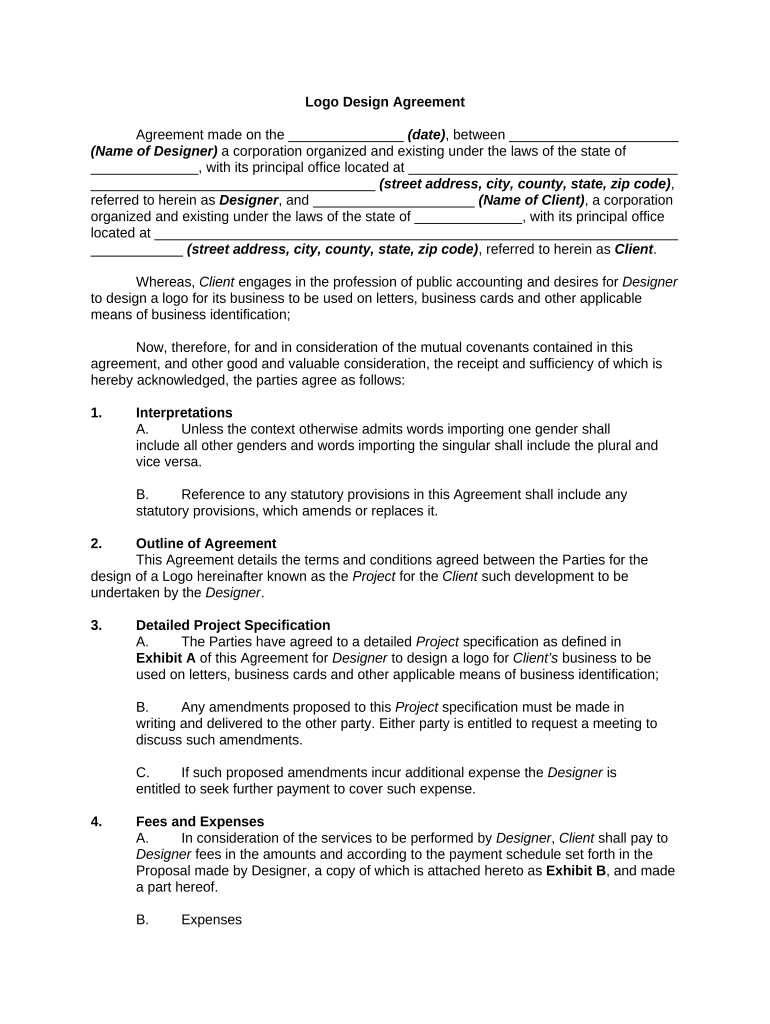
Logo Design Agreement Agreement made on the _______________ (date) , between ______________________ (Name of Designer) a corporation organized and existing under the laws of the state of ______________, with its principal office located at ___________________________________ _____________________________________ (street address, city, county, state, zip code) , referred to herein as Designer , and _____________________ (Name of Client) , a corporation organized and existing under the laws of the state of ______________, with its principal office located at ____________________________________________________________________ ____________ (street address, city, county, state, zip code) , referred to herein as Client . Whereas, Client engages in the profession of public accounting and desires for Designer to design a logo for its business to be used on letters, business cards and other applicable means of business identification; Now, therefore, for and in consideration of the mutual covenants contained in this agreement, and other good and valuable consideration, the receipt and sufficiency of which is hereby acknowledged, the parties agree as follows: 1. Interpretations A. Unless the context otherwise admits words importing one gender shall include all other genders and words importing the singular shall include the plural and vice versa. B. Reference to any statutory provisions in this Agreement shall include any statutory provisions, which amends or replaces it. 2. Outline of Agreement This Agreement details the terms and conditions agreed between the Parties for the design of a Logo hereinafter known as the Project for the Client such development to be undertaken by the Designer . 3. Detailed Project Specification A. The Parties have agreed to a detailed Project specification as defined in Exhibit A of this Agreement for Designer to design a logo for Client’s business to be used on letters, business cards and other applicable means of business identification; B. Any amendments proposed to this Project specification must be made in writing and delivered to the other party. Either party is entitled to request a meeting to discuss such amendments. C. If such proposed amendments incur additional expense the Designer is entitled to seek further payment to cover such expense. 4. Fees and Expenses A. In consideration of the services to be performed by Designer , Client shall pay to Designer fees in the amounts and according to the payment schedule set forth in the Proposal made by Designer, a copy of which is attached hereto as Exhibit B , and made a part hereof. B. Expenses Client shall pay Designer ’s expenses incurred in connection with this Agreement as follows: 1. Incidental and out-of-pocket expenses including but not limited to costs for telephone calls, postage, shipping, overnight courier, service bureaus, typesetting, blueprints, models, presentation materials, photocopies, computer expenses, parking fees and tolls, and taxis at cost plus Designer ’s standard markup of ____ percent, and, if applicable, a mileage reimbursement at _______ per mile; and 2. Travel expenses including transportation, meals, and lodging, incurred by Designer with Client ’s prior approval. C. The Project pricing includes Designer ’s fee only. Any and all outside costs including, but not limited to, equipment rental, photographer’s costs and fees, photography and/or artwork licenses, prototype production costs, and online access or hosting fees, will be billed to Client unless specifically otherwise provided for in the Proposal. D. All invoices are payable within _____ days of receipt. A _____ percent monthly service charge is payable on all overdue balances. Payments will be credited first to late payment charges and next to the unpaid balance. Client shall be responsible for all collection or legal fees necessitated by late or default in payment. Designer reserves the right to withhold delivery and any transfer of ownership of any current work if accounts are not current or overdue invoices are not paid in full. All grants of any license to use or transfer of ownership of any intellectual property rights under this Agreement are conditioned upon receipt of payment in full which shall be inclusive of any and all outstanding additional costs, taxes, expenses and fees, Charges or the costs of Changes. 5. Changes, Revisions and Timing A. Unless otherwise provided in the Proposal, and except as otherwise provided for herein, Client shall pay additional charges for changes requested by Client which are outside the scope of the Services on a time and materials basis, at Designer ’s standard hourly rate of _______ per hour. Such charges shall be in addition to all other amounts payable under the Proposal, despite any maximum budget, contract price or final price identified therein. Designer may extend or modify any delivery schedule or deadlines in the Proposal and Final Product as may be required by such Changes. B. If Client requests or instructs Changes that amount to a revision in or near excess of _____ percent of the time required to produce the Final Product , and or the value or scope of the Services, Designer shall be entitled to submit a new and separate Proposal to Client for written approval. Work shall not begin on the revised services until a fully signed revised Proposal and, if required, any additional retainer fees are received by Designer . C. Designer will prioritize performance of the Services as may be necessary or as identified in the Proposal, and will undertake commercially reasonable efforts to perform the Services within the time(s) identified in the Proposal. Client agrees to review the Final Product within the time identified for such reviews and to promptly either, 1. Approve the Final Product in writing or 2. Provide written comments and/or corrections sufficient to identify the Client ’s concerns, objections or corrections to Designer . The Designer shall be entitled to request written clarification of any concern, objection or correction. Client acknowledges and agrees that Designer ’s ability to meet any and all schedules is entirely dependent upon Client ’s prompt performance of its obligations to provide materials and written approvals and/or instructions pursuant to the Proposal and that any delays in Client ’s performance or Changes in the Services requested by Client may delay delivery of the Final Product . Any such delay caused by Client shall not constitute a breach of any term, condition or Designer ’s obligations under this Agreement. 3. Designer will exercise commercially reasonable efforts to test the Final Product requiring testing and to make all necessary corrections prior to providing the product to Client . Client , within five (5) business days of receipt of the product, or any part thereof, and shall notify Designer , in writing, of any failure of any part of Final Product to comply with the specifications set forth in the Proposal, or of any other objections, corrections, changes or amendments Client wishes made to such product. Any such written notice shall be sufficient to identify with clarity any objection, correction or change or amendment, and Designer will undertake to make the same in a commercially timely manner. Any and all objections, corrections, changes or amendments shall be subject to the terms and conditions of this Agreement. In the absence of such notice from Client , the Deliverable shall be deemed accepted. 6. Client Responsibilities Client acknowledges that it shall be responsible for performing the following in a reasonable and timely manner: A. Coordination of any decision-making with parties other than the Designer ; B. Provide Client information in a form suitable for reproduction or incorporation into the Final Product without further preparation, unless otherwise expressly provided in the Proposal; and C. Final proofreading and in the event that Client has approved the Final Product , but errors, such as, by way of example, not limitation, typographic errors or misspellings, remain in the Final Product , Client shall incur the cost of correcting such errors. 7. Accreditation/Promotions All displays or publications of the Final Product shall bear accreditation and/or copyright notice in Designer ’s name in the form, size and location as incorporated by Designer in the Final Product , or as otherwise directed by Designer . Designer retains the right to reproduce, publish and display the Final Product in Designer ’s portfolios and websites, and in galleries, design periodicals and other media or exhibits for the purposes of recognition of creative excellence or professional advancement, and to be credited with authorship of the finished product in connection with such uses. Either party, subject to the other’s reasonable approval, may describe its role in relation to the Project and, if applicable, the services provided to the other party on its website and in other promotional materials, and, if not expressly objected to, include a link to the other party’s website. 8. Confidential Information Each party acknowledges that in connection with this Agreement it may receive certain confidential or proprietary technical and business information and materials of the other party, including without limitation Preliminary Works (Confidential Information). Each party shall hold and maintain in strict confidence all Confidential Information, shall not disclose Confidential Information to any third party, and shall not use any Confidential Information except as may be necessary to perform its obligations under the Proposal and may be required by a court or governmental authority. Notwithstanding the foregoing, Confidential Information shall not include any information that is in the public domain or becomes publicly known through no fault of the receiving party, or is otherwise properly received from a third party without an obligation of confidentiality. 9. Relationship of the Parties A. Independent Contractor. Designer is an independent contractor, not an employee of Client or any company affiliated with Client . Designer shall provide the Services under the general direction of Client , but Designer shall determine, in Designer ’s sole discretion, the manner and means by which the Services are accomplished. This Agreement does not create a partnership or joint venture and neither party is authorized to act as agent or bind the other party except as expressly stated in this Agreement. Designer and the work product and Final Product prepared by Designer shall not be deemed a work for hire as that term is defined under Copyright Law. All rights, if any, granted to Client are contractual in nature and are wholly defined by the express written agreement of the parties and the various terms and conditions of this Agreement. B. Designer Agents. Designer shall be permitted to engage and/or use third party Designer s or other service providers as independent contractors in connection with the Services (Design Agents). Notwithstanding, Designer shall remain fully responsible for such Design Agents’ compliance with the various terms and conditions of this Agreement. C. No Solicitation. During the term of this Agreement, and for a period of six (6) months after expiration or termination of this Agreement, Client agrees not to solicit, recruit, engage, or otherwise employ or retain, on a full-time, part-time, consulting, work-for-hire, or any other kind of basis, any Designer , employee or Design Agent of Designer , whether or not said person has been assigned to perform tasks under this Agreement. In the event such employment, consultation or work-for-hire event occurs, Client agrees that Designer shall be entitled to an agency commission to be the greater of, either (a) ____ percent of said person’s starting salary with Client , or (b) ____ percent of fees paid to said person if engaged by Client as an independent contractor. In the event of (a) above, payment of the commission will be due within 30 days of the employment starting date. In the event of (b) above, payment will be due at the end of any month during which the independent contractor performed services for Client . Designer In the event of nonpayment and in connection with this section, shall be entitled to seek all remedies under law and equity. D. No Exclusivity. The parties expressly acknowledge that this Agreement does not create an exclusive relationship between the parties. Client is free to engage others to perform services of the same or similar nature to those provided by Designer , and Designer shall be entitled to offer and provide design services to others, solicit other Client s and otherwise advertise the services offered by Designer . 10. Warranties and Representations A. By Client. Client represents, warrants and covenants to Designer the following: 1. Client owns all right, title, and interest in, or otherwise has full right and authority to permit the use of the Client Content, 2. To the best of Client ’s knowledge, the Client Content does not infringe the rights of any third party, and use of the Client Content as well as any Trademarks in connection with the Project does not and will not violate the rights of any third parties. 3. Client shall comply with the terms and conditions of any licensing agreements which govern the use of Third Party Materials, and 4. Client shall comply with all laws and regulations as they relate to the Services and Final Product . B. By Designer 1. Designer hereby represents, warrants and covenants to Client that Designer will provide the Services identified in the Agreement in a professional and workmanlike manner and in accordance with all reasonable professional standards for such services. 2. Designer further represents, warrants and covenants to Client that (i) except for Third Party Materials and Client Content, the Final Product shall be the original work of Designer and/or its independent contractors, (ii) in the event that the Final Product include the work of independent contractors commissioned for the Project by Designer , Designer shall have secure agreements from such contractors granting all necessary rights, title, and interest in and to the Final Product sufficient for Designer to grant the intellectual property rights provided in this Agreement, and (iii) to the best of Designer ’s knowledge, the Final Art provided by Designer and Designer ’s subcontractors does not infringe the rights of any party, and use of same in connection with the Project will not violate the rights of any third parties. In the event Client or third parties modify or otherwise use the Final Product outside of the scope or for any purpose not identified in the Proposal or this Agreement or contrary to the terms and conditions noted herein, all representations and warranties of Designer shall be void. 3. EXCEPT FOR THE EXPRESS REPRESENTATIONS AND WARRANTIES STATED IN THIS AGREEMENT, DESIGNER MAKES NO WARRANTIES WHATSOEVER. DESIGNER EXPLICITLY DISCLAIMS ANY OTHER WARRANTIES OF ANY KIND, EITHER EXPRESS OR IMPLIED, INCLUDING BUT NOT LIMITED TO WARRANTIES OF MERCHANTABILITY OR FITNESS FOR A PARTICULAR PURPOSE OR COMPLIANCE WITH LAWS OR GOVERNMENT RULES OR REGULATIONS APPLICABLE TO THE PROJECT. C. Subject to the terms, conditions, express representations and warranties provided in this Agreement, Designer agrees to indemnify, save and hold harmless Client from any and all damages, liabilities, costs, losses or expenses arising out of any finding of fact which is inconsistent with Designer ’s representations and warranties made herein, except in the event any such claims, damages, liabilities, costs, loses or expenses arise directly as a result of gross negligence or misconduct of Client provided that (a) Client promptly notifies Designer in writing of the claim; (b) Designer shall have sole control of the defense and all related settlement negotiations; and (c) Client shall provide Designer with the assistance, information and authority necessary to perform Designer ’s obligations under this section. Notwithstanding the foregoing, Designer shall have no obligation to defend or otherwise indemnify Client for any claim or adverse finding of fact arising out of or due to Client Content, any unauthorized content, improper or illegal use, or the failure to update or maintain any Final Product provided by Designer . 11. Term and Termination A. This Agreement shall commence upon the Effective Date and shall remain effective until the Services are completed and delivered. B. This Agreement may be terminated at any time by either party effective immediately upon notice, or the mutual agreement of the parties, or if any party: 1. Becomes insolvent, files a petition in bankruptcy, makes an assignment for the benefit of its creditors; or 2. Breaches any of its material responsibilities or obligations under this Agreement, which breach is not remedied within ten (10) days from receipt of written notice of such breach. 3. In the event of termination, Designer shall be compensated for the Services performed through the date of termination in the amount of (a) any advance payment, (b) a prorated portion of the fees due, or (c) hourly fees for work performed by Designer or Designer ’s agents as of the date of termination, whichever is greater; and Client shall pay all expenses, fees, out of pockets together with any additional costs incurred through and up to, the date of cancellation. C. In the event of termination by Client and upon full payment of compensation as D. Upon expiration or termination of this Agreement: (a) each party shall return or, at the disclosing party’s request, destroy the Confidential Information of the other party, and (b) other than as provided herein, all rights and obligations of each party under this Agreement, exclusive of the Services, shall survive. 12. Intellectual Property Provisions A. C lient Content, including all pre-existing Trademarks, shall remain the sole property of Client or its respective suppliers, and Client or its suppliers shall be the sole owner of all rights in connection therewith. Client hereby grants to Designer a nonexclusive, nontransferable license to use, reproduce, modify, display and publish the Client Content solely in connection with Designer ’s performance of the Services and limited promotional uses of the Final Product as authorized in this Agreement. B. All Third Party Materials are the exclusive property of their respective owners. Designer shall inform Client of all Third Party Materials that may be required to perform the Services or otherwise integrated into the Final Art. Under such circumstances Designer shall inform Client of any need to license, at Client ’s expense, and unless otherwise provided for by Client , Designer shall obtain the license(s) necessary to permit Client ’s use of the Third Party Materials consistent with the usage rights granted herein. In the event Client fails to properly secure or otherwise arrange for any necessary licenses or instructs the use of third party art, Client hereby indemnifies, saves and holds harmless Designer from any and all damages, liabilities, costs, losses or expenses arising out of any claim, demand, or action by a third party arising out of Client ’s failure to obtain copyright, trademark, publicity, privacy, defamation or other releases or permissions with respect to materials included in the Final Art. C. Designer retains all rights in and to all Preliminary Works. Client shall return all Preliminary Works to Designer within thirty (30) days of completion of the Services and all rights in and to any Preliminary Works shall remain the exclusive property of Designer . D. Designer retains all right and title in and to any original artwork comprising Final Art, including all rights to display or sell such artwork. Client shall return all original artwork to Designer within thirty (30) days of completion of the Services. E. Upon completion of the Services and expressly conditioned upon full payment of all fees, costs and out-of-pocket expenses due, Designer assigns to Client all ownership rights, including any copyrights, in and to any artworks or designs comprising the works created by Designer for use by Client as a Trademark. Designer shall cooperate with Client and shall execute any additional documents reasonably requested by Client to evidence such assignment. Client shall have sole responsibility for ensuring that any proposed trademarks. Final Product intended to be a Trademark are available for use in commerce and federal registration and do not otherwise infringe the rights of any third party. Client hereby indemnifies, saves and holds harmless Designer from any and all damages, liabilities, costs, losses or expenses arising out of any claim, demand, or action by any third party alleging any infringement arising out of Client ’s use and/or failure to obtain rights to use or use of the Trademark. 13. Designer Tools All Designer Tools are and shall remain the exclusive property of Designer . Designer hereby grants to Client a nonexclusive, nontransferable perpetual, worldwide license to use the Designer Tools solely to the extent necessary with the Final Product for the Project . Client may not directly or indirectly, in any form or manner, decompile, reverse engineer, create derivative works or otherwise disassemble or modify any Designer Tools comprising any software or technology of Designer . 14. Severability The invalidity of any portion of this Agreement will not and shall not be deemed to affect the validity of any other provision. If any provision of this Agreement is held to be invalid, the parties agree that the remaining provisions shall be deemed to be in full force and effect as if they had been executed by both parties subsequent to the expungement of the invalid provision. 15. No Waiver The failure of either party to this Agreement to insist upon the performance of any of the terms and conditions of this Agreement, or the waiver of any breach of any of the terms and conditions of this Agreement, shall not be construed as subsequently waiving any such terms and conditions, but the same shall continue and remain in full force and effect as if no such forbearance or waiver had occurred. 16. Governing Law This Agreement shall be governed by, construed, and enforced in accordance with the laws of the State of ______________. 17. Notices Any notice provided for or concerning this Agreement shall be in writing and shall be deemed sufficiently given when sent by certified or registered mail if sent to the respective address of each party as set forth at the beginning of this Agreement. 18. Attorney’s Fees In the event that any lawsuit is filed in relation to this Agreement, the unsuccessful party in the action shall pay to the successful party, in addition to all the sums that either party may be called on to pay, a reasonable sum for the successful party's attorney fees. 19. Mandatory Arbitration Any dispute under this Agreement shall be required to be resolved by binding arbitration of the parties hereto. If the parties cannot agree on an arbitrator, each party shall select one arbitrator and both arbitrators shall then select a third. The third arbitrator so selected shall arbitrate said dispute. The arbitration shall be governed by the rules of the American Arbitration Association then in force and effect. 20. Entire Agreement This Agreement shall constitute the entire agreement between the parties and any prior understanding or representation of any kind preceding the date of this Agreement shall not be binding upon either party except to the extent incorporated in this Agreement. 21. Modification of Agreement Any modification of this Agreement or additional obligation assumed by either party in connection with this Agreement shall be binding only if placed in writing and signed by each party or an authorized representative of each party. 22. Assignment of Rights The rights of each party under this Agreement are personal to that party and may not be assigned or transferred to any other person, firm, corporation, or other entity without the prior, express, and written consent of the other party. WITNESS our signatures as of the day and date first above stated. ______________________ _______________________ (Name of Designer) (Name of Client) By:______________________________ By:_____________________________ ___________________________ __________________________ (P rinted name & Office in Corporation) (P rinted name & Office in Corporation ______________________________ ___________________________ (Signature of Officer) (Signature of Officer)

Helpful advice on preparing your ‘Agreement Form Advertising’ online

Are you fed up with the inconvenience of managing paperwork? Look no further than airSlate SignNow, the top eSignature option for individuals and small to medium-sized businesses. Bid farewell to the tedious process of printing and scanning documents. With airSlate SignNow, you can easily complete and sign documents online. Take advantage of the powerful features integrated into this user-friendly and cost-effective platform and transform your method of document management. Whether you need to approve documents or gather signatures, airSlate SignNow takes care of everything seamlessly, with just a few clicks.

Follow this detailed guide:

  1. Sign in to your account or register for a free trial with our service.
  2. Click +Create to upload a document from your device, cloud storage, or our template collection.
  3. Open your ‘Agreement Form Advertising’ in the editor.
  4. Click Me (Fill Out Now) to finalize the form on your end.
  5. Add and designate fillable fields for others (if necessary).
  6. Proceed with the Send Invite options to request eSignatures from others.
  7. Download, print your version, or convert it into a reusable template.

Don’t fret if you need to work with others on your Agreement Form Advertising or send it for notarization—our solution offers everything you require to accomplish such tasks. Sign up with airSlate SignNow today and elevate your document management to a new level!

Here is a list of the most common customer questions. If you can’t find an answer to your question, please don’t hesitate to reach out to us.

Need help? Contact Support
Simple agreement form advertising
Simple advertising contract template
Agreement form advertising example
Advertising Agreement pdf
Agreement form advertising pdf
Agreement form advertising template word
Free agreement form advertising
Agreement form advertising template free
Simple agreement form advertising
Agreement form advertising template word
Free agreement form advertising
Agreement form advertising pdf

The best way to complete and sign your agreement form advertising

Save time on document management with airSlate SignNow and get your agreement form advertising eSigned quickly from anywhere with our fully compliant eSignature tool.

How to Sign a PDF Online How to Sign a PDF Online

How to fill out and sign forms online

Previously, working with paperwork took pretty much time and effort. But with airSlate SignNow, document management is fast and easy. Our powerful and easy-to-use eSignature solution enables you to easily complete and eSign your agreement form advertising online from any internet-connected device.

Follow the step-by-step guidelines to eSign your agreement form advertising template online:

  • 1.Sign up for a free trial with airSlate SignNow or log in to your account with password credentials or SSO authentication.
  • 2.Click Upload or Create and add a form for eSigning from your device, the cloud, or our form catalogue.
  • 3.Click on the file name to open it in the editor and utilize the left-side menu to fill out all the empty areas accordingly.
  • 4.Drop the My Signature field where you need to eSign your sample. Provide your name, draw, or import an image of your regular signature.
  • 5.Click Save and Close to finish modifying your completed form.

Once your agreement form advertising template is ready, download it to your device, export it to the cloud, or invite other individuals to eSign it. With airSlate SignNow, the eSigning process only takes a couple of clicks. Use our powerful eSignature tool wherever you are to handle your paperwork efficiently!

How to Sign a PDF Using Google Chrome How to Sign a PDF Using Google Chrome

How to fill out and sign paperwork in Google Chrome

Completing and signing documents is easy with the airSlate SignNow extension for Google Chrome. Installing it to your browser is a fast and effective way to deal with your paperwork online. Sign your agreement form advertising template with a legally-binding electronic signature in just a few clicks without switching between tools and tabs.

Follow the step-by-step guide to eSign your agreement form advertising template in Google Chrome:

  • 1.Navigate to the Chrome Web Store, find the airSlate SignNow extension for Chrome, and install it to your browser.
  • 2.Right-click on the link to a document you need to sign and select Open in airSlate SignNow.
  • 3.Log in to your account using your password or Google/Facebook sign-in buttons. If you don’t have one, you can start a free trial.
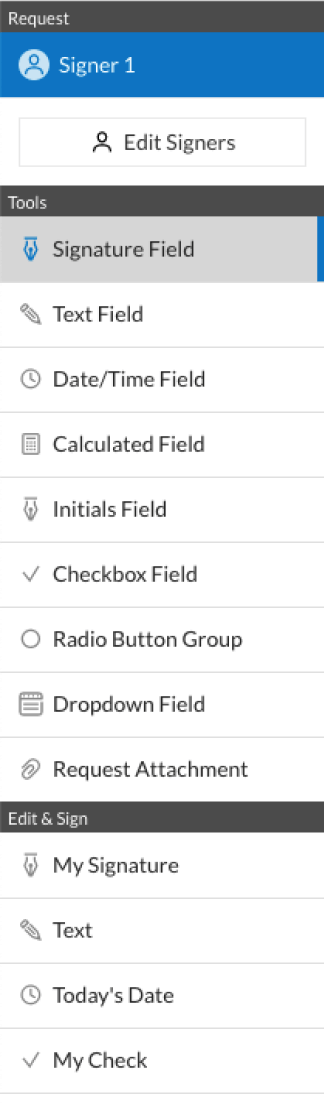
  • 4.Utilize the Edit & Sign toolbar on the left to fill out your sample, then drag and drop the My Signature field.
  • 5.Add an image of your handwritten signature, draw it, or simply enter your full name to eSign.
  • 6.Verify all the details are correct and click Save and Close to finish modifying your form.

Now, you can save your agreement form advertising sample to your device or cloud storage, email the copy to other individuals, or invite them to electronically sign your document via an email request or a secure Signing Link. The airSlate SignNow extension for Google Chrome enhances your document workflows with minimum effort and time. Try airSlate SignNow today!

How to Sign a PDF in Gmail How to Sign a PDF in Gmail How to Sign a PDF in Gmail

How to fill out and sign documents in Gmail

Every time you get an email with the agreement form advertising for approval, there’s no need to print and scan a document or download and re-upload it to another tool. There’s a better solution if you use Gmail. Try the airSlate SignNow add-on to quickly eSign any paperwork right from your inbox.

Follow the step-by-step guide to eSign your agreement form advertising in Gmail:

  • 1.Go to the Google Workplace Marketplace and look for a airSlate SignNow add-on for Gmail.
  • 2.Install the tool with a corresponding button and grant the tool access to your Google account.
  • 3.Open an email containing an attachment that needs signing and use the S symbol on the right sidebar to launch the add-on.
  • 4.Log in to your airSlate SignNow account. Select Send to Sign to forward the file to other people for approval or click Upload to open it in the editor.
  • 5.Place the My Signature option where you need to eSign: type, draw, or import your signature.

This eSigning process saves efforts and only requires a few clicks. Take advantage of the airSlate SignNow add-on for Gmail to update your agreement form advertising with fillable fields, sign paperwork legally, and invite other parties to eSign them al without leaving your inbox. Boost your signature workflows now!

How to Sign a PDF on a Mobile Device How to Sign a PDF on a Mobile Device How to Sign a PDF on a Mobile Device

How to complete and sign documents in a mobile browser

Need to rapidly submit and sign your agreement form advertising on a smartphone while working on the go? airSlate SignNow can help without needing to set up additional software applications. Open our airSlate SignNow solution from any browser on your mobile device and add legally-binding electronic signatures on the go, 24/7.

Follow the step-by-step guidelines to eSign your agreement form advertising in a browser:

  • 1.Open any browser on your device and go to the www.signnow.com
  • 2.Register for an account with a free trial or log in with your password credentials or SSO option.
  • 3.Click Upload or Create and pick a file that needs to be completed from a cloud, your device, or our form catalogue with ready-made templates.
  • 4.Open the form and complete the blank fields with tools from Edit & Sign menu on the left.
  • 5.Place the My Signature field to the sample, then enter your name, draw, or upload your signature.

In a few simple clicks, your agreement form advertising is completed from wherever you are. As soon as you're done with editing, you can save the document on your device, create a reusable template for it, email it to other people, or ask them to eSign it. Make your documents on the go speedy and productive with airSlate SignNow!


How to Sign a PDF on iPhone How to Sign a PDF on iPhone

How to complete and sign forms on iOS

In today’s corporate environment, tasks must be accomplished rapidly even when you’re away from your computer. Using the airSlate SignNow app, you can organize your paperwork and approve your agreement form advertising with a legally-binding eSignature right on your iPhone or iPad. Set it up on your device to close deals and manage forms from anyplace 24/7.

Follow the step-by-step guide to eSign your agreement form advertising on iOS devices:

  • 1.Open the App Store, search for the airSlate SignNow app by airSlate, and set it up on your device.
  • 2.Launch the application, tap Create to add a form, and choose Myself.
  • 3.Select Signature at the bottom toolbar and simply draw your autograph with a finger or stylus to eSign the form.
  • 4.Tap Done -> Save after signing the sample.
  • 5.Tap Save or utilize the Make Template option to re-use this document later on.

This process is so straightforward your agreement form advertising is completed and signed in just a few taps. The airSlate SignNow application works in the cloud so all the forms on your mobile device are kept in your account and are available any time you need them. Use airSlate SignNow for iOS to boost your document management and eSignature workflows!


How to Sign a PDF on Android How to Sign a PDF on Android

How to complete and sign paperwork on Android

With airSlate SignNow, it’s easy to sign your agreement form advertising on the go. Install its mobile application for Android OS on your device and start improving eSignature workflows right on your smartphone or tablet.

Follow the step-by-step guidelines to eSign your agreement form advertising on Android:

  • 1.Go to Google Play, find the airSlate SignNow application from airSlate, and install it on your device.
  • 2.Sign in to your account or create it with a free trial, then import a file with a ➕ button on the bottom of you screen.
  • 3.Tap on the uploaded file and choose Open in Editor from the dropdown menu.
  • 4.Tap on Tools tab -> Signature, then draw or type your name to eSign the template. Complete empty fields with other tools on the bottom if needed.
  • 5.Use the ✔ key, then tap on the Save option to finish editing.

With a user-friendly interface and full compliance with major eSignature requirements, the airSlate SignNow application is the best tool for signing your agreement form advertising. It even works offline and updates all record changes when your internet connection is restored and the tool is synced. Complete and eSign forms, send them for eSigning, and create multi-usable templates anytime and from anywhere with airSlate SignNow.

Sign up and try Agreement form advertising
  • Close deals faster
  • Improve productivity
  • Delight customers
  • Increase revenue
  • Save time & money
  • Reduce payment cycles